Home Payment Gateway Payment Links Payment Pages Payment Buttons QR Codes Instant Settlement Invoices Smart Collect Subscriptions International Payments Razorpay POS Razorpay TokenHQ Optimizer App Store Payments Mobile App Magic Checkout UPI AutoPay Payment Gateway Payment Links Payment Buttons RazorpayX Source to Pay Payouts Payout Links View Live Demo Current Account Escrow+ Account Forex/FDI Transfers Bank Account Verification Tax Payments Digital Lending 2.0 Razorpay Capital Line of Credit Company Registration Current Accounts Vendor Payments Payroll Partners For Startups & SMEs For Enterprises Pricing Blog Learn Events White papers Customer Stories Developer Docs Integrations API Reference Onboarding APIs SaaS E-commerce Education BFSI Freelance GST Calculator Online TDS Payment GST Number Search GST Search by PAN ROI Calculator CAGR Calculator EBITDA Calculator Raise a request Knowledgebase Chargeback Guides Settlement Guides Product Recommender Razorpay Curlec Razorpay Demo Razorpay Documentation Chargeback Blog

Bring Apple Pay
to your customers
with Razorpay

Bring Apple Pay to your customers with Razorpay

Razorpay brings Apple Pay to your customers in India - simplifying checkout, boosting conversion rates and user adoption. Your customers can speed through checkout in-store, online and in apps, while you increase sales.

A world of possibilities for your business

Frictionless checkout

Frictionless checkout

Customers can pay in seconds even from the product page using cards already available in Apple Wallet - no card numbers or OTP to enter.

Secure by design

Secure by design

Transactions require biometric authentication, like Face ID and Touch ID, or the cardholder’s passcode - which helps provide another layer of protection against fraud.

Integration first

Integration first

Offer Apple Pay across supported web and app experiences while Razorpay handles payment processing behind the scenes.

India ready

India ready

Accept eligible domestic Apple Pay payments in INR through Razorpay, alongside the payment methods your customers already use.

How it works
Mobile
Desktop

1

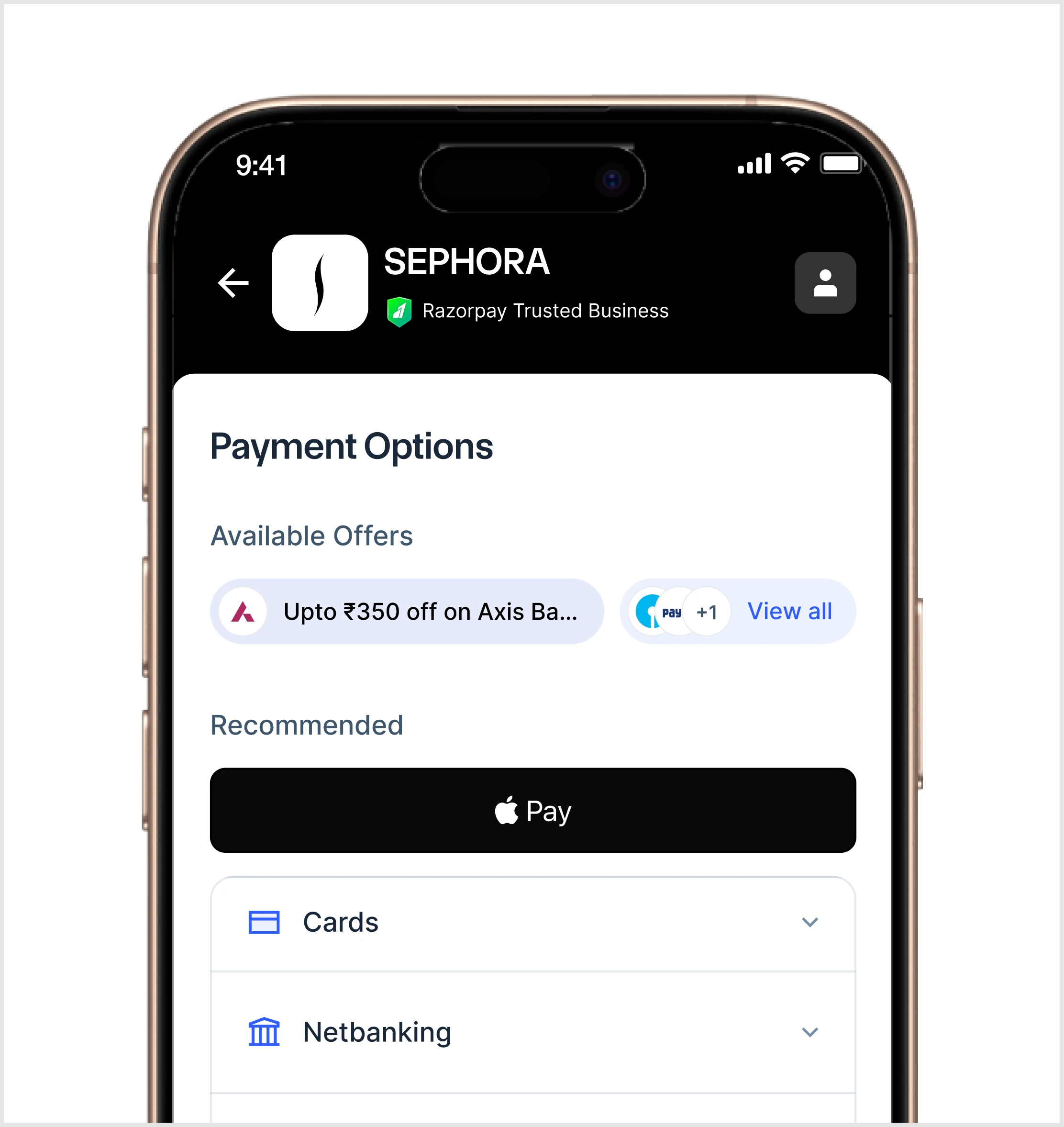
Customer chooses Apple Pay

Apple Pay automatically appears as a payment option for eligible customers on supported Apple devices.

2

Customer authenticates

Customer taps the Apple Pay button, confirms their info, and authenticates with Face ID, Touch ID, or their passcode.

3

Payment complete

Razorpay processes the payment and returns the payment confirmation to your business.

Mobile
Desktop
INTEGRATION

Bring Apple Pay to your Razorpay checkout

Bring Apple Pay to
your Razorpay checkout

Get started in minutes. Enable Apple Pay through the Razorpay integrations that fits your business - to simplify checkout and
boost conversion rates and user adoption

Get started in minutes. Enable Apple Pay through the Razorpay integrations that fits your business - to simplify checkout and boost conversion rates and user adoption

Go live faster:
no code

Go live faster:
no code

Apple Pay appears automatically on Razorpay Standard Checkout, Payment Links, Payment Pages and Shopify - alongside your other payment methods.

Own the experience:
your design, no re-directs

Own the experience:
your design, no re-directs

Keep customers on your website or app with your own checkout design. The Apple Pay payment sheet opens directly over the page, with no redirects.

Get complete control:
server to server

Get complete control:
server to server

Manage Apple Pay eligibility, checkout design and payment routing from your own systems, while Razorpay securely processes the payment for you. 

Frequently Asked Questions

Ready to get started ?

Already a Razorpay customer

If you are a Razorpay standard checkout business, no integration effort is needed from your end. We will enable it for you. 
For others, register your interest to enable Apple Pay on Razorpay.

If you are a Razorpay standard checkout business, no integration effort is needed from your end. We will enable it for you. For others, register your interest to enable Apple Pay on Razorpay.

Not a customer

Contact our team and we will help you set up a test account where you can explore our platform and payment methods.

Full disclaimer: To use Apple Pay, customers need a supported card from a participating card issuer. During a customer's initial setup of their card for Apple Pay, an additional factor of verification like OTP or Bank App Verification may be required by a card issuer. To check if their card is compatible with Apple Pay, customers should contact their card issuer. Axis credit cards can currently be used with Apple Pay on Apple devices except Mac. Apple Pay is not available in all markets. View Apple Pay countries and regions. Features are subject to change. Some features, applications, and services may not be available in all regions or all languages and may require specific hardware and software. For more information, see Feature Availability.

Full disclaimer: To use Apple Pay, customers need a supported card from a participating card issuer. During a customer's initial setup of their card for Apple Pay, an additional factor of verification like OTP or Bank App Verification may be required by a card issuer. To check if their card is compatible with Apple Pay, customers should contact their card issuer. Axis credit cards can currently be used with Apple Pay on Apple devices except Mac. Apple Pay is not available in all markets. View Apple Pay countries and regions. Features are subject to change. Some features, applications, and services may not be available in all regions or all languages and may require specific hardware and software. For more information, see Feature Availability.