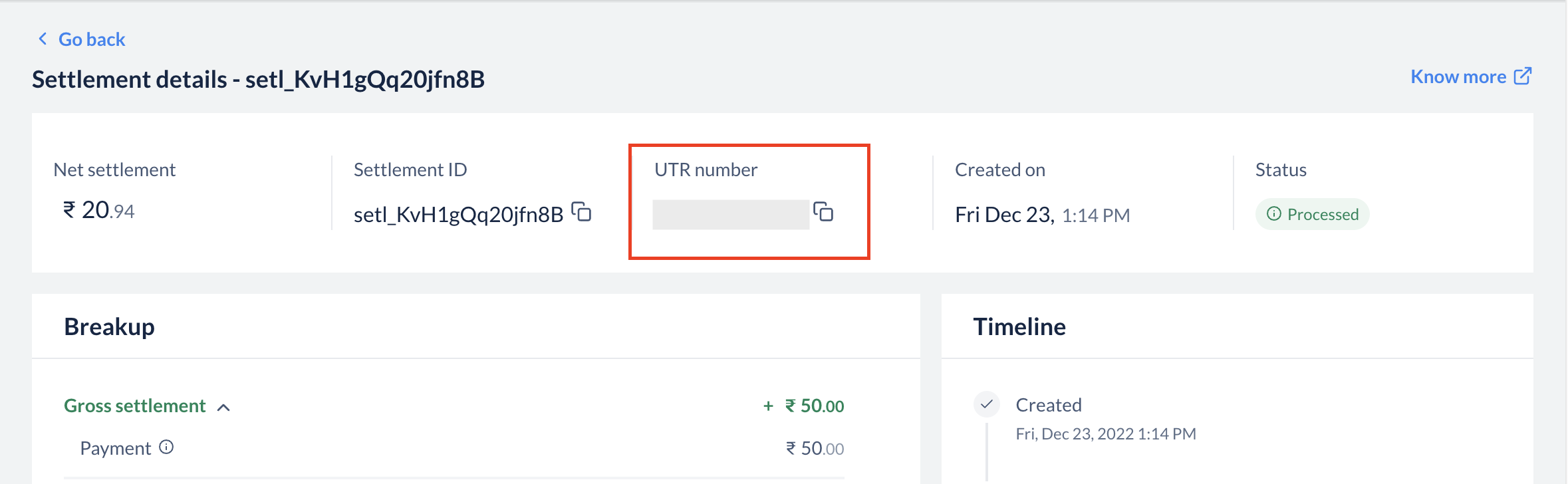
Settlement is the process in which the money received from your customers is settled to your bank account. Settlements for all payments will be done in INR (Indian Rupees), irrespective of the currency in which the payment was made by the customer. Settlement cycle is subject to bank approval and can vary based on your business vertical, risk factor, and so on. Each settlement generated has a unique settlement id attached to it along with the amount settled. Know more about Settlements.
What is the settlement cycle you offer?
Our standard settlement cycle is T+2 working days, T being the date of transaction capture. This means that the captured payments are settled within 2 working days from the date of capture. This applies to domestic payments. International payments follow a longer settlement cycle of T+7 working days. For details, see FAQ 9.
Handy TipsWorking days do not include second and fourth Saturdays, Sundays and bank holidays. For details on how holidays affect your settlement date, see FAQ 7.
How do I check settlements in my bank account?
Each settlement has a Unique Transaction Reference (UTR) number, which is provided by our banking partners. You can see this number in the settlement section when you click on a particular settlement id. You can also download Settlement Reports from the Reports section to view UTR. This is a unique reference number available across banks, which can be used to track a specific settlement in your bank account.
The status of my settlement shows as failed on the Dashboard. What do I do?
Razorpay sends emails regarding blocked or failed settlements to your registered email address. Please revert to the email with the necessary details. If you have not received any email from Razorpay, please contact our Support Team for assistance.
How to reconcile settlements along with the transactions made?
You can download a daily or a monthly report for the Settlement Reconciliation Report from the Reports section on the Dashboard. The report contains transactions and the corresponding settlement ids.
Why are my settlements blocked?
Razorpay sends emails regarding blocked or failed settlements to your registered email address. Please revert to the email with the necessary details. If you have not received any email from Razorpay, please contact our Support Team for assistance. If your settlements are paused due to a bank holiday or weekend, see FAQ 7.
Are settlements processed on weekends and bank holidays?
No. Settlements to your bank account are processed only on bank working days. They are not processed on Sundays, the second and fourth Saturdays, and public or bank holidays, and are credited on the next working day.Why does this happen even when UPI, IMPS, NEFT and RTGS operate 24x7?Although consumer payment rails operate round-the-clock, settlements to businesses depend on the inter-bank settlement and fund-flow process between the issuing banks, Razorpay’s nodal/escrow account, and your bank. This process follows the banking calendar and RBI fund-flow norms, which do not operate on bank holidays. As a result, the standard settlement cycle is paused on those days.If your business requires funds on a holiday or weekend, you can use Instant Settlements or Smart Settlements to settle your available balance 24x7, including holidays, for a small fee.
My settlement is delayed over a long weekend or consecutive holidays — is this normal?
Yes. The T+2 cycle counts only working days. When holidays fall back-to-back (for example, a Saturday–Sunday–public-holiday stretch), the credit date moves to the next available working day, which can compound into a multi-day delay. You can check the expected credit date against the settlement schedule on your Dashboard, or settle immediately via Instant Settlements.
How is the settlement cycle different for international payments?
International payments follow a longer settlement cycle than domestic payments. While domestic payments are settled on a T+2 working day cycle, the standard cycle for international payments is T+7 working days, where T is the date the payment is captured. The exact cycle is subject to applicable laws and is shown on your Razorpay Dashboard.As with domestic settlements, international settlements are processed only on bank working days. If the settlement date falls on a weekend or bank holiday, the credit moves to the next working day. International payments are settled in INR (Indian Rupees), irrespective of the currency in which the payment was made, using the exchange rate at the time of payment creation. Know more about International Settlements.
Balance Segregation is a feature that maintains separate balances for each payment channel type.Instead of having one combined balance, you now have multiple isolated balances:
Online (Domestic transactions + International Cards): Domestic PG transactions and international card payments.
In-Person: POS terminal transactions.
Alternate Payment Method (International): Balances from international bank transfer.
This ensures complete fund isolation, regulatory compliance and eliminates cross-channel settlement failures.
Why are my balances now showing separately on the Dashboard?
If you are an omni-channel business (using both PG and POS) or a cross-border business, your balances are automatically segregated by channel type. This is to ensure compliance with RBI guidelines that prohibit co-mingling of funds across different payment channels and to provide you with better visibility and control over your funds.
What is included in the Online (Domestic transactions + International Cards) balance?
The Online (Domestic transactions + International Cards) balance includes:
All domestic PG transactions (cards, UPI, netbanking, domestic wallets).
International card transactions.
This balance is separate from your In-Person (POS) and APM International balances.
What is included in the In-Person balance?
The In-Person balance includes all transactions processed through POS terminals. This balance is used for:
POS transaction settlements.
POS device rental deductions (if applicable).
Refunds for POS transactions.
It operates completely independently from your Online (Domestic transactions + International Cards) balance.
What is included in the APM (International) balance?
The Alternate Payment Method (International) balance includes cross-border transactions made through international bank transfers.This is separate from international card transactions, which are included in the Online (Domestic transactions + International Cards) balance.
How does Balance Segregation affect my settlements?
With Balance Segregation:
Settlements are processed separately for each balance account (Online (Domestic transactions + International Cards), In-Person, APM International).
Each balance has its own settlement schedule.
Refunds and chargebacks are debited only from the respective channel balance.
You can enable Instant Settlements independently for each balance.
Settlement failures due to cross-channel fund usage are eliminated.
I am a PG + POS business. Can I now use Instant Settlements?
Yes. With Balance Segregation, Instant Settlements is now available for omni-channel businesses. You can enable Instant Settlements on your PG Online balance independently of your POS balance. This was previously restricted to prevent cross-channel fund utilisation issues, which are now resolved with segregated balances.
I am a Cross-border business. How does Balance Segregation benefit me?
For cross-border businesses, Balance Segregation provides:
Separate balance for APM (International) transactions.
International card transactions tracked in your Online (Domestic transactions + International Cards) balance.
Instant Settlements enabled for your Online (Domestic transactions + International Cards) balance.
Clear visibility of domestic vs international transaction funds.
What happens to refunds with segregated balances?
Refunds are now processed from the same channel balance where the original payment was received:
Online payment refund → debited from Online (Domestic transactions + International Cards) balance
In-Person (POS) payment refund → debited from In-Person balance
APM International payment refund → debited from APM International balance
This ensures that refunds in one channel never impact settlements in another channel.
Will my existing balance be migrated to segregated balances?
No, existing balances are not migrated. Balance Segregation applies to new transactions going forward. Your current combined balance will continue to be settled as per your existing settlement cycle, while new transactions will be credited to the appropriate segregated balance based on channel type.
How do I view my segregated balances on the Dashboard?
You can view your segregated balances in multiple places on the Dashboard:
Home Page: Separate balance cards for each channel type (Online (Domestic transactions + International Cards), In-Person, APM International).
Settlements Page: Filter settlements by balance type.
Account & Settings → Balances: Detailed view of all your balance accounts.
Each balance card shows the current amount, next settlement date and settlement cycle.
Can I transfer funds between my segregated balances?
No, inter-channel fund transfers are not currently supported. Each balance operates independently to maintain fund isolation and regulatory compliance. If you have specific requirements, please contact our Support Team.
How are POS device rentals collected with Balance Segregation?
With Balance Segregation, POS device rentals are automatically collected from your POS (In-Person) balance only. This ensures that rental deductions never impact your PG Online balance or cause settlement failures. The collection is automated through the Meter Pricing Platform for businesses enrolled in the program.
Will my settlement reports change with Balance Segregation?
Yes, settlement reports now include additional fields:
Channel Type: Identifies the source channel (Online (Domestic transactions + International Cards), In-Person, APM International).
Balance Account id: Unique identifier for the balance account.
You can filter reports by channel type to reconcile each balance separately. The Settlement Reconciliation Report will show transactions grouped by their respective balance accounts.
I see multiple balances but I only use PG Online. Why?
If you only use PG Online for domestic transactions, you will typically see just one balance account (Online (Domestic transactions + International Cards)). Multiple balances appear only when you have:
Both PG Online and POS enabled (In-person).
International bank transfers (APM International balance).
International card payments (included in Online (Domestic transactions + International Cards) balance).
If you believe there is an error in your balance configuration, please contact our Support Team.
Are international card transactions and international APM transactions in the same balance?
No, they are in separate balances:
International card transactions are included in the Online (Domestic transactions + International Cards) balance along with domestic transactions.
International APM transactions (international bank transfers) are in the separate APM (International) balance.
This separation ensures proper fund isolation for different payment method types.
By default, the settlement cycle is T+2 days for domestic payments and T+7 days for international payments, where T is the date the payment was captured.
The Instant Settlement feature allows you to settle your current balance to your bank account instantly 24x7 for a small fee. You can either settle your current balance in full or choose to settle a portion of it as per your needs.
Are there any additional charges for Instant Settlements?
Yes. We charge a small fee to process Instant Settlements.
How is the fees and tax for an Instant Settlement deducted?
The fees and tax for an Instant Settlement is deducted from the request settlement amount.
For example, you place a request for ₹2000. Fees of ₹3 and tax of ₹1 is deducted from the requested amount and the remaining amount, ₹1995 is settled to your bank account.
Why is there a limit on Instant Settlements?
We have introduced the limits on Instant Settlements to make the settlement process more predictable for your daily needs. With limits, you can:
Settle a definite amount from the assigned limit until the next working day.
Enjoy a quicker and higher success rate throughout the working day.
For any queries, contact support or your Relationship Manager.
Once enabled, do I need to make Instant Settlement request for all my settlements?
No. You can create an Instant Settlement request when you need the money. If you do not create an Instant Settlement, your current balance is settled to your bank account as per your settlement cycle.
What happens to my current balance if I do not make any Instant Settlement requests?
Your current balance is settled to your bank account as per your settlement cycle.
Once Instant Settlements are enabled, will I be charged for all my settlements?
No. You will only be charged for the Instant settlements you create. You will not be charged for settlements that happen according to your settlement cycle.
Smart Settlement is an extended form of Instant Settlement that allows you to settle amounts above ₹ 5 L in one shot using the RTGS channel. A settlement done via Smart Settlements reflects as a single entry in your bank statement making reconciliation much easier.
What is the amount cap for Smart Settlements?
You can initiate a Smart Settlement if the amount is abover ₹ 5 L. The maximum ceiling is ₹ 50 Cr per settlement.
Is it mandatory to use Smart Settlements if the amount is > 5 L?
No, Smart Settlement is a recommended option for amounts > 5 L and < 5 Cr because it settles the amount as one credit in your bank statement. You can still use the Instant Settlement option for this range, but it will appear as multiple entries in your bank statement.
However, amounts > 5 Cr are settled through Smart Settlements only. Instant Settlement option is automatically disabled for amounts > 5Cr.Find out more about Instant Vs Smart Settlements
Do I have to request for enabling Smart Settlements?
No, Smart Settlement feature is automatically enabled if the Instant Settlement feature is activated for your dashboard. However, Instant Settlement is an on-demand feature. Contact support to get this feature enabled.
Is there a separate fee for Smart Settlements?
No, Smart Settlements follow the same fee structure as Instant Settlements. Click to know more about Instant Settlement pricing.
How is the fees and tax for a Smart Settlement deducted?
The fees and taxes for Smart Settlements are deducted from the requested settlement amount.
For example, you place a request for ₹2000, fees of ₹3 and tax of ₹1 is deducted from the requested amount and the remaining amount, ₹1995 is settled to your bank account.
What is the settlement cycle for Smart Settlements?
The settlement cycle is T+0 for Smart Settlements. Since Smart Settlements are routed through RTGS channel, the transaction usually happens real-time. However, depending on bank channel traffic, it may sometimes take up to 1 hour.
Was this page helpful?
Assistant
Responses are generated using AI and may contain mistakes.