

RBI Compliance Requirements for Route
Why is there a compliance communication about Route now?
Why is there a compliance communication about Route now?
What are the two eligibility criteria for using Route?
What are the two eligibility criteria for using Route?
- Minimum Financial Turnover: Your business must have domestic turnover exceeding ₹40 Lakhs or export turnover exceeding ₹5 Lakhs in either the current (FY26) or preceding (FY25) financial year.
- Payer-Payee Transparency: You must confirm that the linked account (third party) to which your customers’ payments are routed directly interfaces with those customers to provide goods or services.
What documents are accepted to prove the required turnover?
What documents are accepted to prove the required turnover?
- GST-3B returns for domestic turnover. You may submit returns from multiple filing periods within a financial year. The cumulative “outward taxable supplies” value across all submitted returns must exceed ₹40 Lakhs.
- Bank-issued FIRC (Foreign Inward Remittance Certificate) for export turnover. This must be a single certificate covering a date range within a financial year and must reflect INR equivalent inward remittances exceeding ₹5 Lakhs.
My financial documents for the current year (FY26) do not show the required turnover. Can I submit documents from the previous year (FY25)?
My financial documents for the current year (FY26) do not show the required turnover. Can I submit documents from the previous year (FY25)?
I do not have GST registration. Can I still apply?
I do not have GST registration. Can I still apply?
What is the Payer-Payee Transparency requirement?
What is the Payer-Payee Transparency requirement?
How do I submit the required compliance information?
How do I submit the required compliance information?
- Unmanaged accounts: Reply to the compliance email sent from
routepriority@razorpay.comwith the required documents and declaration. - Managed accounts: Contact your Razorpay account manager directly. You do not need to reply to the email.
How long does the review process take?
How long does the review process take?
My request to continue Route has been denied. What does this mean?
My request to continue Route has been denied. What does this mean?
I want to stop using Razorpay Route. What happens next?
I want to stop using Razorpay Route. What happens next?
- The Route page will no longer appear on your Dashboard.
- Route API calls will not be authorised.
- All customer payments will be settled in full to your primary Razorpay settlement account.
Is there an alternative to Razorpay Route?
Is there an alternative to Razorpay Route?
- Customer payments are fully settled into your primary Razorpay account.
- You manually transfer the relevant amounts to vendors or linked parties.
These RBI guidelines are making it harder for early-stage businesses to operate. Why is Razorpay enforcing this?
These RBI guidelines are making it harder for early-stage businesses to operate. Why is Razorpay enforcing this?
How can I transfer money to customers?
How can I transfer money to customers?
- Log in to the Dashboard.
- Find a payment on the Transactions panel (left column). Click on the Payment id to view its details on the right panel. Create a transfer from the payment.
- Alternatively, find a payment under the Payments tab on the Route panel. Click on the Payment id to view its details and create a transfer.
How can I track the status of transactions initiated using Route?
How can I track the status of transactions initiated using Route?
transfer.processed webhook is sent (if enabled). Know more about setting up Webhooks.How can I track the status of funds transferred to linked accounts?
How can I track the status of funds transferred to linked accounts?
transfer.processed webhook is sent for every successful transfer. The webhook indicates that the requested transfer is processed, funds are debited from the business and credited to the linked account.Know more about setting up Webhooks.Can you reverse a transfer?
Can you reverse a transfer?
- Log in to the Dashboard.
- Go to Route → Transfers. Click on a Transfer id to view the details. Click on the Create Reversal button to reverse the transfer.
- You can also use the Reverse Transfers from all Linked Accounts API to reverse money transfer.
- You can also refund payment and simultaneously reverse all the transfers made on that payment.
Can I create transfers on an order for international currencies?
Can I create transfers on an order for international currencies?
When should I initiate Transfer using Payments?
When should I initiate Transfer using Payments?
When should I initiate Direct Transfers?
When should I initiate Direct Transfers?
You should initiate Direct Transfers when fund transfers to a linked account is not necessarily linked to any incoming payments. You can also use this feature for payouts.
I have created a linked account on the Dashboard in the Test mode. Can I use it on the Live mode?
I have created a linked account on the Dashboard in the Test mode. Can I use it on the Live mode?
Does Razorpay Route support international currencies?
Does Razorpay Route support international currencies?
How do I create linked accounts using bulk upload?
How do I create linked accounts using bulk upload?
Should the linked account websites be whitelisted to use route?
Should the linked account websites be whitelisted to use route?
Why am I not able to create Linked Accounts from the Dashboard?
Why am I not able to create Linked Accounts from the Dashboard?
Can I use the same Razorpay API Keys on multiple websites or domains?
Can I use the same Razorpay API Keys on multiple websites or domains?
How should I manage API Keys when working with a developer for integration?
How should I manage API Keys when working with a developer for integration?
- Phase 1: Testing (Integration) The Owner or Admin must generate and securely share the Test Mode API Keys with the developer. The developer will use these keys to build and test the integration without affecting any live payments.
- Phase 2: Go-Live Once testing is complete, the Owner or Admin must generate the Live Mode API Keys and provide them to the developer to replace the Test Keys in the final application setup.
How do I transfer funds using the Route API after accepting a payment via a Razorpay Payment Link?
How do I transfer funds using the Route API after accepting a payment via a Razorpay Payment Link?
- Dashboard: Initiate a transfer directly from the specific Payment id within the Transactions or Route section of your Dashboard.
- API: Use the Create Transfers from Payments API, where you specify the Payment id to be split among your Linked Accounts.
- Automatic: If you set up an automatic split before the payment link is generated, the funds will be split instantly upon successful payment.
What are the different fees involved when splitting a payment using Razorpay Route?
What are the different fees involved when splitting a payment using Razorpay Route?
- Payment Gateway Fee: This fee is charged on the full Payment Amount received from the customer, before any funds are split. This covers the cost of processing the original transaction.
- Transfer Fee: This fee is charged on the Amount Transferred to each Linked Account. This covers the cost of facilitating the money transfer from your main account to the Linked Account(s).
VPA Settlements
What is VPA settlement and how does it work with Route?
What is VPA settlement and how does it work with Route?
Can a Linked Account have both a VPA and a bank account for settlement?
Can a Linked Account have both a VPA and a bank account for settlement?
What happens if a VPA payout fails?
What happens if a VPA payout fails?
payout.vpa_failed webhook. You should notify the beneficiary, collect an updated VPA, update the Linked Account and retry the settlement from the Dashboard under Route → Settlements → Failed → Retry.Know more about handling VPA settlement failures.Penny Testing
What is Penny Testing?
What is Penny Testing?
Is the Penny testing feature enabled for all Linked Accounts?
Is the Penny testing feature enabled for all Linked Accounts?
- Only for new Linked Accounts.
- Only for those accounts which have this feature enabled.
How long does it take for a Linked Account to get activated with the Penny Testing feature enabled?
How long does it take for a Linked Account to get activated with the Penny Testing feature enabled?
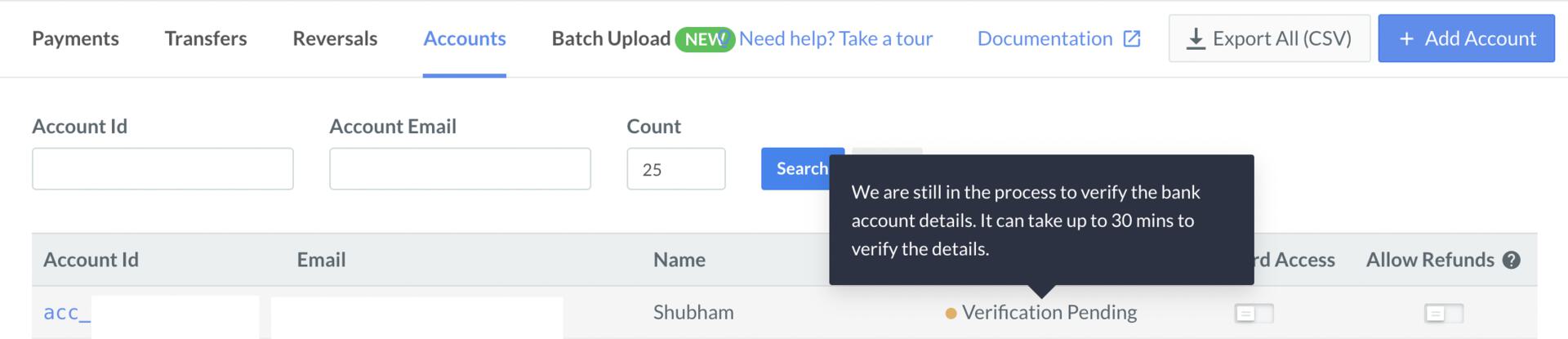
activated or verification_failed state.Verification Failed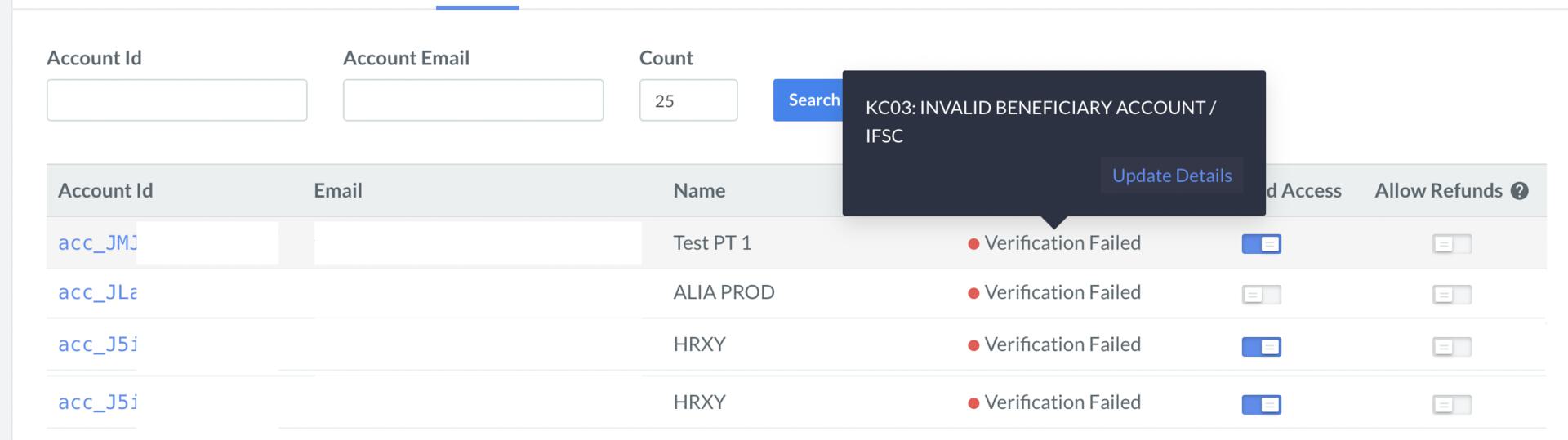 Activated
 Verification Pending
 Not Activated
What are the different activation statuses of a Linked Account?
What are the different activation statuses of a Linked Account?
What happens to business's existing Linked Accounts when the Penny Testing feature is enabled?
What happens to business's existing Linked Accounts when the Penny Testing feature is enabled?
Can I create multiple Linked Accounts with the same email address?
Can I create multiple Linked Accounts with the same email address?
- A Linked Account can have the same email address across different parent businesses.
- At a business level, however, the email address of multiple Linked Accounts should be unique.
la1@gmail.com. Acme Corp will not be able to create more Linked Accounts with the same email address. However, other businesses such as Raftar Soft and ABC Co can still create Linked Accounts with the email la1@gmail.com. Further, la1@gmail.com can be used to create a regular Razorpay account if it does not exist already.Does perform Penny Testing when I update a Linked Account's bank details?
Does perform Penny Testing when I update a Linked Account's bank details?
Can I modify the bank account details of the Linked Account or create another one if bank verification via Penny Testing fails?
Can I modify the bank account details of the Linked Account or create another one if bank verification via Penny Testing fails?
How many Linked Accounts can I create in bulk for Penny Testing?
How many Linked Accounts can I create in bulk for Penny Testing?
Will I receive a notification when the batch upload is completed?
Will I receive a notification when the batch upload is completed?
Will I receive a notification when the Linked Account is activated?
Will I receive a notification when the Linked Account is activated?
Will I receive a notification when the Linked Account verification fails?
Will I receive a notification when the Linked Account verification fails?
Will the Penny Testing be done in the test mode?
Will the Penny Testing be done in the test mode?
Can I update my Linked Account's email address after they are created?
Can I update my Linked Account's email address after they are created?