

Master KYC & Account Verification
What is Central KYC Registry (CKYC) and how does it help me?
What is Central KYC Registry (CKYC) and how does it help me?
- Instant Verification: If you have CKYC records (from bank, mutual fund, insurance), verification happens in seconds.
- No Document Uploads: Many required documents are auto-fetched from CKYC.
- Skip Video KYC: Businesses can bypass Video KYC completely.
- Faster Activation: Complete onboarding in minutes instead of days.
How do I give consent to download my CKYC records?
How do I give consent to download my CKYC records?
- Enter your Personal PAN.
- Razorpay checks if CKYC record exists.
- Enter mobile number linked to your CKYC record.
- Enter OTP sent by CKYC system.
- Your CKYC record is downloaded with documents.
- Enter Business PAN and upload PAN document.
- Date of Incorporation is extracted from PAN document.
- Razorpay checks CKYC using PAN and Date of Incorporation.
- Your business CKYC record is downloaded.
What is Video KYC and when is it required?
What is Video KYC and when is it required?
- CKYC data is successfully fetched for your entity.
- You can proceed directly with document submission.
- CKYC search returns no record for your business.
- CKYC OTP verification fails.
- You do not have existing CKYC records.
Why must I show the original PAN card during Video KYC?
Why must I show the original PAN card during Video KYC?
- Document authenticity.
- Prevention of fraudulent submissions.
- Compliance with regulatory requirements.
- Printed copies of PAN.
- Screenshots of PAN.
- E-PAN displayed on mobile screen.
- Original physical PAN card only.
Is UBO verification mandatory for my business type?
Is UBO verification mandatory for my business type?
- Private Limited Company (>10% shareholding)
- Public Limited Company (>10% shareholding)
- Section 8 Company (>10% shareholding)
- Partnership Firm (>10% holding)
- Limited Liability Partnership (>10% contribution)
- Trust (≥10% interest - includes exactly 10%)
- Society (>15% interest - higher threshold)
- Individual/Unregistered Business (owner is the merchant)
- Sole Proprietorship (owner is the merchant)
- Hindu Undivided Family (HUF)
- Government Entity
- Judicial Person
- Local Authority
What if I do not have a CKYC record?
What if I do not have a CKYC record?
- Upload Required Documents: Based on your business type.
- Complete Video KYC: Live video call with original PAN display.
- Digilocker Verification: Within 3 days of video call.
- Review: Our team reviews your submission (3-4 business days).
- Speed up any future KYC processes.
- Enable instant verification with other financial institutions.
- Reduce document resubmission across services.
Which business types can never be auto-activated?
Which business types can never be auto-activated?
- Hindu Undivided Family (HUF) - PAN 4th letter: H
- Government Entity - PAN 4th letter: G
- Judicial Person - PAN 4th letter: J
- Local Authority - PAN 4th letter: L
- CKYC data is successfully fetched.
- All required documents are present.
- Business category supports auto-activation.
What documents are NEW requirements under Master KYC?
What documents are NEW requirements under Master KYC?
- Memorandum of Association (MOA) - NEW.
- Articles of Association (AOA) - NEW.
- Board Resolution or Power of Attorney - NEW (for Authorised Signatory).
- UBO Declaration - NEW (for shareholders >10%).
- 2 Business Documents - NEW requirement (from approved list).
- Previously only 1 document (GSTIN) was required.
- Ultimate Beneficial Owner (UBO) Declaration - NEW.
- Power of Attorney - NEW (if Authorised Signatory is not owner/director/partner).
- Website policies (Terms, Refund, Privacy) - No longer required at onboarding.
Can I track my CKYC verification status?
Can I track my CKYC verification status?
- Checking CKYC: System searching for your CKYC record.
- Awaiting Consent: Waiting for mobile OTP verification.
- CKYC Fetched: Records successfully downloaded.
- CKYC Not Found: No record exists, proceed with manual verification.
- Consent Failed: OTP verification failed, retry or use manual method.
- System automatically switches to traditional verification.
- You will be prompted to upload documents.
- Video KYC requirement will be displayed.
- Proceed with Digilocker + Video KYC flow.
What happens if my Video KYC verification fails?
What happens if my Video KYC verification fails?
- Poor video quality (lighting, connection).
- Face mismatch between PAN, Aadhaar and live video.
- Original PAN card not shown (showing e-PAN or printout).
- Digilocker verification not completed within 3 days.
- Wrong person attended the call (not the Authorised Signatory).
- You will receive notification of failure reason.
- Can retry Video KYC (no limit on retries).
- Ensure all requirements are met before retry.
- Use original physical PAN card.
- Ensure good lighting and stable internet.
- Authorised Signatory must attend (not someone else).
- Complete Digilocker verification first.
- Enable camera, microphone, GPS permissions.
- Schedule call during the 8 AM - 7 PM (Monday to Sunday) window.
Do I need to complete separate CKYC for my business and myself?
Do I need to complete separate CKYC for my business and myself?
- For the registered business entity
- Contains: Business PAN, Certificate of Incorporation, MOA/AOA and so on.
- Used for: Business identity verification
- For the person authorised to sign on behalf of business
- Contains: Personal PAN, Aadhaar, address proof
- Used for: Authorised Signatory verification
- Entity CKYC: Company’s CKYC record (Business PAN and Date of Incorporation)
- Individual CKYC: Director’s CKYC record (Director’s personal PAN)
- Only one CKYC record (individual’s record)
- Proprietorship may have separate entity CKYC in some cases
Account Activation
Do you support freelancers or individuals?
Do you support freelancers or individuals?
I submitted the activation form a while ago. How can I get my account activated?
I submitted the activation form a while ago. How can I get my account activated?
I have signed up with Razorpay. How do I complete my activation form?
I have signed up with Razorpay. How do I complete my activation form?
- Log in to your Dashboard.
- Complete Account Activation and KYC Verification steps.
- Submit the activation form.
I have submitted my activation form, but my account is not activated. Can I start integrating?
I have submitted my activation form, but my account is not activated. Can I start integrating?
I have submitted my activation form. When will my account get activated?
I have submitted my activation form. When will my account get activated?
My account has not been activated; it has been too long since I got any update. What do I do?
My account has not been activated; it has been too long since I got any update. What do I do?
What are the documents needed to sign-up?
What are the documents needed to sign-up?
8 . What payment methods are supported by Razorpay?
8 . What payment methods are supported by Razorpay?
Why is my settlement on hold and my account under review after activation?
Why is my settlement on hold and my account under review after activation?
Can I change my business type once my account is created?
Can I change my business type once my account is created?
I am unable to use my mobile number. It shows that the mobile number already exists. How can I create an account using the same number?
I am unable to use my mobile number. It shows that the mobile number already exists. How can I create an account using the same number?
Can a UK company register with Razorpay?
Can a UK company register with Razorpay?
I don’t have GST and a current account. It is a very small, new business. How can I proceed without the above details?
I don’t have GST and a current account. It is a very small, new business. How can I proceed without the above details?
How do I know my KYC status?
How do I know my KYC status?
How do I submit my HUF document?
How do I submit my HUF document?
I am unable to add comments to my activation form. It says "locked by admin". How can I resolve this?
I am unable to add comments to my activation form. It says "locked by admin". How can I resolve this?
Can I update my PAN Card details?
Can I update my PAN Card details?
Account Configuration
Can I disable the customer receipt emails from Razorpay?
Can I disable the customer receipt emails from Razorpay?
I have signed up using my phone number. How do I setup my password?
I have signed up using my phone number. How do I setup my password?
- Enter your email address and click Forgot?. You will receive a verification link on your email ID.
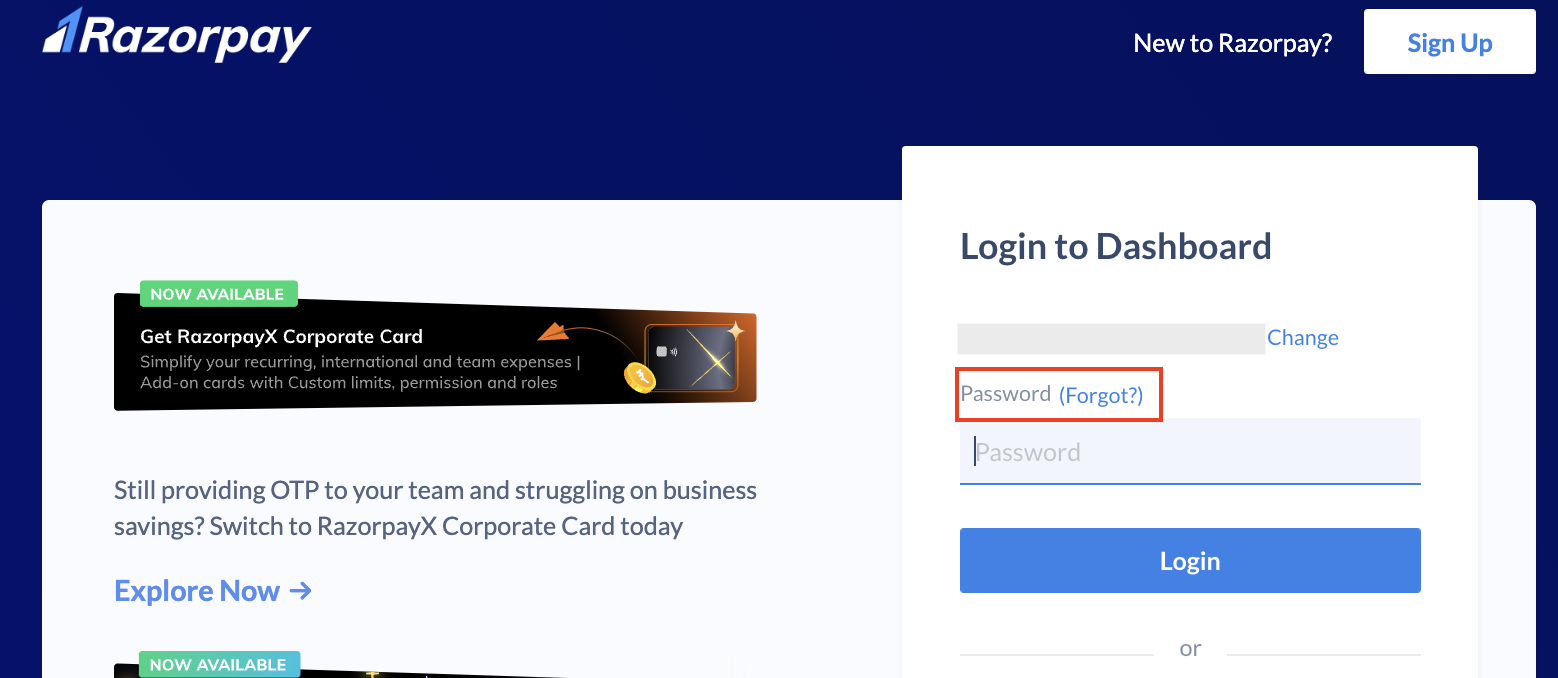
- Click the verification link and setup your password.
Account Rejection
Why has my account been rejected?
Why has my account been rejected?