

Available in🇮🇳 India
There are three types of credits Amount credits, Fee credits and Refund credits. You can view and add funds to these credits from the Dashboard. Also, you can configure alerts to receive email notifications when your credits fall below the set threshold.

Amount Credits
Amount credits are the credits against which you can receive payments without any fee deduction.Example
Example
If you have a credit of , you will not be charged any fees for payments up to . However, if a transaction exceeds (for example, ), fees apply to the entire amount, and you cannot use your credits for this transaction. Amount credits might be assigned to your account during sign-up if Razorpay runs promotional campaigns.
View Amount Credits
View Amount Credits
You can view the Amount credits assigned to your Razorpay Dashboard account. However, you cannot add any funds to this credit.To view Amount credits history: A list of Amount credits assigned to the account in the past is displayed.
- Log in to the Dashboard.
- Click Account & Settings in the left navigation.
- Click Credits under Payments and refunds section.
- Click Past Coupons under Amount Credits.
A list of Amount credits assigned to the account in the past is displayed.Fee Credits
Fee credits are the credits using which businesses can receive the full settlement amount without any fee deduction. Specific business categories use these credits to help them meet regulatory requirements.Example
Example
If you have a fee credit of , all the transactions will be settled in full, and the fees for these payments will be deducted from the ₹100 fee credit.
Add Fee Credits
Add Fee Credits
You can add funds to Fee credits using the Dashboard through UPI or Bank Transfer.
Your Fee credits balance is updated.
- Add Fee Credits Using UPI
- Add Fee Credits Using Bank Transfer
To add Fee Credits using UPI:
- Log in to the Dashboard.
- Click Account & Settings in the left navigation.
- Click Credits under Payments and refunds section.
- Click Add Fee Credits.

- Select UPI.
- Enter the description and amount to be added.
- Click Add Credits.
- Enter the email and contact number on the checkout pop-up page and click Proceed.
- Select UPI, enter UPI ID or scan the QR, click PayNow and complete the payment.
Handy TipsIt may take 2-3 hours for the credits to reflect in your Razorpay account.
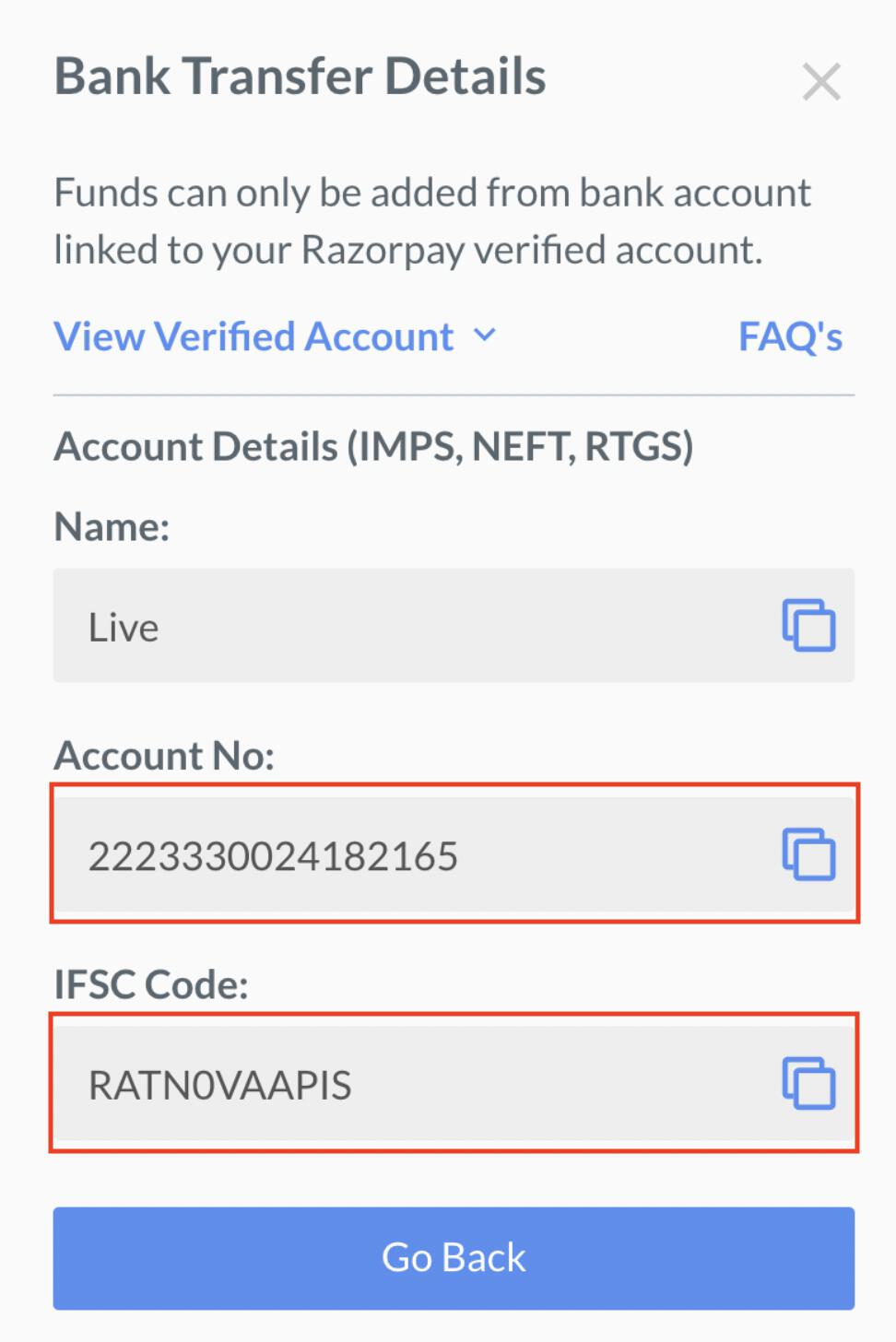
View Fee Credit History
View Fee Credit History
You can view the Fee credits previously added by you.To view Fee credit history:
- Log in to the Dashboard.
- Click Account & Settings in the left navigation.
- Click Credits under Payments and refunds section.
- Click View History under Fee Credits.
Refund Credits
Refund credits are the credits you can use to make refunds to customers. This ensures that the refunds are not made from your settlement amount but from a separate credit pool.Example
Example
If you have a Refund credit of , any refunds to be processed will be deducted from this credit and not from the actual payment.
Add Refund Credits
Add Refund Credits
You can add funds to Refund credits using the Dashboard through either UPI or Bank Transfer.
- Add Refund Credits Using UPI
- Add Refund Credits Using Bank Transfer
To add Refund credits using UPI:
- Log in to the Dashboard.
- Click Account & Settings in the left navigation.
- Click Credits under Payments and refunds section.
- Click Add Refund Credits.

- Select UPI.
- Enter the description and amount to be added.
- Click Add Credits.
- Enter the email and contact number on the checkout pop-up page and click Proceed.
- Select UPI, enter UPI ID or scan the QR, click PayNow and complete the payment.
Handy TipsIt may take 2-3 hours for the credits to reflect in your Razorpay account.
View Refund Credit History
View Refund Credit History
You can view the Refund credits previously added by you.To view Refund credit history:
- Log in to the Dashboard.
- Click Account & Settings in the left navigation.
- Click Credits under Payments and refunds section.
- Click View History under Refund Credits.
Credit Alerts
You can configure alerts to receive email notifications when any of your credits fall below the set threshold amount. This helps you monitor your credit balance and add funds to them whenever necessary. You can set three alert levels, wherein:- Alert Level 1: Level set by you on the Dashboard.
- Alert Level 2: Automatically set as 50% of Alert Level 1.
- Alert Level 3: Automatically set as 25% of Alert Level 1.
Example
Example
You can set your Refunds credit alert as . This means that whenever your Refund credits balance falls below:
- : The first email is sent to your registered email address.
- : The second email is sent.
- : The third and final email is sent.
Configure Credit Alerts
Configure Credit Alerts
You can configure credit alerts using the Dashboard.To configure alerts:
- Log in to the Dashboard.
- Click Account & Settings in the left navigation.
- Click Credits under Payments and refunds section.
- Click Manage Alerts.
- Set up the alerts for each credit type. You need to enter the value of Alert Level 1 only.
Handy TipsIf you do not want to receive any alerts, set the value to
0.