

Registrations
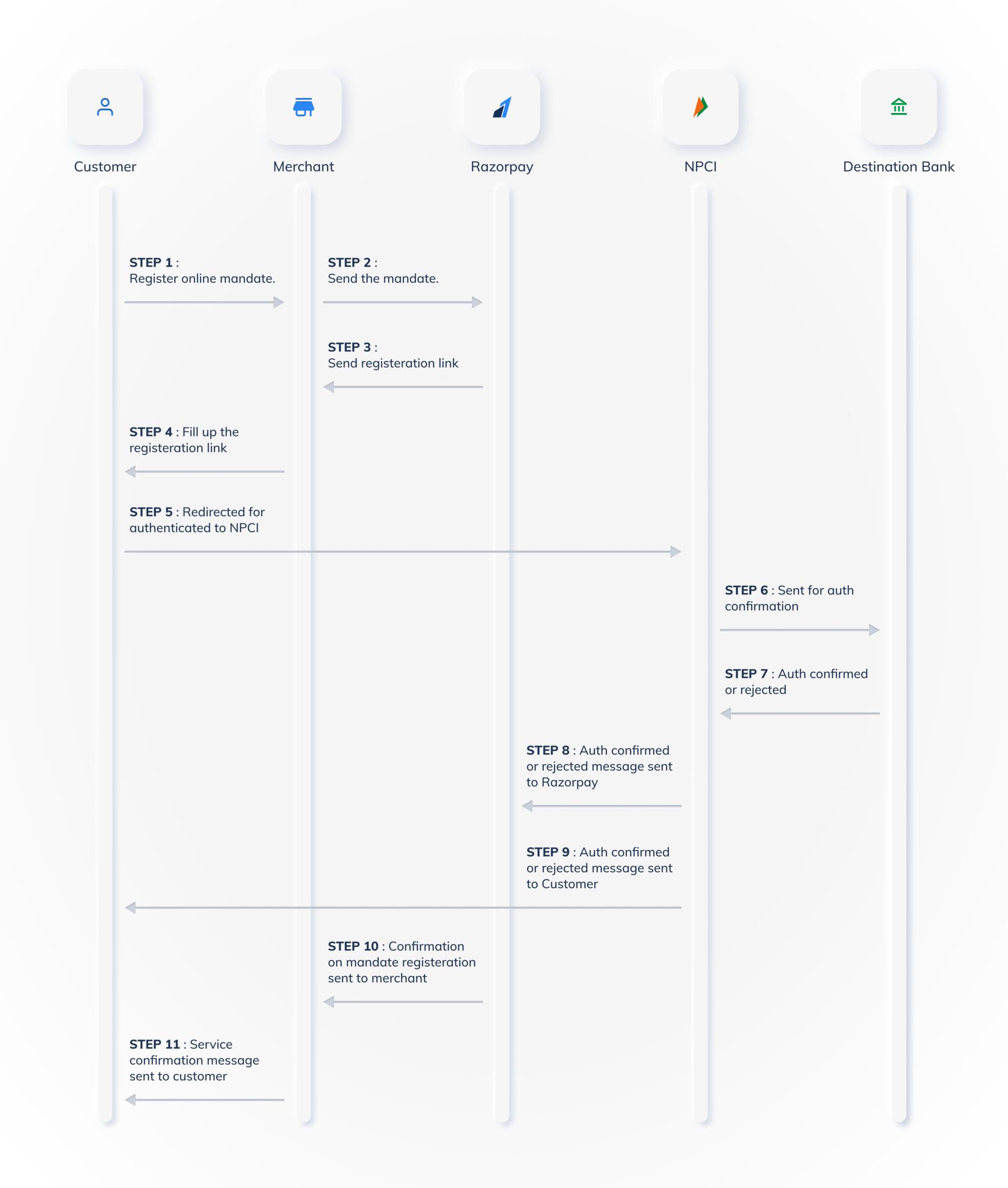
How does the NPCI ENACH registration process work?
How does the NPCI ENACH registration process work?
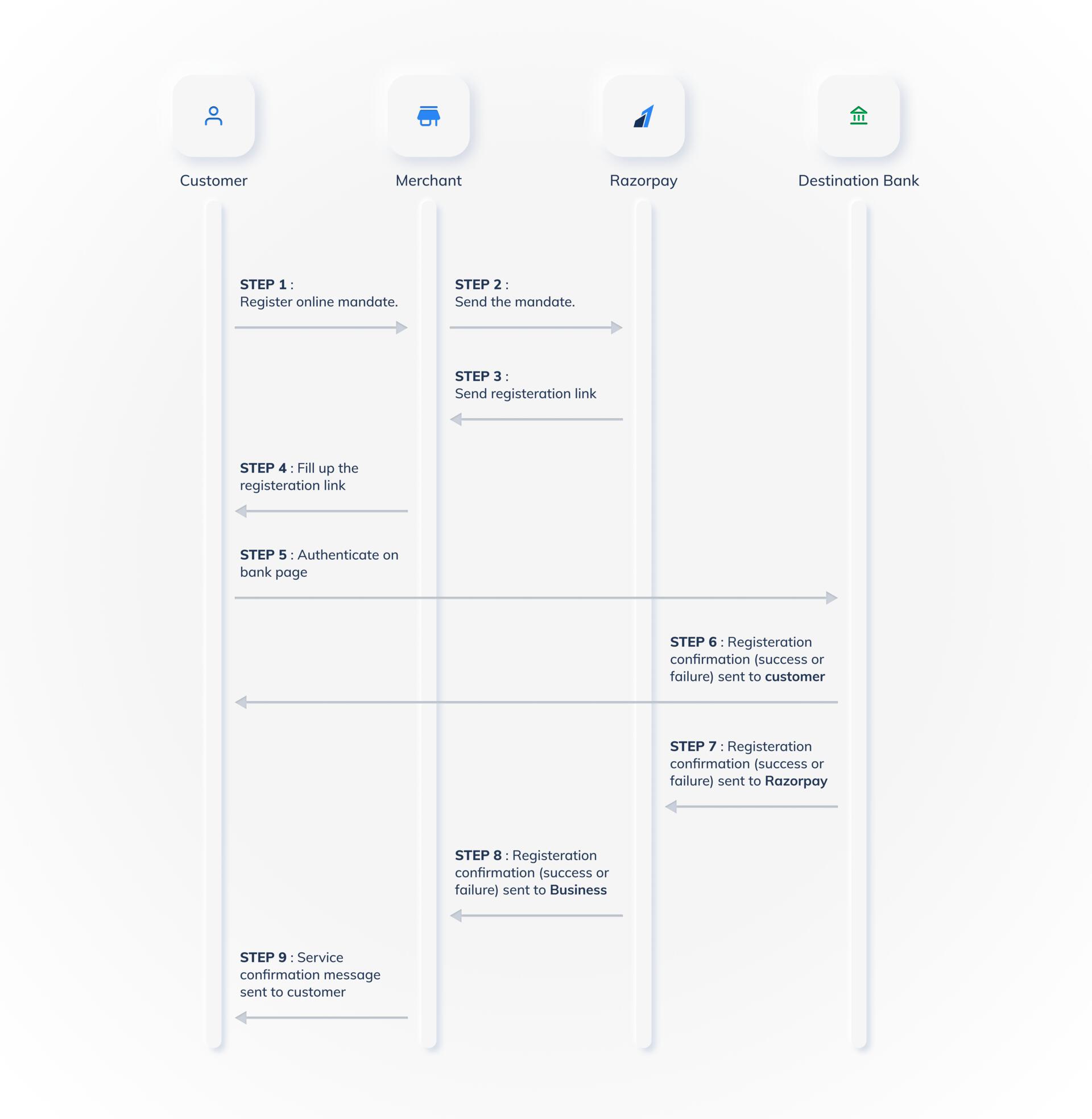
How does Emanate registration process work with Razorpay’s direct bank partnerships?
How does Emanate registration process work with Razorpay’s direct bank partnerships?
What can I do to ensure the best user experience for Emandate registrations?
What can I do to ensure the best user experience for Emandate registrations?
- Before customers proceed with the authorisation transaction, you can display a message asking your customers to keep their netbanking credentials handy. This will help prevent time-out at the checkout.
- Inform your customers that there might be a ₹1 or ₹2 deduction during the authorisation transaction. This amount will be refunded to your customer in 3-5 bank working days.
What is the timeline for Emandate token registration confirmation?
What is the timeline for Emandate token registration confirmation?
- Requests created between T-1 day 9:00 AM and T day 9:00 AM are processed on T during banking hours.
- Requests created after T day 9:00 AM are processed in the T+1 cycle.
- Delays: Token confirmation may be delayed up to 5 days in some instances due to bank-side issues or bank holidays.
- Debit timing: Debits can only be initiated after token confirmation is complete.
- NPCI eNACH partner banks: While registrations are instant with NPCI eNACH, partner banks may take up to 2 days to complete their registration process. Debits initiated before the bank completes registration will fail. Wait at least 2 days before retrying a failed debit.
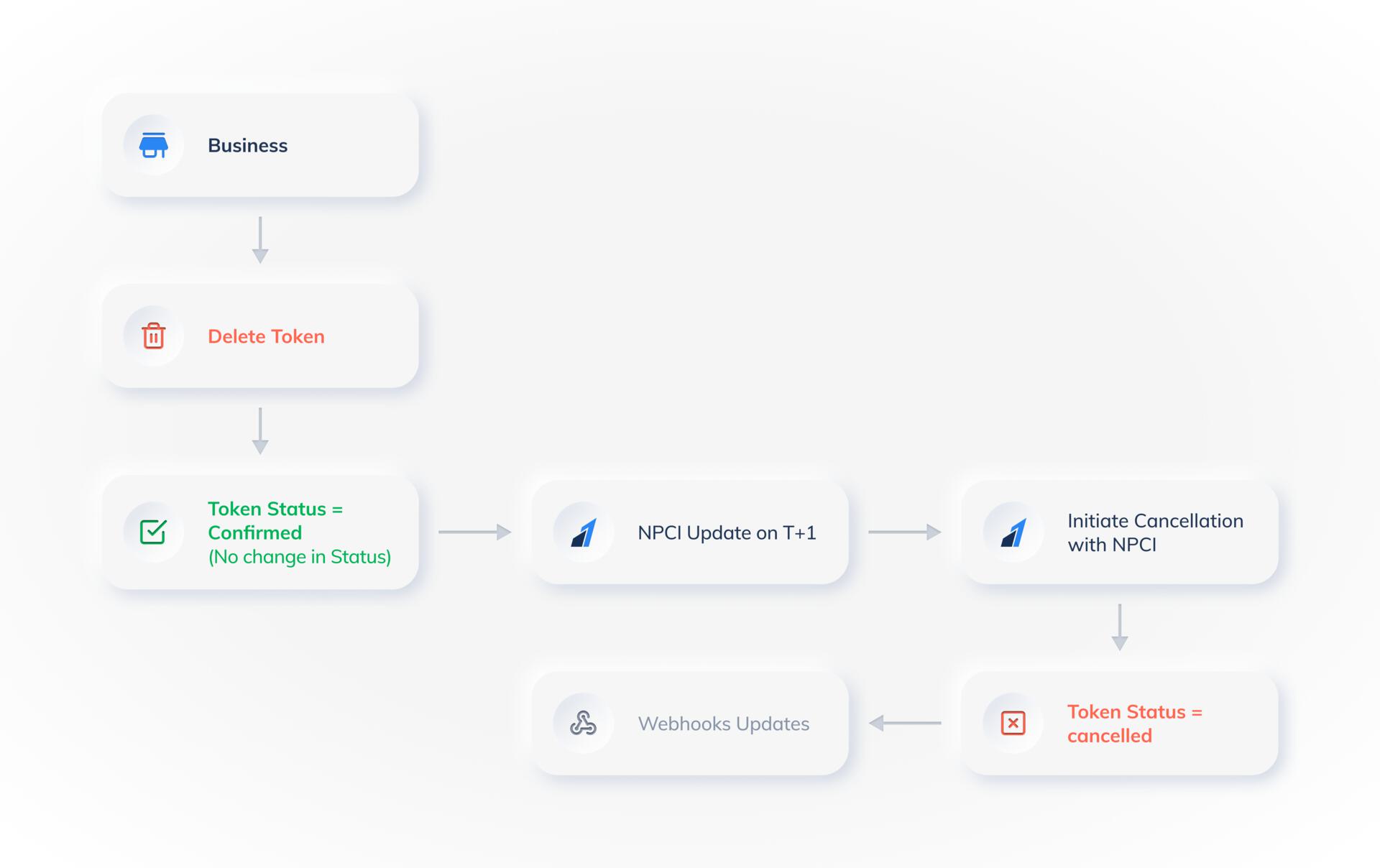
How can I cancel my customer's registered mandates?
How can I cancel my customer's registered mandates?
Can Razorpay help schedule debits for Emandates?
Can Razorpay help schedule debits for Emandates?
My customers are not able to register via one of the banks. What can I do?
My customers are not able to register via one of the banks. What can I do?
Which account types are allowed to sign up for online Emandates?
Which account types are allowed to sign up for online Emandates?
- Savings
- Current
- If your customer is a sole proprietor of the business, they can register their Emandates using the
currentaccount type. - Suppose your customer’s business has a corporate cash-credit account. In that case, they can only register using Physical NACH, where we have an option of
cash creditaccounts for mandate registrations.
Can joint account holders sign up for Emandates?
Can joint account holders sign up for Emandates?
either or survivor or anyone or survivor). In that case, they can register the mandates.However, if both joint holders’ approval is required for operating the account, then such account holders cannot register with Emandates.What are the prerequisites for customers to register using Emandates?
What are the prerequisites for customers to register using Emandates?
- Have the details for the selected mode of authentication.
- NetBanking: Login and Password
- Debit Card: Card Number, Expiry and Debit Card PIN
- Aadhaar: Aadhaar Number and Registered mobile number as on Aadhaar
- Ensure the bank account used for authentication with NetBanking or Debit Card is the same as the account number used for registration. For Aadhaar based authentication, ensure to map the Aadhaar Number to the bank account on which the mandate is being registered.
- Maintain average monthly balance in the bank account where the mandate is being registered.
- Ensure that the selected bank account is in the
activestate.
Which banks are supported for Emandates?
Which banks are supported for Emandates?
What information should we collect from a user to successfully register their Emandate?
What information should we collect from a user to successfully register their Emandate?
- Customer Name
- Account Number
- IFSC Code
- Account Type
- Bank Name
How do I enable Aadhaar as an auth type for emandates? Do I need to make changes in my Integration to use the aadhaar emandate?
How do I enable Aadhaar as an auth type for emandates? Do I need to make changes in my Integration to use the aadhaar emandate?
auth_type=aadhaar in the existing emandate APIs to start using Aadhaar-based mandate registration.How can I modify or edit a mandate that has already been created?
How can I modify or edit a mandate that has already been created?
Debits Presentments
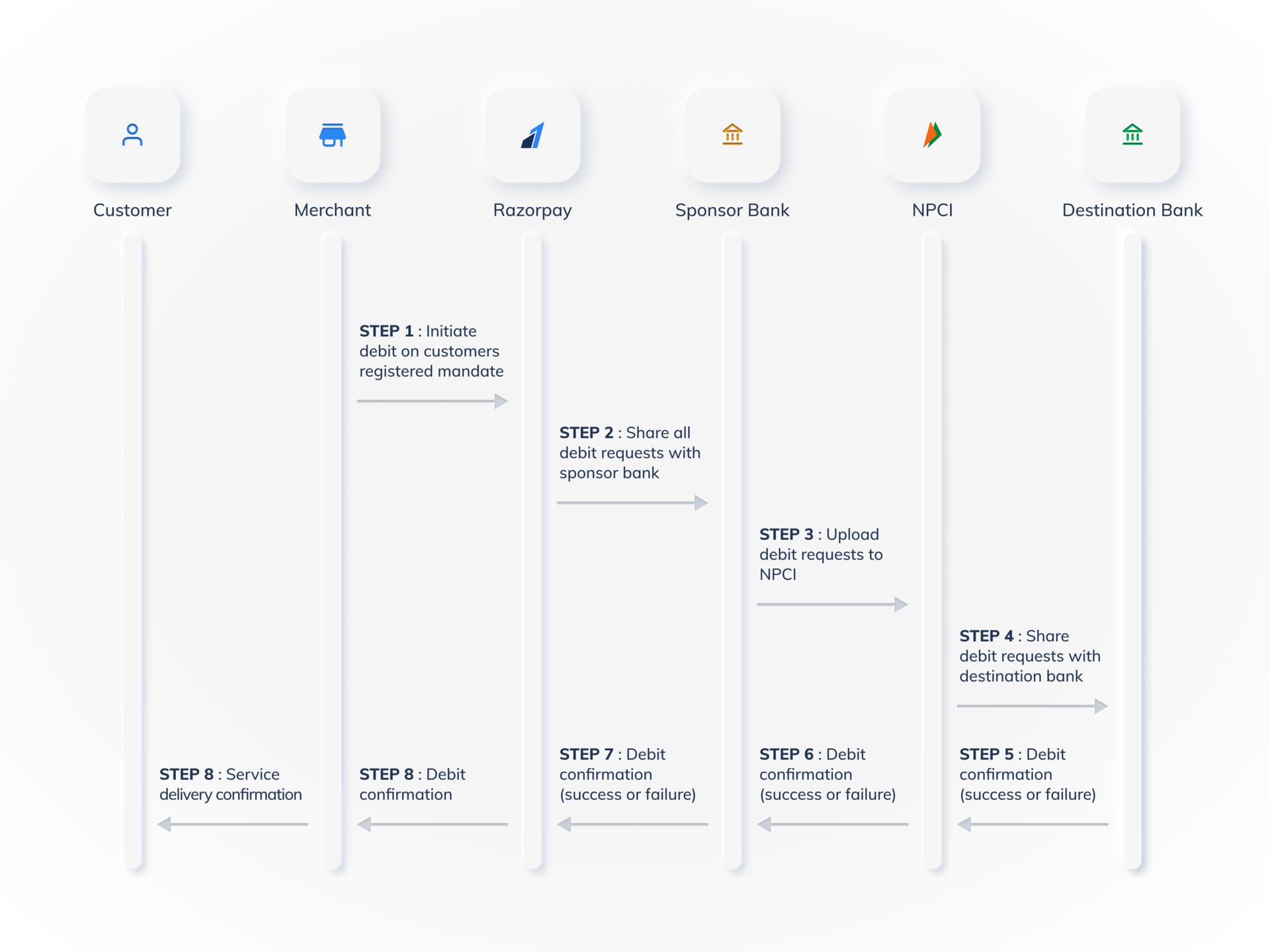
How does the debit presentment work with NPCI ENACH?
How does the debit presentment work with NPCI ENACH?
What is the maximum amount which can be debited from the customers?
What is the maximum amount which can be debited from the customers?
Is there a cooling period for Emandates registered via NPCI ENACH (debit card, netbanking and Aadhaar) for initiating the first debit after completing the registration process?
Is there a cooling period for Emandates registered via NPCI ENACH (debit card, netbanking and Aadhaar) for initiating the first debit after completing the registration process?
Is there a cooling period for Emandates created via Direct Bank Integration (ICICI, Axis, HDFC, SBI) for initiating the first debit after completing the registration process?
Is there a cooling period for Emandates created via Direct Bank Integration (ICICI, Axis, HDFC, SBI) for initiating the first debit after completing the registration process?
confirmed. There is no additional waiting or cooling period required.Will my debits get processed on holidays as well?
Will my debits get processed on holidays as well?
I am getting an error saying Customer has to refer to branch to complete registration while initiating debits for my customers?
I am getting an error saying Customer has to refer to branch to complete registration while initiating debits for my customers?
I am getting an error saying Payment failed because emandate is cancelled or inactive while presenting debits for my customers?
I am getting an error saying Payment failed because emandate is cancelled or inactive while presenting debits for my customers?
- When the first debit is presented within a few days after registration. This means that the bank has not completed the mandate setup. You can retry after 5 days of the first failure in such cases.
- When the debit is presented more than a month after registration, then it means that the customers have cancelled the mandate by approaching their bank. In such cases, you will need to ask customers to register a new mandate.
When can I retry subsequent debit if the first attempt fails for NPCI ENACH?
When can I retry subsequent debit if the first attempt fails for NPCI ENACH?
- If the charge fails on 1 November 2023 and you receive the confirmation, you can retry the attempt on 4 November 2023.
- If the charge fails on 1 November 2023 and you receive the confirmation on 2 November 2023, you can retry the attempt on 5 November 2023.
Will there be any charges applied for subsequent debit failures?
Will there be any charges applied for subsequent debit failures?
Charge Customer During Registration
Is the feature, Charging Customers During Registration, supported by all banks?
Is the feature, Charging Customers During Registration, supported by all banks?
How is this feature, Charging Customers During Registration, different from the First Payment Amount feature?
How is this feature, Charging Customers During Registration, different from the First Payment Amount feature?
What is the maximum amount I can charge a customer immediately using the Charging Customers During Registration feature?
What is the maximum amount I can charge a customer immediately using the Charging Customers During Registration feature?
Payment retries
Can I retry a failed payment?
Can I retry a failed payment?
insufficient_balance, you can only re-initiate a payment 3 days after initiating the previous payment.How many times can I retry a payment?
How many times can I retry a payment?
insufficient_balance, you can only re-initiate a payment 3 days after initiating the previous payment.