

Available in🇮🇳 India
Meta Ads enables you to run Meta ad campaigns directly from your Razorpay Dashboard. Pick an objective, choose a package and track your results without leaving Razorpay.
A Meta-certified team sets up your campaign and manages targeting, delivery and optimisation on your behalf. You do not need a Meta ad account, an agency or any integration.
Handy Tips
- Meta Ads is available for businesses in India only.
- On your Razorpay Dashboard, this feature appears as Razorpay Ads on the top menu bar.
Why use Meta Ads
Meta Ads brings advertising into the same dashboard you already use to manage payments, so you can grow your business without juggling multiple tools. Key benefits include:- One place for payments and marketing: Launch and track ad campaigns alongside your payments, settlements and reports, without switching between platforms or logging in to a separate ad account.
- Simplified campaign setup: Skip the complexity of Meta’s advertising tools. Pick an objective and a package, and a Meta-certified team handles targeting, delivery and optimisation for you. Setting up a campaign takes about 10 minutes.
- Reach where your customers are: Run ads across Facebook and Instagram to connect with potential customers and drive traffic to your business.
- Performance at a glance: Monitor ad views, ad clicks, ad spends and conversions directly from your dashboard, with a platform-level breakdown for Facebook and Instagram.
- Packages for every stage: Start with an entry-level package and move to a larger one as you see results.
- Leads you can act on: Every lead is traced back to the campaign that drove it. Track WhatsApp inquiries, filter them by status and export them to Google Sheets for follow-up.
How it Works
Meta Ads integrates the Meta advertising platform with your Razorpay Dashboard. You pick a campaign objective and a package, and a Meta-certified team creates and runs the ad on Meta’s platforms on your behalf. The campaign runs across Facebook and Instagram, and the results appear in your Razorpay Dashboard. Your campaign goes live within 24 hours of launch. The following screenshot shows the Razorpay Ads section on your Razorpay Dashboard: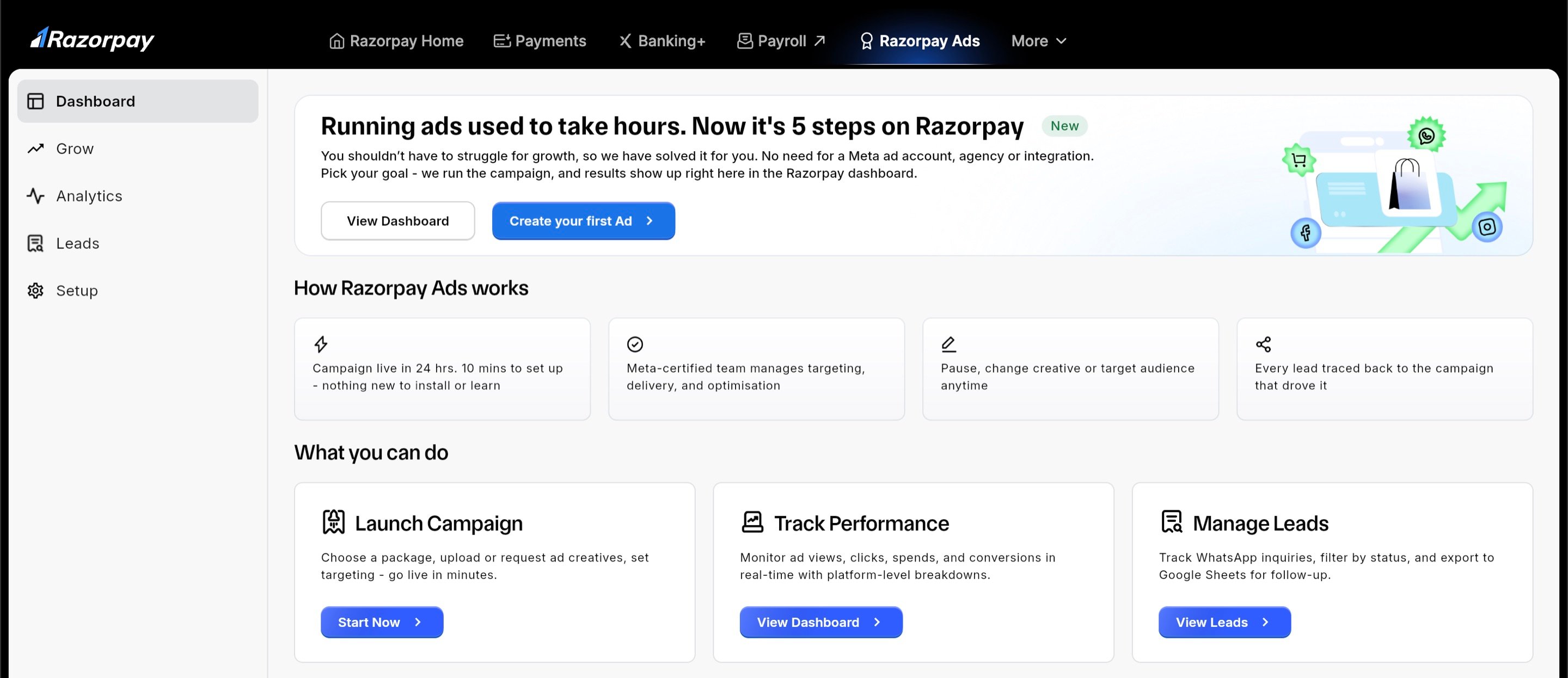
Get Started
Prerequisites
Before you launch a Meta ad campaign, ensure that you meet the following requirements:- An active Razorpay account with completed KYC.
- A Facebook page that you can grant advertising rights for. See Connect your Facebook Page.
- A business website URL to direct traffic to, if you want to run a website campaign.
- Budget for a campaign package. Packages start at ₹4,999.
Connect your Facebook Page
Razorpay needs advertising rights for the Facebook page that you want your ads to run for.- Log in to your Razorpay Dashboard.
- Navigate to Razorpay Ads on the top menu bar.
- Click Setup on the left menu.
-
Click Link your facebook page and grant advertising rights for your page.
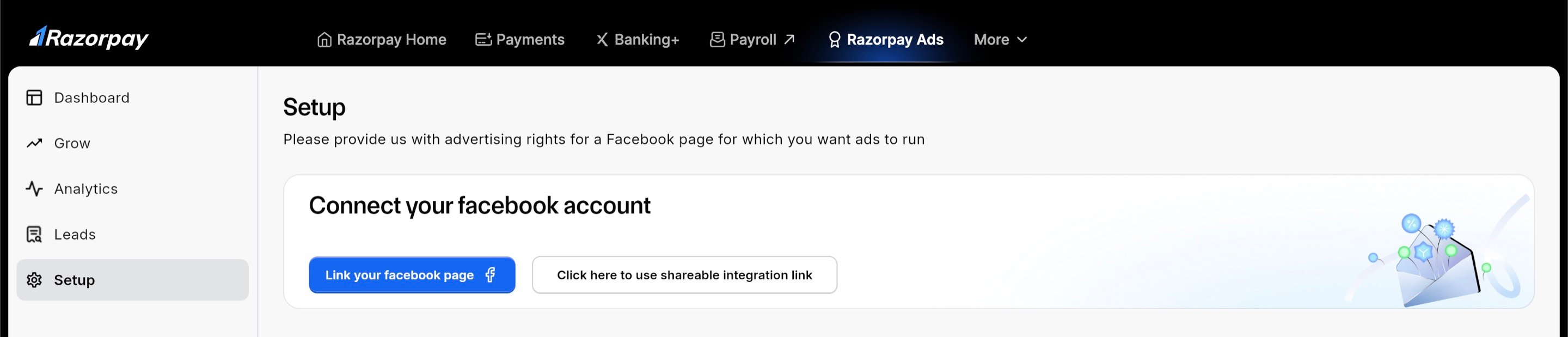
Handy TipsIf someone else manages your Facebook page, click Click here to use shareable integration link and share the link with them.
Launch a Campaign
To launch a Meta ad campaign from your Razorpay Dashboard:- Log in to your Razorpay Dashboard.
- Navigate to Razorpay Ads on the top menu bar.
- Click Grow on the left menu.
-
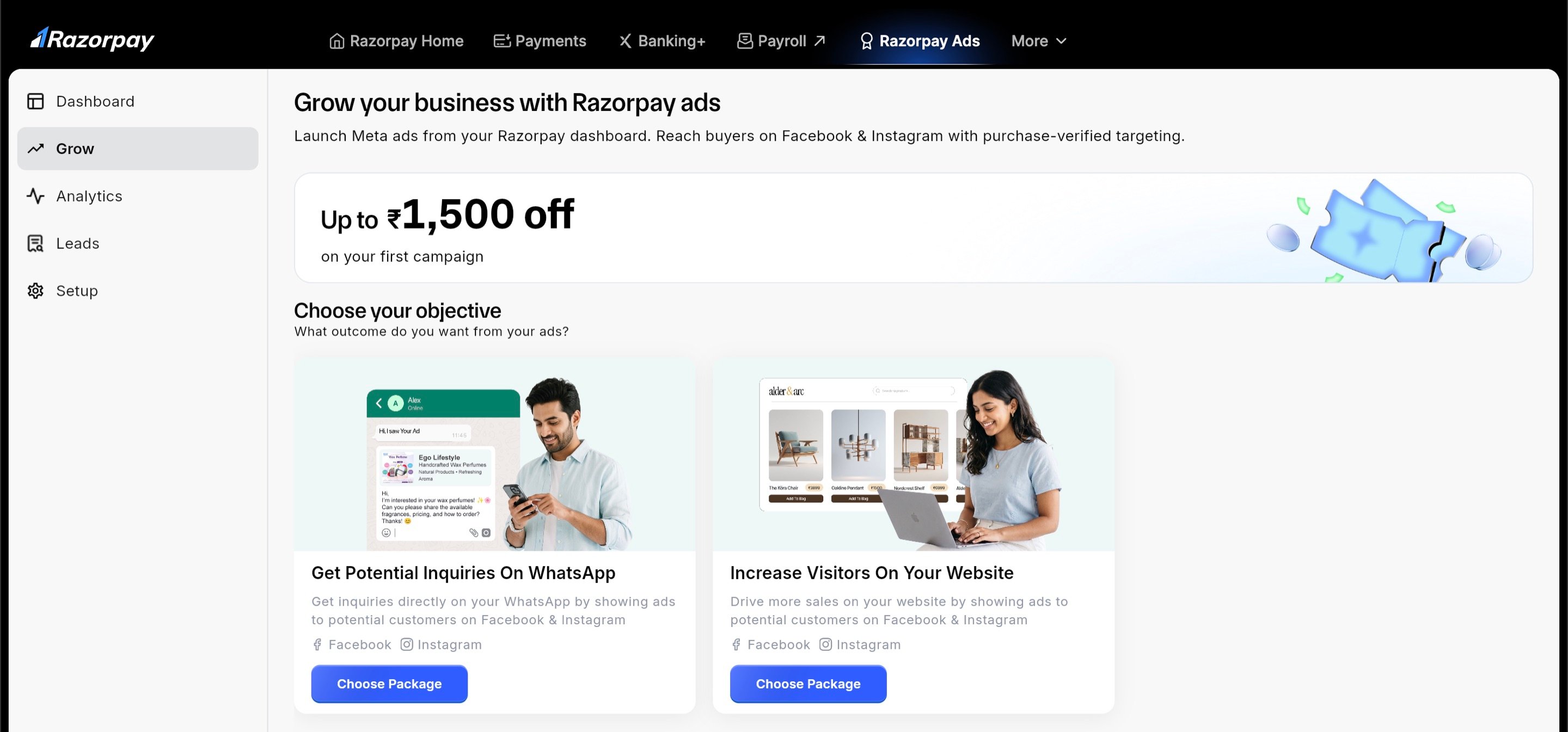
Under Choose your objective, select the outcome you want from your ads and click Choose Package.
- Get Potential Inquiries On WhatsApp: Customers who see your ad on Facebook or Instagram send you an inquiry on WhatsApp.
- Increase Visitors On Your Website: Customers who see your ad on Facebook or Instagram are directed to your website.
-
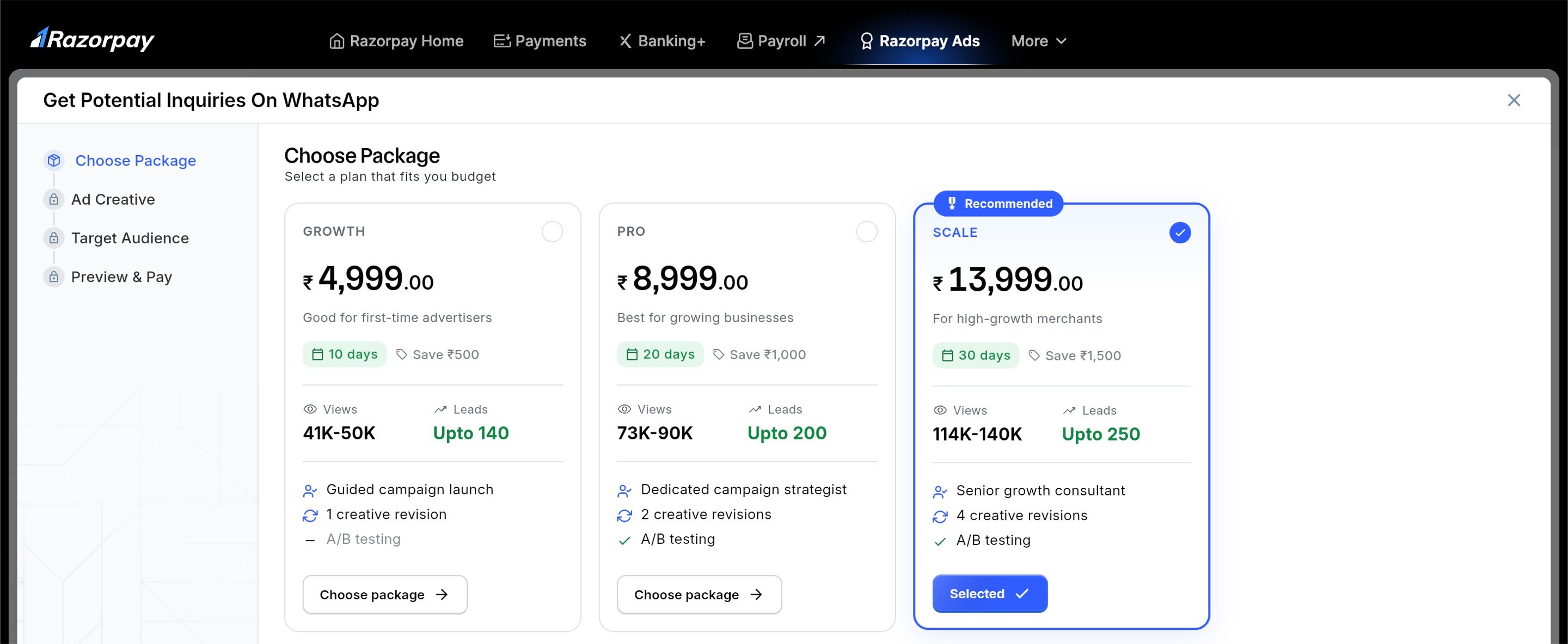
Select a package and click Next. The package determines your campaign spend, duration, estimated ad views and estimated leads.
- Under Ad Creative, upload your ad creative or request one from the Razorpay team.
- Under Target Audience, set the audience you want to reach.
- Under Preview & Pay, review your campaign and pay for the package to launch your campaign.
Campaign Packages
The following packages are available:
Each package also includes a different level of support:
- Growth: A guided campaign launch and 1 creative revision.
- Pro: A dedicated campaign strategist, 2 creative revisions and A/B testing.
- Scale: A senior growth consultant, 4 creative revisions and A/B testing.
Handy Tips
- New advertisers get up to ₹1,500 off their first campaign.
- Package prices and estimates may vary based on your campaign objective. Check the packages displayed on your dashboard before you pay.
Track Campaign Performance
You can track the performance of your Meta ad campaigns from the Analytics tab on your Razorpay Dashboard. The tab displays the following metrics:- Campaigns: Number of campaigns you have run
- Ad Views: Number of times your ads were shown
- Ad Clicks: Number of clicks on your ads
- Ad Spends: Total amount spent across your campaigns
- Log in to your Razorpay Dashboard.
- Navigate to Razorpay Ads on the top menu bar.
- Click Analytics on the left menu.
-
View the summary metrics and the report for each campaign. Click See Details on a campaign to view its detailed report.
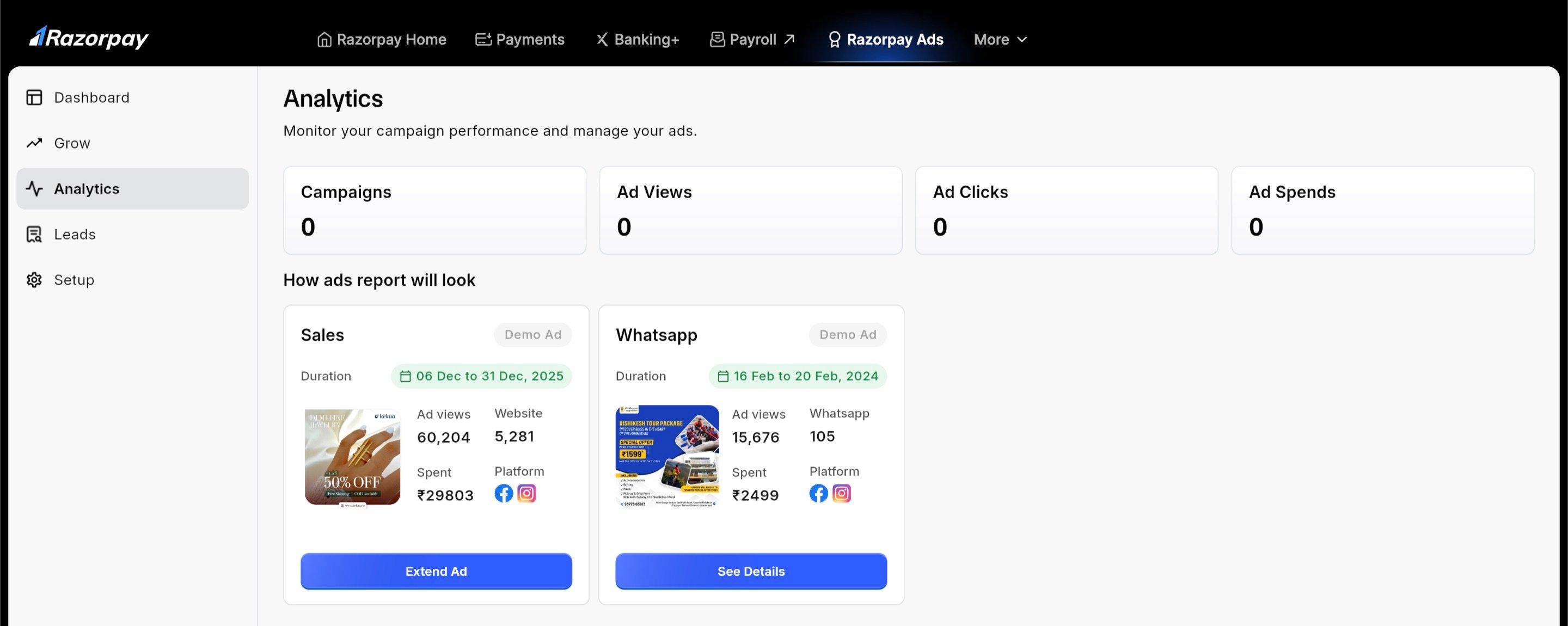
Handy TipsUntil you launch your first campaign, the Analytics tab displays sample reports labelled Demo Ad so that you can see how your campaign report will look.
Manage Campaigns
You can manage your campaigns from the Analytics tab on your Razorpay Dashboard. The following actions are available:- Extend Ad: Extend the duration of a running campaign.
- See Details: View the detailed report for a campaign.
- Pause or edit a running campaign: Pause a campaign, or change its ad creative or target audience, at any time after it goes live.
Manage Leads
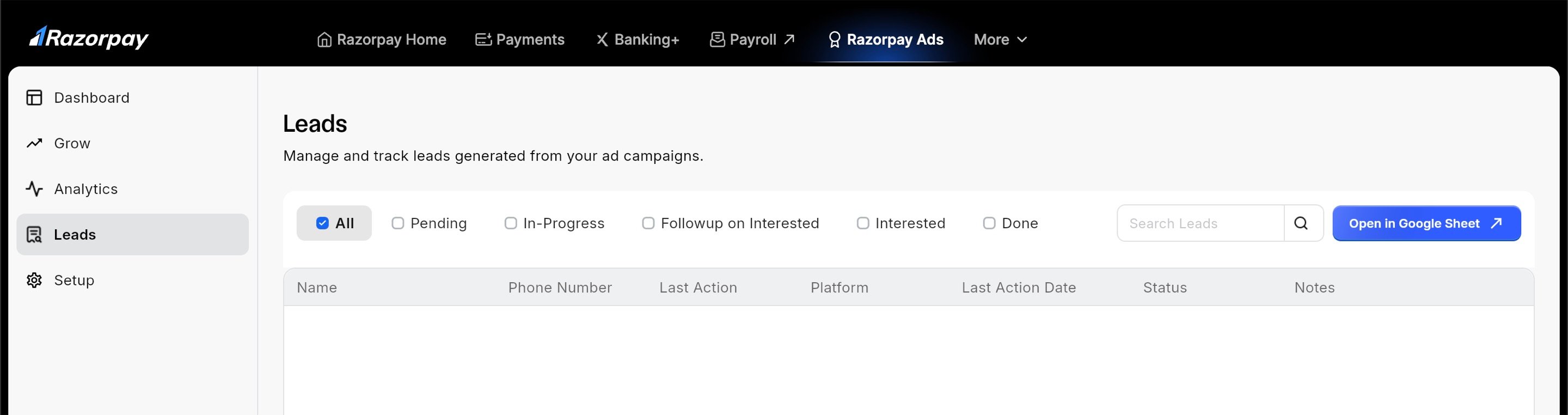
If you run a campaign with the Get Potential Inquiries On WhatsApp objective, the inquiries you receive appear in the Leads tab on your Razorpay Dashboard. For each lead, the tab displays the name, phone number, last action, platform, last action date, status and notes. You can:- Filter leads by status: Pending, In-Progress, Followup on Interested, Interested and Done.
- Search for a specific lead.
- Click Open in Google Sheet to export your leads for follow-up.
Frequently Asked Questions (FAQs)
Which platforms do my ads appear on?
Which platforms do my ads appear on?
Your ads appear on Meta’s advertising platforms, including Facebook and Instagram. The placement is determined automatically based on your campaign objective and target audience.
Do I need a Meta ad account to run Meta Ads?
Do I need a Meta ad account to run Meta Ads?
No. You do not need a Meta ad account, an agency or any integration. You only need to grant Razorpay advertising rights for the Facebook page that you want your ads to run for. You can do this from the Setup tab in the Razorpay Ads section.
What is the minimum budget for a Meta ad campaign?
What is the minimum budget for a Meta ad campaign?
Campaign packages start at ₹4,999 for a 10-day campaign. Larger packages are also available: ₹8,999 for 20 days and ₹13,999 for 30 days. New advertisers get up to ₹1,500 off their first campaign.
Who creates and manages my ad?
Who creates and manages my ad?
A Meta-certified team manages targeting, delivery and optimisation on your behalf. You can upload your own ad creative or request one from the Razorpay team. Depending on the package you choose, you get a guided campaign launch, a dedicated campaign strategist or a senior growth consultant, along with 1 to 4 creative revisions.
How long does it take for my campaign to go live?
How long does it take for my campaign to go live?
Your campaign goes live within 24 hours of launch. Setting up a campaign takes about 10 minutes.
Can I edit my campaign after launching it?
Can I edit my campaign after launching it?
You can pause a campaign, or change its ad creative or target audience, at any time after it goes live. You can also extend the duration of a running campaign using the Extend Ad option on the Analytics tab. To change your campaign objective or package, launch a new campaign.
How do I track the results of my campaign?
How do I track the results of my campaign?
You can track your campaign performance from the Analytics tab in the Razorpay Ads section of your Razorpay Dashboard. The tab displays ad views, ad clicks, ad spends and conversions, with a platform-level breakdown for Facebook and Instagram.
Where do I see the leads generated by my campaign?
Where do I see the leads generated by my campaign?
If you run a campaign with the Get Potential Inquiries On WhatsApp objective, your inquiries appear in the Leads tab in the Razorpay Ads section. You can filter leads by status, search for a specific lead and click Open in Google Sheet to export them for follow-up.
Are Meta Ads available for all Razorpay businesses?
Are Meta Ads available for all Razorpay businesses?
Meta Ads is currently available for businesses in India only. Razorpay is gradually expanding this feature to more businesses. If you do not see the Razorpay Ads section on your dashboard, check back later or contact our support team.