

Available in🇮🇳 India
Follow these steps to integrate the Razorpay Magic Checkout on your iOS application when using Shopify as your e-commerce platform.
Prerequisites
- Ensure you enable Magic Checkout on your account.
- Integrate Magic Checkout With Shopify Store.
- Integrate with iOS Integration.
- Generate Live API Keys from the Dashboard.
1. Build Integration
Integrate with iOS App for Shopify.
2. Test Integration
Test the integration by making a test payment.
1. Build Integration
Follow the steps given below:1 Create a Checkout id
1 Create a Checkout id
Generate a unique cart identifier to initiate the Magic Checkout process.
ImportantEnsure you create the Shopify cart before making this request as the cart token must be included in the payload.
POST /magic/checkout/shopify?key_id=rzp_live_XXXXXXRequest Parameters
Request Parameters
cart mandatory
: object Complete cart object from Shopify.cart.token mandatory
: string Unique cart token from Shopify cart creation.cart.note optional
: string|null Customer notes or special instructions.cart.attributes optional
: object Custom attributes for the cart (key-value pairs).cart.item_count mandatory
: integer Total number of items in the cart.cart.items mandatory
: array Array of cart items.cart.items[].id mandatory
: integer Unique item identifier.cart.items[].quantity mandatory
: integer Quantity of the item.cart.items[].product_id mandatory
: integer Shopify product identifier.cart.items[].variant_id mandatory
: integer Shopify variant identifier.cart.items[].properties optional
: object Custom item properties.Response Parameters
Response Parameters
shopify_checkout_id
: string Unique checkout identifier for Shopify integration.tax_details
: object Tax information for the checkout.total_tax
: integer Total tax amount in smallest currency unit (paise).taxes_included
: boolean Whether taxes are included in item prices. Possible values:true: Taxes are included in item prices.false: Taxes are separate from item prices.
2 Create Order id on Server
2 Create Order id on Server
Create a Razorpay order id required for the payment modal. This API requires the
shopify_checkout_id from Step 1.1.POST /magic/order/shopify?key_id=rzp_live_XXXXXXRequest Parameters
Request Parameters
shopify_checkout_id mandatory
: string Checkout id from Step 1.1.ga_id optional
: string Google Analytics client identifier.fb_analytics optional
: object Facebook Analytics parameters.external_id optional
: string Unique external id for Facebook tracking.fbp optional
: string Facebook browser pixel id.fbc optional
: string Facebook click id.event_source_url optional
: string Source URL for the event.utm_parameters optional
: object UTM tracking parameters.landing_page_url optional
: string Landing page URL.user_agent optional
: string Browser user agent string.analytics optional
: object Comprehensive analytics data.fb_analytics optional
: object Facebook Analytics configuration.external_id optional
: string Unique external id for Facebook tracking.fbp optional
: string Facebook browser pixel id.fbc optional
: string Facebook click id.ga4 optional
: object Google Analytics 4 configuration.session_ids optional
: object GA4 session identifiers.client_id optional
: string GA4 client identifier.google_ads optional
: object Google Ads tracking parameters.gclid optional
: string Google Click Identifier.wbraid optional
: string Web-to-app measurement parameter.gbraid optional
: string Google Ads Broad match parameter.source_url optional
: string Source URL for analytics.Response Parameters
Response Parameters
preferences
: object|null Customer preferences. Returns null if no preferences are set.order_id
: string Unique Razorpay order identifier. For example, order_EKwxwAgItmmXdp.3 Import Razorpay iOS Standard SDK Library
3 Import Razorpay iOS Standard SDK Library
You can import the Razorpay iOS Standard SDK library using any of these ways:
- Cocoapod
- Manual
- Objective-C
Refer to our Cocoapod (bitcode enabled) pod.
Xcode 11
Xcode 11
Ensure that you have the framework added in Frameworks, Libraries, and Embed Content under Target settings - General. Change
Watch the GIF to see how to add Frameworks, Libraries and Embed Content.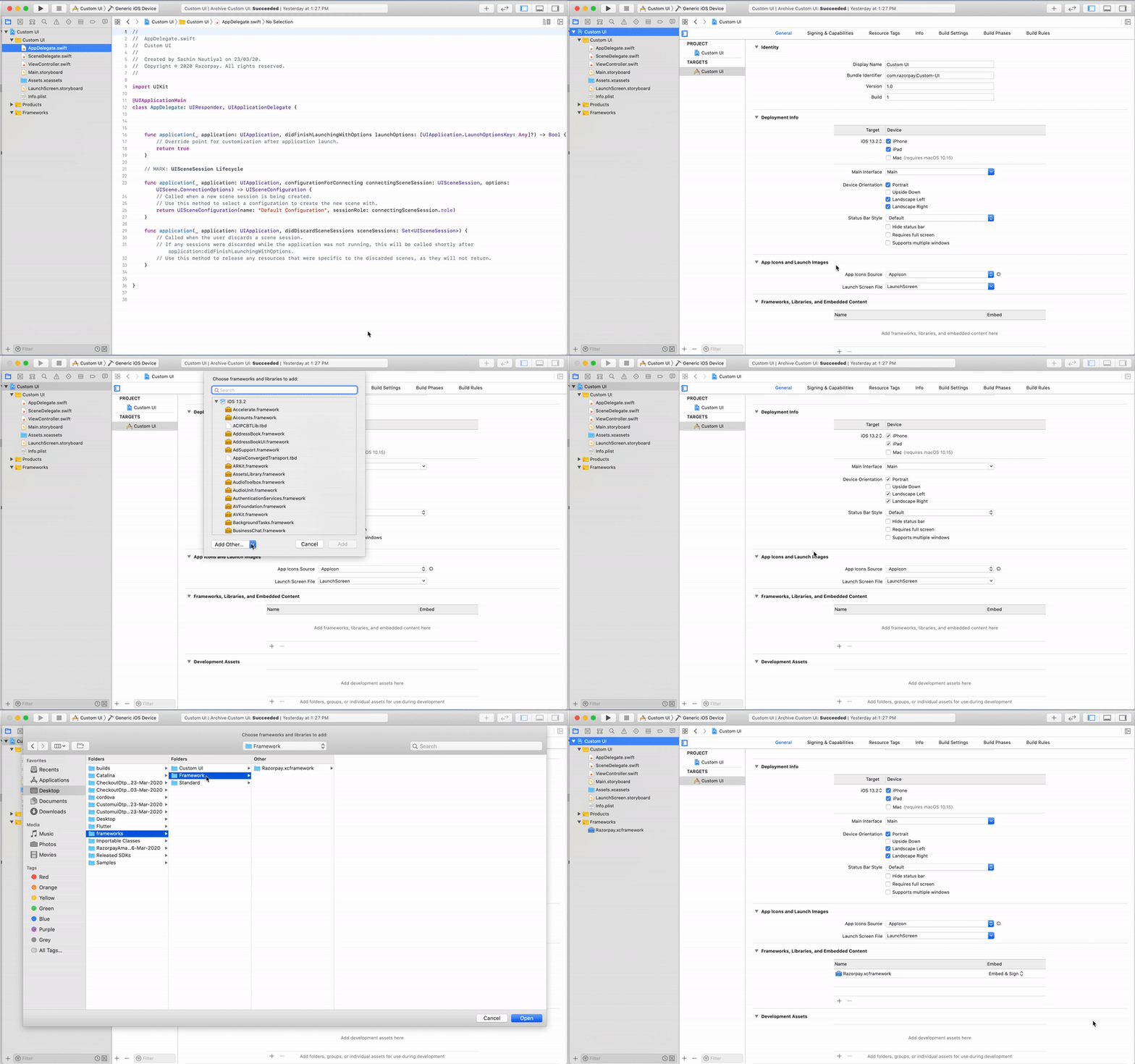
Embed status from - Do not Embed to Embed & Sign. Watch the GIF to see how to add Frameworks, Libraries and Embed Content.
4 Initialise Razorpay iOS Standard SDK
4 Initialise Razorpay iOS Standard SDK
To initialise Razorpay iOS Standard SDK, you need the following:
- API keys. You can generate this from the Dashboard.
- A delegate that implements
RazorpayPaymentCompletionProtocolorRazorpayPaymentCompletionProtocolWithData.
5 Coupon Handling
5 Coupon Handling
Since this is an SDK integration, Shopify coupons will not auto-apply like they do on the website. You must explicitly pass coupon codes to Magic Checkout. When initialising Magic Checkout, include the coupon code in the prefill options:Your app captures the coupon applied on the cart page, then passes the coupon code in the
prefill.coupon_code field. The SDK internally calls applyCoupon('MY_COUPON_NAME'), and if the coupon is valid, it is automatically applied in Magic Checkout.6 Pass Payment Options and Display Checkout Form
6 Pass Payment Options and Display Checkout Form
Call
RazorpayCheckout.checkIntegration(withMerchantKey: <merchant_key>) to check the health of integration. This will also let you know if the SDK version is outdated. The opinionated alerting is displayed only when it is running on simulators.Add the following code to your ViewController or wherever you want to initialise payments:Optional Parameter - displayControllerWhen the optional parameter- displayController, is specified, the Razorpay controller is pushed onto this controller’s navigation controller if present or presented on this controller if absent.
Checkout Options
Checkout Options
key mandatory
: string API key id generated from the Dashboard.amount mandatory
: integer The amount to be paid by the customer in currency subunits. For example, if the amount is ₹500, enter 50000.currency mandatory
: string The currency in which the payment should be made by the customer. Length must be of 3 characters.name mandatory
: string Your Business/Enterprise name shown on the Checkout form. For example, Acme Corp.description optional
: string Description of the purchase item shown on the Checkout form. It should start with an alphanumeric character.image optional
: string Link to an image (usually your business logo) shown on the Checkout form. Can also be a base64 string if you are not loading the image from a network.order_id mandatory
: string Order id generated via Orders API.prefill
: object You can prefill the following details at Checkout.Boost Conversions and Minimise Drop-offs
- Autofill customer contact details, especially phone number to ease form completion. Include customer’s phone number in the
contactparameter of the JSON request’sprefillobject. Format: +(country code)(phone number). Example: “contact”: “+919000090000”. - This is not applicable if you do not collect customer contact details on your website before checkout, have Shopify stores or use any of the no-code apps.
name optional
: string Cardholder’s name to be prefilled if customer is to make card payments on Checkout. For example, Gaurav Kumar.email optional
: string Email address of the customer.contact optional
: string Phone number of the customer. The expected format of the phone number is + {country code}{phone number}. If the country code is not specified, 91 will be used as the default value. This is particularly important while prefilling contact of customers with phone numbers issued outside India. Examples:- +14155552671 (a valid non-Indian number)
- +919977665544 (a valid Indian number).
If 9977665544 is entered,+91is added to it as +919977665544.
method optional
: string Pre-selection of the payment method for the customer. Will only work if contact and email are also prefilled. Possible values:cardnetbankingwalletupicod
notes optional
: object Set of key-value pairs that can be used to store additional information about the payment. It can hold a maximum of 15 key-value pairs, each 256 characters long (maximum).show_coupons optional
: boolean Determines whether to show the coupons to customer on the checkout. Possible values:true(default): Enables the Coupon feature.false: Disables the Coupon feature.
theme
: object Thematic options to modify the appearance of Checkout.color optional
: string Enter your brand colour’s HEX code to alter the text, payment method icons and CTA (call-to-action) button colour of the Checkout form.backdrop_color optional
: string Enter a HEX code to change the Checkout’s backdrop colour.modal
: object Options to handle the Checkout modal.backdropclose optional
: boolean Indicates whether clicking the translucent blank space outside the Checkout form should close the form. Possible values:true: Closes the form when your customer clicks outside the checkout form.false(default): Does not close the form when customer clicks outside the checkout form.
escape optional
: boolean Indicates whether pressing the escape key should close the Checkout form. Possible values:true(default): Closes the form when the customer presses the escape key.false: Does not close the form when the customer presses the escape key.
handleback optional
: boolean Determines whether Checkout must behave similar to the browser when back button is pressed. Possible values:true(default): Checkout behaves similarly to the browser. That is, when the browser’s back button is pressed, the Checkout also simulates a back press. This happens as long as the Checkout modal is open.false: Checkout does not simulate a back press when browser’s back button is pressed.
confirm_close optional
: boolean Determines whether a confirmation dialog box should be shown if customers attempts to close Checkout. Possible values:true: Confirmation dialog box is shown.false(default): Confirmation dialog box is not shown.
ondismiss optional
: function Used to track the status of Checkout. You can pass a modal object with ondismiss: function()\{\} as options. This function is called when the modal is closed by the user. If retry is false, the ondismiss function is triggered when checkout closes, even after a failure.animation optional
: boolean Shows an animation before loading of Checkout. Possible values:true(default): Animation appears.false: Animation does not appear.
callback_url optional
: string Customers will be redirected to this URL on successful payment. Ensure that the domain of the Callback URL is allowlisted.redirect optional
: boolean Determines whether to post a response to the event handler post payment completion or redirect to Callback URL. callback_url must be passed while using this parameter. Possible values:true: Customer is redirected to the specified callback URL in case of payment failure.false(default): Customer is shown the Checkout popup to retry the payment with the suggested next best option.
customer_id optional
: string Unique identifier of customer. Used for:- Local saved cards feature.
- Static bank account details on Checkout in case of Bank Transfer payment method.
remember_customer optional
: boolean Determines whether to allow saving of cards. Can also be configured via the Dashboard. Possible values:true: Enables card saving feature.false(default): Disables card saving feature.
timeout optional
: integer Sets a timeout on Checkout, in seconds. After the specified time limit, the customer will not be able to use Checkout.readonly
: object Marks fields as read-only.contact optional
: boolean Used to set the contact field as read-only. Possible values:true: Customer will not be able to edit this field.false(default): Customer will be able to edit this field.
email optional
: boolean Used to set the email field as read-only. Possible values:true: Customer will not be able to edit this field.false(default): Customer will be able to edit this field.
name optional
: boolean Used to set the name field as read-only. Possible values:true: Customer will not be able to edit this field.false(default): Customer will be able to edit this field.
hidden
: object Hides the contact details.contact optional
: boolean Used to set the contact field as optional. Possible values:true: Customer will not be able to view this field.false(default): Customer will be able to view this field.
email optional
: boolean Used to set the email field as optional. Possible values:true: Customer will not be able to view this field.false(default): Customer will be able to view this field.
send_sms_hash optional
: boolean Used to auto-read OTP for cards and netbanking pages. Applicable from Android SDK version 1.5.9 and above. Possible values:true: OTP is auto-read.false(default): OTP is not auto-read.
allow_rotation optional
: boolean Used to rotate payment page as per screen orientation. Applicable from Android SDK version 1.6.4 and above. Possible values:true: Payment page can be rotated.false(default): Payment page cannot be rotated.
retry optional
: object Parameters that enable retry of payment on the checkout.enabled
: boolean Determines whether the customers can retry payments on the checkout. Possible values:true(default): Enables customers to retry payments.false: Disables customers from retrying the payment.
max_count
: integer The number of times the customer can retry the payment. We recommend you to set this to 4. Having a larger number here can cause loops to occur.config optional
: object Parameters that enable checkout configuration.display
: object Child parameter that enables configuration of checkout display language.language
: string The language in which checkout should be displayed. Possible values:-
en: English -
ben: Bengali -
hi: Hindi -
mar: Marathi -
guj: Gujarati -
tam: Tamil -
tel: Telugu You must pass these parameters in Checkout to initiate the payment.
6.1 Enable UPI Intent on iOS (Optional)
6.1 Enable UPI Intent on iOS (Optional)
Provide your customers with a better payment experience by enabling UPI Intent on your app’s Checkout form. In the UPI Intent flow:Know more about UPI Intent and its benefits.
- Customer selects UPI as the payment method in your iOS app. A list of UPI apps supporting the intent flow is displayed. For example, PhonePe, Google Pay and Paytm.
- Customer selects the preferred app. The UPI app opens with pre-populated payment details.
- Customer enters their UPI PIN to complete their transactions.
- Once the payment is successful, the customer is redirected to your app or website.
info.plist
7 Perform Post Payment Processing
7 Perform Post Payment Processing
Based on the response, you can handle post-payment processing on your end.
Fetch an Order
Fetch an Order
Use the Fetch Orders API to retrieve order details, including customer information, address, shipping method and promotions of a particular order:Know more about the Orders API.
GET v1/orders/:idOrder StatusCheck the order status for the following:
- Prepaid orders:
paid. - COD orders:
placed.
Path Parameter
Path Parameter
id mandatory
: string Unique identifier of the order to be retrieved.Response Parameters
Response Parameters
id
: string Unique identifier of the order. For example, order_R1yDkxyIuKXXXX.entity
: string Type of entity. Value is order.amount
: integer Total order amount in the smallest currency unit (paise).amount_paid
: integer Amount paid towards the order in paise. For prepaid orders, this shows the actual amount paid. For COD orders, this is 0 until payment is collected.amount_due
: integer Outstanding amount due in paise. For prepaid orders, this shows any remaining balance. For COD orders, this equals the amount field until payment is collected.currency
: string The 3-letter ISO currency code. For example, INR.receipt
: string Receipt identifier for internal reference. For example, #30567.offers
: array Array of offer IDs applied to the order.status
: string Current status of the order. Possible values:placed: Order placed but payment pending (COD orders).paid: Order placed and payment completed (prepaid orders).cancelled: Order cancelled.refunded: Order refunded.
attempts
: integer Number of payment attempts made for this order. For example, 1.notes
: object Custom notes added to the order containing integration-specific data.cart_id
: string Shopping cart identifier.storefront_id
: string Storefront system identifier.shopify_order_id
: string Shopify order reference.flits_cart_token
: string Flits integration token (optional).created_at
: integer Unix timestamp indicating when the order was created. For example, 1756045901.description
: string|null Order description. Returns null if no description is provided.checkout
: string|null Checkout identifier. Returns null if not applicable.promotions
: array Array of promotion objects applied to the order.code
: string Promotion code used. For example, orderOff.type
: string Type of promotion. For example, cart_value.value
: integer Discount value in paise. For example, 10000 for ₹100.description
: string Human-readable promotion description.reference_id
: string Internal reference for the promotion.cod_fee
: integer Cash on Delivery charges in paise. For COD orders, this contains the fee amount (for example, 5000 for ₹50). For prepaid orders, this is 0.shipping_fee
: integer Shipping charges in paise. For example, 700 for ₹7.customer_details
: object Customer information.contact
: string Customer’s phone number.email
: string Customer’s email address.shipping_address
: object Complete shipping address information.city
: string City name.contact
: string Contact number for delivery.country
: string Country code. For example, in.id
: string Address identifier (optional).line1
: string Address line 1.line2
: string Address line 2.name
: string Recipient name.state
: string State name.tag
: string Address tag. For example, Home.type
: string Address type. Value is shipping_address.zipcode
: string Postal code.billing_address
: object Complete billing address information.city
: string City name.contact
: string Contact number for billing.country
: string Country code. For example, in.id
: string Address identifier (optional).line1
: string Address line 1.line2
: string Address line 2.name
: string Account holder name.state
: string State name.tag
: string Address tag. For example, Home.type
: string Address type. Value is billing_address.zipcode
: string Postal code.line_items_total
: integer Total value of line items in paise before adding shipping fees and COD fees, after applying promotions. For example, 60000 for ₹600.tax_details
: object Tax information.total_tax
: integer Total tax amount in paise. For example, 4128.taxes_included
: boolean Indicates whether taxes are included in the item prices. Possible values:true: Taxes are included in item prices.false: Taxes are separate from item prices.
Fetch a Payment
Fetch a Payment
Use the Fetch Payments API to retrieve comprehensive payment details, including transaction status, payment method, customer information, settlement details, and the associated order information for a specific payment:Know more about the Payments API.
GET v1/payments/:idPath Parameter
Path Parameter
id mandatory
: string Unique identifier of the payment to be retrieved.Response Parameters
Response Parameters
id
: string Unique identifier of the payment. For example, pay_R1yFlWQar3XXXX.entity
: string Type of entity. Value is payment.amount
: integer Payment amount in the smallest currency unit (paise). For COD payments, this includes the COD fee (for example, 55700 for ₹557). For prepaid payments, this equals the captured amount (for example, 90630 for ₹906.30).currency
: string The 3-letter ISO currency code. For example, INR.status
: string Current status of the payment. Possible values:pending: Payment pending collection (COD orders).captured: Payment successfully captured (prepaid orders).authorized: Payment authorized but not captured.failed: Payment attempt failed.
order_id
: string Unique identifier of the associated order. For example, order_R1yDkxyIuKXXXX.invoice_id
: string|null Unique identifier of the associated invoice. Returns null if no invoice is linked.international
: boolean Indicates whether this is an international payment. Possible values:true: International payment.false: Domestic payment.
method
: string Payment method used. Possible values include:codupicardnetbankingwallet
amount_refunded
: integer Amount refunded in paise. For example, 0 indicates no refund has been processed.refund_status
: string|null Current refund status. Returns null if no refund is applicable. Possible values:partial: Partial refund processed.full: Full refund processed.
captured
: boolean Indicates whether the payment has been captured. Possible values:true: Payment has been captured.false: Payment has not been captured.
description
: string|null Payment description. Returns null if no description is provided.card_id
: string|null Unique identifier of the card used for payment. Returns null for non-card payments.bank
: string|null Bank identifier for netbanking payments. Returns null for other payment methods.wallet
: string|null Wallet provider identifier. Returns null for non-wallet payments.vpa
: string|null Virtual Payment Address for UPI payments. For example, gaurav.kumar@exampleupi. Returns null for non-UPI payments.email
: string Customer’s email address.contact
: string Customer’s phone number.notes
: object Custom notes added to the payment containing integration-specific data.cart_id
: string Shopping cart identifier.storefront_id
: string Storefront system identifier.flits_cart_token
: string Flits integration token (optional).optimizer_provider_name
: string Payment optimizer provider name (optional).fee
: integer|null Processing fee charged in paise. For example, 0 indicates no fee. Returns null for COD payments.tax
: integer|null Tax amount on processing fee in paise. For example, 0 indicates no tax. Returns null for COD payments.error_code
: string|null Error code if payment failed. Returns null for successful payments.error_description
: string|null Human-readable error description. Returns null for successful payments.error_source
: string|null Source of the error. Returns null for successful payments.error_step
: string|null Step at which error occurred. Returns null for successful payments.error_reason
: string|null Reason for the error. Returns null for successful payments.acquirer_data
: object Data from the payment acquirer.rrn
: string Retrieval Reference Number from the acquirer (optional).upi_transaction_id
: string UPI transaction identifier from the acquirer (optional).created_at
: integer Unix timestamp indicating when the payment was created. For example, 1756046099.receiver_type
: string|null Type of receiver for the payment. Returns null if not applicable.upi
: object UPI-specific payment details (only present for UPI payments).vpa
: string Virtual Payment Address used for the UPI payment.8 Complete Checkout Call
8 Complete Checkout Call
After a successful payment, call the complete checkout API to create the order in Shopify. You must make the call from the callback handler implemented when importing the react SDK. Ensure you redirect the user to the
order_status_url to show them the order success page on Shopify.POST /1cc/shopify/complete?key_id=rzp_live_XXXXXXRequest Parameters
Request Parameters
razorpay_payment_id mandatory
: string Unique payment identifier. Format: pay_ followed by 14 characters.razorpay_order_id mandatory
: string Unique order identifier from Step 1.2. Format: order_ followed by 14 characters.Response Parameters
Response Parameters
id
: integer Unique Shopify order identifier. For example, 65157213390123.order_id
: string Human-readable order number. For example, #32697.payment_id
: string Razorpay payment identifier. For example, pay_Rk3b76fSqXXXXX.payment_method
: string Payment method used. Possible values include:netbankingupicardwallet
payment_currency
: string The 3-letter ISO currency code. For example, INR.total_amount
: integer Total order amount in smallest currency unit (paise). For example, 659430 for ₹6594.30.total_tax
: string Total tax amount as string. For example, 543.91.shipping_fee
: integer Shipping charges in smallest currency unit (paise). For example, 700 for ₹7.cod_fee
: integer Cash on Delivery fee in smallest currency unit (paise). For example, 0 indicates no COD fee.promotions
: array Array of applied promotions/discounts.reference_id
: string Internal reference for the promotion.code
: string Promotion code used.type
: string Type of promotion. Possible values:automatic: Automatically applied discount.coupon: Coupon-based discount.
value
: integer Discount value in smallest currency unit (paise). For example, 100000 for ₹1000.source
: string Source of the promotion. For example, shopify.shipping_country
: string Country code for shipping destination. For example, in.customer_details
: object Complete customer information.email
: string Customer’s email address.contact
: string Customer’s phone number.shipping_address
: object Complete shipping address information.name
: string Recipient name.line1
: string Address line 1.city
: string City name.state
: string State name.zipcode
: string Postal code.country
: string Country code. For example, in.order_status_url
: string Shopify order status page URL for customer.is_new_customer
: boolean Whether this is a new customer’s first order. Possible values:true: New customer’s first order.false: Existing customer order.
Pass Additional Attributes to Shopify Orders
Shopify orders support Tags and Additional Attributes (note attributes). Include the attributes in the Shopify cart’s attributes object before initiating checkout:2. Test Integration
Check the following checklist below:- Shopify cart creation is working correctly.
- Checkout id is generated successfully.
- Order id is created with analytics parameters.
- Magic Checkout SDK opens without errors.
- Coupons apply correctly via prefill.
- Payment flow completes successfully.
- Complete Checkout API creates order in Shopify.
- Order appears in Shopify Admin with correct details.
- Additional attributes appear correctly in Shopify order.