

Available in🇮🇳 India
You can remove any delivery address you saved while shopping on a store that uses Razorpay Magic Checkout. It takes about a minute, and you do not need to pay or place an order.
Delete an address
-
Open the Razorpay demo page. At the bottom of the page, select Magic Checkout and Mobile, then click Buy Now.

- Enter the mobile number you shop with, then enter the OTP you receive.
-
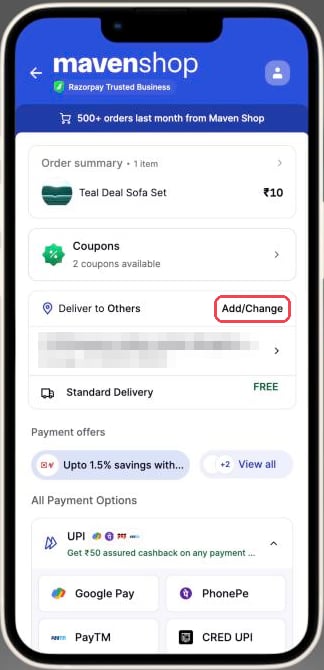
Tap Add/Change next to the delivery address.
-
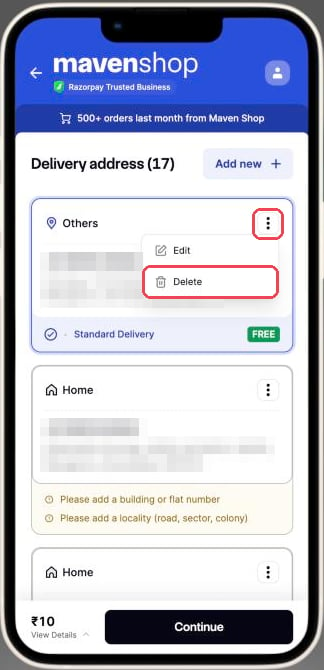
Tap ⋮ on the address you want to remove, then tap Delete.
-
Tap Yes, delete. The address disappears from your list.
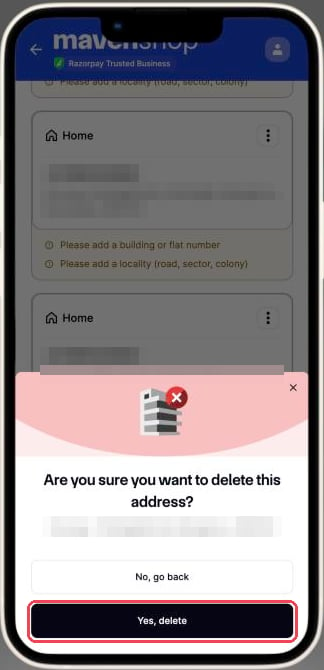
After you delete an address, it no longer appears at checkout on any store that uses Razorpay Magic Checkout.