

Available in🇮🇳 India
Razorpay offers an Anti-Money Laundering (AML) solution, such as Basic AML, designed to help businesses reduce settlement delays and minimize compliance-related transaction flags. Our risk prediction engine analyses historical transaction data and regulatory signals to accurately identify potential risks, reducing AML flags by up to 90% while maintaining compliance standards.
Advantages
Advantages
- Reduced AML Hits: Up to 90% reduction in flagged transactions with proper implementation.
- Faster Settlements: Minimise manual reviews and accelerate fund availability.
- Improved Conversion: Collect additional details only when necessary, reducing customer friction.
- Regulatory Compliance: Automatically meet RBI requirements for high-value transactions.
Basic AML Integration
Basic AML enables you to proactively provide additional customer information with every order, thereby reducing the likelihood that it will be flagged for AML review. You need to pass a few additional parameters related to AML in the Orders API. There is no other change in the rest of the Standard Checkout integration steps.Sample Code
Sample Code
POST /ordersRequest
Success Response
Request Parameters
Request Parameters
amount mandatory
: integer The amount for which the order was created, in currency subunits. For example, for an amount of ₹295, enter 29500. Payment can only be made for this amount against the Order.currency mandatory
: string ISO code for the currency in which you want to accept the payment. The default length is 3 characters. For example, INR.receipt optional
: string Receipt number that corresponds to this order, set for your internal reference. Can have a maximum length of 40 characters and has to be unique.customer_id mandatory
: string Unique identifier of the customer. For example, cust_1Aa00000000004.customer_details mandatory
: object This contains details about the customer details of the order.business_type optional
: string Indicates whether the customer is an individual or business entity. Possible values:companyindividual
name mandatory
: string Customer’s name.- Character length: Between 5 and 50 characters.
- Allowed characters: Uppercase letters (A-Z), lowercase letters (a-z), and spaces (not at the beginning).
- Not allowed characters: Numbers, special characters (For example, @, ”, ,, ., and so on.), Unicode characters, emojis, and non-Latin scripts or regional languages.
- Prohibited names: Names must be meaningful and contextually appropriate.
- Avoid using repetitive patterns (For example, aaa, xyz, kkk kk).
- Names like litri litri, Hfg Gh, or husi husi are not permitted.
- Curse words or offensive names are prohibited.
- Example:
Gaurav Kumar.
email optional
: string The customer’s email address. A maximum length of 64 characters for the username. For example, in “gaurav.kumar@example.com”, “gaurav.kumar” must not exceed 64 characters.contact optional
: string The customer’s phone number. A maximum length of 15 characters including country code. For example, +919123456780.individual
: object Required when business_type is individual.date_of_birth
: object Customer’s date of birth (individuals) or date of incorporation (businesses).day
: integer Day of birth/incorporation (1-31).month
: integer Month of birth/incorporation (1-12).year
: integer Year of birth/incorporation (4-digit format).place_of_birth
: string Place where the customer was born or place of incorporation for businesses.tax_identity
: array List of tax identifiers.name
: string Type of tax identifier.value
: string The identifier value matching the expected format.Response Parameters
Response Parameters
amount
: integer The amount for which the order was created, in currency subunits. For example, for an amount of ₹295, enter 29500.amount_due
: integer The amount pending against the order.amount_paid
: integer The amount paid against the order.attempts
: integer The number of payment attempts, successful and failed, that have been made against this order.created_at
: integer Indicates the Unix timestamp when this order was created.currency
: string ISO code for the currency in which you want to accept the payment. The default length is 3 characters.entity
: string Name of the entity. Here, it is order.id
: string The unique identifier of the order.notes
: object Key-value pair used to store additional information about the entity. Holds 15 key-value pairs, 256 characters (maximum) each. For example, "note_key": "Beam me up Scotty”.offer_id
: string The unique identifier of the offer. For example, offer_JHD834hjbxzhd38d.receipt
: string Receipt number that corresponds to this order. Can have a maximum length of 40 characters and has to be unique.status
: string The status of the order. Possible values:created: When you create an order, it is in thecreatedstate. It stays in this state till a payment is attempted on it.attempted: An order changes to theattemptedstate following the first payment attempt and remains in this state until at least one payment is successfully processed and captured.paid: After the successful capture of the payment, the order moves to thepaidstate. No further payment requests are permitted once the order moves to thepaidstate.
The order stays in thepaidstate even if the payment associated with the order is refunded.
Error Response Parameters
Error Response Parameters
Standard Checkout
Here is how AML works:- Razorpay screens each transaction in real-time.
- Additional customer details are requested only for high-risk orders.
- Low-risk orders proceed without extra fields.
import-mission@razorpay.com.
Payment Flow For Customers
Payment Flow For Customers
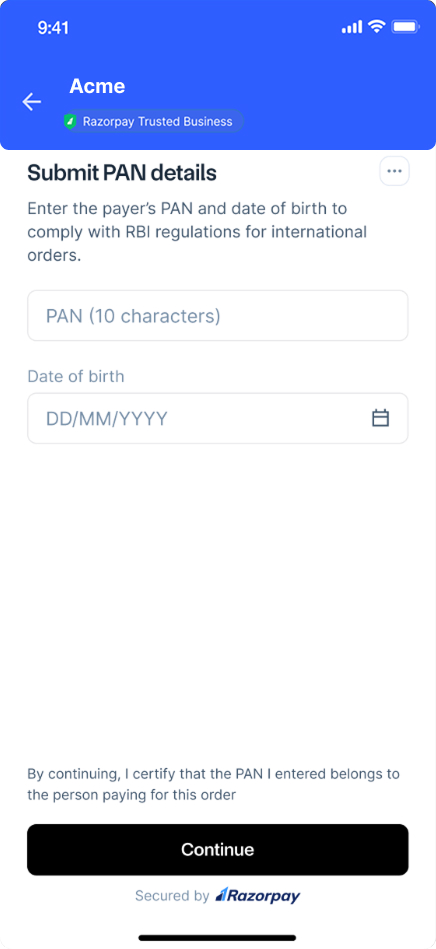
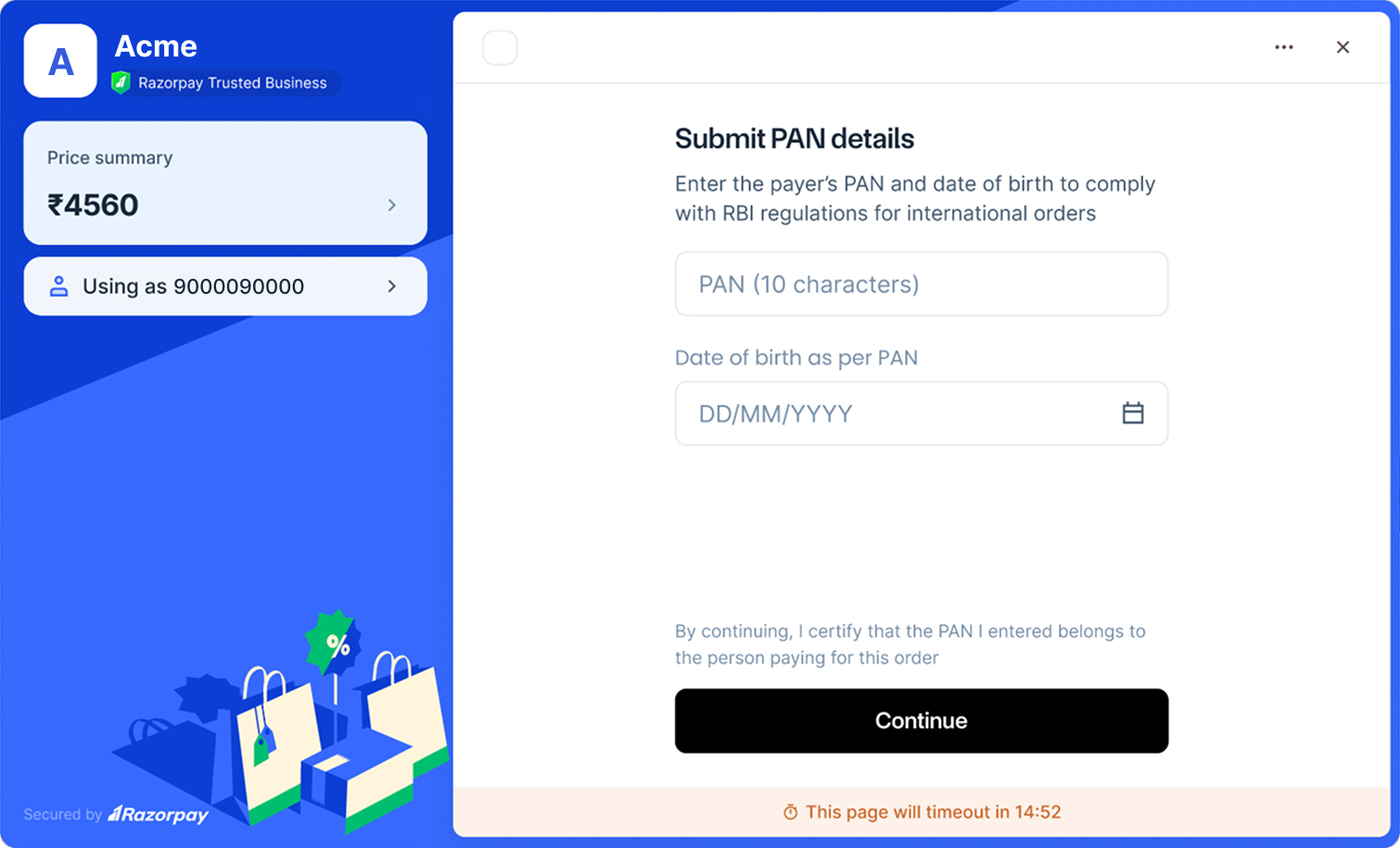
When a transaction is flagged as high-risk, customers will see an additional screen on Razorpay Checkout:
- Customer proceeds to payment. If flagged, Submit PAN details screen appears.
- Enter PAN and Date of birth details.
- Mobile
- Web
- Mobile
- Click Continue to proceed with payment.
Support
For further assistance, reach out to our Support team or email us atimport-mission@razorpay.com.