Server-to-server payment gateway integration connects a merchant’s backend directly to payment initiation APIs while the merchant builds the surrounding customer experience. Removing a gateway’s frontend checkout library changes your integration dependency. It does not remove customer authentication, and it does not define your card-data compliance scope.
Razorpay documents S2S JSON and Redirect APIs for backend-led payment initiation. This guide covers architecture, activation, authentication and server-side verification.
Key Takeaways
- Razorpay supports S2S payments through JSON and Redirect APIs without a frontend checkout library for payment initiation. JSON V2 is recommended and enabled on demand through Support.
- Custom Checkout gives merchants UI control through a JavaScript library. Choose S2S when backend payment initiation is the requirement.
- SDK-free does not mean authentication-free. Customers may still complete OTP, bank-page or UPI app authentication.
- PCI DSS scope follows the card-data path. Confirm merchant requirements with your acquirer; gateway certification does not automatically cover your systems.
- Confirm payment on the server. Validate applicable signatures and webhooks, reconcile payment status and verify the required captured state before fulfilment.
What Is Server-to-Server Payment Gateway Integration, and How Is It Different From Headless Checkout?
Server-to-server payment integration lets your backend initiate payments through gateway APIs. Headless checkout separates the storefront interface from payment processing. Custom Checkout gives the merchant control over the payment form, potentially through a frontend library. These approaches can overlap, but none automatically removes customer authentication or defines the merchant’s card-data compliance scope.
Separate UI Ownership From Payment Initiation
Four questions sit behind every server-to-server payment gateway integration in India, and they have four independent answers:
- Who builds the payment form? Your team, or the provider.
- Which system receives card details? Your servers, or the gateway.
- Which API initiates payment? Your backend, or a client library.
- Where does the customer authenticate? In your interface, on a bank page, or inside a UPI app.
A headless storefront can use a managed checkout component. Razorpay lists Standard, Custom and S2S as separate integration choices. Interface ownership and authentication remain separate decisions.
A Server-Side Order Is Only One Step
A server-created order does not prove SDK-free payment initiation. The order, payment attempt, authentication event and final payment status are separate.
Webhooks report events regardless of checkout type; they do not establish SDK-free payment initiation. See the broader payment gateway API integration guide.
Did You Know?
A server-created order can be consumed by a frontend checkout library. The location of the Orders API call does not tell you whether the payment journey is SDK-free.
Can You Integrate a Payment Gateway in India Without a Frontend SDK?
Yes. Razorpay documents S2S payment APIs that let a merchant’s server initiate the payment flow while the merchant manages the surrounding interface. Its JSON V2 integration is available on demand. Avoiding a frontend payment SDK does not remove browser rendering, bank authentication, UPI app interaction or card-data security requirements for the selected payment method.
What SDK-Free Actually Removes
“SDK-free” carries three different meanings, and only one of them is an architecture decision:
| Claim | What it means | Architectural consequence |
|---|---|---|
| No backend language SDK | Your server makes direct HTTP calls instead of using a helper library | Minimal. This is a dependency preference |
| No gateway frontend SDK | No gateway checkout library loads on web or in the app | This is the real S2S decision |
| No merchant frontend code | No customer-side UI at all | Usually unrealistic for one-time customer payments |
Raw HTTP instead of a backend SDK is a dependency choice. Removing a frontend checkout library changes ownership of the interface, authentication handoff and risk context.
What Still Runs on the Customer’s Device
Your application handles the interface, permitted app switches and result display. Razorpay’s S2S best practices require returned authentication HTML to be opened in the customer’s browser where applicable.
PRO TIP: Write the SDK requirement precisely before choosing an architecture. “No gateway frontend SDK on web” is testable. “Fully headless with no customer interaction” usually describes a different payment requirement altogether.
Hosted Checkout, Custom Checkout and S2S APIs: Which Approach Fits Your UI Requirements?
Choose by UI control, frontend dependency and card-data path. Managed checkout reduces the interface you build; Custom Checkout offers form control through a library; S2S makes payment initiation a backend responsibility.
| Approach | What you control | Frontend dependency | Authentication and security boundary |
|---|---|---|---|
| Provider-managed hosted or Standard Checkout | Surrounding store experience and supported checkout configuration | Depends on the selected integration; Standard Checkout uses its prescribed client integration | Managed payment entry does not remove all merchant obligations |
| Razorpay Custom Checkout | Merchant-built form, selected methods and interface styling | Razorpay Custom Checkout JavaScript library on web | Verify the real data path; payment information must not reach uncertified merchant servers |
| Razorpay S2S JSON V2 | Backend payment initiation and handling of returned next actions | Does not require the Custom Checkout library as the payment initiation path; customer-side UI and actions remain | On-demand activation; method-specific authentication and applicable PCI requirements |
| Razorpay S2S Redirect | Merchant-led initiation with response rendering | Merchant renders the returned response or redirects as documented | The bank or gateway authentication page may still be part of the journey |
Use S2S JSON for returned next-action data, or the documented Redirect path to render the response and direct customers through required authentication.
How Razorpay Supports S2S and Merchant-Controlled Checkout in India
Razorpay supports merchant-controlled checkout through S2S JSON/Redirect APIs and a separate Custom Checkout JavaScript integration. For new S2S work, its documentation recommends JSON V2. Confirm on-demand activation, enabled methods, authentication and compliance requirements for your implementation.
JSON V2 and Redirect Serve Different Response-Handling Needs
For new S2S work, use JSON V2 and handle its returned next-action data in your integration.
Redirect integration provides a separate response-rendering path. Payment creation returns a variety of responses which must be rendered on your customer’s browser, typically resulting in the browser being redirected to a bank or gateway page.
Razorpay documents JSON V1 and V2 but recommends V2. Review the current V2 and migration guidance when assessing an older implementation.
Make Activation a Planned Implementation Step
Request S2S JSON V2 activation through Razorpay Support before production implementation. Confirm enabled payment methods and the required card-data compliance evidence for your chosen flow.
Confirm activation timing and the compliance evidence required for your selected flow with Razorpay Support. Documentation access does not establish production activation.
Choose the Integration for Your Checkout Requirements
Razorpay Payment Gateway gives teams a documented choice of integration paths and control over the surrounding checkout. Assess it against your required payment methods, frontend dependency constraint, activation prerequisites and card-data architecture rather than relying on a generic provider shortlist.
What Changes for Cards, UPI, Netbanking and Wallet Payments?
S2S changes how a payment is initiated, but each payment method keeps its own customer-authorisation steps. Card flows can require an authentication action. UPI can require an app switch or QR scan. Netbanking can take the customer to the bank. Confirm wallet behaviour against the selected integration and enabled methods.
| Payment method | Merchant-controlled part | Customer action or handoff | What to confirm |
|---|---|---|---|
| Cards | Payment interface and approved API initiation | Returned authentication flow, including supported OTP or redirect actions | Card-data path, PCI evidence, account access and issuer/flow eligibility |
| UPI Intent | Merchant UI and supported initiation request | Customer opens a UPI app and authorises payment | Device and channel compatibility, plus the actual returned action |
| UPI QR | Merchant displays an eligible QR flow | Customer scans and authorises using a UPI app | Supported QR product or integration and server-side confirmation |
| Netbanking | Merchant bank-selection UI and initiation | Customer completes bank authentication | Supported bank, redirect and return behaviour |
| Wallets | Merchant UI where the method is enabled | Provider-specific authorisation or redirect | Exact wallet and method support for the account |
Apply the Current UPI Collect Guidance
Razorpay’s S2S documentation states that, following NPCI guidelines, the UPI Collect flow was deprecated effective 28 February 2026, meaning customers can no longer pay or register UPI mandates by manually entering a VPA, UPI ID or mobile number. The documented exemptions are specific: MCC 6012 and 6211, iOS mobile app and mobile web transactions, UPI mandate execute, modify and revoke operations, eRupi vouchers and PACB businesses.
Custom and S2S Checkout integrations require manual migration action. For desktop-web S2S checkout, Razorpay documents a QR-code journey. On supported mobile-web and WebView flows, follow the documented UPI Intent flow and returned deep link. Confirm the current exemptions and integration steps for your surface.
Did You Know?
Customer authorisation inside a UPI app is fully compatible with a merchant-controlled checkout. The app switch belongs to the payment method, not to a gateway checkout SDK.
How Does OTP Authentication Work in a Headless or S2S Payment Flow?
Headless checkout does not bypass authentication. Your integration follows the payment method’s returned next action. Razorpay documents native OTP and redirect handling for supported flows. Native OTP can keep OTP entry within the checkout when enabled and eligible, while other transactions may need the bank’s authentication page.
Native OTP Changes the Interface, Not the Need to Authenticate
Razorpay documents Native OTP for Custom Checkout on web. Request feature enablement through Support and use the documented library methods to check available card flows. Eligible transactions can keep OTP entry within checkout; other flows may require the bank authentication page. These JavaScript methods belong to Custom Checkout. An S2S implementation follows its own approved API and returned-action contract.
OTP convenience features are channel-specific: Razorpay documents auto-read, auto-fill and auto-submit for Android SDK Standard Checkout, rather than universal web behaviour.
Handle Redirects, Retry Limits and Cancellation
Design explicit recovery states for wrong or expired OTP, resend, cancellation, browser closure and delayed completion.
Issuers control relevant authentication behaviour. Razorpay’s native OTP documentation states plainly that the bank determines the number of retries the user is allowed. Avoid hardcoding a universal OTP length or a guaranteed resend count.
The RBI Authentication Mechanisms Directions, 2025 apply to domestic digital payments unless specifically exempted. In-scope transactions require two distinct authentication factors; for transactions other than card-present, at least one factor must be dynamically created or proven. The directions do not prescribe SMS OTP as the universal factor. The general compliance date was 1 April 2026, subject to provision-specific timelines; cross-border transactions have separate provisions.
PRO TIP: Test both the supported native OTP branch and the bank-page branch. A successful test with one card or issuer does not establish support for every card, bank, device or authentication channel.
The linked Razorpay 3DS2 guide covers international card payments and distinguishes browser and app/SDK authentication channels. Confirm the authentication path for your exact domestic or international integration.
How Do You Build and Verify an S2S Payment Integration?
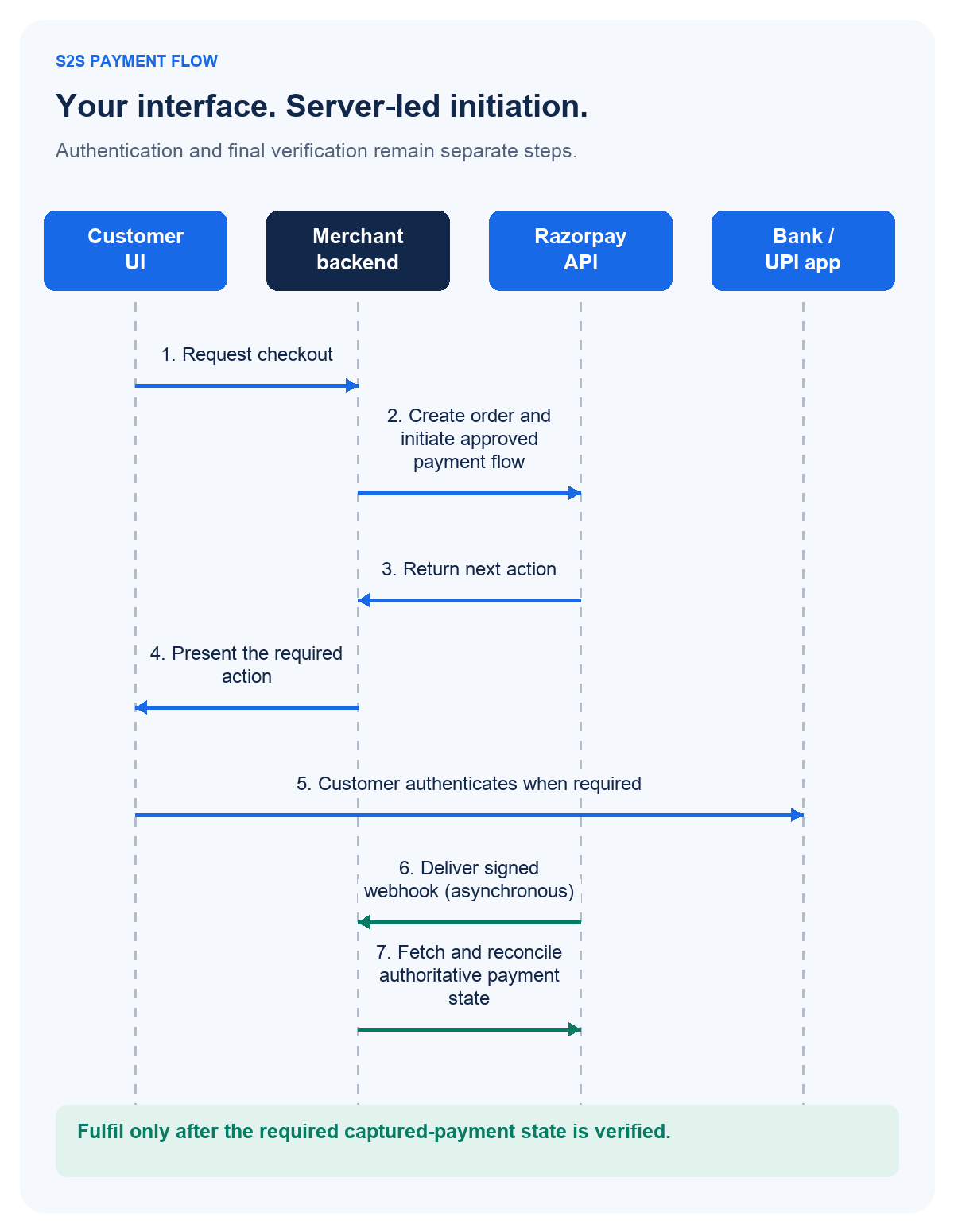
Confirm account activation and compliance scope, create the order on the server, initiate payment through the approved API, handle the returned authentication action, verify the applicable response signature and reconcile payment status. Use verified webhooks and server-side status checks to manage delayed results, and release fulfilment only after the required captured-payment state is established.
Eight Implementation Steps
- Confirm architecture and access. Record market, web or app surface, required payment methods and the frontend SDK constraint. Confirm S2S activation and the compliance evidence required.
- Create the order on the server. Calculate the payable amount from trusted business data. Amounts use the smallest currency sub-unit, so Rs 299 is passed as 29900. Store the business order and gateway order mapping, and keep API secrets on the server.
- Initiate the approved payment flow. Use the current method-specific JSON V2 or Redirect contract. Razorpay’s best practices require passing the actual user agent, customer IP and referrer to avoid failures due to risk. Do not invent a universal payload for cards, UPI and netbanking.
- Handle the returned next action. Render the documented UI, open the permitted redirect or trigger the supported UPI action. Use the returned URL and action rather than hardcoding one issuer path.
- Handle success, failure and cancellation. Preserve an in-progress state for an unresolved result. Prevent repeated clicks from creating duplicate business attempts, and confirm status before a retry that could charge again.
- Verify the relevant signatures. Apply the documented response-verification method for the chosen integration. Validate webhook signatures independently using the configured webhook secret and the raw request body, not a parsed or cast object.
- Reconcile authoritative payment state. Match order, amount, currency and payment identity. Razorpay documents duplicate identification via the
x-razorpay-event-idheader and warns that event ordering may not always be followed. Use verified webhooks to reconcile payments even when the customer never returns to the browser. - Test and release deliberately. Cover supported authentication branches, declines, invalid signatures, abandoned redirects, delayed and duplicate webhooks and capture behaviour. Then confirm live credentials, registered domains, logging redaction, monitoring and owner sign-off.
Example: Create an Order on Your Server
The following is illustrative and was not executed against a payment account. It demonstrates order creation only and is not a complete S2S payment integration.
POST https://api.razorpay.com/v1/orders
Authorization: Basic <base64-encoded-test-key-id-and-secret>
Content-Type: application/json

{
  "amount": 50000,
  "currency": "INR",
  "receipt": "s2s_example_001"
}
This order is for Rs 500 because INR amounts use paise. The Basic placeholder represents Base64 encoding of key_id:key_secret, using test credentials on the server. Payment initiation and authentication still follow the selected method contract. Never expose secrets or real customer/card data in an example.
Full contracts: Orders API, S2S JSON V2, webhook validation and payment capture settings.
What Security and PCI DSS Responsibilities Remain With the Merchant?
Choose a payment integration by its actual card-data path. If your systems store, process or transmit cardholder data, applicable PCI DSS requirements remain relevant. The acquirer or payment brand determines the validation and reporting method; a provider’s certification does not automatically certify the merchant’s website or systems.
Follow the Card Data, Not the Marketing Label
Plan account activation and card-data security together. Razorpay’s S2S documentation states that PCI-DSS certification is required for all entities seeking to store, process and transmit cardholder data. The Custom Checkout documentation carries the mirrored warning that a customer’s payment information should never reach your servers unless you are PCI-DSS certified.
Provider compliance, merchant data scope and merchant validation method are separate. PCI SSC identifies payment brands and acquirers as the entities that determine validation and reporting methods. Encrypted card data is not automatically out of scope, and using JavaScript does not automatically establish SAQ A eligibility.
PCI SSC’s specific script-attack eligibility criterion applies to merchant pages containing a processor’s embedded payment form. That particular criterion does not apply to redirect-only or fully outsourced payment-link flows; other eligibility and compliance obligations still apply. Confirm the complete validation requirements with your acquirer.
Tokenisation does not undo raw-card collection earlier in the data path. For its documented merchant-as-token-requestor card-saving flow, Razorpay requires customer consent and AFA before token creation. See also PCI DSS-compliant payment gateways and payment gateway tokenisation and encryption.
Protect Credentials, Authentication Data and Payment State
Keep secrets in backend secrets management, enforce least access, use HTTPS everywhere, redact logs and restrict retention. Never store CVV for later use and never log OTP values. For wider context, read our guide to payment gateway security, compliance and data protection.
Response signatures, webhook signature verification and capture-state configuration serve different purposes. Do not declare a payment successful merely because a payment ID exists.
Did You Know?
“Authorised” and “captured” are different payment states. Razorpay documents that authorised payments must be captured within three days of creation or they are refunded automatically.
How Should You Choose an Integration for Your Team?
Choose the simplest integration meeting your UI, method and data-handling requirements. Use managed checkout when it fits, Custom Checkout for a merchant-built form with its client library, and S2S when backend initiation and the SDK constraint justify the responsibilities.
Match the Architecture to the Use Case
Consider three hypothetical requirements: D2C branding may call for form control; an embedded SaaS journey may need deliberate next-action handling; enterprise client-dependency rules may require S2S. Select the architecture for the actual requirement.
For recurring billing, treat mandate authentication as separate scope and review Razorpay Subscriptions. Where an in-product custom checkout is unnecessary, Razorpay Payment Links is a hosted collection alternative.
PRO TIP: Ask the integration team to demonstrate your exact payment method, surface and error paths before committing to a UI promise. An approved architecture should name the owner of authentication, webhook processing, capture and reconciliation.
Frequently Asked Questions
Does Razorpay support server-to-server payments without a frontend SDK?
Yes. Razorpay documents S2S JSON and Redirect APIs for backend-led payment initiation. Its documentation recommends JSON V2, which is activated on demand. Your application still handles the customer interface and any returned authentication action. Confirm account activation, supported payment methods and compliance prerequisites first.
Is Razorpay Custom Checkout the same as a headless S2S integration?
They address different requirements. Custom Checkout lets you design the payment interface using its JavaScript library on web. S2S APIs let your backend initiate payments and handle the returned next steps. A headless storefront can use either approach, depending on its client-dependency requirements and security architecture.
Can customers complete OTP verification inside my checkout?
Razorpay documents native OTP for supported, enabled flows, allowing OTP entry within the checkout. That capability depends on the integration and eligible card flow; other transactions can require bank-page authentication. Native OTP changes where the customer authenticates. It does not bypass authentication.
Do all S2S integrations require PCI DSS Level 1 certification?
Do not infer a universal validation level from the label S2S. Card-data handling determines the relevant PCI DSS scope, while the acquirer or payment brand sets validation and reporting requirements. Confirm the exact requirement for your architecture before collecting card details.
How do I confirm payment when the customer closes the browser?
Use the gateway’s server-side payment status and verified webhook notifications to reconcile the order independently of the browser return. Check the relevant identity, amount, currency and capture state, and handle duplicates or late results safely. The browser can display a pending state while the backend establishes the authoritative outcome.