

Available in🇮🇳 India
You can terminate employees on the Dashboard and process their full and final settlement (FnF). This enables you to offboard employees from your organisation and Payroll. Know more about employee dismissal.
When dismissing employees, you can hold employees’ salaries to recover employee overhead costs while also continuing to make compliance payments on Payroll.
How Hold Salary Pay Compliance Works
In some cases, you may need to withhold the employee’s salary for the duration of their notice period to recover any losses incurred by the employee during their tenure of employment. However, you must continue to make the compliance payments. In such cases, you can enable the hold salary setting for that employee to withhold salary and continue to make compliance payments. Example: Your organisation has a 2-month notice period wherein you also withhold the employee’s salary. This means:
On Payroll, you can dismiss employees and hold their salaries while continuing to make compliance payments. You can also manage the net pay and edit the final settlement payable.
Video Tutorial
Watch the video below to know how to dismiss employees, hold their salary and settle net pay or read along.Dismiss Employee
To dismiss an employee:- Log in to the Payroll Dashboard.
- Navigate to People → particular employee’s profile.
- Click DISMISS EMPLOYEE at the bottom of the page.
Hold Salary
To hold the employee’s salary:- Select the Last working date (LWD) from the calendar and provide a reason for dismissal. If you have enabled the resignation module, we automatically add the LWD.
-
In the Salary during resignation months section, select Hold net pay till the last working month. You can then select the start month for withholding salary from the Hold net pay starting from drop-down menu.
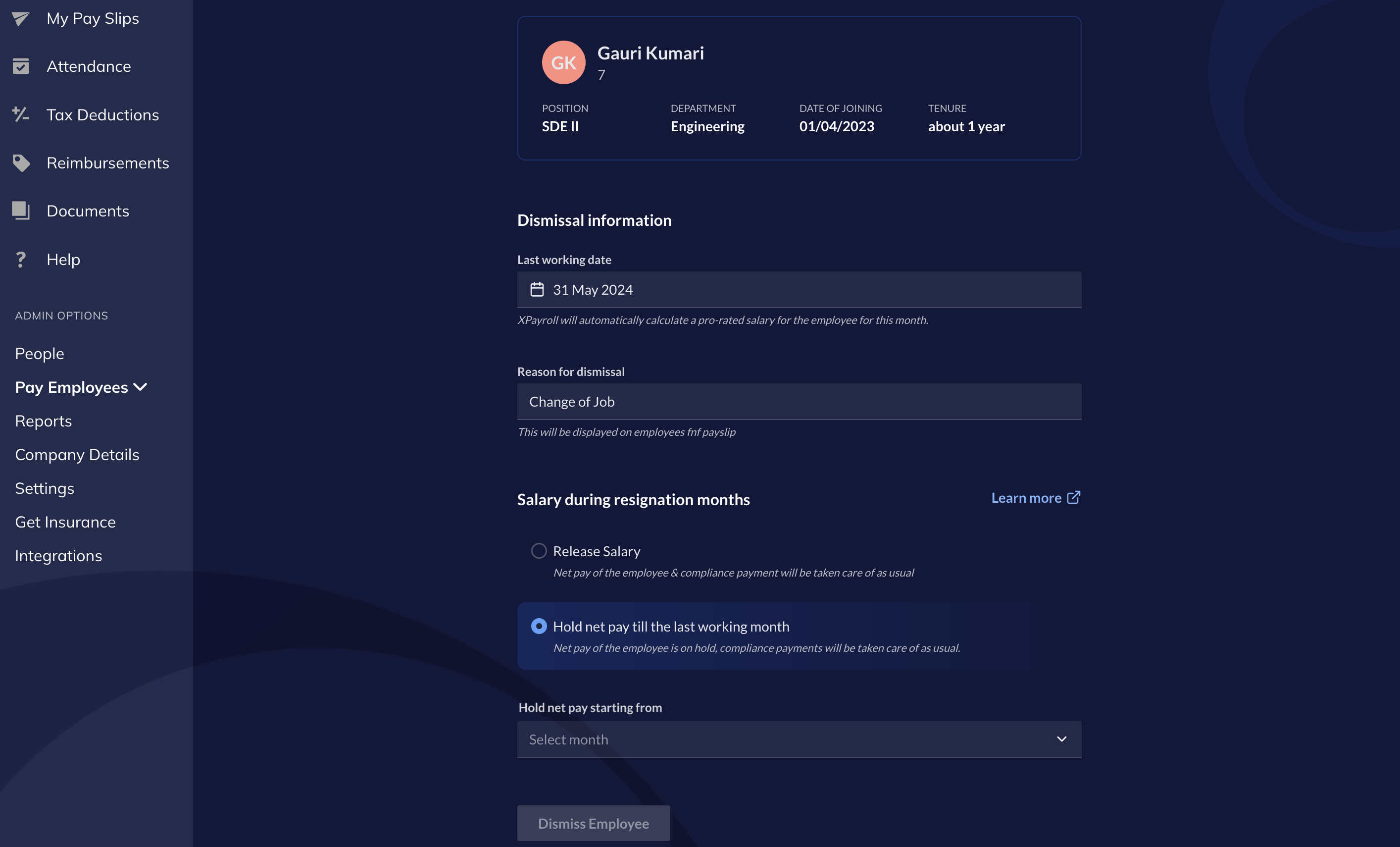 You can select Release Salary to process the final settlement as per the regular employee dismissal process.
- Click Dismiss Employee. Click Dismiss in the modal to confirm employee dismissal.
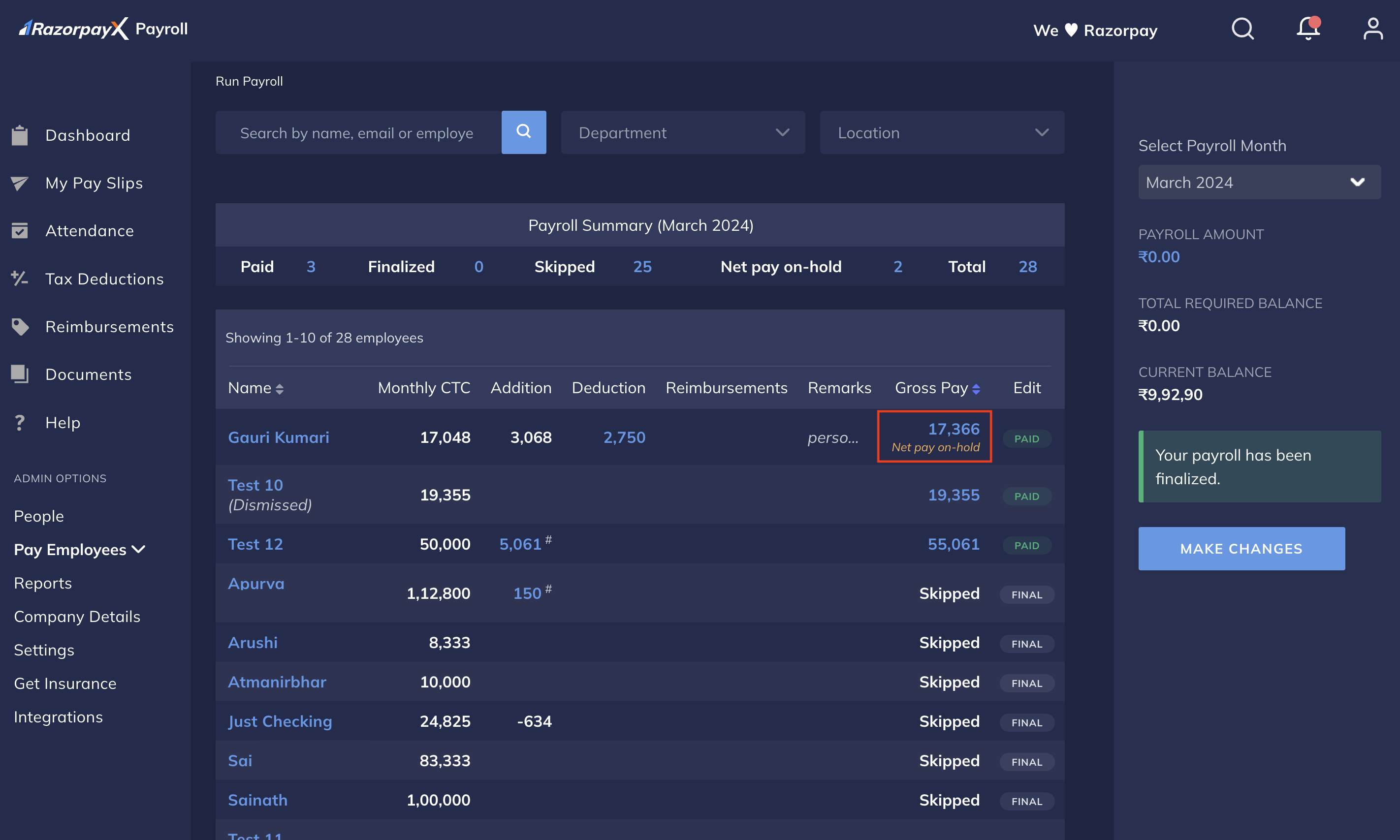
Settlement
After you dismiss an employee, you can open their settlement details on the right pane on the employee’s profile. On this settlement page, you can modify the Loss of Pay, additions and deductions details. To make adjustments to the settlement amount:- Log in to the Payroll Dashboard.
- Navigate to ADMIN OPTIONS → People and navigate to the particular employee’s profile.
- On the top-right pane, click here to open the resettlement page.
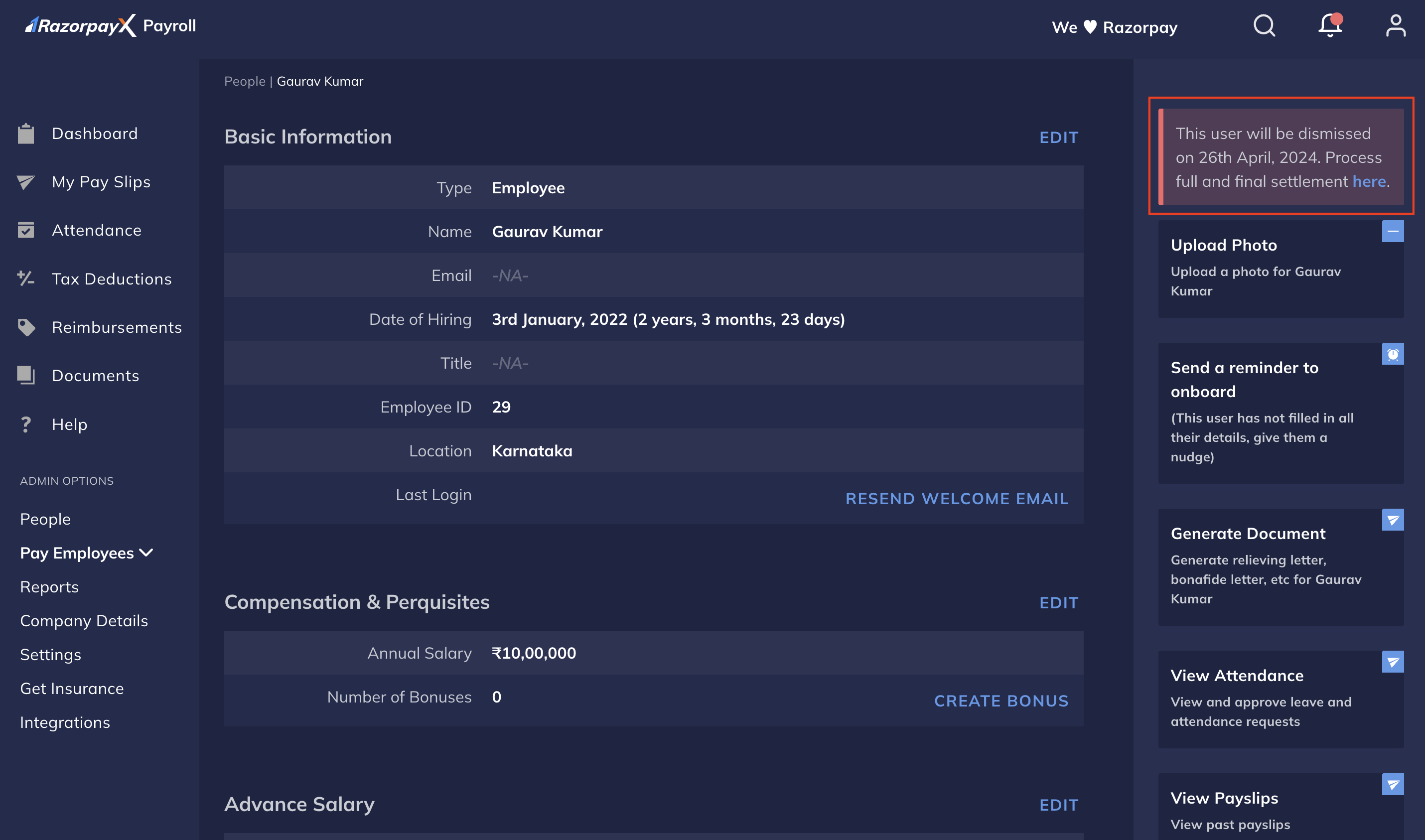
- This opens the Full and final settlement page for the employee. Enter the adjustments as per the usual employee dismissal process.
What adjustments are available?
What adjustments are available?
You can make the following adjustments on the Full and final settlement page: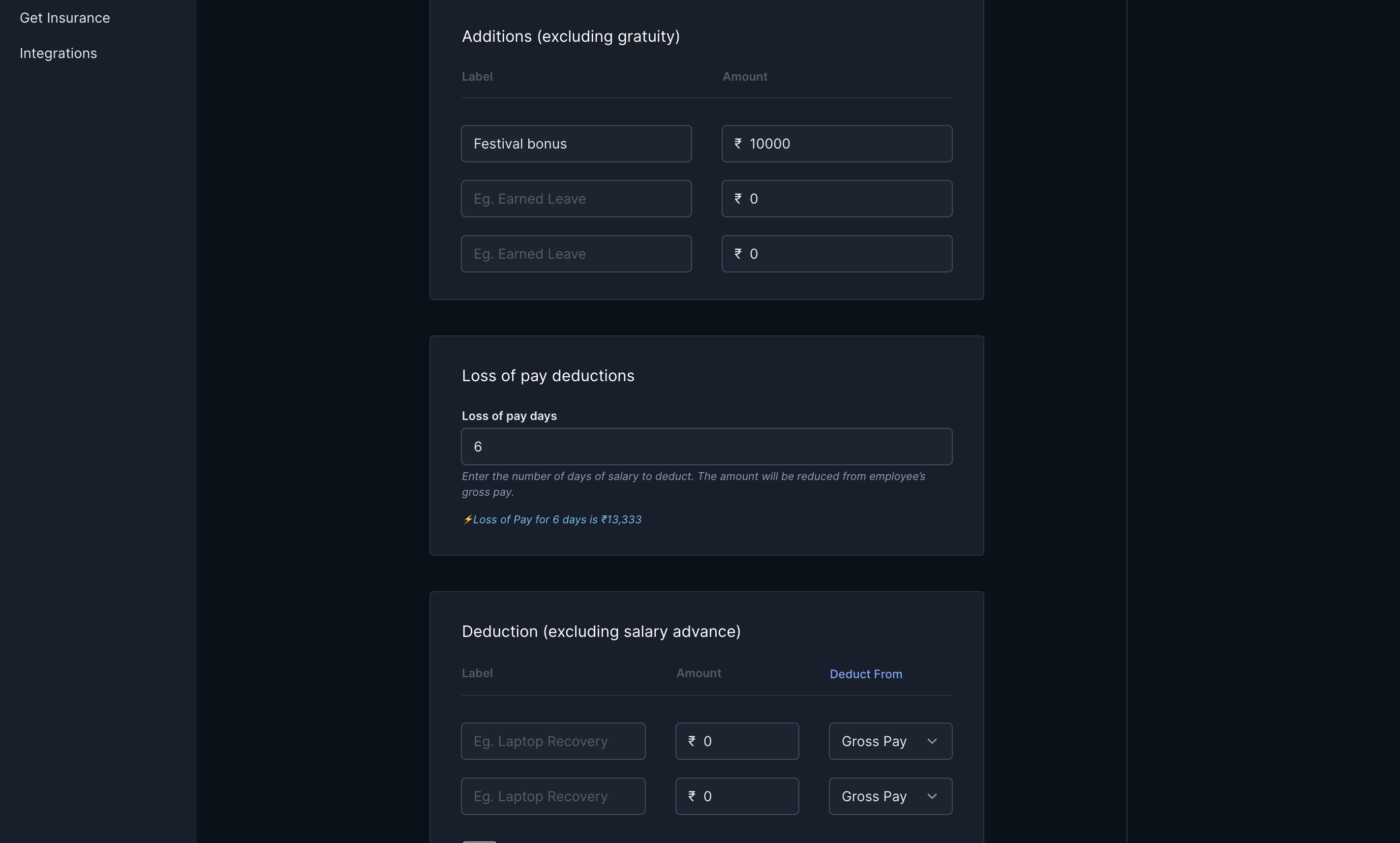
- Enter either the Leave Encashment amount, or the number of leaves to encash.
- Additions (excluding gratuity).
- Loss of pay deductions.
- Deductions (excluding salary advance).
- Personal Email Address.
- Click Add to Payment.
- You can preview the updated payslips for the employee on the Full and final settlement page.
- You can continue to make resettlements until you release net pay for the employees.
Release Net Pay
After you fulfil the requirement for withholding employees’ salary, you can adjust the total amount payable to the employee. This final amount payable is the employee’s net pay. To release net pay:-
Navigate to ADMIN OPTIONS → Pay Employees → Release Net Pay.
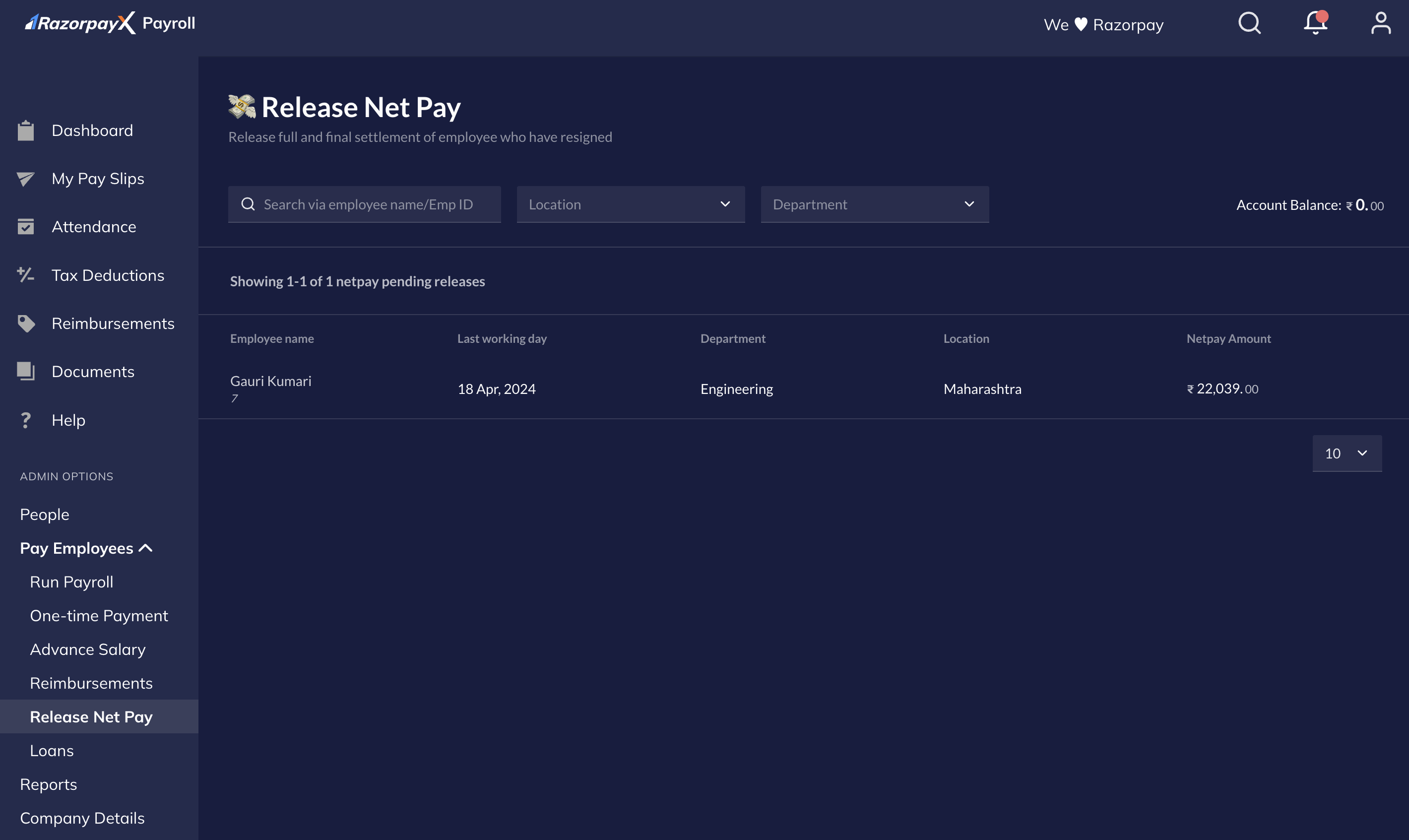
- Select the employee/s to view the net pay breakup in the right pane. To make any changes to the employees’ additions/deductions, LOP or personal email id, you can either hover on the employee’s details and click Manage FNF, or click Manage FNF Settlement → in the right pane.
- Click Release Full & final Settlement. Ensure you have adequate balance in your account.
- Enter the OTP you receive at your registered email address/authenticator app and authorise the net pay release.
FAQs
I am unable to view the dismissal or net pay information of some of my dismissed employees. Why?
I am unable to view the dismissal or net pay information of some of my dismissed employees. Why?
You may not be able to view the dismissal or net pay information of some of your dismissed employees as the payroll for the employee’s last working month is not finalised.Finalise Payroll in Run Payroll for the dismissed employee’s net pay information to reflect on the RazorpayX Dashboard.Suppose your employee’s LWD is 15th May. In that case, finalise the payroll for the month of May for the employee’s dismissal information to appear on the Release Net Pay page.
Does Payroll immediately transfer the net pay after I choose 'Release Salary' when initiating FNF?
Does Payroll immediately transfer the net pay after I choose 'Release Salary' when initiating FNF?
No, choosing Release Salary does not immediately release the employee’s net pay. Instead, Payroll processes the employee’s Full and final settlement as part of the monthly payroll activity.
How can I add the previously skipped salaries of employees to their net pay?
How can I add the previously skipped salaries of employees to their net pay?
You need not manually add the skipped/withheld salaries. The employees’ net pay automatically includes the previously withheld salaries.
What are the supported payment modes to process employee's FNF?
What are the supported payment modes to process employee's FNF?
We support both NEFT and IMPS payment modes to process employee’s full and final settlement. However, we recommend you choose NEFT as your default payment mode. Know more about payroll payouts.
Will PF/ESIC/TDS be paid within the respective months?
Will PF/ESIC/TDS be paid within the respective months?
Yes, we make the compliance payments (except PF payments) within the respective months for dismissed employees.
How do we make additions/deductions such as Loss of Pay to an employee's net pay?
How do we make additions/deductions such as Loss of Pay to an employee's net pay?
You can adjust the employee’s gross and net pay when processing the employee’s full and final settlement. Refer to the steps in Settlement.