Click Business website detail under Website and app settings section.
Click Add website/app details.
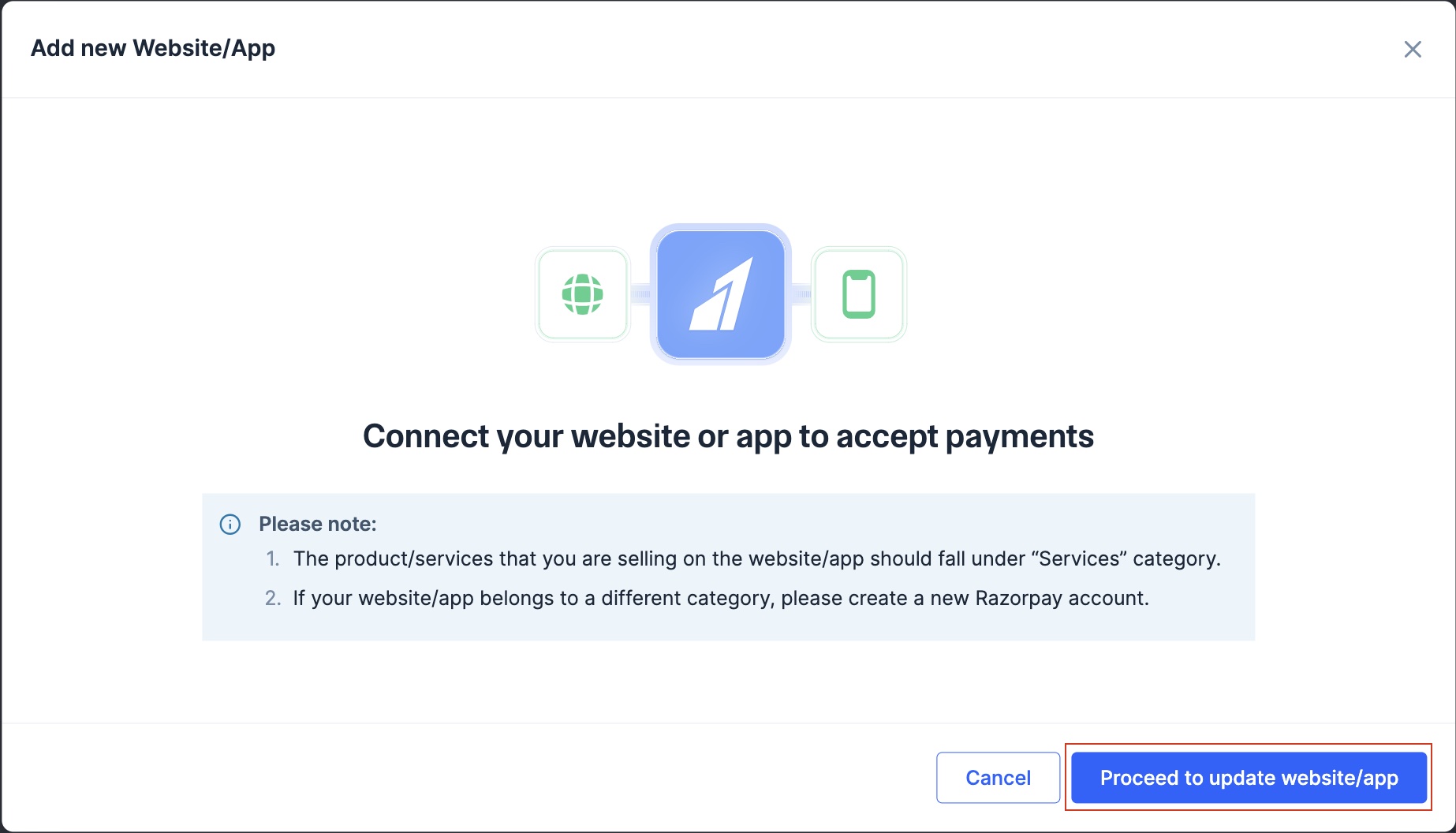
Click Proceed to update website/app.
Ensure you have the following pages- Shipping policy, Contact us, Pricing details, Terms and conditions, Privacy policy and Cancellation and Refunds policy.
Select the relevant answers and add the link for your website/app.
To update website or mobile app details:
Log in to the Dashboard.
Click Account & Settings in the left navigation.
Click Business website detail under Website and app settings section.
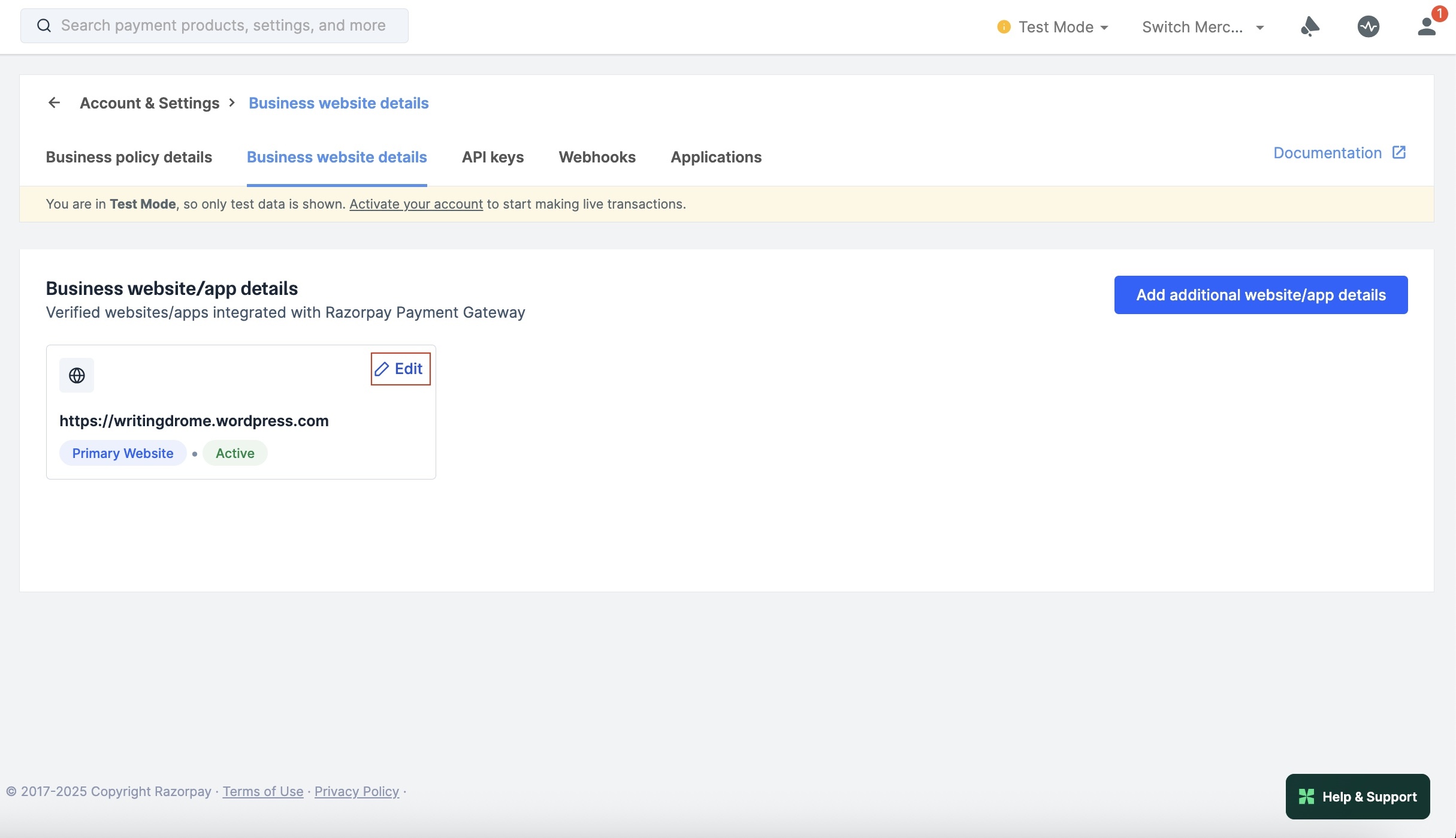
Click Edit next to the website/app that you want to edit.
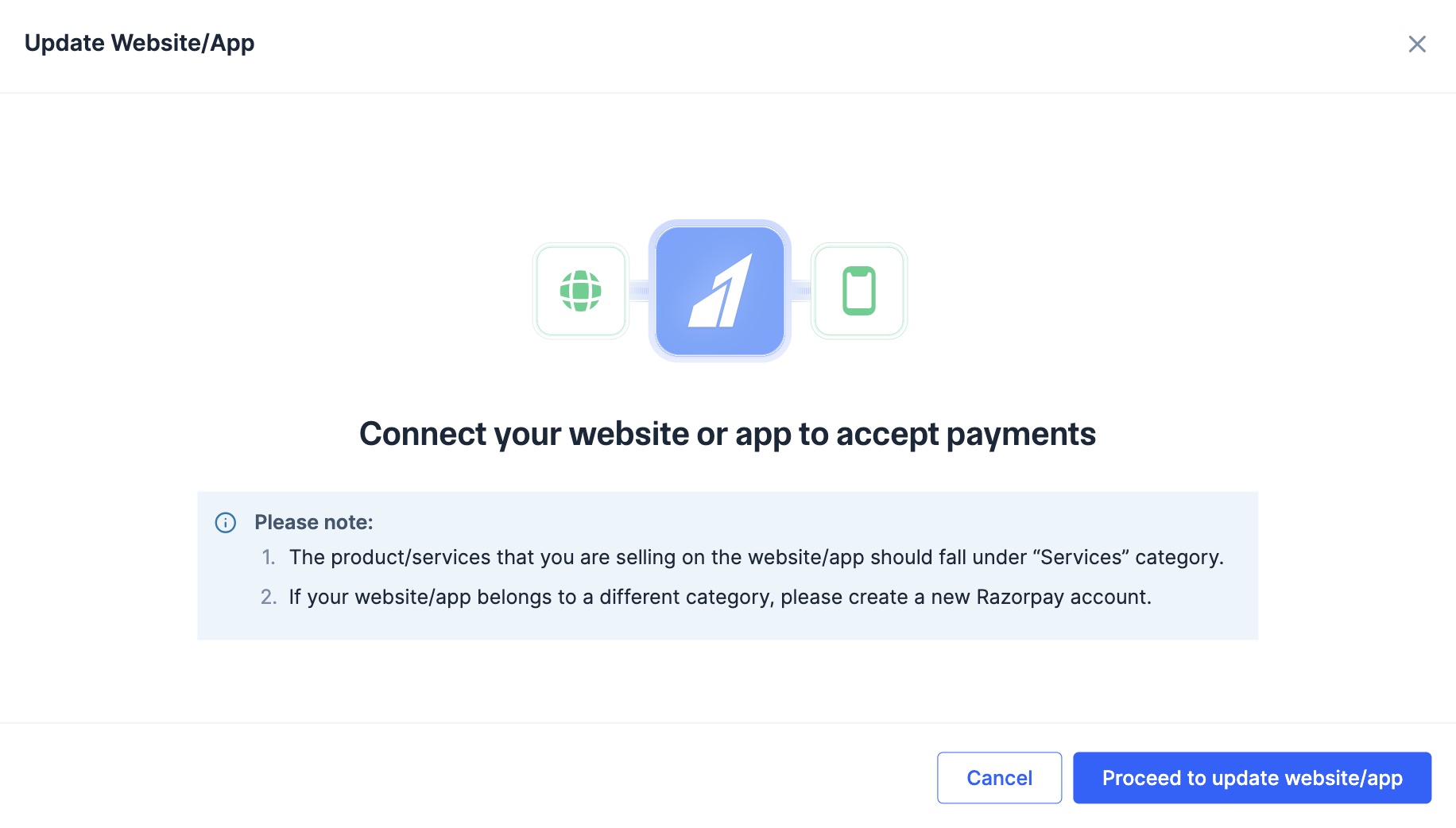
Click Proceed to update website/app.
Select Website or App, based on what you want to update.
Follow these steps if you own a website:
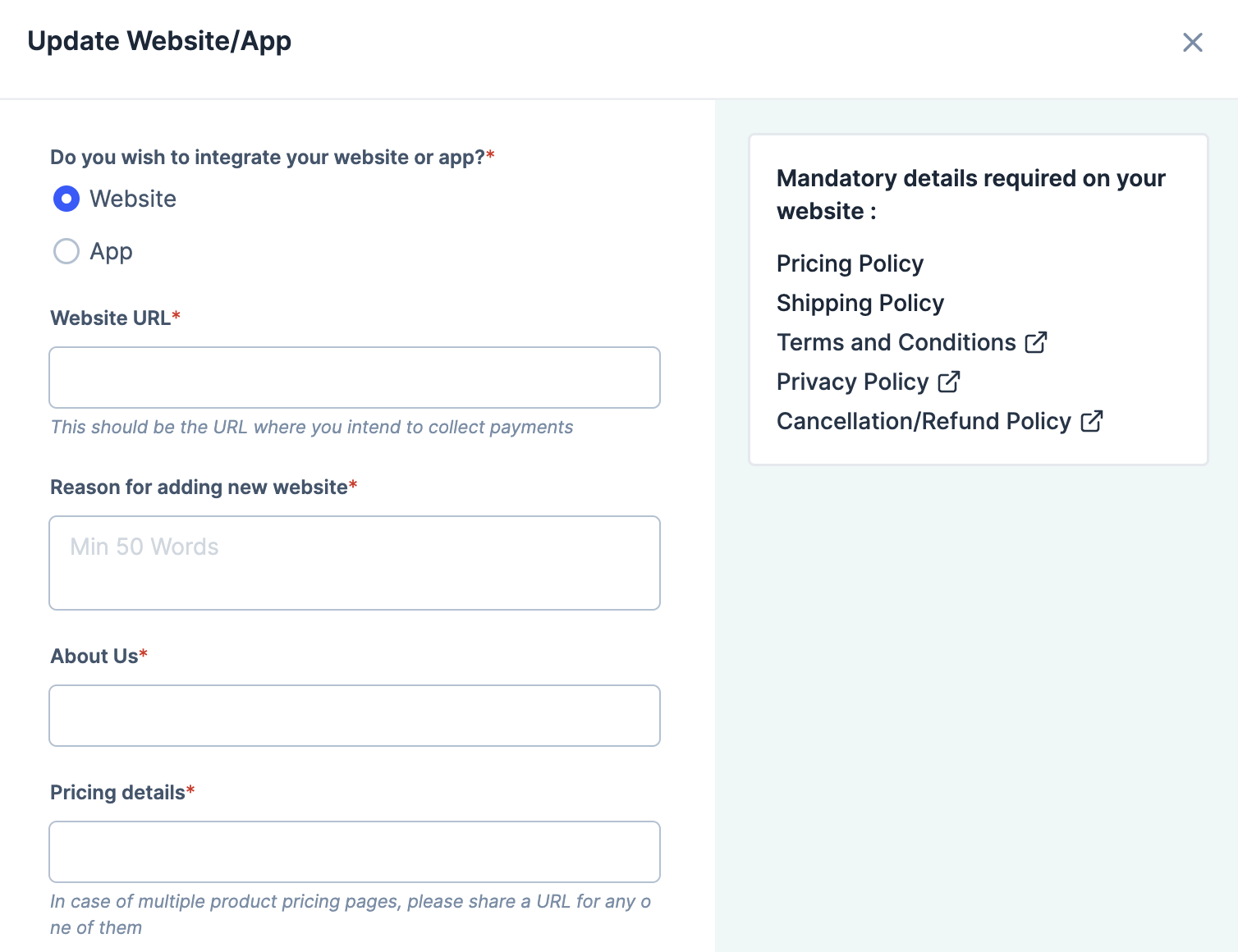
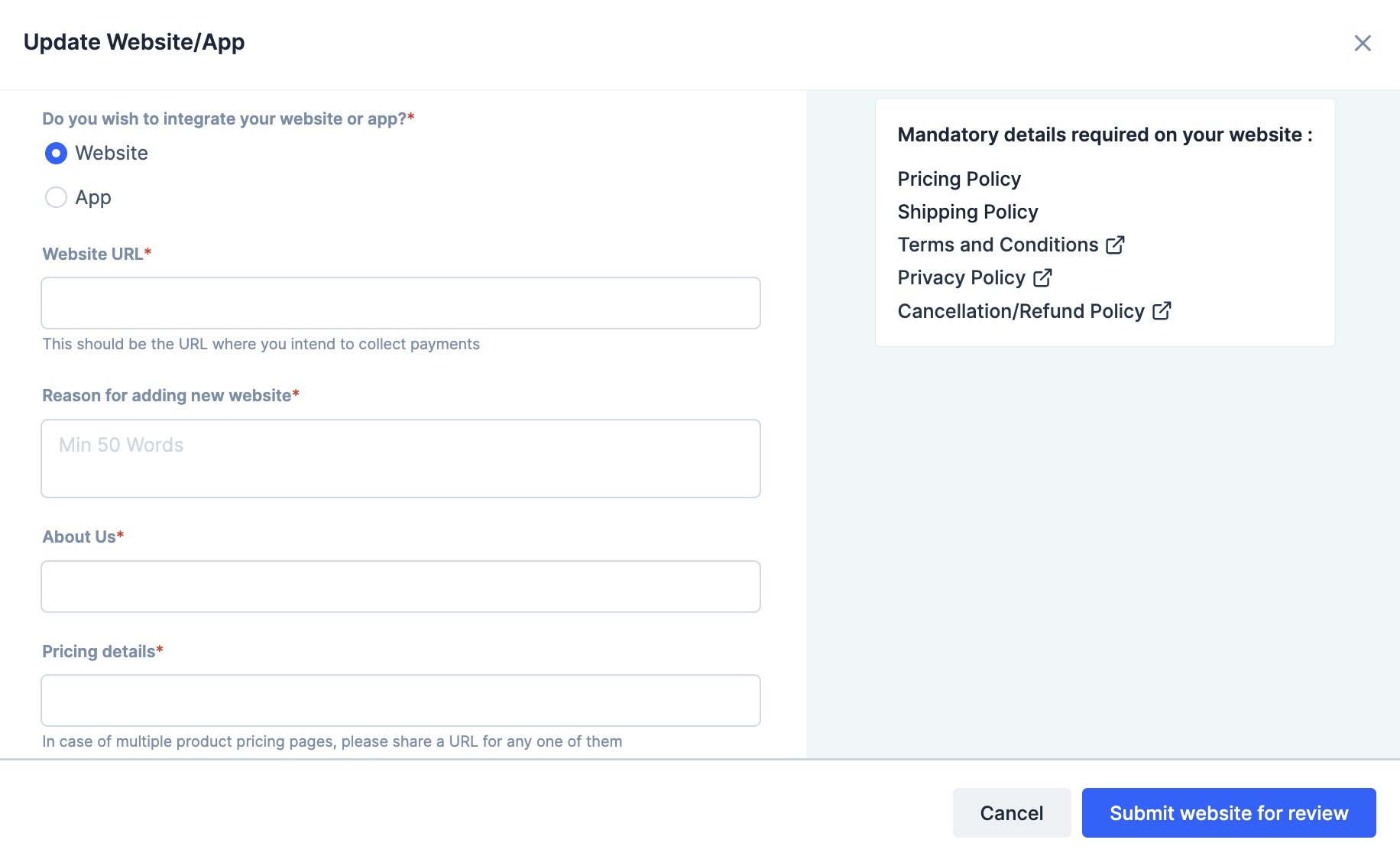
Select Website.
Enter the Website URL.
Provide the links for these pages: About us, Contact us, Pricing details, Terms and conditions, Privacy policy and Refunds policy.
Upload a sample invoice. The accepted file formats are PNG, JPG and PDF.
Provide your website’s Test Account credentials if required or select No for Does your website require login from user to complete payment? if logging in is not required.
Click Submit website for review.
After the details are provided, our team will review the request. We will update the details on the Dashboard.
Follow these steps if you own an app:
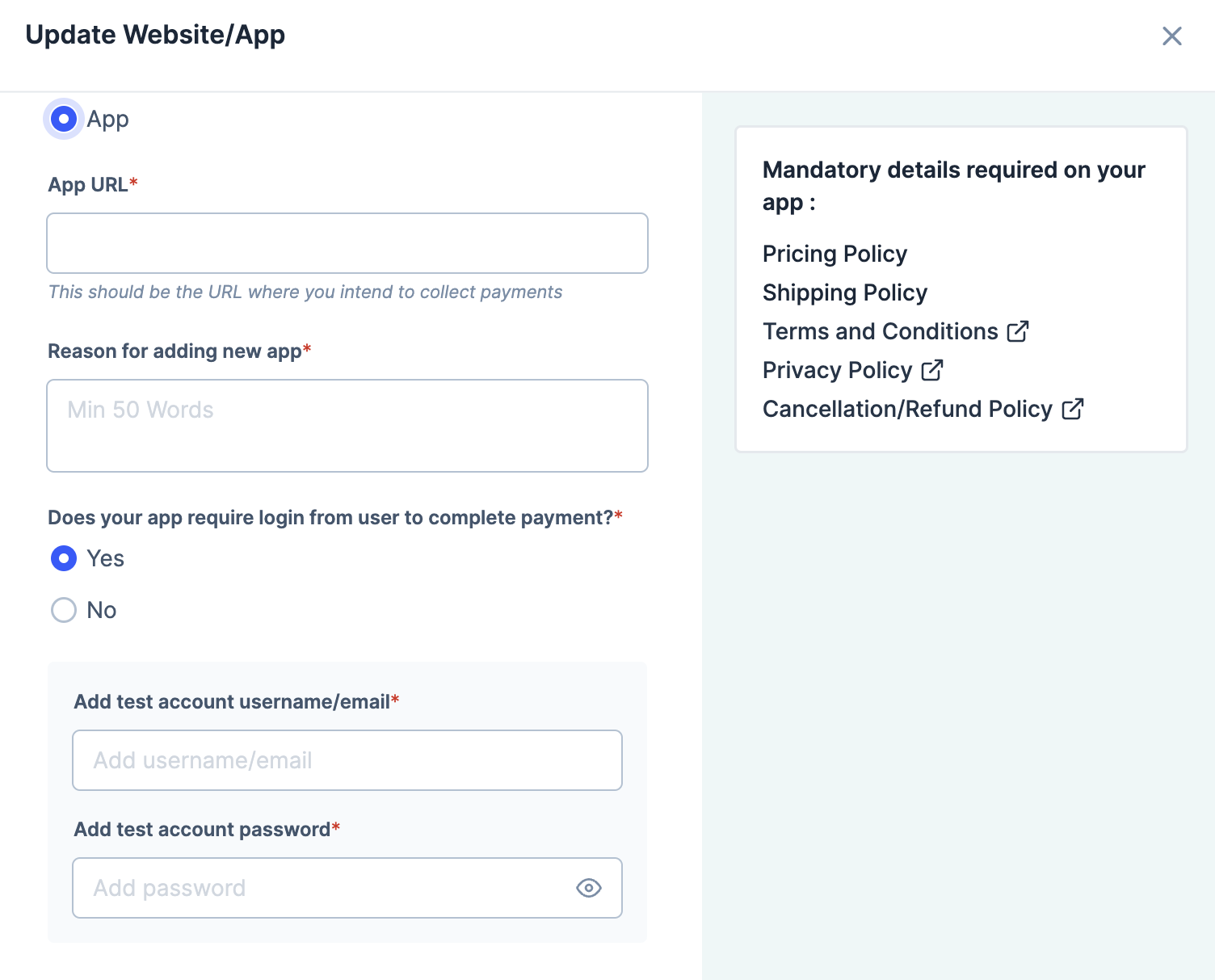
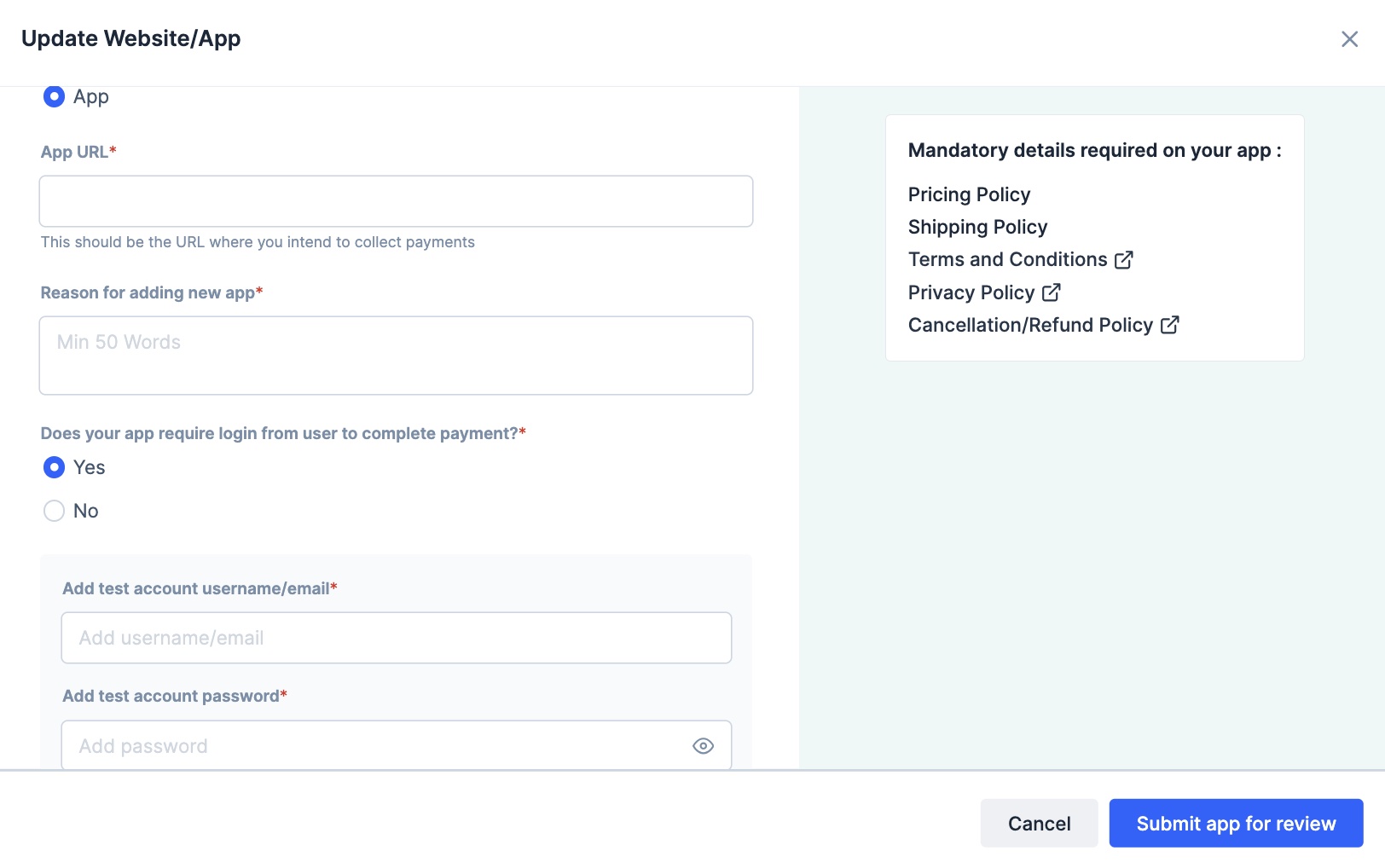
Select App.
Enter the App URL.
Provide your website’s Test Account credentials if required or select No for Does your app require login from user to complete payment? if logging in is not required.
Click Submit app for review.
After the details are provided, our team will review the request. We will update the details on the Dashboard.
Handy TipsWe may reach out to you for clarifications via email, WhatsApp, SMS and Dashboard during the verification process.
Navigate to Account & Settings and submit the necessary information in the appropriate section. Our team will go through the information you provide and help you resolve the issue.
You can accept payments using your account on multiple websites. To do this, you need to share the details of the additional web pages with us. You can add one main website and five additional websites.
Handy TipsThis feature is available only if your services/products fall under the e-commerce business category.
To add an additional website:
Log in to the Dashboard.
Click Account & Settings in the left navigation.
Click Business website detail under Website and app settings section.
Click Add additional website/app details.
Click Proceed to update website/app.
Provide the website or app details:
Follow these steps if you own a website:
Select Website.
Enter the Website URL.
Provide the links for these pages: About us, Contact us, Pricing details, Terms and conditions, Privacy policy and Cancellation/Refund policy.
Upload invoice: Upload a sample invoice. The accepted file formats are PNG, JPG and PDF.
Reason for adding new website: Enter the reason for adding a new website. Enter a minimum of 50 words.
Provide your website’s Test Account credentials if required or select No for Does your website require login from user to complete payment? if logging in is not required.
Click Submit website for review.
Follow these steps if you own an app:
Select App.
Enter the App URL.
Reason for adding new website: Enter the reason for adding a new website. Enter a minimum of 50 words.
Provide your website’s Test Account credentials if required or select No for Does your app require login from user to complete payment? if logging in is not required.
Click Submit app for review.
After you provide the details, our team will review the request. We will update the details on the Dashboard.
If you add or update your primary website, instant checks are run to validate your website, policy pages and business industry. In case the website requirements are not met, you can re-check and enter the valid URLs as prompted or create policy pages with Razorpay.
If you add or update additional websites, our team will review manually and notify you.
Last modified on October 8, 2026
Was this page helpful?
{"docsConfig":{"theme":"mint","$schema":"https://mintlify.com/docs.json","name":"Razorpay","colors":{"primary":"#3395FF","light":"#66B2FF","dark":"#0B62C4"},"logo":{"light":"https://mintcdn.com/razorpay-881012b3/puuu1wI-BbW3rsp2/logo/light.svg?fit=max\u0026auto=format\u0026n=puuu1wI-BbW3rsp2\u0026q=85\u0026s=e0750375ee2004193a685f9f211963fe","dark":"https://mintcdn.com/razorpay-881012b3/puuu1wI-BbW3rsp2/logo/dark.svg?fit=max\u0026auto=format\u0026n=puuu1wI-BbW3rsp2\u0026q=85\u0026s=038b180f26d19ddb4eb40ede0cf84821","href":"https://razorpay.com/docs/"},"favicon":"https://mintcdn.com/razorpay-881012b3/puuu1wI-BbW3rsp2/favicon.png?fit=max\u0026auto=format\u0026n=puuu1wI-BbW3rsp2\u0026q=85\u0026s=9bebe786d3a21e9452fd2e31243e5fb3","api":{"playground":{"display":"interactive"},"mdx":{"auth":{"method":"basic"},"server":"https://api.razorpay.com"}},"navbar":{"links":[{"href":"https://razorpay.com/support/","label":"Support"},{"href":"https://razorpay.com/blog/","label":"Blog"}],"primary":{"type":"button","label":"Dashboard","href":"https://dashboard.razorpay.com/"}},"footer":{"socials":{"x":"https://x.com/Razorpay","linkedin":"https://www.linkedin.com/company/razorpay","github":"https://github.com/razorpay","youtube":"https://www.youtube.com/razorpay"},"links":[{"header":"Products","items":[{"label":"Payment Gateway","href":"https://razorpay.com/payment-gateway"},{"label":"Payment Links","href":"https://razorpay.com/payment-links"},{"label":"RazorpayX","href":"https://razorpay.com/x"},{"label":"Payroll","href":"https://razorpay.com/payroll"}]},{"header":"Resources","items":[{"label":"Documentation","href":"https://razorpay.com/docs"},{"label":"API Reference","href":"https://razorpay.com/docs/api"},{"label":"Support","href":"https://razorpay.com/support"},{"label":"Blog","href":"https://razorpay.com/blog"}]},{"header":"Company","items":[{"label":"About Us","href":"https://razorpay.com/about"},{"label":"Careers","href":"https://razorpay.com/jobs"},{"label":"Pricing","href":"https://razorpay.com/pricing"}]}]},"seo":{"metatags":{"canonical":"https://razorpay.com/docs"}},"contextual":{"options":["copy","view","chatgpt","claude","perplexity","mcp","cursor","vscode"],"display":"header"},"metadata":{"timestamp":true},"styling":{"latex":true},"navigation":{"pages":[]}},"deployment":{"deploymentMetadataValue":{"subdomain":"razorpay-881012b3","hasAudioNarration":false,"actualSubdomain":"razorpay-881012b3","customDomains":["razorpay.com"],"gitSource":{"type":"github","owner":"razorpay-vendor-integrations","repo":"docs","deployBranch":"main","contentDirectory":"","isPrivate":true,"mountPath":"","label":""},"feedback":{"thumbs":true,"agentFeedback":true},"entitlements":{"AI_CHAT":{"status":"ENABLED"},"REMOVE_BRANDING":{"status":"ENABLED"},"CONTEXTUAL_FEEDBACK":{"status":"ENABLED"},"CODE_SNIPPET_FEEDBACK":{"status":"ENABLED"},"WEB_MCP":{"status":"ENABLED"},"NARRATION":{"status":"ENABLED"}},"buildId":"6af576126aaba2f8a1d42b85","clientVersion":"0.0.4111","searchFilterCounts":[{"language":"default","tag":"Payments","count":1648},{"language":"default","tag":"API Reference","count":772},{"language":"default","tag":"Payment Gateway","count":237},{"language":"default","tag":"Dashboard","count":213},{"language":"default","tag":"Subscriptions","count":190},{"language":"default","tag":"Payouts","count":158},{"language":"default","tag":"Payment Links","count":129},{"language":"default","tag":"Banking Plus","count":123},{"language":"default","tag":"Developer Tools","count":104},{"language":"default","tag":"Ecommerce Plugins","count":104}],"searchSettings":{"maxResults":8}},"assistantConfig":{"enableAskAiButton":false,"enableStarterQuestions":false,"enableContextualStarterQuestions":false,"enableAskAiSearchBar":true},"basePath":"/docs","hasChatPermissions":true,"hasWebMcpPermissions":true,"toggles":[{"name":"kill-isr","enabled":true,"variant":{"name":"disabled","enabled":false,"feature_enabled":true},"impressionData":false},{"name":"custom-rbac-roles","enabled":true,"variant":{"name":"disabled","enabled":false,"feature_enabled":true},"impressionData":false},{"name":"agent-mintlify-slack","enabled":true,"variant":{"name":"disabled","enabled":false,"feature_enabled":true},"impressionData":false},{"name":"agent-integrations-settings","enabled":true,"variant":{"name":"disabled","enabled":false,"feature_enabled":true},"impressionData":false},{"name":"rbac-expansion","enabled":true,"variant":{"name":"disabled","enabled":false,"feature_enabled":true},"impressionData":false},{"name":"automations-pr-grouping","enabled":true,"variant":{"name":"disabled","enabled":false,"feature_enabled":true},"impressionData":false},{"name":"custom-prefix","enabled":true,"variant":{"name":"disabled","enabled":false,"feature_enabled":true},"impressionData":false},{"name":"analytics-v7","enabled":true,"variant":{"name":"disabled","enabled":false,"feature_enabled":true},"impressionData":false},{"name":"user-flows-analytics","enabled":true,"variant":{"name":"disabled","enabled":false,"feature_enabled":true},"impressionData":false},{"name":"no-publish-flow","enabled":true,"variant":{"name":"disabled","enabled":false,"feature_enabled":true},"impressionData":false},{"name":"workos-onboarding","enabled":true,"variant":{"name":"disabled","enabled":false,"feature_enabled":true},"impressionData":false},{"name":"llms-txt-v2","enabled":true,"variant":{"name":"disabled","enabled":false,"feature_enabled":true},"impressionData":false},{"name":"snapshot-serving-live","enabled":true,"variant":{"name":"disabled","enabled":false,"feature_enabled":true},"impressionData":false},{"name":"stripTemperatureMiddleware","enabled":true,"variant":{"name":"disabled","enabled":false,"feature_enabled":true},"impressionData":false},{"name":"support-platform-pylon-zendesk","enabled":true,"variant":{"name":"disabled","enabled":false,"feature_enabled":true},"impressionData":false},{"name":"snapshot-serving","enabled":true,"variant":{"name":"disabled","enabled":false,"feature_enabled":true},"impressionData":false},{"name":"instant-rollback","enabled":true,"variant":{"name":"disabled","enabled":false,"feature_enabled":true},"impressionData":false},{"name":"granular-notifications-server","enabled":true,"variant":{"name":"disabled","enabled":false,"feature_enabled":true},"impressionData":false},{"name":"granular-notifications","enabled":true,"variant":{"name":"disabled","enabled":false,"feature_enabled":true},"impressionData":false},{"name":"automations-fable","enabled":true,"variant":{"name":"disabled","enabled":false,"feature_enabled":true},"impressionData":false},{"name":"fixed-ai-action-pricing","enabled":true,"variant":{"name":"disabled","enabled":false,"feature_enabled":true},"impressionData":false},{"name":"automation-resolve-merge-conflict","enabled":true,"variant":{"name":"disabled","enabled":false,"feature_enabled":true},"impressionData":false},{"name":"scoped-publishing","enabled":true,"variant":{"name":"disabled","enabled":false,"feature_enabled":true},"impressionData":false},{"name":"mintql","enabled":true,"variant":{"name":"disabled","enabled":false,"feature_enabled":true},"impressionData":false},{"name":"page-level-analytics","enabled":true,"variant":{"name":"disabled","enabled":false,"feature_enabled":true},"impressionData":false},{"name":"editor-version-history-v2","enabled":true,"variant":{"name":"disabled","enabled":false,"feature_enabled":true},"impressionData":false},{"name":"billing-page-v2","enabled":true,"variant":{"name":"disabled","enabled":false,"feature_enabled":true},"impressionData":false},{"name":"full-page-search","enabled":true,"variant":{"name":"disabled","enabled":false,"feature_enabled":true},"impressionData":false},{"name":"workspace-projects","enabled":true,"variant":{"name":"disabled","enabled":false,"feature_enabled":true},"impressionData":false},{"name":"assistant-v5","enabled":true,"variant":{"name":"disabled","enabled":false,"feature_enabled":true},"impressionData":false},{"name":"fork-pr-previews","enabled":true,"variant":{"name":"disabled","enabled":false,"feature_enabled":true},"impressionData":false},{"name":"revalidation-jwt","enabled":true,"variant":{"name":"disabled","enabled":false,"feature_enabled":true},"impressionData":false},{"name":"workos-sso-scim","enabled":true,"variant":{"name":"disabled","enabled":false,"feature_enabled":true},"impressionData":false},{"name":"hobby-abuse-scan","enabled":true,"variant":{"name":"disabled","enabled":false,"feature_enabled":true},"impressionData":false},{"name":"dashboard-inbox","enabled":true,"variant":{"name":"disabled","enabled":false,"feature_enabled":true},"impressionData":false},{"name":"workos-signup","enabled":true,"variant":{"name":"disabled","enabled":false,"feature_enabled":true},"impressionData":false},{"name":"turbopuffer-dual-write","enabled":true,"variant":{"name":"disabled","enabled":false,"feature_enabled":true},"impressionData":false},{"name":"workos-enabled","enabled":true,"variant":{"name":"disabled","enabled":false,"feature_enabled":true},"impressionData":false},{"name":"approve-review-flow","enabled":true,"variant":{"name":"disabled","enabled":false,"feature_enabled":true},"impressionData":false},{"name":"editor-metadata","enabled":true,"variant":{"name":"disabled","enabled":false,"feature_enabled":true},"impressionData":false},{"name":"sso-setup-deadline-banner","enabled":true,"variant":{"name":"disabled","enabled":false,"feature_enabled":true},"impressionData":false},{"name":"turbopuffer-serve","enabled":true,"variant":{"name":"disabled","enabled":false,"feature_enabled":true},"impressionData":false},{"name":"live-agents","enabled":true,"variant":{"name":"disabled","enabled":false,"feature_enabled":true},"impressionData":false}],"googleFontsInlined":false},"customCss":[{"filePath":"style.css","content":"#navbar ul.sidebar-group.mt-6,ul.sidebar-group.mt-6{margin-top:1rem}[data-component-part=\"callout-content\"]>[data-as=\"p\"]:first-child>strong,[data-component-part=\"callout-content\"]>[data-as=\"p\"]:first-child strong,[data-component-part=\"callout-content\"]>strong:first-child{font-size:1.125rem!important;font-weight:700!important;line-height:1.4!important}.error-code-cards [data-component-part=\"card-title\"]{display:inline-block!important;font-family:ui-monospace, \"SF Mono\", SFMono-Regular, Menlo, Consolas,\n \"Liberation Mono\", monospace!important;font-size:0.875rem!important;font-weight:600!important;line-height:1.3!important;padding:0.25rem 0.75rem!important;border-radius:9999px!important;background:rgba(107, 114, 128, 0.10)!important;border:1px solid rgba(107, 114, 128, 0.25)!important}.dark .error-code-cards [data-component-part=\"card-title\"]{background:rgba(255, 255, 255, 0.06)!important;border-color:rgba(255, 255, 255, 0.15)!important}[data-http-method]{font-weight:700!important;border-color:transparent!important}[data-http-method=\"get\"]{color:#15803d!important;background:rgba(74, 222, 128, 0.2)!important}[data-http-method=\"post\"]{color:#1d4ed8!important;background:rgba(96, 165, 250, 0.2)!important}[data-http-method=\"put\"]{color:#a16207!important;background:rgba(250, 204, 21, 0.2)!important}[data-http-method=\"patch\"]{color:#c2410c!important;background:rgba(251, 146, 60, 0.2)!important}[data-http-method=\"delete\"]{color:#b91c1c!important;background:rgba(248, 113, 113, 0.2)!important}.dark [data-http-method=\"get\"]{color:#4ade80!important}.dark [data-http-method=\"post\"]{color:#60a5fa!important}.dark [data-http-method=\"put\"]{color:#facc15!important}.dark [data-http-method=\"patch\"]{color:#fb923c!important}.dark [data-http-method=\"delete\"]{color:#f87171!important}ul.sidebar-group.mt-6{margin-top:5px}.sticky .panel:has(>.rzp-code-selector){display:grid;grid-auto-rows:minmax(0, 1fr);gap:1.5rem;overflow:hidden}.sticky:has(>.panel>.rzp-code-selector)>div:not(.panel){display:none}.rzp-code-selector{position:relative;display:flex;flex-direction:column;min-height:0;overflow:hidden;padding:0.125rem;border:1px solid rgba(3, 7, 18, 0.1);border-radius:1rem;background:rgb(244, 247, 250)}.dark .rzp-code-selector{border-color:rgba(255, 255, 255, 0.1);background:rgba(255, 255, 255, 0.05)}.rzp-code-selector-bar{display:flex;align-items:center;justify-content:space-between;gap:0.5rem;flex:none;flex-wrap:wrap;padding:0.25rem 4.25rem 0.375rem 0.5rem}.rzp-code-selector-field{position:relative;display:inline-flex;align-items:center;flex:0 0 auto}.rzp-code-selector-select{appearance:none;-webkit-appearance:none;min-width:max-content;padding:0.125rem 1.75rem 0.125rem 0.375rem;border:0;border-radius:0.5rem;background:transparent;color:var(--color-gray-600, #4b5563);font-size:0.75rem;font-weight:500;line-height:1.5rem;cursor:pointer}.dark .rzp-code-selector-select{color:var(--color-gray-300, #d1d5db)}.rzp-code-selector-select:hover{background:rgba(3, 7, 18, 0.05)}.dark .rzp-code-selector-select:hover{background:rgba(255, 255, 255, 0.08)}.rzp-code-selector-chevron{position:absolute;right:0.25rem;width:0.875rem;height:0.875rem;pointer-events:none;opacity:0.6}.rzp-code-selector-body{flex:1 1 auto;min-height:0;overflow-y:auto;overscroll-behavior:contain}.rzp-code-selector-body>.code-block{margin:0!important;min-width:0;border-radius:0 0 0.875rem 0.875rem;position:static!important}.rzp-code-selector-body [data-component-part=\"code-block-root\"]{border-radius:0 0 0.875rem 0.875rem}.rzp-code-selector-body .code-block-fade-overlay{display:none}.rzp-code-selector::after{content:\"\";position:absolute;inset:auto 0 0;height:2rem;border-radius:0 0 0.875rem 0.875rem;pointer-events:none;background:linear-gradient(to bottom, rgba(255, 255, 255, 0), #fff)}.dark .rzp-code-selector::after{background:linear-gradient(to bottom, rgba(11, 12, 14, 0), rgb(11, 12, 14))}.rzp-code-selector>.rzp-code-selector-body>.code-block>.absolute{top:0.5rem;right:0.75rem}"},{"filePath":"static/docs-home/styles.css","href":"/docs/_mintlify/custom/razorpay-881012b3/5b8b615a0125ba7b/static/docs-home/styles.css"},{"filePath":"static/nav-more.css","content":"#navbar .nav-tabs{min-width:0;column-gap:1rem}#navbar .nav-tabs:not(.rzpn-more) .nav-tabs-item{display:block;flex:0 1 auto;min-width:3.5rem;min-width:calc-size(max-content, min(size, 5.25rem));white-space:nowrap;overflow:hidden;text-overflow:ellipsis;line-height:3rem}#navbar .nav-tabs:not(.rzpn-more) .nav-tabs-item>svg{display:inline-block;vertical-align:middle;margin:-2px 8px 0 0}#navbar .nav-tabs.rzpn-more .nav-tabs-item{flex:none;white-space:nowrap}#navbar .nav-tabs-item[data-rzpn-hidden]{display:none}#navbar .rzpn-more-wrap{position:relative;flex:none}#navbar .rzpn-more-wrap:not([hidden]){display:flex}#navbar .rzpn-more-menu:not([hidden]){display:flex;flex-direction:column}#navbar .rzpn-more-btn{background:none;border:0;padding:0;cursor:pointer;white-space:nowrap}#navbar .rzpn-more-menu{position:absolute;top:calc(100% - 4px);right:0;z-index:50;min-width:12rem;padding:6px;border-radius:12px;box-shadow:0 8px 24px rgba(0,0,0,.12)}#navbar .rzpn-more-menu a{display:flex;align-items:center;gap:8px;padding:8px 10px;border-radius:8px;white-space:nowrap}#navbar .rzpn-more-menu a:hover,#navbar .rzpn-more-menu a:focus-visible{background:rgba(127,127,127,.12)}"}],"page":{"pagePath":"us/payments/dashboard/account-settings/business-website-details","slug":"/us/payments/dashboard/account-settings/business-website-details","pageMetadata":{"title":"Business Website Details","description":"Steps to add or update your business website or app details on the Razorpay Dashboard. You can also add or update additional website details.","href":"/us/payments/dashboard/account-settings/business-website-details"},"description":{"compiledSource":"\"use strict\";\nconst {jsx: _jsx} = arguments[0];\nconst {useMDXComponents: _provideComponents} = arguments[0];\nfunction _createMdxContent(props) {\n const _components = {\n p: \"p\",\n ..._provideComponents(),\n ...props.components\n };\n return _jsx(_components.p, {\n children: \"Steps to add or update your business website or app details on the Razorpay Dashboard. You can also add or update additional website details.\"\n });\n}\nfunction MDXContent(props = {}) {\n const {wrapper: MDXLayout} = {\n ..._provideComponents(),\n ...props.components\n };\n return MDXLayout ? _jsx(MDXLayout, {\n ...props,\n children: _jsx(_createMdxContent, {\n ...props\n })\n }) : _createMdxContent(props);\n}\nreturn {\n default: MDXContent\n};\n","frontmatter":{},"scope":{}},"pageType":"default","mdx":{"mdxSource":{"compiledSource":"\"use strict\";const{Fragment:_Fragment,jsx:_jsx,jsxs:_jsxs}=arguments[0];const{useMDXComponents:_provideComponents}=arguments[0];function _createMdxContent(props){const _components={li:`li`,ol:`ol`,p:`p`,strong:`strong`,ul:`ul`,..._provideComponents(),...props.components},{Accordion,AccordionGroup,Heading,Info,OptimizedImage,Tab,Tabs}=_components;if(!Accordion)_missingMdxReference(`Accordion`,true);if(!AccordionGroup)_missingMdxReference(`AccordionGroup`,true);if(!Heading)_missingMdxReference(`Heading`,true);if(!Info)_missingMdxReference(`Info`,true);if(!OptimizedImage)_missingMdxReference(`OptimizedImage`,true);if(!Tab)_missingMdxReference(`Tab`,true);if(!Tabs)_missingMdxReference(`Tabs`,true);return _jsxs(_Fragment,{children:[_jsxs(`div`,{style:{display:`flex`,flexWrap:`wrap`,alignItems:`center`,gap:`0.35rem 0.9rem`,border:`1px solid rgba(128,128,128,0.28)`,borderRadius:`0.5rem`,padding:`0.45rem 0.75rem`,margin:`0 0 1.25rem`,fontSize:`0.875rem`},children:[_jsx(`span`,{style:{fontWeight:600},children:`Available in`}),_jsx(`span`,{children:`🇮🇳 India`}),_jsx(`span`,{children:`🇲🇾 Malaysia`}),_jsx(`span`,{children:`🇸🇬 Singapore`}),_jsx(`span`,{children:`🇺🇸 United States`})]}),`\n`,_jsx(_components.p,{children:`You must provide your live website or mobile app details during account activation.`}),`\n`,_jsxs(_components.ul,{children:[`\n`,_jsxs(_components.li,{children:[`Without these details, you will not be able to access live mode API keys and hence `,_jsx(_components.strong,{children:`cannot accept payments from your website or app`}),`.`]}),`\n`,_jsxs(_components.li,{children:[`You can still accept payments from customers using `,_jsx(_components.strong,{children:`Payment Links`}),` generated via the Dashboard.`]}),`\n`]}),`\n`,_jsx(Heading,{level:`2`,id:`add-and-edit-website/app/additional-websites`,children:`Add and Edit Website/App/Additional Websites`}),`\n`,_jsxs(Tabs,{children:[_jsxs(Tab,{title:`Add Website/Mobile App`,id:`add-website%2Fmobile-app`,children:[_jsx(_components.p,{children:`To add your website or mobile app details:`}),_jsxs(_components.ol,{children:[`\n`,_jsx(_components.li,{children:`Log in to the Dashboard.`}),`\n`,_jsxs(_components.li,{children:[`Click `,_jsx(_components.strong,{children:`Account \u0026 Settings`}),` in the left navigation.`]}),`\n`,_jsxs(_components.li,{children:[`Click `,_jsx(_components.strong,{children:`Business website detail`}),` under `,_jsx(_components.strong,{children:`Website and app settings`}),` section.`]}),`\n`,_jsxs(_components.li,{children:[`Click `,_jsx(_components.strong,{children:`Add website/app details`}),`.`]}),`\n`,_jsxs(_components.li,{children:[`Click `,_jsx(_components.strong,{children:`Proceed to update website/app`}),`.`]}),`\n`,_jsxs(_components.li,{children:[`Ensure you have the following pages- `,_jsx(_components.strong,{children:`Shipping policy`}),`, `,_jsx(_components.strong,{children:`Contact us`}),`, `,_jsx(_components.strong,{children:`Pricing details`}),`, `,_jsx(_components.strong,{children:`Terms and conditions`}),`, `,_jsx(_components.strong,{children:`Privacy policy`}),` and `,_jsx(_components.strong,{children:`Cancellation and Refunds policy`}),`.`]}),`\n`,_jsxs(_components.li,{children:[`Select the relevant answers and add the link for your website/app. `,_jsx(`br`,{})]}),`\n`]})]}),_jsxs(Tab,{title:`Update Website/Mobile App`,id:`update-website%2Fmobile-app`,children:[_jsx(_components.p,{children:`To update website or mobile app details:`}),_jsxs(_components.ol,{children:[`\n`,_jsx(_components.li,{children:`Log in to the Dashboard.`}),`\n`,_jsxs(_components.li,{children:[`Click `,_jsx(_components.strong,{children:`Account \u0026 Settings`}),` in the left navigation.`]}),`\n`,_jsxs(_components.li,{children:[`Click `,_jsx(_components.strong,{children:`Business website detail`}),` under `,_jsx(_components.strong,{children:`Website and app settings`}),` section.`]}),`\n`,_jsxs(_components.li,{children:[`Click `,_jsx(_components.strong,{children:`Edit`}),` next to the website/app that you want to edit. `,_jsx(OptimizedImage,{src:`https://razorpay.com/docs/build/browser/assets/images/dashboard-edit-business-website-details.jpg`,alt:`add website/app`,width:`800`})]}),`\n`,_jsxs(_components.li,{children:[`Click `,_jsx(_components.strong,{children:`Proceed to update website/app`}),`. `,_jsx(OptimizedImage,{src:`https://razorpay.com/docs/build/browser/assets/images/dashboard-proceed-edit-business-website-details.jpg`,alt:`add website/app`,width:`800`})]}),`\n`,_jsxs(_components.li,{children:[`Select `,_jsx(_components.strong,{children:`Website`}),` or `,_jsx(_components.strong,{children:`App`}),`, based on what you want to update.`]}),`\n`]}),_jsxs(AccordionGroup,{children:[_jsxs(Accordion,{title:`Follow these steps if you own a website:`,id:`follow-these-steps-if-you-own-a-website`,children:[_jsxs(_components.ol,{children:[`\n`,_jsxs(_components.li,{children:[`Select `,_jsx(_components.strong,{children:`Website`}),`.`]}),`\n`,_jsxs(_components.li,{children:[`Enter the `,_jsx(_components.strong,{children:`Website URL`}),`.`]}),`\n`,_jsxs(_components.li,{children:[`Provide the links for these pages: `,_jsx(_components.strong,{children:`About us`}),`, `,_jsx(_components.strong,{children:`Contact us`}),`, `,_jsx(_components.strong,{children:`Pricing details`}),`, `,_jsx(_components.strong,{children:`Terms and conditions`}),`, `,_jsx(_components.strong,{children:`Privacy policy`}),` and `,_jsx(_components.strong,{children:`Refunds policy`}),`.`]}),`\n`,_jsx(_components.li,{children:`Upload a sample invoice. The accepted file formats are PNG, JPG and PDF.`}),`\n`,_jsxs(_components.li,{children:[`Provide your website’s `,_jsx(_components.strong,{children:`Test Account credentials`}),` if required or select `,_jsx(_components.strong,{children:`No`}),` for `,_jsx(_components.strong,{children:`Does your website require login from user to complete payment?`}),` if logging in is not required.`]}),`\n`,_jsxs(_components.li,{children:[`Click `,_jsx(_components.strong,{children:`Submit website for review`}),`.`,`\n`,_jsx(OptimizedImage,{src:`https://razorpay.com/docs/build/browser/assets/images/update-website.jpg`,alt:`Enter Website URL`,width:`400`}),`\n`]}),`\n`]}),_jsx(_components.p,{children:`After the details are provided, our team will review the request. We will update the details on the Dashboard.`})]}),_jsxs(Accordion,{title:`Follow these steps if you own an app:`,id:`follow-these-steps-if-you-own-an-app`,children:[_jsxs(_components.ol,{children:[`\n`,_jsxs(_components.li,{children:[`Select `,_jsx(_components.strong,{children:`App`}),`.`]}),`\n`,_jsxs(_components.li,{children:[`Enter the `,_jsx(_components.strong,{children:`App URL`}),`.`]}),`\n`,_jsxs(_components.li,{children:[`Provide your website’s `,_jsx(_components.strong,{children:`Test Account credentials`}),` if required or select `,_jsx(_components.strong,{children:`No`}),` for `,_jsx(_components.strong,{children:`Does your app require login from user to complete payment?`}),` if logging in is not required.`]}),`\n`,_jsxs(_components.li,{children:[`Click `,_jsx(_components.strong,{children:`Submit app for review`}),`.`,`\n`,_jsx(OptimizedImage,{src:`https://razorpay.com/docs/build/browser/assets/images/update-app.jpg`,alt:`Enter App URL`,width:`400`}),`\n`]}),`\n`]}),_jsx(_components.p,{children:`After the details are provided, our team will review the request. We will update the details on the Dashboard.`})]})]}),_jsxs(Info,{children:[_jsx(_components.p,{children:_jsx(_components.strong,{children:`Handy Tips`})}),_jsxs(_components.p,{children:[`We may reach out to you for clarifications via email, WhatsApp, SMS and Dashboard during the verification process.\nNavigate to `,_jsx(_components.strong,{children:`Account \u0026 Settings`}),` and submit the necessary information in the appropriate section. Our team will go through the information you provide and help you resolve the issue.`]})]})]}),_jsxs(Tab,{title:`Additional Website/Mobile App`,id:`additional-website%2Fmobile-app`,children:[_jsx(_components.p,{children:`You can accept payments using your account on multiple websites. To do this, you need to share the details of the additional web pages with us. You can add one main website and five additional websites.`}),_jsxs(Info,{children:[_jsx(_components.p,{children:_jsx(_components.strong,{children:`Handy Tips`})}),_jsx(_components.p,{children:`This feature is available only if your services/products fall under the e-commerce business category.`})]}),_jsx(_components.p,{children:`To add an additional website:`}),_jsxs(_components.ol,{children:[`\n`,_jsx(_components.li,{children:`Log in to the Dashboard.`}),`\n`,_jsxs(_components.li,{children:[`Click `,_jsx(_components.strong,{children:`Account \u0026 Settings`}),` in the left navigation.`]}),`\n`,_jsxs(_components.li,{children:[`Click `,_jsx(_components.strong,{children:`Business website detail`}),` under `,_jsx(_components.strong,{children:`Website and app settings`}),` section.`]}),`\n`,_jsxs(_components.li,{children:[`Click `,_jsx(_components.strong,{children:`Add additional website/app details`}),`.`]}),`\n`,_jsxs(_components.li,{children:[`Click `,_jsx(_components.strong,{children:`Proceed to update website/app`}),`.`,`\n`,_jsx(OptimizedImage,{src:`https://razorpay.com/docs/build/browser/assets/images/proceed-update-biz-website-details.jpg`,alt:`add website/app`,width:`800`}),`\n`]}),`\n`,_jsx(_components.li,{children:`Provide the website or app details:`}),`\n`]}),_jsxs(AccordionGroup,{children:[_jsxs(Accordion,{title:`Follow these steps if you own a website:`,id:`follow-these-steps-if-you-own-a-website-1`,children:[_jsxs(`ol`,{children:[_jsxs(`li`,{children:[`Select `,_jsx(_components.strong,{children:`Website`}),`.`]}),`\n`,_jsxs(`li`,{children:[`Enter the `,_jsx(_components.strong,{children:`Website URL`}),`.`]}),`\n`,_jsxs(`li`,{children:[`Provide the links for these pages: `,_jsx(_components.strong,{children:`About us`}),`, `,_jsx(_components.strong,{children:`Contact us`}),`, `,_jsx(_components.strong,{children:`Pricing details`}),`, `,_jsx(_components.strong,{children:`Terms and conditions`}),`, `,_jsx(_components.strong,{children:`Privacy policy`}),` and `,_jsx(_components.strong,{children:`Cancellation/Refund policy`}),`.`]}),`\n`,_jsxs(`li`,{children:[_jsx(_components.strong,{children:`Upload invoice`}),`: Upload a sample invoice. The accepted file formats are PNG, JPG and PDF.`]}),`\n`,_jsxs(`li`,{children:[_jsx(_components.strong,{children:`Reason for adding new website`}),`: Enter the reason for adding a new website. Enter a minimum of 50 words.`]}),`\n`,_jsxs(`li`,{children:[`Provide your website’s `,_jsx(_components.strong,{children:`Test Account credentials`}),` if required or select `,_jsx(_components.strong,{children:`No`}),` for `,_jsx(_components.strong,{children:`Does your website require login from user to complete payment?`}),` if logging in is not required.`]}),`\n`,_jsxs(`li`,{children:[`Click `,_jsx(_components.strong,{children:`Submit website for review`}),`.`]})]}),_jsx(OptimizedImage,{src:`https://razorpay.com/docs/build/browser/assets/images/dashboard-additional-website-details.jpg`,alt:`add website/app`,width:`800`})]}),_jsxs(Accordion,{title:`Follow these steps if you own an app:`,id:`follow-these-steps-if-you-own-an-app-1`,children:[_jsxs(_components.ol,{children:[`\n`,_jsxs(_components.li,{children:[`Select `,_jsx(_components.strong,{children:`App`}),`.`]}),`\n`,_jsxs(_components.li,{children:[`Enter the `,_jsx(_components.strong,{children:`App URL`}),`.`]}),`\n`,_jsxs(_components.li,{children:[_jsx(_components.strong,{children:`Reason for adding new website`}),`: Enter the reason for adding a new website. Enter a minimum of 50 words.`]}),`\n`,_jsxs(_components.li,{children:[`Provide your website’s `,_jsx(_components.strong,{children:`Test Account credentials`}),` if required or select `,_jsx(_components.strong,{children:`No`}),` for `,_jsx(_components.strong,{children:`Does your app require login from user to complete payment?`}),` if logging in is not required.`]}),`\n`,_jsxs(_components.li,{children:[`Click `,_jsx(_components.strong,{children:`Submit app for review`}),`.`]}),`\n`]}),_jsx(OptimizedImage,{src:`https://razorpay.com/docs/build/browser/assets/images/dashboard-additional-app-details.jpg`,alt:`add website/app`,width:`800`}),_jsx(_components.p,{children:`After you provide the details, our team will review the request. We will update the details on the Dashboard.`})]})]})]})]}),`\n`,_jsxs(_components.ul,{children:[`\n`,_jsxs(_components.li,{children:[`\n`,_jsxs(_components.p,{children:[`If you add or update your `,_jsx(_components.strong,{children:`primary website`}),`, instant checks are run to validate your website, policy pages and business industry. In case the website requirements are not met, you can re-check and enter the valid URLs as prompted or create policy pages with Razorpay.`]}),`\n`]}),`\n`,_jsxs(_components.li,{children:[`\n`,_jsxs(_components.p,{children:[`If you add or update `,_jsx(_components.strong,{children:`additional websites`}),`, our team will review manually and notify you.`]}),`\n`]}),`\n`]})]})}function MDXContent(props={}){const{wrapper:MDXLayout}={..._provideComponents(),...props.components};return MDXLayout?_jsx(MDXLayout,{...props,children:_jsx(_createMdxContent,{...props})}):_createMdxContent(props)}return{default:MDXContent};function _missingMdxReference(id,component){throw new Error(`Expected `+(component?`component`:`object`)+\" `\"+id+\"` to be defined: you likely forgot to import, pass, or provide it.\")}","frontmatter":{},"scope":{"config":{},"pageMetadata":{"title":"Business Website Details","description":"Steps to add or update your business website or app details on the Razorpay Dashboard. You can also add or update additional website details.","href":"/us/payments/dashboard/account-settings/business-website-details"}}},"mdxSourceWithNoJs":null},"mdxExtracts":{"tableOfContents":[{"title":"Add and Edit Website/App/Additional Websites","slug":"add-and-edit-website/app/additional-websites","depth":2,"children":[]}],"codeExamples":{}},"jsLinks":["/docs/_mintlify/custom/razorpay-881012b3/ccee8c0e9edccd6b/country-switcher.js","/docs/_mintlify/custom/razorpay-881012b3/d04f2910efb9afc8/static/docs-home/script.js","/docs/_mintlify/custom/razorpay-881012b3/e78183bdfe89167a/ga4.js","/docs/_mintlify/custom/razorpay-881012b3/0ccbc66d726b02ea/static/nav-more.js","/docs/_mintlify/custom/razorpay-881012b3/fe07c43033bf9a19/hreflang.js"],"subdomain":"razorpay-881012b3","siteName":"Razorpay","title":"Business Website Details - Razorpay","navMaps":{"firstHrefInVersion":{"India":{"href":"/payments/dashboard/account-settings/business-website-details","matchLevel":1},"Singapore":{"href":"/sg/payments/dashboard/account-settings/business-website-details","matchLevel":1},"United States":{"href":"/us/payments/dashboard/account-settings/business-website-details","matchLevel":0}},"firstHrefInLanguage":{}},"lastModified":"2026-10-08T16:37:49.063Z","gitLastModified":"2026-10-08T16:35:44.000Z","originalFileLocation":"us/payments/dashboard/account-settings/business-website-details.mdx"},"headHtml":"\u003cscript data-mint-head>(function(){var d=document.documentElement,p=null;if(!p){try{p=localStorage.getItem(\"isDarkMode\")}catch(e){}if(p==='true')p='dark';else if(p==='false')p='light';if(p!=='light'\u0026\u0026p!=='dark'\u0026\u0026p!=='system')p=\"system\"}var r=p==='system'?(matchMedia(\"(prefers-color-scheme: dark)\").matches?'dark':'light'):p;d.classList.remove(r==='dark'?'light':'dark');d.classList.add(r);d.setAttribute(\"data-theme-preference\",p)})();\u003c/script>\u003cmeta data-mint-head name=\"description\" content=\"Steps to add or update your business website or app details on the Razorpay Dashboard. You can also add or update additional website details.\">\u003cmeta data-mint-head name=\"application-name\" content=\"Razorpay\">\u003cmeta data-mint-head name=\"generator\" content=\"Mintlify\">\u003clink data-mint-head rel=\"icon\" type=\"image/png\" sizes=\"192x192\" href=\"/docs/mintlify-assets/_mintlify/favicons/razorpay-881012b3/gWy2bjt_zV_OZ2iN/_generated/favicon/android-chrome-192x192.png\" media=\"(prefers-color-scheme: light)\">\u003clink data-mint-head rel=\"apple-touch-icon\" type=\"image/png\" sizes=\"180x180\" href=\"/docs/mintlify-assets/_mintlify/favicons/razorpay-881012b3/gWy2bjt_zV_OZ2iN/_generated/favicon/apple-touch-icon.png\">\u003clink data-mint-head rel=\"icon\" type=\"image/png\" sizes=\"16x16\" href=\"/docs/mintlify-assets/_mintlify/favicons/razorpay-881012b3/gWy2bjt_zV_OZ2iN/_generated/favicon/favicon-16x16.png\" media=\"(prefers-color-scheme: light)\">\u003clink data-mint-head rel=\"icon\" type=\"image/png\" sizes=\"32x32\" href=\"/docs/mintlify-assets/_mintlify/favicons/razorpay-881012b3/gWy2bjt_zV_OZ2iN/_generated/favicon/favicon-32x32.png\" media=\"(prefers-color-scheme: light)\">\u003clink data-mint-head rel=\"shortcut icon\" type=\"image/x-icon\" href=\"/docs/mintlify-assets/_mintlify/favicons/razorpay-881012b3/gWy2bjt_zV_OZ2iN/_generated/favicon/favicon.ico\" media=\"(prefers-color-scheme: light)\">\u003clink data-mint-head rel=\"icon\" type=\"image/png\" sizes=\"192x192\" href=\"/docs/mintlify-assets/_mintlify/favicons/razorpay-881012b3/gWy2bjt_zV_OZ2iN/_generated/favicon-dark/android-chrome-192x192.png\" media=\"(prefers-color-scheme: dark)\">\u003clink data-mint-head rel=\"icon\" type=\"image/png\" sizes=\"16x16\" href=\"/docs/mintlify-assets/_mintlify/favicons/razorpay-881012b3/gWy2bjt_zV_OZ2iN/_generated/favicon-dark/favicon-16x16.png\" media=\"(prefers-color-scheme: dark)\">\u003clink data-mint-head rel=\"icon\" type=\"image/png\" sizes=\"32x32\" href=\"/docs/mintlify-assets/_mintlify/favicons/razorpay-881012b3/gWy2bjt_zV_OZ2iN/_generated/favicon-dark/favicon-32x32.png\" media=\"(prefers-color-scheme: dark)\">\u003clink data-mint-head rel=\"shortcut icon\" type=\"image/x-icon\" href=\"/docs/mintlify-assets/_mintlify/favicons/razorpay-881012b3/gWy2bjt_zV_OZ2iN/_generated/favicon-dark/favicon.ico\" media=\"(prefers-color-scheme: dark)\">\u003cmeta data-mint-head property=\"og:title\" content=\"Business Website Details - Razorpay\">\u003cmeta data-mint-head property=\"og:description\" content=\"Steps to add or update your business website or app details on the Razorpay Dashboard. You can also add or update additional website details.\">\u003cmeta data-mint-head property=\"og:site_name\" content=\"Razorpay\">\u003cmeta data-mint-head property=\"og:url\" content=\"https://razorpay.com/docs/us/payments/dashboard/account-settings/business-website-details\">\u003cmeta data-mint-head property=\"og:type\" content=\"website\">\u003cmeta data-mint-head property=\"og:image\" content=\"https://razorpay-881012b3.mintlify.site/docs/_mintlify/api/og/v2?division=Website+%26+App+Settings\u0026amp;title=Business+Website+Details\u0026amp;description=Steps+to+add+or+update+your+business+website+or+app+details+on+the+Razorpay+Dashboard.+You+can+also+add+or+update+additional+website+details.\u0026amp;theme=a4f414a96152b37051aa45a2\u0026amp;signature=4304b079f69285288952f534c53435049439b9f93ebcc7a47f07dd103b7c57b4\">\u003cmeta data-mint-head property=\"og:image:width\" content=\"1200\">\u003cmeta data-mint-head property=\"og:image:height\" content=\"630\">\u003cmeta data-mint-head name=\"twitter:card\" content=\"summary_large_image\">\u003cmeta data-mint-head name=\"twitter:title\" content=\"Business Website Details - Razorpay\">\u003cmeta data-mint-head name=\"twitter:description\" content=\"Steps to add or update your business website or app details on the Razorpay Dashboard. You can also add or update additional website details.\">\u003cmeta data-mint-head name=\"twitter:image\" content=\"https://razorpay-881012b3.mintlify.site/docs/_mintlify/api/og/v2?division=Website+%26+App+Settings\u0026amp;title=Business+Website+Details\u0026amp;description=Steps+to+add+or+update+your+business+website+or+app+details+on+the+Razorpay+Dashboard.+You+can+also+add+or+update+additional+website+details.\u0026amp;theme=a4f414a96152b37051aa45a2\u0026amp;signature=4304b079f69285288952f534c53435049439b9f93ebcc7a47f07dd103b7c57b4\">\u003cmeta data-mint-head name=\"twitter:image:width\" content=\"1200\">\u003cmeta data-mint-head name=\"twitter:image:height\" content=\"630\">\u003cmeta data-mint-head name=\"msapplication-config\" content=\"/docs/mintlify-assets/_mintlify/favicons/razorpay-881012b3/gWy2bjt_zV_OZ2iN/_generated/favicon/browserconfig.xml\">\u003cmeta data-mint-head name=\"apple-mobile-web-app-title\" content=\"Razorpay\">\u003cmeta data-mint-head name=\"msapplication-TileColor\" content=\"#3395FF\">\u003clink data-mint-head rel=\"canonical\" href=\"https://razorpay.com/docs/us/payments/dashboard/account-settings/business-website-details\">\u003clink data-mint-head rel=\"alternate\" type=\"application/xml\" href=\"/docs/sitemap.xml\">\u003clink data-mint-head rel=\"alternate\" type=\"text/markdown\" href=\"/docs/us/payments/dashboard/account-settings/business-website-details.md\">\u003cscript data-mint-head type=\"application/ld+json\">{\"@context\":\"https://schema.org\",\"@graph\":[{\"@type\":\"Organization\",\"@id\":\"https://razorpay.com/#organization\",\"name\":\"Razorpay\",\"url\":\"https://razorpay.com\",\"logo\":{\"@type\":\"ImageObject\",\"url\":\"https://mintcdn.com/razorpay-881012b3/puuu1wI-BbW3rsp2/logo/light.svg?fit=max\u0026auto=format\u0026n=puuu1wI-BbW3rsp2\u0026q=85\u0026s=e0750375ee2004193a685f9f211963fe\"}},{\"@type\":\"WebSite\",\"@id\":\"https://razorpay.com/docs#website\",\"name\":\"Razorpay\",\"url\":\"https://razorpay.com/docs\",\"publisher\":{\"@id\":\"https://razorpay.com/#organization\"}},{\"@type\":\"WebPage\",\"@id\":\"https://razorpay.com/docs/us/payments/dashboard/account-settings/business-website-details#webpage\",\"url\":\"https://razorpay.com/docs/us/payments/dashboard/account-settings/business-website-details\",\"name\":\"Business Website Details\",\"description\":\"Steps to add or update your business website or app details on the Razorpay Dashboard. You can also add or update additional website details.\",\"dateModified\":\"2026-10-08T16:35:44.000Z\",\"isPartOf\":{\"@id\":\"https://razorpay.com/docs#website\"},\"breadcrumb\":{\"@id\":\"https://razorpay.com/docs/us/payments/dashboard/account-settings/business-website-details#breadcrumb\"}},{\"@type\":\"BreadcrumbList\",\"@id\":\"https://razorpay.com/docs/us/payments/dashboard/account-settings/business-website-details#breadcrumb\",\"itemListElement\":[{\"@type\":\"ListItem\",\"position\":1,\"name\":\"Dashboard\",\"item\":\"https://razorpay.com/docs/us/payments/dashboard\"},{\"@type\":\"ListItem\",\"position\":2,\"name\":\"Account \u0026 Settings\",\"item\":\"https://razorpay.com/docs/us/payments/dashboard/account-settings\"},{\"@type\":\"ListItem\",\"position\":3,\"name\":\"Business Website Details\",\"item\":\"https://razorpay.com/docs/us/payments/dashboard/account-settings/business-website-details\"}]},{\"@type\":[\"Article\",\"TechArticle\"],\"@id\":\"https://razorpay.com/docs/us/payments/dashboard/account-settings/business-website-details#article\",\"headline\":\"Business Website Details\",\"name\":\"Business Website Details\",\"description\":\"Steps to add or update your business website or app details on the Razorpay Dashboard. You can also add or update additional website details.\",\"url\":\"https://razorpay.com/docs/us/payments/dashboard/account-settings/business-website-details\",\"mainEntityOfPage\":{\"@id\":\"https://razorpay.com/docs/us/payments/dashboard/account-settings/business-website-details#webpage\"},\"dateModified\":\"2026-10-08T16:35:44.000Z\",\"publisher\":{\"@id\":\"https://razorpay.com/#organization\"},\"isPartOf\":{\"@id\":\"https://razorpay.com/docs#website\"}}]}\u003c/script>","agentPointerHref":"/docs/us/payments/dashboard/account-settings/business-website-details.md","siteName":"Razorpay","nav":{"global":null,"versions":[{"version":"India","default":true,"pages":[{"title":"India","href":"/payments/dashboard/account-settings/business-website-details"}]},{"version":"Singapore","pages":[{"title":"Singapore","href":"/sg/payments/dashboard/account-settings/business-website-details"}]},{"version":"United States","tabs":[{"tab":"Home","icon":"house","pages":[{"title":"Home","href":"/us/home"}]},{"tab":"Payments","icon":"credit-card","pages":[{"title":"Razorpay Payments Suite","href":"/us/payments"},{"title":"Quickstart Guide","href":"/us/payments/quickstart"},{"group":"Sign Up","root":{"title":"Set up a Razorpay Account","href":"/us/payments/set-up"},"pages":[{"title":"KYC Documents for Business Types","href":"/us/payments/business-types-kyc-documents"},{"title":"Frequently Asked Questions (FAQs)","href":"/us/payments/faqs"}]},{"group":"Dashboard","root":{"title":"About Dashboard","href":"/us/payments/dashboard"},"pages":[{"title":"Test and Live Modes","href":"/us/payments/dashboard/test-live-modes"},{"group":"Reports","pages":[{"group":"Standard Reports","pages":[{"title":"About Reports","href":"/us/payments/dashboard/reports"},{"title":"List of Standard Reports","href":"/us/payments/dashboard/reports/list-of-reports"}]}]},{"group":"Account \u0026 Settings","pages":[{"title":"About Account \u0026 Settings","description":"Check the various Account \u0026 Settings options on the Razorpay Dashboard.","href":"/us/payments/dashboard/account-settings"},{"group":"Website \u0026 App Settings","pages":[{"title":"Business Website Details","href":"/us/payments/dashboard/account-settings/business-website-details"},{"title":"API Keys","description":"Generate and regenerate Test and Live API Keys using the Razorpay Dashboard.","href":"/us/payments/dashboard/account-settings/api-keys"},{"title":"Webhooks","href":"/us/payments/dashboard/account-settings/webhooks"}]},{"group":"Business Settings","pages":[{"title":"Account Details","href":"/us/payments/dashboard/account-settings/account-details"},{"title":"Your Support Tickets","href":"/us/payments/dashboard/account-settings/support-tickets"},{"title":"Manage Team","href":"/us/payments/dashboard/account-settings/manage-team"},{"title":"Security \u0026 Sign-in","href":"/us/payments/dashboard/account-settings/security-sign-in"}]},{"group":"Payments \u0026 Refunds","pages":[{"title":"Balances","href":"/us/payments/dashboard/account-settings/balances"},{"title":"Transaction Limits","href":"/us/payments/dashboard/account-settings/transaction-limits"},{"title":"Capture and Refund Settings","href":"/us/payments/dashboard/account-settings/capture-refund"}]},{"group":"Bank Account \u0026 Settlements","pages":[{"title":"Bank Account Details","href":"/us/payments/dashboard/account-settings/bank-account-details"},{"title":"Settlement Details","href":"/us/payments/dashboard/account-settings/settlement-details"}]}]},{"title":"Support","sidebarTitle":"Contact Support","href":"/us/payments/dashboard/support"},{"title":"Frequently Asked Questions (FAQs)","href":"/us/payments/dashboard/faqs"}]},{"group":"Customers","root":{"title":"About Customers","href":"/us/payments/customers"},"pages":[{"title":"Customer Refunds","href":"/us/payments/customers/customer-refunds"}]},{"group":"Orders","root":{"title":"About Orders","href":"/us/payments/orders"},"pages":[{"title":"Orders - Dashboard Actions","sidebarTitle":"Dashboard","href":"/us/payments/orders/dashboard"},{"title":"Orders APIs","href":"/us/payments/orders/apis"},{"title":"Frequently Asked Questions (FAQs)","href":"/us/payments/orders/faqs"}]},{"group":"Payments","root":{"title":"About Payments","href":"/us/payments/payments"},"pages":[{"title":"Test Cards Details to Test Payments and Subscriptions","href":"/us/payments/payments/test-card-details"},{"title":"Payment Capture Settings","href":"/us/payments/payments/capture-settings"},{"group":"Manage Late Authorised Payments","pages":[{"title":"Late Payment Authorisations","href":"/us/payments/payments/late-authorisation"},{"title":"Handle Late Authorised Payments","href":"/us/payments/payments/late-authorisation/handle"}]},{"title":"Payments - Dashboard Actions","sidebarTitle":"Dashboard","href":"/us/payments/payments/dashboard"},{"title":"Payments APIs","href":"/us/payments/payments/apis"},{"title":"Frequently Asked Questions (FAQs)","href":"/us/payments/payments/faqs"}]},{"group":"International Payments","root":{"title":"About International Payments","href":"/us/payments/international-payments"},"pages":[{"group":"Domestic Businesses","pages":[{"title":"Accept Payments from International Customers","href":"/us/payments/international-payments/accept-payments-from-international-customers"},{"group":"Supported Payment Methods","pages":[{"title":"International Debit and Credit Cards","sidebarTitle":"Via International Debit and Credit Cards","href":"/us/payments/international-payments/international-debit-credit-cards"}]}]},{"title":"Glossary","href":"/us/payments/international-payments/glossary"},{"title":"International Payments | FAQs","sidebarTitle":"Frequently Asked Questions (FAQs)","href":"/us/payments/international-payments/faqs"}]},{"group":"Payment Methods","root":{"title":"About Payment Methods","href":"/us/payments/payment-methods"},"pages":[{"title":"ACH Direct Debit","href":"/us/payments/payment-methods/ach"},{"group":"Apple Pay","pages":[{"title":"Apple Pay Standard Checkout","href":"/us/payments/payment-methods/apple-pay"}]},{"group":"Cards","pages":[{"title":"About Card Payments","href":"/us/payments/payment-methods/cards"},{"group":"Features","pages":[{"title":"Card Tap \u0026 Read at Standard Checkout","sidebarTitle":"Card Tap \u0026 Read","href":"/us/payments/payment-methods/cards/features/card-tap-and-read"}]},{"title":"Frequently Asked Questions (FAQs)","href":"/us/payments/payment-methods/cards/faqs"}]}]},{"group":"Settlements","root":{"title":"About Settlements","href":"/us/payments/settlements"},"pages":[{"title":"Settlements - Dashboard Actions","sidebarTitle":"Dashboard","href":"/us/payments/settlements/dashboard"},{"title":"Settlements APIs","href":"/us/payments/settlements/apis"},{"title":"Frequently Asked Questions (FAQs)","href":"/us/payments/settlements/faqs"}]},{"group":"Refunds","root":{"title":"About Refunds","href":"/us/payments/refunds"},"pages":[{"title":"Normal Refunds","href":"/us/payments/refunds/normal"},{"title":"Auto-Refunds","href":"/us/payments/refunds/auto-refunds"},{"group":"Dashboard","pages":[{"title":"Issue Refunds","href":"/us/payments/refunds/issue"},{"title":"View Refunds","href":"/us/payments/refunds/view"}]},{"title":"Handle Refund Errors","href":"/us/payments/refunds/errors"},{"title":"Refunds APIs","href":"/us/payments/refunds/apis"},{"title":"Subscribe to Webhooks","href":"/us/payments/refunds/subscribe-to-webhooks"},{"title":"Refund Communication","href":"/us/payments/refunds/communication"},{"title":"Frequently Asked Questions (FAQs)","href":"/us/payments/refunds/faqs"}]},{"group":"Payment Gateway","root":{"title":"About Payment Gateway","href":"/us/payments/payment-gateway"},"pages":[{"title":"How Payment Gateway Works","href":"/us/payments/payment-gateway/how-it-works"},{"group":"Web Integration","pages":[{"title":"Web Standard Checkout Prerequisites","sidebarTitle":"Prerequisites","href":"/us/payments/payment-gateway/web-integration/standard"},{"title":"Integration Steps","href":"/us/payments/payment-gateway/web-integration/standard/integration-steps"},{"title":"Best Practices for Standard Checkout Integration","sidebarTitle":"Best Practices","href":"/us/payments/payment-gateway/web-integration/standard/best-practices"},{"title":"Troubleshooting \u0026 FAQs","href":"/us/payments/payment-gateway/web-integration/standard/troubleshooting-faqs"}]},{"group":"Android Integration","pages":[{"title":"Android Standard Checkout Prerequisites","sidebarTitle":"Prerequisites","href":"/us/payments/payment-gateway/android-integration/standard"},{"title":"Integration Steps","href":"/us/payments/payment-gateway/android-integration/standard/integration-steps"},{"group":"Payment Methods","pages":[{"title":"Additional Support for Payment Methods","href":"/us/payments/payment-gateway/android-integration/standard/payment-methods"}]},{"title":"Customisation Options","href":"/us/payments/payment-gateway/android-integration/standard/customisation"},{"title":"Troubleshooting \u0026 FAQs","href":"/us/payments/payment-gateway/android-integration/standard/troubleshooting-faqs"},{"title":"Google Play Console - Data Safety","href":"/us/payments/payment-gateway/android-integration/standard/google-data-safety"}]},{"group":"iOS Integration","pages":[{"title":"iOS Standard Checkout Prerequisites","sidebarTitle":"Prerequisites","href":"/us/payments/payment-gateway/ios-integration/standard"},{"title":"Integration Steps","href":"/us/payments/payment-gateway/ios-integration/standard/integration-steps"},{"title":"Troubleshooting \u0026 FAQs","href":"/us/payments/payment-gateway/ios-integration/standard/troubleshooting-faqs"}]},{"title":"Unsupported Platforms and Integrations","href":"/us/payments/payment-gateway/unsupported-platforms"}]},{"group":"Ecommerce Plugins","root":{"title":"About Ecommerce Plugins","href":"/us/payments/payment-gateway/ecommerce-plugins"},"pages":[{"group":"Payment Gateway","pages":[{"group":"WooCommerce","pages":[{"title":"WooCommerce Plugin Prerequisites","sidebarTitle":"Prerequisites","href":"/us/payments/payment-gateway/ecommerce-plugins/woocommerce"},{"title":"Integration Steps","href":"/us/payments/payment-gateway/ecommerce-plugins/woocommerce/integration-steps"},{"title":"Troubleshooting \u0026 FAQs","href":"/us/payments/payment-gateway/ecommerce-plugins/woocommerce/troubleshooting-faqs"}]}]}]},{"group":"Invoicing \u0026 Billing Integrations","root":{"title":"About Invoicing \u0026 Billing Integrations","href":"/us/payments/payment-gateway/invoicing-billing"},"pages":[{"group":"Moon Invoice","pages":[{"title":"Moon Invoice Prerequisites","sidebarTitle":"Prerequisites","href":"/us/payments/payment-gateway/invoicing-billing/moon-invoice"},{"title":"Integration Steps","href":"/us/payments/payment-gateway/invoicing-billing/moon-invoice/integration-steps"},{"title":"Troubleshooting \u0026 FAQs","href":"/us/payments/payment-gateway/invoicing-billing/moon-invoice/troubleshooting-faqs"}]}]},{"group":"Payment Links","root":{"title":"About Payment Links","href":"/us/payments/payment-links"},"pages":[{"title":"Payment Links Use Cases","href":"/us/payments/payment-links/use-cases"},{"group":"Payment Link Types","pages":[{"title":"Standard Payment Links","href":"/us/payments/payment-links/standard"}]},{"title":"How Payment Link Works","href":"/us/payments/payment-links/how-it-works"},{"title":"Payment Link States","href":"/us/payments/payment-links/states"},{"group":"Dashboard","pages":[{"title":"Create a Payment Link","href":"/us/payments/payment-links/create"},{"title":"Enable Partial Payments","href":"/us/payments/payment-links/partial-payments"},{"title":"Edit a Payment Link","href":"/us/payments/payment-links/edit"},{"title":"Cancel a Payment Link","href":"/us/payments/payment-links/cancel"},{"title":"Duplicate a Payment Link","href":"/us/payments/payment-links/duplicate"},{"title":"Search a Payment Link","href":"/us/payments/payment-links/search"},{"title":"Resend a Payment Link","href":"/us/payments/payment-links/resend"},{"title":"Create Payment Links in Batches","href":"/us/payments/payment-links/batch"},{"title":"Send Reminders","href":"/us/payments/payment-links/reminders"}]},{"title":"Create Payment Links on WhatsApp","href":"/us/payments/payment-links/whatsapp-bot"},{"title":"Customise Payment Links","sidebarTitle":"Customise","href":"/us/payments/payment-links/customise"},{"title":"Manage Team","href":"/us/payments/payment-links/manage-team"},{"title":"Payment Links APIs","href":"/us/payments/payment-links/apis"},{"title":"Subscribe to Webhooks","href":"/us/payments/payment-links/subscribe-to-webhooks"},{"title":"FAQs (Frequently Asked Questions)","sidebarTitle":"Frequently Asked Questions (FAQs)","href":"/us/payments/payment-links/faqs"},{"title":"Glossary","href":"/us/payments/payment-links/glossary"}]},{"group":"Payment Pages","root":{"title":"About Payment Pages","href":"/us/payments/payment-pages"},"pages":[{"title":"Payment Pages Use Cases","href":"/us/payments/payment-pages/use-cases"},{"title":"How Payment Pages Work","href":"/us/payments/payment-pages/how-it-works"},{"title":"Payment Pages States","href":"/us/payments/payment-pages/states"},{"group":"Dashboard","pages":[{"title":"Create a Payment Page","href":"/us/payments/payment-pages/create"},{"title":"Add Images, Videos and More","href":"/us/payments/payment-pages/add-images-videos"},{"group":"Manage","pages":[{"title":"Manage Payment Pages","href":"/us/payments/payment-pages/manage"},{"title":"Customise Payment Pages","href":"/us/payments/payment-pages/customise"}]},{"group":"Configure Payment Receipt","pages":[{"title":"Configure Payment Pages Receipt","href":"/us/payments/payment-pages/receipt"}]},{"title":"Search for Payment Pages","href":"/us/payments/payment-pages/search"},{"title":"Upload Data on Payment Pages in Batches","href":"/us/payments/payment-pages/batch"},{"title":"Configure Goal Tracker","href":"/us/payments/payment-pages/goal-tracker"},{"title":"Add Domain Link (Beta)","href":"/us/payments/payment-pages/domain-linking"}]},{"group":"Plugins \u0026 Add-ons","pages":[{"title":"Add Google Analytics Tracking ID","href":"/us/payments/payment-pages/plugins-add-ons/google-analytics"},{"title":"Add Facebook Pixel","href":"/us/payments/payment-pages/plugins-add-ons/fb-pixel"},{"title":"Add Facebook Pixel on Payment Success Page","href":"/us/payments/payment-pages/plugins-add-ons/fb-payment-success"}]},{"title":"View Reports","href":"/us/payments/payment-pages/view-reports"},{"title":"Subscribe to Webhooks","href":"/us/payments/payment-pages/subscribe-to-webhooks"},{"title":"Frequently Asked Questions (FAQs)","href":"/us/payments/payment-pages/faqs"},{"title":"Glossary","href":"/us/payments/payment-pages/glossary"}]},{"group":"Subscriptions","root":{"title":"About Subscriptions","href":"/us/payments/subscriptions"},"pages":[{"title":"How Subscriptions Work","href":"/us/payments/subscriptions/workflow"},{"title":"Subscriptions States","href":"/us/payments/subscriptions/states"},{"title":"Subscriptions Use Cases","href":"/us/payments/subscriptions/use-cases"},{"title":"Supported Payment Methods","href":"/us/payments/subscriptions/supported-payment-methods"},{"title":"Create Subscriptions","href":"/us/payments/subscriptions/create"},{"title":"Test Subscriptions","href":"/us/payments/subscriptions/test"},{"title":"Integrate With Subscriptions","href":"/us/payments/subscriptions/integration-guide"},{"group":"Dashboard","pages":[{"title":"Create and View Plans","href":"/us/payments/subscriptions/create-plans"},{"title":"Create Subscriptions via Links","href":"/us/payments/subscriptions/create-subscription-links"},{"title":"Charge a Card Manually","href":"/us/payments/subscriptions/manually-charge-card"},{"title":"View Subscription Details","sidebarTitle":"View a Subscription","href":"/us/payments/subscriptions/view"},{"title":"Update a Subscription","href":"/us/payments/subscriptions/update"},{"title":"Pause, Resume and Cancel a Subscription","href":"/us/payments/subscriptions/pause-resume-cancel"},{"title":"Subscriptions Settings","href":"/us/payments/subscriptions/settings"}]},{"title":"Payment Retries","href":"/us/payments/subscriptions/payment-retries"},{"title":"Supported Banks and Apps","href":"/us/payments/subscriptions/supported-banks-apps"},{"title":"Notifications","href":"/us/payments/subscriptions/notifications"},{"title":"Subscriptions APIs","href":"/us/payments/subscriptions/apis"},{"title":"Subscribe to Webhooks","href":"/us/payments/subscriptions/subscribe-to-webhooks"},{"title":"Frequently Asked Questions (FAQs)","href":"/us/payments/subscriptions/faqs"},{"title":"Glossary","href":"/us/payments/subscriptions/glossary"}]}]},{"tab":"API Reference","icon":"code","pages":[{"title":"API Reference","href":"/us/api"}]},{"tab":"Developer Tools","icon":"screwdriver-wrench","pages":[{"title":"Developer Tools","href":"/us/developer-tools"}]},{"tab":"Prerequisites (Payments)","hidden":true,"pages":[{"title":"Prerequisites (Payments)","href":"/us/payments/payment-gateway/ecommerce-plugins/shopify-razorpay-secure"}]},{"tab":"Recurring Payments","hidden":true,"pages":[{"title":"Recurring Payments","href":"/us/payments/recurring-payments"}]},{"tab":"Web Integration - Razorpay Custom Checkout","hidden":true,"pages":[{"title":"Web Integration - Razorpay Custom Checkout","href":"/us/payments/payment-gateway/web-integration/custom"}]}]},{"version":"Malaysia","href":"https://curlec.com/docs"}]},"basePath":"","title":"Business Website Details - Razorpay","buildId":"dpl_6PxPD4Fj1JDU9BJxEHvfdUmxKThw","deploymentId":"dpl_6PxPD4Fj1JDU9BJxEHvfdUmxKThw","dynamics":["a74be98ba7"],"chunks":["zoom-image-lightbox-hIK1nklX.js","lightbox-handle-r17bVUz3.js"]}