

Available in🇮🇳 India🇸🇬 Singapore🇺🇸 United States
What happens when a customer tries to use the card details of banks that are not yet available for Recurring Payments?
What happens when a customer tries to use the card details of banks that are not yet available for Recurring Payments?
If a customer enters card details of banks that are not available for Recurring Payments, an error message is displayed as
Card does not support recurring payments.How do I know the token status?
How do I know the token status?
You can go to the Reports section in your Dashboard and download the token report to know the status of all your tokens to take appropriate action.To download the token report: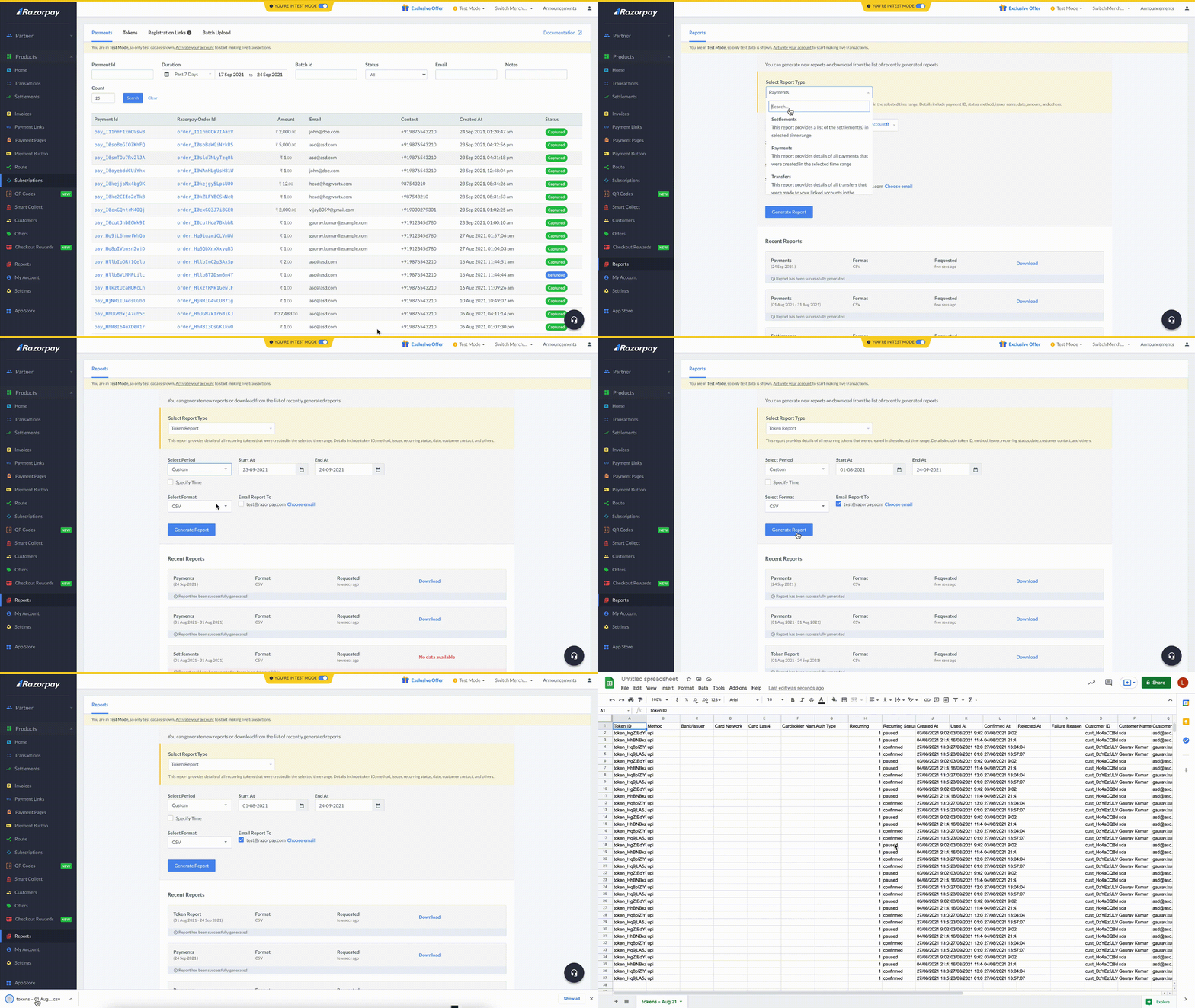
- Log in to the Dashboard and click the Reports from the left menu.
- Select Token Report from the Select Report Type drop-down list.
- Select the relevant Period from the Select Period drop-down list.
- Select the file format from the Select Format drop-down list. You can choose CSV, XLSX or XLS formats.
- Click Generate Report to download or get it emailed to your registered email address by selecting the Email Report To check box.
Are there any changes in the APIs for processing card-based mandates?
Are there any changes in the APIs for processing card-based mandates?
There are no changes in the existing integration flow. However, we have added a few optional token parameters to the Create Order API. If these parameters are not passed in the request, the default values are assumed. Know more about Recurring Payments APIs.
For card mandates, how long does it take for the token status to move from the initiated state to the confirmed state?
For card mandates, how long does it take for the token status to move from the initiated state to the confirmed state?
For card mandates, the status is updated in real-time.
Can cardholders make changes to registered card tokens? How are businesses notified of such changes?
Can cardholders make changes to registered card tokens? How are businesses notified of such changes?
Yes, cardholders can pause, resume and cancel card tokens from the portal provided by the bank to manage them. You will get notifications through multiple webhooks when a cardholder initiates any such changes to the card tokens. You can also see these changes on the Dashboard.
Can I cancel a card mandate?
Can I cancel a card mandate?
Yes. You can use the cancel a card mandate by deleting the token. Tokens can be deleted: