

Which banks have enabled Recurring Payments through Cards?
Which banks have enabled Recurring Payments through Cards?

What happens when a customer tries to use the card details of banks that are not yet available for Recurring Payments?
What happens when a customer tries to use the card details of banks that are not yet available for Recurring Payments?
Card does not support recurring payments. Ask the customer to use another card, UPI Autopay or eMandate.
How do I know the recurring token status?
How do I know the recurring token status?
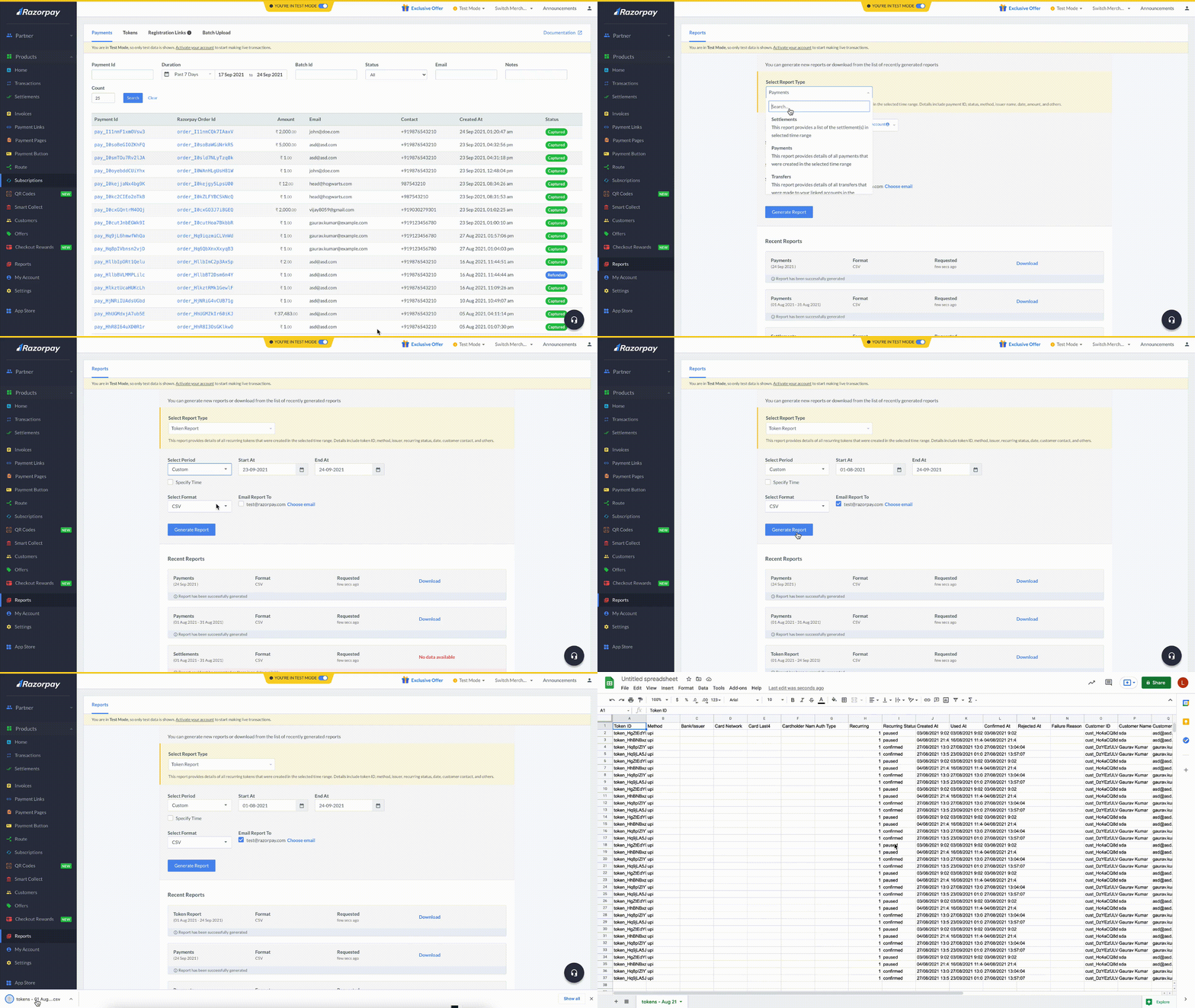
- Log in to the Dashboard and click the Reports from the left menu.
- Select Token Report from the Select Report Type drop-down list.
- Select the relevant Period from the Select Period drop-down list.
- Select the file format from the Select Format drop-down list. You can choose CSV, XLSX or XLS formats.
- Click Generate Report to download or get it emailed to your registered email address by selecting the Email Report To check box.
Are there any changes in turnaround time (TAT) for registering mandates and for processing debits?
Are there any changes in turnaround time (TAT) for registering mandates and for processing debits?
- Create the debit at least 36 hours before you need it.
- A pre-debit notification will be sent to the customer’s registered mobile number or email id.
- If they do not pause or cancel the mandate, the recurring debit will be processed and you will get the notification through a webhook or in the Dashboard.

Is there a maximum monetary limit for processing card-based mandates?
Is there a maximum monetary limit for processing card-based mandates?
- You can register mandates up to a maximum of ₹15,000 without any intervention from customers and process subsequent payments.
- If you fall under the following merchant category codes, the AFA limit is ₹1,00,000, so you can process subsequent payments up to ₹1,00,000 without any intervention from customers:
- Mutual Funds: 6211
- Insurance: 6300, 6529, 5960
- Credit Card Bill Payment: 6012, 5413
- For others to register and process mandates of amounts greater than ₹15,000, an Additional Factor Authentication (AFA) is required from customers for every subsequent debit.
What is the new flow to process subsequent debits using cards under the new RBI guidelines?
What is the new flow to process subsequent debits using cards under the new RBI guidelines?
- Businesses initiate the debit for an amount less than ₹15,000.
- Bank will send a pre-debit notification SMS to the customer immediately.
- The amount will be debited 36 hours after the notification.
To process subsequent debits above ₹15,000 (upto ₹1,00,000 for certain merchant categories):- Businesses initiate the debit.
- Bank will send a notification with a link for Additional Factor Authentication (AFA) to the customer immediately. The AFA link will be active for 72 hours.
- The amount will be debited as soon as the customer provides AFA.

Are there any changes in processing recurring payments on international cards?
Are there any changes in processing recurring payments on international cards?
For card mandates, how long does it take for the token status to move from the initiated state to the confirmed state?
For card mandates, how long does it take for the token status to move from the initiated state to the confirmed state?
What is the TAT for processing debits of cards mandates?
What is the TAT for processing debits of cards mandates?
- For processing debits below ₹15,000, the TAT is 36 hours after raising the debit request, subject to the customer not pausing or cancelling the mandate.
- For processing debits above ₹15,000 (upto ₹1,00,000 for certain merchant categories), the amount will be debited as soon as the customer provides consent through AFA, which has a validity of 72 hours.
Can cardholders make changes to registered recurring tokens? How are businesses notified of such changes?
Can cardholders make changes to registered recurring tokens? How are businesses notified of such changes?
Can I cancel a card mandate?
Can I cancel a card mandate?
Is it possible to skip the mandate summary screen that appears before the bank page while making a transaction?
Is it possible to skip the mandate summary screen that appears before the bank page while making a transaction?
- Log in to the Dashboard and click Account & Settings in the left menu.
- Click Skip mandate summary page under Checkout settings.

- Enable the Skip Mandate Summary Page for Cards option.

What types of cards are supported for Recurring Payments?
What types of cards are supported for Recurring Payments?
Is any additional integration required to enable RuPay?
Is any additional integration required to enable RuPay?
What banks support recurring payments via RuPay cards?
What banks support recurring payments via RuPay cards?
Are the 2021 RBI guidelines for recurring payments on cards applicable to RuPay cards?
Are the 2021 RBI guidelines for recurring payments on cards applicable to RuPay cards?
Is tokenisation of cards required for RuPay SI flows?
Is tokenisation of cards required for RuPay SI flows?
Are there any differences in functionalities/use cases supported via RuPay compared to Visa and Mastercard cards?
Are there any differences in functionalities/use cases supported via RuPay compared to Visa and Mastercard cards?
- Mandate registration with saved card: Supported.
- Debits greater than ₹15,000: Supported, subject to the same AFA rules as other networks.
- Pre-debit Notification with the same amount on a given mandate: Currently, NPCI does not support the functionality of raising multiple pre-debits with the same amount simultaneously on a mandate. After a pre-debit notification for a given amount is raised on a mandate, the next pre-debit with the same amount will override the previous pre-debit notification. Hence, the next pre-debit with the same amount should only be raised after the debit is successfully done against the previous pre-debit notification or after the previous pre-debit notification expires(T+3 days to expire, where T is the debit date specified).
Payment retries
Can I retry a failed payment?
Can I retry a failed payment?
How many times can I retry a payment?
How many times can I retry a payment?