

Available in🇮🇳 India
After the integration is complete, a Pay button appears on your webpage/app.
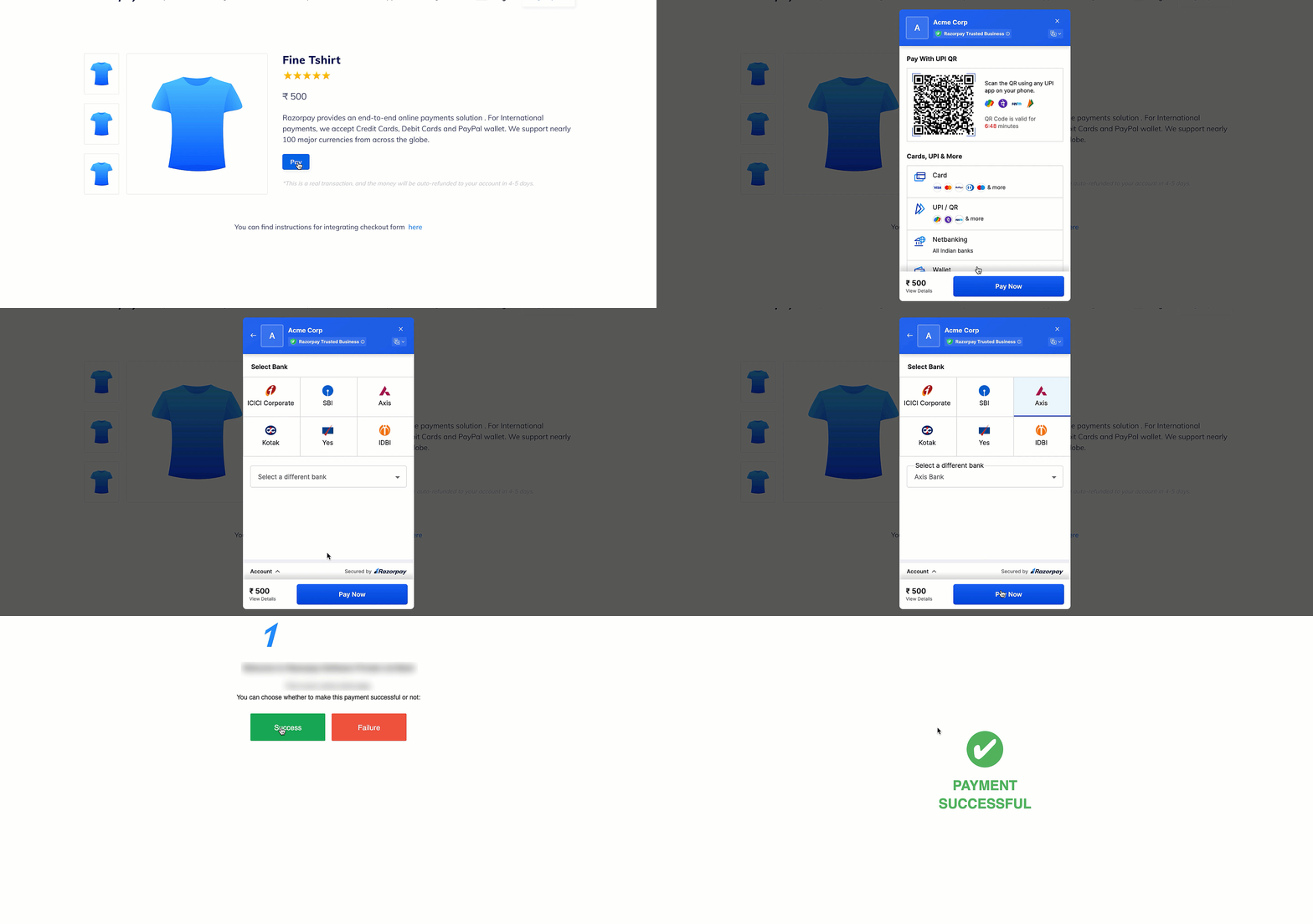 Click the button and make a test transaction to ensure the integration is working as expected. You can start accepting actual payments from your customers once the test transaction is successful.
Following are all the payment modes that the customer can use to complete the payment on the Checkout. Some of them are available by default, while others may require approval from us. Raise a request from the Dashboard to enable such payment methods.
Click the button and make a test transaction to ensure the integration is working as expected. You can start accepting actual payments from your customers once the test transaction is successful.
Following are all the payment modes that the customer can use to complete the payment on the Checkout. Some of them are available by default, while others may require approval from us. Raise a request from the Dashboard to enable such payment methods.
You can make test payments using one of the payment methods configured at the Checkout.
Netbanking
Netbanking
You can select any of the listed banks. After choosing a bank, Razorpay will redirect to a mock page where you can make the payment
success or a failure. Since this is Test Mode, we will not redirect you to the bank login portals.Check the list of supported banks.UPI
UPI
You can enter one of the following UPI IDs:
success@razorpay: To make the payment successful.failure@razorpay: To fail the payment.
Handy TipsYou can use Test Mode to test UPI payments, and Live Mode for UPI Intent and QR payments.
Cards
Cards
You can use the following test cards to test transactions for your integration in Test Mode.
Domestic Cards
Use the following test cards for Indian payments:Error Scenarios
Use these test cards to simulate payment errors. See the complete list of error test cards with detailed scenarios. Check the following lists:International Cards
Use the following test cards to test international payments. Use any valid expiration date in the future in the MM/YY format and any random CVV to create a successful payment.Check the list of supported card networks.
Wallet
Wallet
You can select any of the listed wallets. After choosing a wallet, Razorpay will redirect to a mock page where you can make the payment
success or a failure. Since this is Test Mode, we will not redirect you to the wallet login portals.Check the list of supported wallets.