

Available in🇮🇳 India
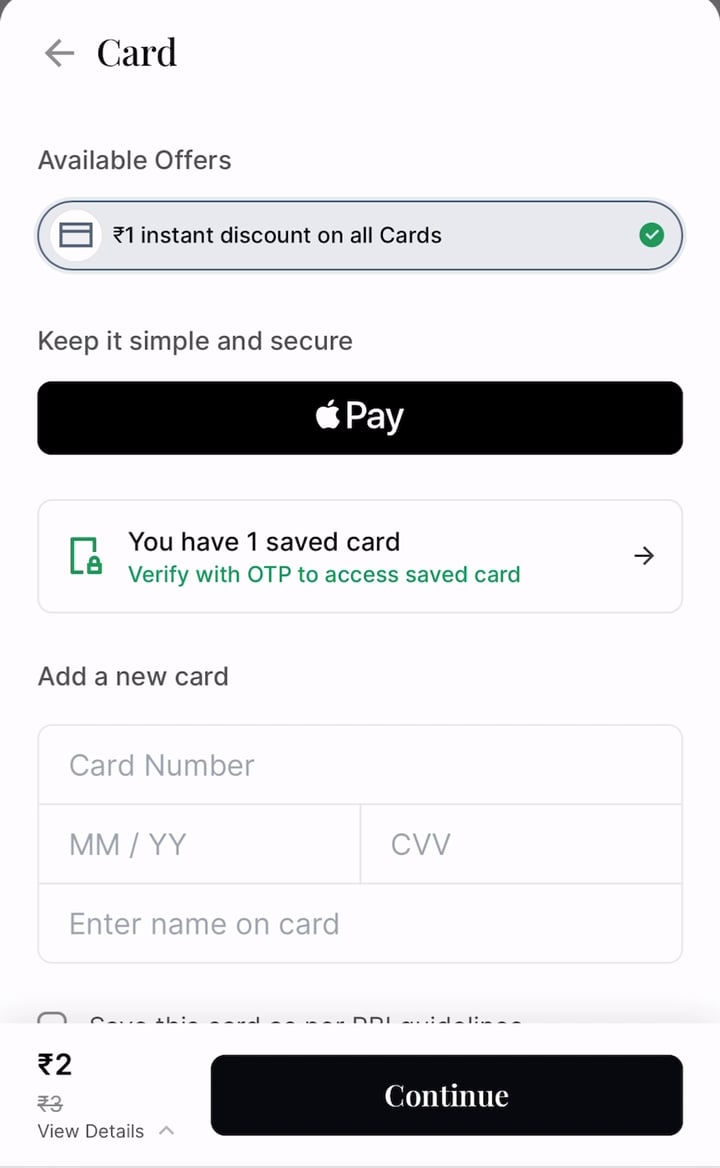
Card offers you run on Razorpay Standard Checkout also apply when customers pay with Apple Pay. Apple Pay does not share the actual card number with Razorpay. Instead, Razorpay identifies the card the customer picks in their Apple Wallet and checks the offer against it. Bank, network, card type and IIN offers work the same way they do on a regular card payment, and the discount is itemised on Checkout.
For example, if you run an instant discount on a bank’s credit cards, customers who pay with that bank’s credit card through Apple Pay now get the discount too.
No Changes NeededYou do not need to change your integration or create new offers. Any card offer that is active on your account applies to Apple Pay payments.
Prerequisites
- Apple Pay enabled on Standard Checkout.
- One or more card offers created on the Dashboard and integrated with Standard Checkout.
How It Works
- The customer selects a card offer on Checkout, or Checkout applies one automatically. Checkout shows the discounted amount.
- The customer taps Apple Pay. The offer carries over to the Apple Pay payment.
- In the Apple Pay sheet, the customer chooses a card and authenticates with Face ID or Touch ID.
- Razorpay identifies the card behind the Apple Pay token and checks that it is eligible for the offer.
- If the card is eligible, the payment completes at the discounted amount. If it is not, the payment fails and the customer sees the reason on Checkout.
Offer Validation Happens After AuthenticationOn a regular card payment, Razorpay checks the offer when the customer enters their card details. On Apple Pay, the card details are only available after the customer authenticates in the Apple Pay sheet, so the offer is checked at that point.
Supported Offers
If you force an offer that is not a card offer, Apple Pay is not shown on Checkout for that order.
Limitations
- Offers on Apple Pay are available only on Razorpay Standard Checkout, for domestic payments in India. They are not available on Custom Checkout or Server-to-Server (S2S) integrations.
- Apple Pay does not work in test mode, so you cannot test offers on Apple Pay in test mode.
- If an Apple Pay payment fails, Checkout removes all offers applied to it. When the customer retries, the payment goes through without an offer, at the full amount.
Frequently Asked Questions
Why did a customer's Apple Pay payment fail after they applied an offer?
Why did a customer's Apple Pay payment fail after they applied an offer?
The card the customer chose in the Apple Pay sheet was not eligible for the offer. For example, the offer is for one bank’s cards and the customer paid with another bank’s card, or the customer has already used the offer the maximum number of times on that card.Checkout shows the customer why the offer could not be applied. The Apple Pay sheet itself shows only a general payment failure, as Apple does not allow Razorpay to show its own messages there. If the customer tries again, the payment goes through without the offer.
Do I need to create separate offers for Apple Pay?
Do I need to create separate offers for Apple Pay?
No. Your existing card offers apply to Apple Pay payments. There is no separate offer type or setting for Apple Pay.
How do I find Apple Pay payments that used an offer?
How do I find Apple Pay payments that used an offer?
Apple Pay payments have
"provider": "apple_pay" in the payment notes field. To see the offer applied on a payment, use the Fetch Payment With Expanded Offers API.