

Current Challenges
- Limited payment methods are available to end customers. For example, UPI and recurring payments are not supported by most payment providers.
- Registration in India is a tedious and long process and is often subjected to regulations and reporting requirements.
- International card payments are convenient ways of remitting funds to India from abroad. However, it incurs huge costs, making them a less preferred method for accepting payments.
Advantages
- Customers
- Businesses
-
No Card? No Problem!
Customers who do not have access to cards can use our Import Flow solution to pay through their bank account: through UPI or Netbanking, making it easy for them to buy products in foreign countries with lower card coverage. -
No Visit to Bank Branch
Currently, customers have to visit their bank branch to make an international bank transfer to the seller’s account. This process heavily impacts the customer experience as it is time-consuming. Using the Import Flow method, you can make bank transfers in your local currency. -
The Most Affordable Solution to Transfer Funds Internationally
The customer can transfer funds to the seller’s bank account. This incurs less cost than international card payments or SWIFT transfers. -
Faster Payments Experience
Accept payments without a website or app using other Razorpay products, such as Payment Links and Payment Pages.
Supported Merchant Categories
Razorpay supports these merchant categories:Import (Goods)
Import (Goods)
Transport Services
Transport Services
Travel Services
Travel Services
Insurance and Pension Services
Insurance and Pension Services
Telecommunication, Computer and Information Services
Telecommunication, Computer and Information Services
Other Business Services
Other Business Services
Personal, Cultural and Recreational Services
Personal, Cultural and Recreational Services
Manufacturing Services
Manufacturing Services
Prerequisites
You must meet the following prerequisites to accept payments from your Indian customers:- Ensure you have an active Razorpay account with KYC verification completed.
- Foreign businesses with goods and services that can accept payments using this solution are:
- Digital Goods
- Digital Services
- Online Travel Agencies (OTA)
- Physical Goods
- Travel
- Education
- Digital Goods
How it Works
Follow the steps given below to onboard and accept payments from Indian customers:- Log in to the Dashboard.
- Navigate to Account & Settings.
- You must provide the Purpose Code information when applying for international payments.
- Click International Payment Codes under International payment settings.
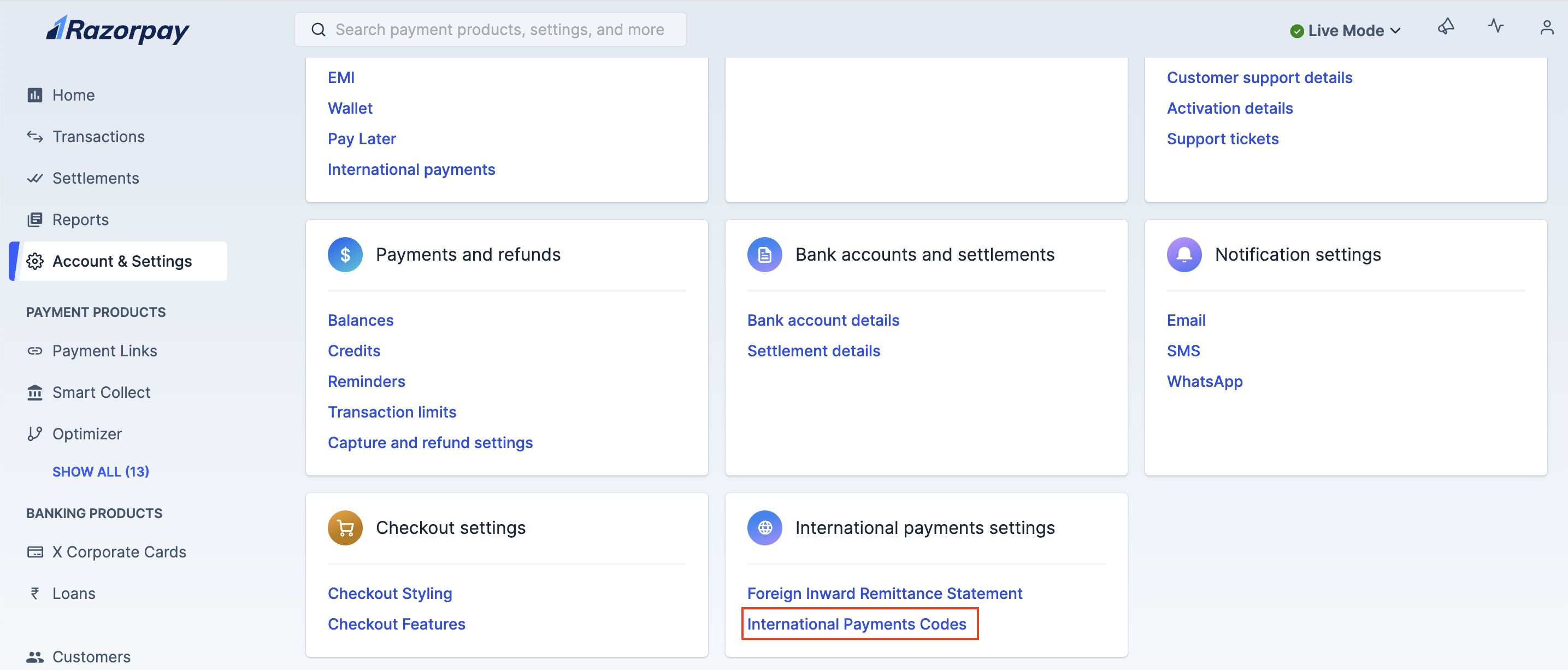
- Update your purpose code under the International Payment Codes section.
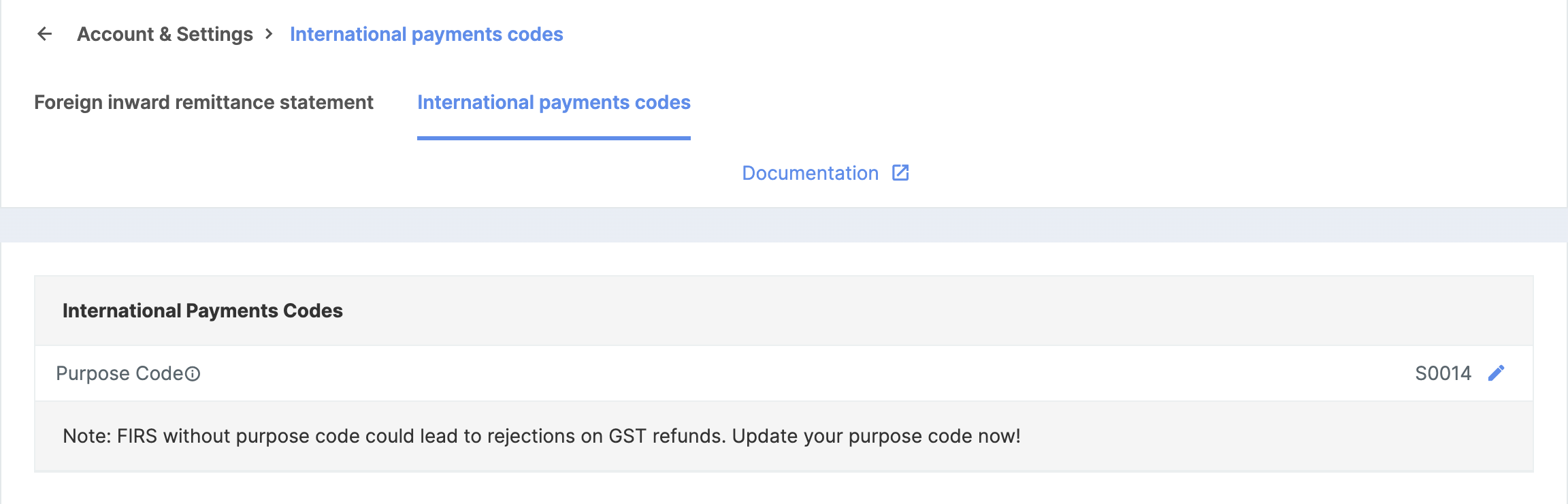
- Select the appropriate Purpose Code.
- Click International Payment Codes under International payment settings.
- Add HS Code
- Add IEC Code
- Click International Payment Codes under International payment settings.
- Update your HS Code under the International Payment Codes section.
- Select the appropriate Harmonised System Code, also known as HS Code.
- For Software: HSCode is 85238020 and HSDescription is Other Information technology software.
- For Goods: Refer to the list from the DGFT website.
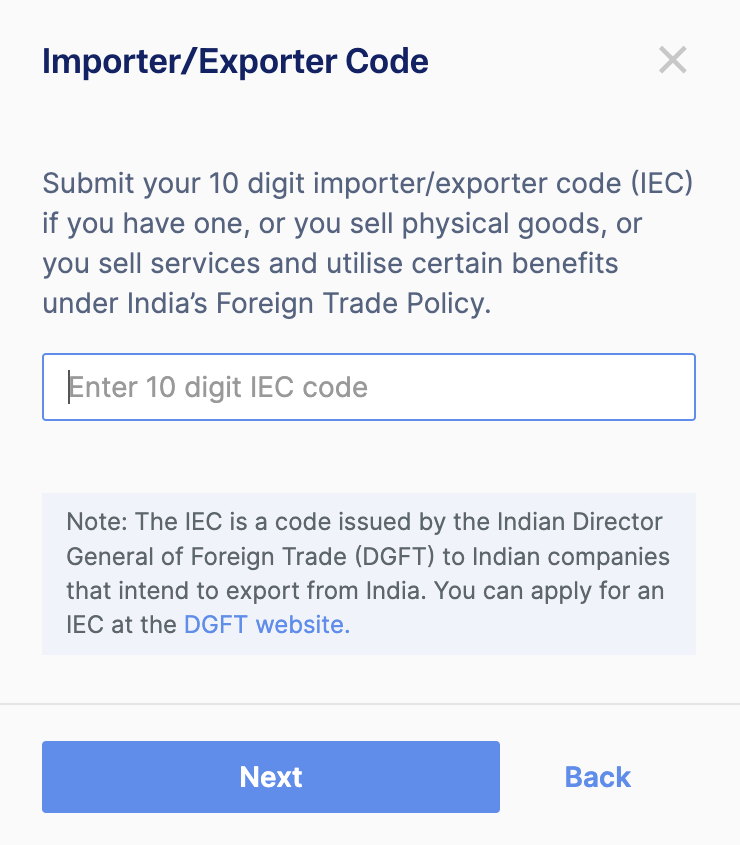
- Review and click Confirm. The Razorpay Activation/Operations team verifies the selected Purpose Code.
List of Purpose Codes
Download the complete list of transaction purpose codes you can select during the onboarding process.Documents and Details Required
Given below is a list of documents required:- The Import/Export code is required when selling tangible goods.
- All import transactions should be accompanied by invoices.
- Airway bill is mandatory to import goods if and when required.
Frequently Asked Questions (FAQs)
What is the pricing for using this solution?
What is the pricing for using this solution?
What is the settlement TAT for international payments?
What is the settlement TAT for international payments?
Do you support multiple settlement currencies?
Do you support multiple settlement currencies?
Do you need any bills/invoices from me?
Do you need any bills/invoices from me?
Which card networks do you support? Is support for certain networks limited by geographical region?
Which card networks do you support? Is support for certain networks limited by geographical region?
- Visa
- Mastercard
- Diners
- Rupay
- Amex
- Discover
What if my end customer raises a dispute with Razorpay?
What if my end customer raises a dispute with Razorpay?
Are refunds supported on these transactions?
Are refunds supported on these transactions?
Is this feature available on all Razorpay integrations?
Is this feature available on all Razorpay integrations?
Do we need to collect the PAN details from customers?
Do we need to collect the PAN details from customers?
Is there any restriction on maximum transaction value?
Is there any restriction on maximum transaction value?