List of values for Source and Step parameters for each payment method supported by Razorpay.
Available in🇮🇳 India🇲🇾 Malaysia🇸🇬 Singapore🇺🇸 United States
There are certain error codes specific for each payment method supported by Razorpay. To understand the errors and their reasons, it is recommended to know the source (stakeholders) and the steps involved in the payment flows:
The payment flow for Card payments is illustrated below.
Source Parameter
Step Parameter
The possible values for the source parameter for cards are listed below:
customer
business
internal
gateway
issuer_bank
The possible values for the step parameter, along with the description, are listed below:
payment_initiation
Your system initiates and sends the payment request to our server. Our server validates your request, creates the payment flow and forwards the request to the Gateway.
card_enrollment_check
Upon receiving a request from Razorpay, Gateway sends the enrollment check request to the bank for the enrollment of the card check.
payment_authentication
The bank verifies the enrollment of the card, and then requests the authentication of the customer by sending 3DS URL and OTP to the customer.
3DS URL
Bank sends the Authentication (3DS URL), which is routed through Gateway > Razorpay > Customer.
OTP
The bank sends the OTP to the customer’s mobile directly. The customer enters the valid OTP within the time on the bank’s OTP page.
payment_authorization
Once the customer has completed the authentication, the bank authorises the release of the funds. The authorisation status is communicated to the Gateway which in turn communicates the same to Razorpay.
payment_capture
Once the payment is successfully authorised, Razorpay sends the capture request to the Gateway which in turn sends the same to the bank to capture the authorised payment.
The payment flow for UPI Intent payments is illustrated below.
Source Parameter
Step Parameter
The possible values for the source parameter for both collect and intent flows in UPI are as follows:
customer
business
internal
customer_psp
gateway
network
issuer_bank
beneficiary_bank
The possible values for the step parameter for UPI Intent flow, along with the description, are listed below:
mandate_creation
Request to create a new UPI mandate.
payment_initiation
Your system initiates and sends the payment request to our server.
payment_creation
Razorpay creates an intent URL and passes it back to you.
payment_authentication
Payer clicks on the pay button (pointing to the intent url), which prompts the payer to open the PSP App. After the App opens, the payer enters the M-PIN on the PSP App, and then authenticates the transaction.
payment_request
Payer PSP sends the payment request to the UPI network.
payment_request_beneficiary_details
The UPI network requests the beneficiary details from the Payee PSP.
payment_response_beneficiary_details
Payee PSP sends the beneficiary details to the UPI network.
payment_debit_request
The UPI network requests a debit of the given payment amount from the customer’s bank.
payment_debit_response
Customer’s bank sends the debit response to the NPCI.
payment_credit_request
The UPI network sends the payment credit request to your account maintained with Razorpay.
payment_credit_response
The beneficiary bank sends the credit response to the UPI network.
payment_status_request
UPI network requests the transaction confirmation status from Payee PSP which acts as the gateway in UPI transactions.
payment_status_response
Payee PSP sends the transaction confirmation response to the UPI Network.
payment_response
Payee PSP sends the callback to our server. This will contain the final transaction status.
refund_request
Request to initiate a refund.
Collect Flow
The payment flow for UPI Collect payments is illustrated below.
Source Parameter
Step Parameter
The possible values for the source parameter for both collect and intent flows in UPI are as follows:
customer
business
internal
customer_psp
gateway
network
issuer_bank
beneficiary_bank
The possible values for the step parameter for the UPI Collect flow, along with the description, are listed below:
mandate_creation
Request to create a new UPI mandate.
payment_initiation
Your system initiates and sends the payment request to our server.
payment_creation
Razorpay creates the payment and sends the collect request via Payee PSP (Gateway).
payment_request
Payee PSP sends the payment request to the UPI network.
payment_authentication_request
The UPI network sends an authentication request for the given payment amount to the Payer PSP.
payment_authentication
Customer clicks on the payment notification received on mobile which opens the PSP App. After the App opens, the customer enters the M-PIN on the PSP App, and then authenticates the transaction.
payment_authentication_response
Payer PSP sends the authentication details to the UPI network.
payment_debit_request
Upon successful authentication, the UPI network requests a debit of the given payment amount from the customer’s bank.
payment_debit_response
Customer’s bank sends the debit response to the UPI Network.
payment_credit_request
The UPI network sends the payment credit request to your account maintained with Razorpay.
payment_credit_response
The beneficiary bank sends the credit response to the UPI network.
payment_status_request
UPI network sends the transaction confirmation request to payer PSP (Google Pay).
payment_status_response
Payer PSP (Google Pay) sends acknowledge, informs the customer and sends the response to NPCI.
payment_response
Payee PSP sends the callback to our server. This will contain the final transaction status.
refund_request
Request to initiate a refund.
UPI Collect Flow DeprecatedAccording to NPCI guidelines, the UPI Collect flow is being deprecated effective 28 February 2026. Customers can no longer make payments or register UPI mandates by manually entering VPA/UPI id/mobile numbers.Exemptions: UPI Collect will continue to be supported for:
MCC 6012 & 6211 (IPO and secondary market transactions).
If you are an existing Razorpay user not covered by exemptions, you must migrate to UPI Intent or UPI QR code to continue accepting UPI payments. For detailed migration steps, refer to the migration documentation.
The payment flow for Netbanking payments is illustrated below:
Source Parameter
Step Parameter
The possible values for the source parameter for netbanking are listed below:
customer
business
internal
issuer_bank
The possible values for the step parameter, along with the description, are listed below:
payment_initiation
Your system initiates and sends the payment request to our server. Razorpay sends the bank URL back to you.
payment_authentication
The customer logs into his netbanking account and completes the transaction.
payment_authorization
Upon successful authentication, bank authorises the release of funds and notifies Razorpay. Razorpay in turn, notifies the business.
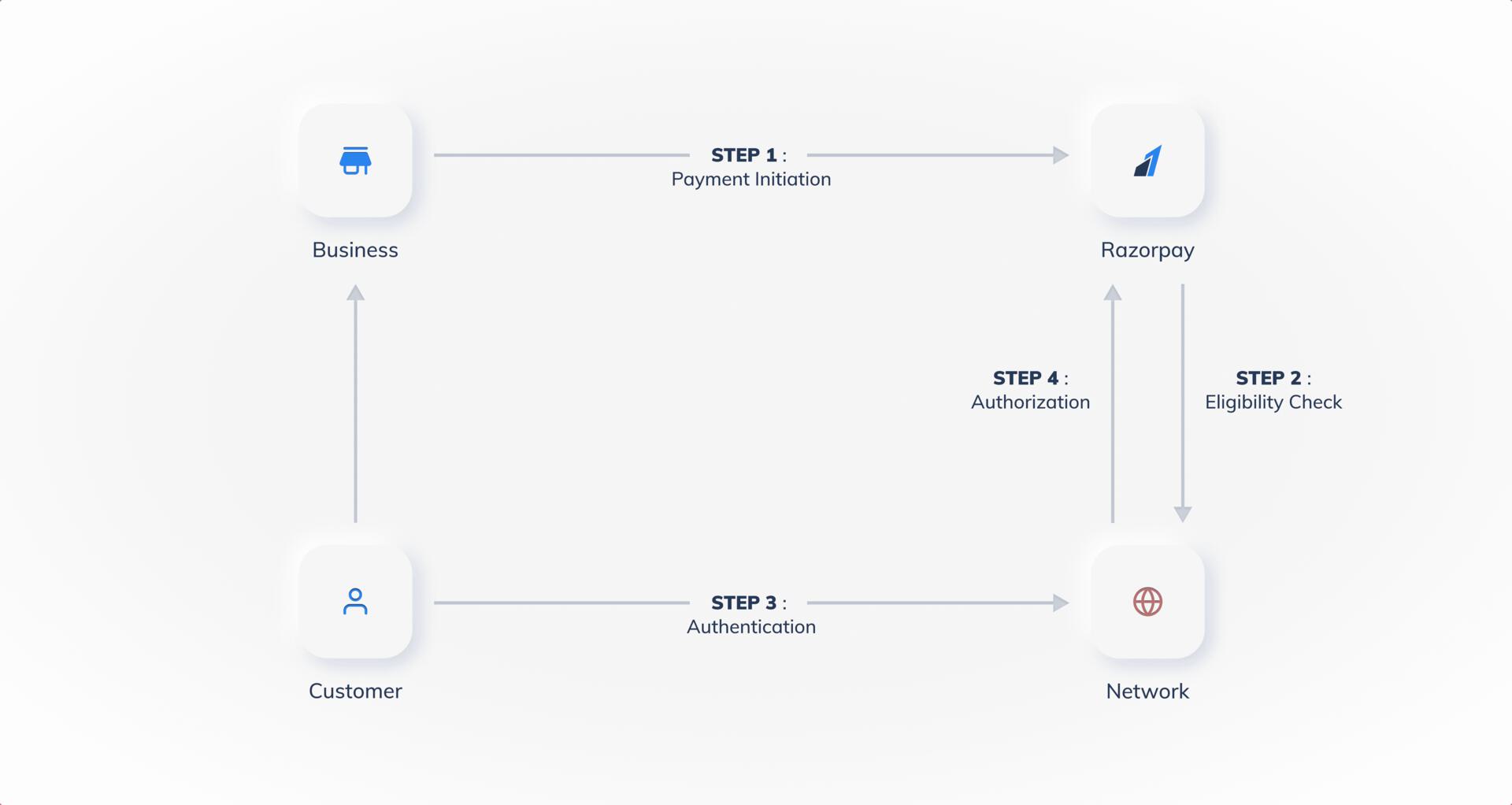
The payment flow for Cardless EMI payments is illustrated below:
Source Parameter
Step Parameter
The possible values for the source parameter for Cardless EMI flow are:
customer
business
internal
network
issuer
The possible values for the step parameter, along with the description, are listed below:
payment_initiation
Your system initiates and sends the payment request to our server. Our server sends the same request to the Bank/Gateway.
payment_eligibility_check
Razorpay sends the eligibility check request to the issuer to determine if the entered customer information is correct and to determine the credit eligibility of the customer.
payment_authentication
Customer authenticates the payment using OTP provided by the issuer.
payment_authorization
Issuer authorizes the release of funds and sends confirmation to Razorpay.
The possible values for the source parameter for Emandate are listed below:
customer
bank
business
internal
gateway
issuer_bank
The possible values for the step parameter, along with the description, are listed below:
payment_initiation
Your system initiates and sends the payment request to our server. Our server validates your request, creates the payment flow and forwards the request to the Gateway.
payment_authentication
The bank verifies the enrollment of the Emandate by asking customers to authenticate themselves.
payment_authorization
Once the customer has completed the authentication, the bank authorizes the release of the funds. The authorization status is communicated to the Gateway which in turn communicates the same to Razorpay.
Last modified on October 8, 2026
Was this page helpful?
{"docsConfig":{"theme":"mint","$schema":"https://mintlify.com/docs.json","name":"Razorpay","colors":{"primary":"#3395FF","light":"#66B2FF","dark":"#0B62C4"},"logo":{"light":"https://mintcdn.com/razorpay-881012b3/puuu1wI-BbW3rsp2/logo/light.svg?fit=max\u0026auto=format\u0026n=puuu1wI-BbW3rsp2\u0026q=85\u0026s=e0750375ee2004193a685f9f211963fe","dark":"https://mintcdn.com/razorpay-881012b3/puuu1wI-BbW3rsp2/logo/dark.svg?fit=max\u0026auto=format\u0026n=puuu1wI-BbW3rsp2\u0026q=85\u0026s=038b180f26d19ddb4eb40ede0cf84821","href":"https://razorpay.com/docs/"},"favicon":"https://mintcdn.com/razorpay-881012b3/puuu1wI-BbW3rsp2/favicon.png?fit=max\u0026auto=format\u0026n=puuu1wI-BbW3rsp2\u0026q=85\u0026s=9bebe786d3a21e9452fd2e31243e5fb3","api":{"playground":{"display":"interactive"},"mdx":{"auth":{"method":"basic"},"server":"https://api.razorpay.com"}},"navbar":{"links":[{"href":"https://razorpay.com/support/","label":"Support"},{"href":"https://razorpay.com/blog/","label":"Blog"}],"primary":{"type":"button","label":"Dashboard","href":"https://dashboard.razorpay.com/"}},"footer":{"socials":{"x":"https://x.com/Razorpay","linkedin":"https://www.linkedin.com/company/razorpay","github":"https://github.com/razorpay","youtube":"https://www.youtube.com/razorpay"},"links":[{"header":"Products","items":[{"label":"Payment Gateway","href":"https://razorpay.com/payment-gateway"},{"label":"Payment Links","href":"https://razorpay.com/payment-links"},{"label":"RazorpayX","href":"https://razorpay.com/x"},{"label":"Payroll","href":"https://razorpay.com/payroll"}]},{"header":"Resources","items":[{"label":"Documentation","href":"https://razorpay.com/docs"},{"label":"API Reference","href":"https://razorpay.com/docs/api"},{"label":"Support","href":"https://razorpay.com/support"},{"label":"Blog","href":"https://razorpay.com/blog"}]},{"header":"Company","items":[{"label":"About Us","href":"https://razorpay.com/about"},{"label":"Careers","href":"https://razorpay.com/jobs"},{"label":"Pricing","href":"https://razorpay.com/pricing"}]}]},"seo":{"metatags":{"canonical":"https://razorpay.com/docs"}},"contextual":{"options":["copy","view","chatgpt","claude","perplexity","mcp","cursor","vscode"],"display":"header"},"metadata":{"timestamp":true},"styling":{"latex":true},"navigation":{"pages":[]}},"deployment":{"deploymentMetadataValue":{"subdomain":"razorpay-881012b3","hasAudioNarration":false,"actualSubdomain":"razorpay-881012b3","customDomains":["razorpay.com"],"gitSource":{"type":"github","owner":"razorpay-vendor-integrations","repo":"docs","deployBranch":"main","contentDirectory":"","isPrivate":true,"mountPath":"","label":""},"feedback":{"thumbs":true,"agentFeedback":true},"entitlements":{"AI_CHAT":{"status":"ENABLED"},"REMOVE_BRANDING":{"status":"ENABLED"},"CONTEXTUAL_FEEDBACK":{"status":"ENABLED"},"CODE_SNIPPET_FEEDBACK":{"status":"ENABLED"},"WEB_MCP":{"status":"ENABLED"},"NARRATION":{"status":"ENABLED"}},"buildId":"6af30eb48b1d48fe4630331b","clientVersion":"0.0.4094","searchFilterCounts":[{"language":"default","tag":"Payments","count":1648},{"language":"default","tag":"API Reference","count":772},{"language":"default","tag":"Payment Gateway","count":237},{"language":"default","tag":"Dashboard","count":213},{"language":"default","tag":"Subscriptions","count":190},{"language":"default","tag":"Payouts","count":158},{"language":"default","tag":"Payment Links","count":129},{"language":"default","tag":"Banking Plus","count":123},{"language":"default","tag":"Developer Tools","count":104},{"language":"default","tag":"Ecommerce Plugins","count":104}],"searchSettings":{"maxResults":8}},"assistantConfig":{"enableAskAiButton":false,"enableStarterQuestions":false,"enableContextualStarterQuestions":false,"enableAskAiSearchBar":true},"basePath":"/docs","hasChatPermissions":true,"hasWebMcpPermissions":true,"toggles":[{"name":"kill-isr","enabled":true,"variant":{"name":"disabled","enabled":false,"feature_enabled":true},"impressionData":false},{"name":"custom-rbac-roles","enabled":true,"variant":{"name":"disabled","enabled":false,"feature_enabled":true},"impressionData":false},{"name":"agent-mintlify-slack","enabled":true,"variant":{"name":"disabled","enabled":false,"feature_enabled":true},"impressionData":false},{"name":"agent-integrations-settings","enabled":true,"variant":{"name":"disabled","enabled":false,"feature_enabled":true},"impressionData":false},{"name":"rbac-expansion","enabled":true,"variant":{"name":"disabled","enabled":false,"feature_enabled":true},"impressionData":false},{"name":"automations-pr-grouping","enabled":true,"variant":{"name":"disabled","enabled":false,"feature_enabled":true},"impressionData":false},{"name":"custom-prefix","enabled":true,"variant":{"name":"disabled","enabled":false,"feature_enabled":true},"impressionData":false},{"name":"analytics-v7","enabled":true,"variant":{"name":"disabled","enabled":false,"feature_enabled":true},"impressionData":false},{"name":"user-flows-analytics","enabled":true,"variant":{"name":"disabled","enabled":false,"feature_enabled":true},"impressionData":false},{"name":"no-publish-flow","enabled":true,"variant":{"name":"disabled","enabled":false,"feature_enabled":true},"impressionData":false},{"name":"workos-onboarding","enabled":true,"variant":{"name":"disabled","enabled":false,"feature_enabled":true},"impressionData":false},{"name":"llms-txt-v2","enabled":true,"variant":{"name":"disabled","enabled":false,"feature_enabled":true},"impressionData":false},{"name":"snapshot-serving-live","enabled":true,"variant":{"name":"disabled","enabled":false,"feature_enabled":true},"impressionData":false},{"name":"stripTemperatureMiddleware","enabled":true,"variant":{"name":"disabled","enabled":false,"feature_enabled":true},"impressionData":false},{"name":"support-platform-pylon-zendesk","enabled":true,"variant":{"name":"disabled","enabled":false,"feature_enabled":true},"impressionData":false},{"name":"snapshot-serving","enabled":true,"variant":{"name":"disabled","enabled":false,"feature_enabled":true},"impressionData":false},{"name":"instant-rollback","enabled":true,"variant":{"name":"disabled","enabled":false,"feature_enabled":true},"impressionData":false},{"name":"granular-notifications-server","enabled":true,"variant":{"name":"disabled","enabled":false,"feature_enabled":true},"impressionData":false},{"name":"granular-notifications","enabled":true,"variant":{"name":"disabled","enabled":false,"feature_enabled":true},"impressionData":false},{"name":"automations-fable","enabled":true,"variant":{"name":"disabled","enabled":false,"feature_enabled":true},"impressionData":false},{"name":"fixed-ai-action-pricing","enabled":true,"variant":{"name":"disabled","enabled":false,"feature_enabled":true},"impressionData":false},{"name":"automation-resolve-merge-conflict","enabled":true,"variant":{"name":"disabled","enabled":false,"feature_enabled":true},"impressionData":false},{"name":"scoped-publishing","enabled":true,"variant":{"name":"disabled","enabled":false,"feature_enabled":true},"impressionData":false},{"name":"mintql","enabled":true,"variant":{"name":"disabled","enabled":false,"feature_enabled":true},"impressionData":false},{"name":"page-level-analytics","enabled":true,"variant":{"name":"disabled","enabled":false,"feature_enabled":true},"impressionData":false},{"name":"editor-version-history-v2","enabled":true,"variant":{"name":"disabled","enabled":false,"feature_enabled":true},"impressionData":false},{"name":"billing-page-v2","enabled":true,"variant":{"name":"disabled","enabled":false,"feature_enabled":true},"impressionData":false},{"name":"full-page-search","enabled":true,"variant":{"name":"disabled","enabled":false,"feature_enabled":true},"impressionData":false},{"name":"workspace-projects","enabled":true,"variant":{"name":"disabled","enabled":false,"feature_enabled":true},"impressionData":false},{"name":"assistant-v5","enabled":true,"variant":{"name":"disabled","enabled":false,"feature_enabled":true},"impressionData":false},{"name":"fork-pr-previews","enabled":true,"variant":{"name":"disabled","enabled":false,"feature_enabled":true},"impressionData":false},{"name":"revalidation-jwt","enabled":true,"variant":{"name":"disabled","enabled":false,"feature_enabled":true},"impressionData":false},{"name":"workos-sso-scim","enabled":true,"variant":{"name":"disabled","enabled":false,"feature_enabled":true},"impressionData":false},{"name":"hobby-abuse-scan","enabled":true,"variant":{"name":"disabled","enabled":false,"feature_enabled":true},"impressionData":false},{"name":"dashboard-inbox","enabled":true,"variant":{"name":"disabled","enabled":false,"feature_enabled":true},"impressionData":false},{"name":"workos-signup","enabled":true,"variant":{"name":"disabled","enabled":false,"feature_enabled":true},"impressionData":false},{"name":"turbopuffer-dual-write","enabled":true,"variant":{"name":"disabled","enabled":false,"feature_enabled":true},"impressionData":false},{"name":"workos-enabled","enabled":true,"variant":{"name":"disabled","enabled":false,"feature_enabled":true},"impressionData":false},{"name":"approve-review-flow","enabled":true,"variant":{"name":"disabled","enabled":false,"feature_enabled":true},"impressionData":false},{"name":"editor-metadata","enabled":true,"variant":{"name":"disabled","enabled":false,"feature_enabled":true},"impressionData":false},{"name":"sso-setup-deadline-banner","enabled":true,"variant":{"name":"disabled","enabled":false,"feature_enabled":true},"impressionData":false},{"name":"turbopuffer-serve","enabled":true,"variant":{"name":"disabled","enabled":false,"feature_enabled":true},"impressionData":false},{"name":"live-agents","enabled":true,"variant":{"name":"disabled","enabled":false,"feature_enabled":true},"impressionData":false}],"googleFontsInlined":false},"customCss":[{"filePath":"style.css","content":"#navbar ul.sidebar-group.mt-6,ul.sidebar-group.mt-6{margin-top:1rem}[data-component-part=\"callout-content\"]>[data-as=\"p\"]:first-child>strong,[data-component-part=\"callout-content\"]>[data-as=\"p\"]:first-child strong,[data-component-part=\"callout-content\"]>strong:first-child{font-size:1.125rem!important;font-weight:700!important;line-height:1.4!important}.error-code-cards [data-component-part=\"card-title\"]{display:inline-block!important;font-family:ui-monospace, \"SF Mono\", SFMono-Regular, Menlo, Consolas,\n \"Liberation Mono\", monospace!important;font-size:0.875rem!important;font-weight:600!important;line-height:1.3!important;padding:0.25rem 0.75rem!important;border-radius:9999px!important;background:rgba(107, 114, 128, 0.10)!important;border:1px solid rgba(107, 114, 128, 0.25)!important}.dark .error-code-cards [data-component-part=\"card-title\"]{background:rgba(255, 255, 255, 0.06)!important;border-color:rgba(255, 255, 255, 0.15)!important}[data-http-method]{font-weight:700!important;border-color:transparent!important}[data-http-method=\"get\"]{color:#15803d!important;background:rgba(74, 222, 128, 0.2)!important}[data-http-method=\"post\"]{color:#1d4ed8!important;background:rgba(96, 165, 250, 0.2)!important}[data-http-method=\"put\"]{color:#a16207!important;background:rgba(250, 204, 21, 0.2)!important}[data-http-method=\"patch\"]{color:#c2410c!important;background:rgba(251, 146, 60, 0.2)!important}[data-http-method=\"delete\"]{color:#b91c1c!important;background:rgba(248, 113, 113, 0.2)!important}.dark [data-http-method=\"get\"]{color:#4ade80!important}.dark [data-http-method=\"post\"]{color:#60a5fa!important}.dark [data-http-method=\"put\"]{color:#facc15!important}.dark [data-http-method=\"patch\"]{color:#fb923c!important}.dark [data-http-method=\"delete\"]{color:#f87171!important}ul.sidebar-group.mt-6{margin-top:5px}.sticky .panel:has(>.rzp-code-selector){display:grid;grid-auto-rows:minmax(0, 1fr);gap:1.5rem;overflow:hidden}.sticky:has(>.panel>.rzp-code-selector)>div:not(.panel){display:none}.rzp-code-selector{position:relative;display:flex;flex-direction:column;min-height:0;overflow:hidden;padding:0.125rem;border:1px solid rgba(3, 7, 18, 0.1);border-radius:1rem;background:rgb(244, 247, 250)}.dark .rzp-code-selector{border-color:rgba(255, 255, 255, 0.1);background:rgba(255, 255, 255, 0.05)}.rzp-code-selector-bar{display:flex;align-items:center;justify-content:space-between;gap:0.5rem;flex:none;flex-wrap:wrap;padding:0.25rem 4.25rem 0.375rem 0.5rem}.rzp-code-selector-field{position:relative;display:inline-flex;align-items:center;flex:0 0 auto}.rzp-code-selector-select{appearance:none;-webkit-appearance:none;min-width:max-content;padding:0.125rem 1.75rem 0.125rem 0.375rem;border:0;border-radius:0.5rem;background:transparent;color:var(--color-gray-600, #4b5563);font-size:0.75rem;font-weight:500;line-height:1.5rem;cursor:pointer}.dark .rzp-code-selector-select{color:var(--color-gray-300, #d1d5db)}.rzp-code-selector-select:hover{background:rgba(3, 7, 18, 0.05)}.dark .rzp-code-selector-select:hover{background:rgba(255, 255, 255, 0.08)}.rzp-code-selector-chevron{position:absolute;right:0.25rem;width:0.875rem;height:0.875rem;pointer-events:none;opacity:0.6}.rzp-code-selector-body{flex:1 1 auto;min-height:0;overflow-y:auto;overscroll-behavior:contain}.rzp-code-selector-body>.code-block{margin:0!important;min-width:0;border-radius:0 0 0.875rem 0.875rem;position:static!important}.rzp-code-selector-body [data-component-part=\"code-block-root\"]{border-radius:0 0 0.875rem 0.875rem}.rzp-code-selector-body .code-block-fade-overlay{display:none}.rzp-code-selector::after{content:\"\";position:absolute;inset:auto 0 0;height:2rem;border-radius:0 0 0.875rem 0.875rem;pointer-events:none;background:linear-gradient(to bottom, rgba(255, 255, 255, 0), #fff)}.dark .rzp-code-selector::after{background:linear-gradient(to bottom, rgba(11, 12, 14, 0), rgb(11, 12, 14))}.rzp-code-selector>.rzp-code-selector-body>.code-block>.absolute{top:0.5rem;right:0.75rem}"},{"filePath":"static/docs-home/styles.css","href":"/docs/_mintlify/custom/razorpay-881012b3/5b8b615a0125ba7b/static/docs-home/styles.css"},{"filePath":"static/nav-more.css","content":"#navbar .nav-tabs{min-width:0;column-gap:1rem}#navbar .nav-tabs:not(.rzpn-more) .nav-tabs-item{display:block;flex:0 1 auto;min-width:3.5rem;min-width:calc-size(max-content, min(size, 5.25rem));white-space:nowrap;overflow:hidden;text-overflow:ellipsis;line-height:3rem}#navbar .nav-tabs:not(.rzpn-more) .nav-tabs-item>svg{display:inline-block;vertical-align:middle;margin:-2px 8px 0 0}#navbar .nav-tabs.rzpn-more .nav-tabs-item{flex:none;white-space:nowrap}#navbar .nav-tabs-item[data-rzpn-hidden]{display:none}#navbar .rzpn-more-wrap{position:relative;flex:none}#navbar .rzpn-more-wrap:not([hidden]){display:flex}#navbar .rzpn-more-menu:not([hidden]){display:flex;flex-direction:column}#navbar .rzpn-more-btn{background:none;border:0;padding:0;cursor:pointer;white-space:nowrap}#navbar .rzpn-more-menu{position:absolute;top:calc(100% - 4px);right:0;z-index:50;min-width:12rem;padding:6px;border-radius:12px;box-shadow:0 8px 24px rgba(0,0,0,.12)}#navbar .rzpn-more-menu a{display:flex;align-items:center;gap:8px;padding:8px 10px;border-radius:8px;white-space:nowrap}#navbar .rzpn-more-menu a:hover,#navbar .rzpn-more-menu a:focus-visible{background:rgba(127,127,127,.12)}"}],"page":{"pagePath":"errors/payments/payment-methods-error-parameters","slug":"/errors/payments/payment-methods-error-parameters","pageMetadata":{"title":"Payment Method Error Parameters","sidebarTitle":"Error Parameters","description":"List of values for Source and Step parameters for each payment method supported by Razorpay.","href":"/errors/payments/payment-methods-error-parameters"},"description":{"compiledSource":"\"use strict\";\nconst {jsx: _jsx} = arguments[0];\nconst {useMDXComponents: _provideComponents} = arguments[0];\nfunction _createMdxContent(props) {\n const _components = {\n p: \"p\",\n ..._provideComponents(),\n ...props.components\n };\n return _jsx(_components.p, {\n children: \"List of values for Source and Step parameters for each payment method supported by Razorpay.\"\n });\n}\nfunction MDXContent(props = {}) {\n const {wrapper: MDXLayout} = {\n ..._provideComponents(),\n ...props.components\n };\n return MDXLayout ? _jsx(MDXLayout, {\n ...props,\n children: _jsx(_createMdxContent, {\n ...props\n })\n }) : _createMdxContent(props);\n}\nreturn {\n default: MDXContent\n};\n","frontmatter":{},"scope":{}},"pageType":"default","mdx":{"mdxSource":{"compiledSource":"\"use strict\";const{Fragment:_Fragment,jsx:_jsx,jsxs:_jsxs}=arguments[0];const{useMDXComponents:_provideComponents}=arguments[0];function _createMdxContent(props){const _components={a:`a`,code:`code`,li:`li`,ol:`ol`,p:`p`,strong:`strong`,ul:`ul`,..._provideComponents(),...props.components},{Card,CardGroup,Heading,OptimizedImage,Tab,Tabs,Warning}=_components;if(!Card)_missingMdxReference(`Card`,true);if(!CardGroup)_missingMdxReference(`CardGroup`,true);if(!Heading)_missingMdxReference(`Heading`,true);if(!OptimizedImage)_missingMdxReference(`OptimizedImage`,true);if(!Tab)_missingMdxReference(`Tab`,true);if(!Tabs)_missingMdxReference(`Tabs`,true);if(!Warning)_missingMdxReference(`Warning`,true);return _jsxs(_Fragment,{children:[_jsxs(`div`,{style:{display:`flex`,flexWrap:`wrap`,alignItems:`center`,gap:`0.35rem 0.9rem`,border:`1px solid rgba(128,128,128,0.28)`,borderRadius:`0.5rem`,padding:`0.45rem 0.75rem`,margin:`0 0 1.25rem`,fontSize:`0.875rem`},children:[_jsx(`span`,{style:{fontWeight:600},children:`Available in`}),_jsx(`span`,{children:`🇮🇳 India`}),_jsx(`span`,{children:`🇲🇾 Malaysia`}),_jsx(`span`,{children:`🇸🇬 Singapore`}),_jsx(`span`,{children:`🇺🇸 United States`})]}),`\n`,_jsxs(_components.p,{children:[`There are certain error codes specific for each payment method supported by Razorpay. To understand the errors and their `,_jsx(_components.code,{children:`reasons`}),`, it is recommended to know the `,_jsx(_components.code,{children:`source`}),` (stakeholders) and the `,_jsx(_components.code,{children:`steps`}),` involved in the payment flows:`]}),`\n`,_jsxs(_components.ul,{children:[`\n`,_jsx(_components.li,{children:_jsx(_components.a,{href:`#cards`,children:`Cards`})}),`\n`,_jsx(_components.li,{children:_jsx(_components.a,{href:`#upi`,children:`UPI`})}),`\n`,_jsx(_components.li,{children:_jsx(_components.a,{href:`#netbanking`,children:`Netbanking`})}),`\n`,_jsx(_components.li,{children:_jsx(_components.a,{href:`#wallet`,children:`Wallet`})}),`\n`,_jsx(_components.li,{children:_jsx(_components.a,{href:`#cardless-emi`,children:`Cardless EMI`})}),`\n`,_jsx(_components.li,{children:_jsx(_components.a,{href:`#emandate`,children:`Emandate`})}),`\n`]}),`\n`,_jsx(Heading,{level:`2`,id:`cards`,children:`Cards`}),`\n`,_jsxs(_components.p,{children:[`The payment flow for `,_jsx(_components.strong,{children:`Card`}),` payments is illustrated below.`]}),`\n`,_jsx(OptimizedImage,{src:`https://razorpay.com/docs/build/browser/assets/images/payment-flow-card.jpg`,class:`click-zoom`,alt:`Errors Payment Methods Cards`,width:`800`}),`\n`,_jsxs(Tabs,{children:[_jsxs(Tab,{title:`Source Parameter`,id:`source-parameter`,children:[_jsxs(_components.p,{children:[`The possible values for the `,_jsx(_components.code,{children:`source`}),` parameter for cards are listed below:`]}),_jsxs(_components.ul,{children:[`\n`,_jsx(_components.li,{children:_jsx(_components.code,{children:`customer`})}),`\n`,_jsx(_components.li,{children:_jsx(_components.code,{children:`business`})}),`\n`,_jsx(_components.li,{children:_jsx(_components.code,{children:`internal`})}),`\n`,_jsx(_components.li,{children:_jsx(_components.code,{children:`gateway`})}),`\n`,_jsx(_components.li,{children:_jsx(_components.code,{children:`issuer_bank`})}),`\n`]})]}),_jsxs(Tab,{title:`Step Parameter`,id:`step-parameter`,children:[_jsxs(_components.p,{children:[`The possible values for the `,_jsx(_components.code,{children:`step`}),` parameter, along with the description, are listed below:`]}),_jsxs(_components.ol,{children:[`\n`,_jsxs(_components.li,{children:[`\n`,_jsxs(_components.p,{children:[_jsx(_components.code,{children:`payment_initiation`}),_jsx(`br`,{}),`\nYour system initiates and sends the payment request to our server. Our server validates your request, creates the payment flow and forwards the request to the Gateway.`]}),`\n`]}),`\n`,_jsxs(_components.li,{children:[`\n`,_jsxs(_components.p,{children:[_jsx(_components.code,{children:`card_enrollment_check`}),_jsx(`br`,{}),`\nUpon receiving a request from Razorpay, Gateway sends the enrollment check request to the bank for the enrollment of the card check.`]}),`\n`]}),`\n`,_jsxs(_components.li,{children:[`\n`,_jsxs(_components.p,{children:[_jsx(_components.code,{children:`payment_authentication`}),_jsx(`br`,{}),`\nThe bank verifies the enrollment of the card, and then requests the authentication of the customer by sending 3DS URL and OTP to the customer.`]}),`\n`,_jsxs(_components.ul,{children:[`\n`,_jsxs(_components.li,{children:[`\n`,_jsxs(_components.p,{children:[`3DS URL`,_jsx(`br`,{}),`\nBank sends the Authentication (3DS URL), which is routed through Gateway > Razorpay > Customer.`]}),`\n`]}),`\n`,_jsxs(_components.li,{children:[`\n`,_jsxs(_components.p,{children:[`OTP`,_jsx(`br`,{}),`\nThe bank sends the OTP to the customer’s mobile directly. The customer enters the valid OTP within the time on the bank’s OTP page.`]}),`\n`]}),`\n`]}),`\n`]}),`\n`,_jsxs(_components.li,{children:[`\n`,_jsxs(_components.p,{children:[_jsx(_components.code,{children:`payment_authorization`}),_jsx(`br`,{}),`\nOnce the customer has completed the authentication, the bank authorises the release of the funds. The authorisation status is communicated to the Gateway which in turn communicates the same to Razorpay.`]}),`\n`]}),`\n`,_jsxs(_components.li,{children:[`\n`,_jsxs(_components.p,{children:[_jsx(_components.code,{children:`payment_capture`}),_jsx(`br`,{}),`\nOnce the payment is successfully authorised, Razorpay sends the capture request to the Gateway which in turn sends the same to the bank to capture the authorised payment.`]}),`\n`]}),`\n`]})]})]}),`\n`,_jsx(Heading,{level:`2`,id:`upi`,children:`UPI`}),`\n`,_jsxs(_components.p,{children:[_jsx(_components.strong,{children:`UPI`}),` payments can be made using the following:`]}),`\n`,_jsxs(CardGroup,{cols:2,children:[_jsxs(Card,{title:`Intent Flow`,children:[_jsx(_components.p,{children:`The payment flow for UPI Intent payments is illustrated below.`}),_jsx(OptimizedImage,{src:`https://razorpay.com/docs/build/browser/assets/images/payment-flow-upi_intent.jpg`}),_jsxs(Tabs,{children:[_jsxs(Tab,{title:`Source Parameter`,id:`source-parameter-2`,children:[_jsxs(_components.p,{children:[`The possible values for the `,_jsx(_components.code,{children:`source`}),` parameter for both collect and intent flows in UPI are as follows:`]}),_jsxs(_components.ul,{children:[`\n`,_jsx(_components.li,{children:_jsx(_components.code,{children:`customer`})}),`\n`,_jsx(_components.li,{children:_jsx(_components.code,{children:`business`})}),`\n`,_jsx(_components.li,{children:_jsx(_components.code,{children:`internal`})}),`\n`,_jsx(_components.li,{children:_jsx(_components.code,{children:`customer_psp`})}),`\n`,_jsx(_components.li,{children:_jsx(_components.code,{children:`gateway`})}),`\n`,_jsx(_components.li,{children:_jsx(_components.code,{children:`network`})}),`\n`,_jsx(_components.li,{children:_jsx(_components.code,{children:`issuer_bank`})}),`\n`,_jsx(_components.li,{children:_jsx(_components.code,{children:`beneficiary_bank`})}),`\n`]})]}),_jsxs(Tab,{title:`Step Parameter`,id:`step-parameter-2`,children:[_jsxs(_components.p,{children:[`The possible values for the `,_jsx(_components.code,{children:`step`}),` parameter for UPI Intent flow, along with the description, are listed below:`]}),_jsxs(_components.ol,{children:[`\n`,_jsxs(_components.li,{children:[`\n`,_jsxs(_components.p,{children:[_jsx(_components.code,{children:`mandate_creation`}),_jsx(`br`,{}),`\nRequest to create a new UPI mandate.`]}),`\n`]}),`\n`,_jsxs(_components.li,{children:[`\n`,_jsxs(_components.p,{children:[_jsx(_components.code,{children:`payment_initiation`}),_jsx(`br`,{}),`\nYour system initiates and sends the payment request to our server.`]}),`\n`]}),`\n`,_jsxs(_components.li,{children:[`\n`,_jsxs(_components.p,{children:[_jsx(_components.code,{children:`payment_creation`}),_jsx(`br`,{}),`\nRazorpay creates an intent URL and passes it back to you.`]}),`\n`]}),`\n`,_jsxs(_components.li,{children:[`\n`,_jsxs(_components.p,{children:[_jsx(_components.code,{children:`payment_authentication`}),_jsx(`br`,{}),`\nPayer clicks on the pay button (pointing to the intent url), which prompts the payer to open the PSP App. After the App opens, the payer enters the M-PIN on the PSP App, and then authenticates the transaction.`]}),`\n`]}),`\n`,_jsxs(_components.li,{children:[`\n`,_jsxs(_components.p,{children:[_jsx(_components.code,{children:`payment_request`}),_jsx(`br`,{}),`\nPayer PSP sends the payment request to the UPI network.`]}),`\n`]}),`\n`,_jsxs(_components.li,{children:[`\n`,_jsxs(_components.p,{children:[_jsx(_components.code,{children:`payment_request_beneficiary_details`}),_jsx(`br`,{}),`\nThe UPI network requests the beneficiary details from the Payee PSP.`]}),`\n`]}),`\n`,_jsxs(_components.li,{children:[`\n`,_jsxs(_components.p,{children:[_jsx(_components.code,{children:`payment_response_beneficiary_details`}),_jsx(`br`,{}),`\nPayee PSP sends the beneficiary details to the UPI network.`]}),`\n`]}),`\n`,_jsxs(_components.li,{children:[`\n`,_jsxs(_components.p,{children:[_jsx(_components.code,{children:`payment_debit_request`}),_jsx(`br`,{}),`\nThe UPI network requests a debit of the given payment amount from the customer’s bank.`]}),`\n`]}),`\n`,_jsxs(_components.li,{children:[`\n`,_jsxs(_components.p,{children:[_jsx(_components.code,{children:`payment_debit_response`}),_jsx(`br`,{}),`\nCustomer’s bank sends the debit response to the NPCI.`]}),`\n`]}),`\n`,_jsxs(_components.li,{children:[`\n`,_jsxs(_components.p,{children:[_jsx(_components.code,{children:`payment_credit_request`}),_jsx(`br`,{}),`\nThe UPI network sends the payment credit request to your account maintained with Razorpay.`]}),`\n`]}),`\n`,_jsxs(_components.li,{children:[`\n`,_jsxs(_components.p,{children:[_jsx(_components.code,{children:`payment_credit_response`}),_jsx(`br`,{}),`\nThe beneficiary bank sends the credit response to the UPI network.`]}),`\n`]}),`\n`,_jsxs(_components.li,{children:[`\n`,_jsxs(_components.p,{children:[_jsx(_components.code,{children:`payment_status_request`}),_jsx(`br`,{}),`\nUPI network requests the transaction confirmation status from Payee PSP which acts as the gateway in UPI transactions.`]}),`\n`]}),`\n`,_jsxs(_components.li,{children:[`\n`,_jsxs(_components.p,{children:[_jsx(_components.code,{children:`payment_status_response`}),_jsx(`br`,{}),`\nPayee PSP sends the transaction confirmation response to the UPI Network.`]}),`\n`]}),`\n`,_jsxs(_components.li,{children:[`\n`,_jsxs(_components.p,{children:[_jsx(_components.code,{children:`payment_response`}),_jsx(`br`,{}),`\nPayee PSP sends the callback to our server. This will contain the final transaction status.`]}),`\n`]}),`\n`,_jsxs(_components.li,{children:[`\n`,_jsxs(_components.p,{children:[_jsx(_components.code,{children:`refund_request`}),_jsx(`br`,{}),`\nRequest to initiate a refund.`]}),`\n`]}),`\n`]})]})]})]}),_jsxs(Card,{title:`Collect Flow`,children:[_jsx(_components.p,{children:`The payment flow for UPI Collect payments is illustrated below.`}),_jsx(OptimizedImage,{src:`https://razorpay.com/docs/build/browser/assets/images/payment-flow-upi_collect.jpg`}),_jsxs(Tabs,{children:[_jsxs(Tab,{title:`Source Parameter`,id:`source-parameter-3`,children:[_jsxs(_components.p,{children:[`The possible values for the `,_jsx(_components.code,{children:`source`}),` parameter for both collect and intent flows in UPI are as follows:`]}),_jsxs(_components.ul,{children:[`\n`,_jsx(_components.li,{children:_jsx(_components.code,{children:`customer`})}),`\n`,_jsx(_components.li,{children:_jsx(_components.code,{children:`business`})}),`\n`,_jsx(_components.li,{children:_jsx(_components.code,{children:`internal`})}),`\n`,_jsx(_components.li,{children:_jsx(_components.code,{children:`customer_psp`})}),`\n`,_jsx(_components.li,{children:_jsx(_components.code,{children:`gateway`})}),`\n`,_jsx(_components.li,{children:_jsx(_components.code,{children:`network`})}),`\n`,_jsx(_components.li,{children:_jsx(_components.code,{children:`issuer_bank`})}),`\n`,_jsx(_components.li,{children:_jsx(_components.code,{children:`beneficiary_bank`})}),`\n`]})]}),_jsxs(Tab,{title:`Step Parameter`,id:`step-parameter-3`,children:[_jsxs(_components.p,{children:[`The possible values for the `,_jsx(_components.code,{children:`step`}),` parameter for the UPI Collect flow, along with the description, are listed below:`]}),_jsxs(_components.ol,{children:[`\n`,_jsxs(_components.li,{children:[`\n`,_jsxs(_components.p,{children:[_jsx(_components.code,{children:`mandate_creation`}),_jsx(`br`,{}),`\nRequest to create a new UPI mandate.`]}),`\n`]}),`\n`,_jsxs(_components.li,{children:[`\n`,_jsxs(_components.p,{children:[_jsx(_components.code,{children:`payment_initiation`}),_jsx(`br`,{}),`\nYour system initiates and sends the payment request to our server.`]}),`\n`]}),`\n`,_jsxs(_components.li,{children:[`\n`,_jsxs(_components.p,{children:[_jsx(_components.code,{children:`payment_creation`}),_jsx(`br`,{}),`\nRazorpay creates the payment and sends the collect request via Payee PSP (Gateway).`]}),`\n`]}),`\n`,_jsxs(_components.li,{children:[`\n`,_jsxs(_components.p,{children:[_jsx(_components.code,{children:`payment_request`}),_jsx(`br`,{}),`\nPayee PSP sends the payment request to the UPI network.`]}),`\n`]}),`\n`,_jsxs(_components.li,{children:[`\n`,_jsxs(_components.p,{children:[_jsx(_components.code,{children:`payment_authentication_request`}),_jsx(`br`,{}),`\nThe UPI network sends an authentication request for the given payment amount to the Payer PSP.`]}),`\n`]}),`\n`,_jsxs(_components.li,{children:[`\n`,_jsxs(_components.p,{children:[_jsx(_components.code,{children:`payment_authentication`}),_jsx(`br`,{}),`\nCustomer clicks on the payment notification received on mobile which opens the PSP App. After the App opens, the customer enters the M-PIN on the PSP App, and then authenticates the transaction.`]}),`\n`]}),`\n`,_jsxs(_components.li,{children:[`\n`,_jsxs(_components.p,{children:[_jsx(_components.code,{children:`payment_authentication_response`}),_jsx(`br`,{}),`\nPayer PSP sends the authentication details to the UPI network.`]}),`\n`]}),`\n`,_jsxs(_components.li,{children:[`\n`,_jsxs(_components.p,{children:[_jsx(_components.code,{children:`payment_debit_request`}),_jsx(`br`,{}),`\nUpon successful authentication, the UPI network requests a debit of the given payment amount from the customer’s bank.`]}),`\n`]}),`\n`,_jsxs(_components.li,{children:[`\n`,_jsxs(_components.p,{children:[_jsx(_components.code,{children:`payment_debit_response`}),_jsx(`br`,{}),`\nCustomer’s bank sends the debit response to the UPI Network.`]}),`\n`]}),`\n`,_jsxs(_components.li,{children:[`\n`,_jsxs(_components.p,{children:[_jsx(_components.code,{children:`payment_credit_request`}),_jsx(`br`,{}),`\nThe UPI network sends the payment credit request to your account maintained with Razorpay.`]}),`\n`]}),`\n`,_jsxs(_components.li,{children:[`\n`,_jsxs(_components.p,{children:[_jsx(_components.code,{children:`payment_credit_response`}),_jsx(`br`,{}),`\nThe beneficiary bank sends the credit response to the UPI network.`]}),`\n`]}),`\n`,_jsxs(_components.li,{children:[`\n`,_jsxs(_components.p,{children:[_jsx(_components.code,{children:`payment_status_request`}),_jsx(`br`,{}),`\nUPI network sends the transaction confirmation request to payer PSP (Google Pay).`]}),`\n`]}),`\n`,_jsxs(_components.li,{children:[`\n`,_jsxs(_components.p,{children:[_jsx(_components.code,{children:`payment_status_response`}),_jsx(`br`,{}),`\nPayer PSP (Google Pay) sends acknowledge, informs the customer and sends the response to NPCI.`]}),`\n`]}),`\n`,_jsxs(_components.li,{children:[`\n`,_jsxs(_components.p,{children:[_jsx(_components.code,{children:`payment_response`}),_jsx(`br`,{}),`\nPayee PSP sends the callback to our server. This will contain the final transaction status.`]}),`\n`]}),`\n`,_jsxs(_components.li,{children:[`\n`,_jsxs(_components.p,{children:[_jsx(_components.code,{children:`refund_request`}),_jsx(`br`,{}),`\nRequest to initiate a refund.`]}),`\n`]}),`\n`]})]})]})]})]}),`\n`,_jsxs(Warning,{children:[_jsx(_components.p,{children:_jsx(_components.strong,{children:`UPI Collect Flow Deprecated`})}),_jsx(_components.p,{children:`According to NPCI guidelines, the UPI Collect flow is being deprecated effective 28 February 2026. Customers can no longer make payments or register UPI mandates by manually entering VPA/UPI id/mobile numbers.`}),_jsxs(_components.p,{children:[_jsx(_components.strong,{children:`Exemptions:`}),` UPI Collect will continue to be supported for:`]}),_jsxs(_components.ul,{children:[`\n`,_jsx(_components.li,{children:`MCC 6012 \u0026 6211 (IPO and secondary market transactions).`}),`\n`,_jsx(_components.li,{children:`iOS mobile app and mobile web transactions.`}),`\n`,_jsx(_components.li,{children:`UPI Mandates (execute/modify/revoke operations only)`}),`\n`,_jsx(_components.li,{children:`eRupi vouchers.`}),`\n`,_jsx(_components.li,{children:`PACB businesses (cross-border/international payments).`}),`\n`]}),_jsx(_components.p,{children:_jsx(_components.strong,{children:`Action Required:`})}),_jsxs(_components.ul,{children:[`\n`,_jsxs(_components.li,{children:[`If you are a new Razorpay user, use `,_jsx(_components.a,{href:`/payments/payment-methods/upi/upi-intent`,children:`UPI Intent`}),`.`]}),`\n`,_jsxs(_components.li,{children:[`If you are an existing Razorpay user not covered by exemptions, you must migrate to UPI Intent or UPI QR code to continue accepting UPI payments. For detailed migration steps, refer to the `,_jsx(_components.a,{href:`/announcements/upi-collect-migration/standard-integration`,children:`migration documentation`}),`.`]}),`\n`]})]}),`\n`,_jsx(Heading,{level:`2`,id:`netbanking`,children:`Netbanking`}),`\n`,_jsxs(_components.p,{children:[`The payment flow for `,_jsx(_components.strong,{children:`Netbanking`}),` payments is illustrated below:`]}),`\n`,_jsx(OptimizedImage,{src:`https://razorpay.com/docs/build/browser/assets/images/payment-flow-netbanking.jpg`,class:`click-zoom`,alt:`Errors Payment Methods Netbanking`,width:`800`}),`\n`,_jsxs(Tabs,{children:[_jsxs(Tab,{title:`Source Parameter`,id:`source-parameter-4`,children:[_jsxs(_components.p,{children:[`The possible values for the `,_jsx(_components.code,{children:`source`}),` parameter for netbanking are listed below:`]}),_jsxs(_components.ul,{children:[`\n`,_jsx(_components.li,{children:_jsx(_components.code,{children:`customer`})}),`\n`,_jsx(_components.li,{children:_jsx(_components.code,{children:`business`})}),`\n`,_jsx(_components.li,{children:_jsx(_components.code,{children:`internal`})}),`\n`,_jsx(_components.li,{children:_jsx(_components.code,{children:`issuer_bank`})}),`\n`]})]}),_jsxs(Tab,{title:`Step Parameter`,id:`step-parameter-4`,children:[_jsxs(_components.p,{children:[`The possible values for the `,_jsx(_components.code,{children:`step`}),` parameter, along with the description, are listed below:`]}),_jsxs(_components.ol,{children:[`\n`,_jsxs(_components.li,{children:[`\n`,_jsxs(_components.p,{children:[_jsx(_components.code,{children:`payment_initiation`}),_jsx(`br`,{}),`\nYour system initiates and sends the payment request to our server. Razorpay sends the bank URL back to you.`]}),`\n`]}),`\n`,_jsxs(_components.li,{children:[`\n`,_jsxs(_components.p,{children:[_jsx(_components.code,{children:`payment_authentication`}),_jsx(`br`,{}),`\nThe customer logs into his netbanking account and completes the transaction.`]}),`\n`]}),`\n`,_jsxs(_components.li,{children:[`\n`,_jsxs(_components.p,{children:[_jsx(_components.code,{children:`payment_authorization`}),_jsx(`br`,{}),`\nUpon successful authentication, bank authorises the release of funds and notifies Razorpay. Razorpay in turn, notifies the business.`]}),`\n`]}),`\n`]})]})]}),`\n`,_jsx(Heading,{level:`2`,id:`wallet`,children:`Wallet`}),`\n`,_jsxs(_components.p,{children:[`The payment flow for `,_jsx(_components.strong,{children:`Wallet`}),` payments is illustrated below:`]}),`\n`,_jsx(OptimizedImage,{src:`https://razorpay.com/docs/build/browser/assets/images/payment-flow-wallet.jpg`,class:`click-zoom`,alt:`Errors Payment Methods Wallets`,width:`800`}),`\n`,_jsxs(_components.p,{children:[`The payment flow for `,_jsx(_components.strong,{children:`Wallet`}),` payments is illustrated below:`]}),`\n`,_jsx(OptimizedImage,{src:`https://razorpay.com/docs/build/browser/assets/images/payment-flow-wallet.jpg`,class:`click-zoom`,alt:`Errors Payment Methods Wallets`,width:`800`}),`\n`,_jsxs(Tabs,{children:[_jsxs(Tab,{title:`Source Parameter`,id:`source-parameter-5`,children:[_jsxs(_components.p,{children:[`The possible values for the `,_jsx(_components.code,{children:`source`}),` parameter for wallet are listed below:`]}),_jsxs(_components.ul,{children:[`\n`,_jsx(_components.li,{children:_jsx(_components.code,{children:`customer`})}),`\n`,_jsx(_components.li,{children:_jsx(_components.code,{children:`business`})}),`\n`,_jsx(_components.li,{children:_jsx(_components.code,{children:`internal`})}),`\n`,_jsx(_components.li,{children:_jsx(_components.code,{children:`issuer`})}),`\n`]})]}),_jsxs(Tab,{title:`Step Parameter`,id:`step-parameter-5`,children:[_jsxs(_components.p,{children:[`The possible values for the `,_jsx(_components.code,{children:`step`}),` parameter, along with the description, are listed below:`]}),_jsxs(_components.ol,{children:[`\n`,_jsxs(_components.li,{children:[`\n`,_jsxs(_components.p,{children:[_jsx(_components.code,{children:`payment_initiation`}),_jsx(`br`,{}),`\nYour system initiates and sends the payment request to our server. Our server sends the same request to the Bank/Gateway.`]}),`\n`]}),`\n`,_jsxs(_components.li,{children:[`\n`,_jsxs(_components.p,{children:[_jsx(_components.code,{children:`payment_eligibility_check`}),_jsx(`br`,{}),`\nRazorpay sends the eligibility check request to the issuer to determine if the entered customer information is correct.`]}),`\n`]}),`\n`,_jsxs(_components.li,{children:[`\n`,_jsxs(_components.p,{children:[_jsx(_components.code,{children:`payment_authentication`}),_jsx(`br`,{}),`\nCustomer authenticates the payment using OTP provided by the issuer.`]}),`\n`]}),`\n`,_jsxs(_components.li,{children:[`\n`,_jsxs(_components.p,{children:[_jsx(_components.code,{children:`payment_authorization`}),_jsx(`br`,{}),`\nIssuer authorises the release of funds and sends confirmation to Razorpay.`]}),`\n`]}),`\n`]})]})]}),`\n`,_jsx(Heading,{level:`2`,id:`cardless-emi`,children:`Cardless EMI`}),`\n`,_jsxs(_components.p,{children:[`The payment flow for `,_jsx(_components.strong,{children:`Cardless EMI`}),` payments is illustrated below:`]}),`\n`,_jsx(OptimizedImage,{src:`https://razorpay.com/docs/build/browser/assets/images/payment-flow-cardless_emi.jpg`,class:`click-zoom`,alt:`Errors Payment Methods Cardless EMI`,width:`800`}),`\n`,_jsxs(Tabs,{children:[_jsxs(Tab,{title:`Source Parameter`,id:`source-parameter-6`,children:[_jsxs(_components.p,{children:[`The possible values for the `,_jsx(_components.code,{children:`source`}),` parameter for Cardless EMI flow are:`]}),_jsxs(_components.ul,{children:[`\n`,_jsx(_components.li,{children:_jsx(_components.code,{children:`customer`})}),`\n`,_jsx(_components.li,{children:_jsx(_components.code,{children:`business`})}),`\n`,_jsx(_components.li,{children:_jsx(_components.code,{children:`internal`})}),`\n`,_jsx(_components.li,{children:_jsx(_components.code,{children:`network`})}),`\n`,_jsx(_components.li,{children:_jsx(_components.code,{children:`issuer`})}),`\n`]})]}),_jsxs(Tab,{title:`Step Parameter`,id:`step-parameter-6`,children:[_jsxs(_components.p,{children:[`The possible values for the `,_jsx(_components.code,{children:`step`}),` parameter, along with the description, are listed below:`]}),_jsxs(_components.ol,{children:[`\n`,_jsxs(_components.li,{children:[`\n`,_jsxs(_components.p,{children:[_jsx(_components.code,{children:`payment_initiation`}),_jsx(`br`,{}),`\nYour system initiates and sends the payment request to our server. Our server sends the same request to the Bank/Gateway.`]}),`\n`]}),`\n`,_jsxs(_components.li,{children:[`\n`,_jsxs(_components.p,{children:[_jsx(_components.code,{children:`payment_eligibility_check`}),_jsx(`br`,{}),`\nRazorpay sends the eligibility check request to the issuer to determine if the entered customer information is correct and to determine the credit eligibility of the customer.`]}),`\n`]}),`\n`,_jsxs(_components.li,{children:[`\n`,_jsxs(_components.p,{children:[_jsx(_components.code,{children:`payment_authentication`}),_jsx(`br`,{}),`\nCustomer authenticates the payment using OTP provided by the issuer.`]}),`\n`]}),`\n`,_jsxs(_components.li,{children:[`\n`,_jsxs(_components.p,{children:[_jsx(_components.code,{children:`payment_authorization`}),_jsx(`br`,{}),`\nIssuer authorizes the release of funds and sends confirmation to Razorpay.`]}),`\n`]}),`\n`]})]})]}),`\n`,_jsx(Heading,{level:`2`,id:`emandate`,children:`Emandate`}),`\n`,_jsxs(Tabs,{children:[_jsxs(Tab,{title:`Source Parameter`,id:`source-parameter-7`,children:[_jsxs(_components.p,{children:[`The possible values for the `,_jsx(_components.code,{children:`source`}),` parameter for Emandate are listed below:`]}),_jsxs(_components.ul,{children:[`\n`,_jsx(_components.li,{children:_jsx(_components.code,{children:`customer`})}),`\n`,_jsx(_components.li,{children:_jsx(_components.code,{children:`bank`})}),`\n`,_jsx(_components.li,{children:_jsx(_components.code,{children:`business`})}),`\n`,_jsx(_components.li,{children:_jsx(_components.code,{children:`internal`})}),`\n`,_jsx(_components.li,{children:_jsx(_components.code,{children:`gateway`})}),`\n`,_jsx(_components.li,{children:_jsx(_components.code,{children:`issuer_bank`})}),`\n`]})]}),_jsxs(Tab,{title:`Step Parameter`,id:`step-parameter-7`,children:[_jsxs(_components.p,{children:[`The possible values for the `,_jsx(_components.code,{children:`step`}),` parameter, along with the description, are listed below:`]}),_jsxs(_components.ol,{children:[`\n`,_jsxs(_components.li,{children:[`\n`,_jsxs(_components.p,{children:[_jsx(_components.code,{children:`payment_initiation`}),_jsx(`br`,{}),`\nYour system initiates and sends the payment request to our server. Our server validates your request, creates the payment flow and forwards the request to the Gateway.`]}),`\n`]}),`\n`,_jsxs(_components.li,{children:[`\n`,_jsxs(_components.p,{children:[_jsx(_components.code,{children:`payment_authentication`}),_jsx(`br`,{}),`\nThe bank verifies the enrollment of the Emandate by asking customers to authenticate themselves.`]}),`\n`]}),`\n`,_jsxs(_components.li,{children:[`\n`,_jsxs(_components.p,{children:[_jsx(_components.code,{children:`payment_authorization`}),_jsx(`br`,{}),`\nOnce the customer has completed the authentication, the bank authorizes the release of the funds. The authorization status is communicated to the Gateway which in turn communicates the same to Razorpay.`]}),`\n`]}),`\n`]})]})]})]})}function MDXContent(props={}){const{wrapper:MDXLayout}={..._provideComponents(),...props.components};return MDXLayout?_jsx(MDXLayout,{...props,children:_jsx(_createMdxContent,{...props})}):_createMdxContent(props)}return{default:MDXContent};function _missingMdxReference(id,component){throw new Error(`Expected `+(component?`component`:`object`)+\" `\"+id+\"` to be defined: you likely forgot to import, pass, or provide it.\")}","frontmatter":{},"scope":{"config":{},"pageMetadata":{"title":"Payment Method Error Parameters","sidebarTitle":"Error Parameters","description":"List of values for Source and Step parameters for each payment method supported by Razorpay.","href":"/errors/payments/payment-methods-error-parameters"}}},"mdxSourceWithNoJs":null},"mdxExtracts":{"tableOfContents":[{"title":"Cards","slug":"cards","depth":2,"children":[]},{"title":"UPI","slug":"upi","depth":2,"children":[]},{"title":"Netbanking","slug":"netbanking","depth":2,"children":[]},{"title":"Wallet","slug":"wallet","depth":2,"children":[]},{"title":"Cardless EMI","slug":"cardless-emi","depth":2,"children":[]},{"title":"Emandate","slug":"emandate","depth":2,"children":[]}],"codeExamples":{}},"jsLinks":["/docs/_mintlify/custom/razorpay-881012b3/ccee8c0e9edccd6b/country-switcher.js","/docs/_mintlify/custom/razorpay-881012b3/d04f2910efb9afc8/static/docs-home/script.js","/docs/_mintlify/custom/razorpay-881012b3/e78183bdfe89167a/ga4.js","/docs/_mintlify/custom/razorpay-881012b3/0ccbc66d726b02ea/static/nav-more.js","/docs/_mintlify/custom/razorpay-881012b3/fe07c43033bf9a19/hreflang.js"],"subdomain":"razorpay-881012b3","siteName":"Razorpay","title":"Payment Method Error Parameters - Razorpay","navMaps":{"firstHrefInVersion":{"India":{"href":"/errors/payments/payment-methods-error-parameters","matchLevel":0},"Singapore":{"href":"/sg/errors/payments/payment-methods-error-parameters","matchLevel":1},"United States":{"href":"/us/errors/payments/payment-methods-error-parameters","matchLevel":1}},"firstHrefInLanguage":{}},"lastModified":"2026-10-08T16:37:53.767Z","gitLastModified":"2026-10-08T16:35:44.000Z","originalFileLocation":"errors/payments/payment-methods-error-parameters.mdx"},"headHtml":"\u003cscript data-mint-head>(function(){var d=document.documentElement,p=null;if(!p){try{p=localStorage.getItem(\"isDarkMode\")}catch(e){}if(p==='true')p='dark';else if(p==='false')p='light';if(p!=='light'\u0026\u0026p!=='dark'\u0026\u0026p!=='system')p=\"system\"}var r=p==='system'?(matchMedia(\"(prefers-color-scheme: dark)\").matches?'dark':'light'):p;d.classList.remove(r==='dark'?'light':'dark');d.classList.add(r);d.setAttribute(\"data-theme-preference\",p)})();\u003c/script>\u003cmeta data-mint-head name=\"description\" content=\"List of values for Source and Step parameters for each payment method supported by Razorpay.\">\u003cmeta data-mint-head name=\"application-name\" content=\"Razorpay\">\u003cmeta data-mint-head name=\"generator\" content=\"Mintlify\">\u003clink data-mint-head rel=\"icon\" type=\"image/png\" sizes=\"192x192\" href=\"/docs/mintlify-assets/_mintlify/favicons/razorpay-881012b3/gWy2bjt_zV_OZ2iN/_generated/favicon/android-chrome-192x192.png\" media=\"(prefers-color-scheme: light)\">\u003clink data-mint-head rel=\"apple-touch-icon\" type=\"image/png\" sizes=\"180x180\" href=\"/docs/mintlify-assets/_mintlify/favicons/razorpay-881012b3/gWy2bjt_zV_OZ2iN/_generated/favicon/apple-touch-icon.png\">\u003clink data-mint-head rel=\"icon\" type=\"image/png\" sizes=\"16x16\" href=\"/docs/mintlify-assets/_mintlify/favicons/razorpay-881012b3/gWy2bjt_zV_OZ2iN/_generated/favicon/favicon-16x16.png\" media=\"(prefers-color-scheme: light)\">\u003clink data-mint-head rel=\"icon\" type=\"image/png\" sizes=\"32x32\" href=\"/docs/mintlify-assets/_mintlify/favicons/razorpay-881012b3/gWy2bjt_zV_OZ2iN/_generated/favicon/favicon-32x32.png\" media=\"(prefers-color-scheme: light)\">\u003clink data-mint-head rel=\"shortcut icon\" type=\"image/x-icon\" href=\"/docs/mintlify-assets/_mintlify/favicons/razorpay-881012b3/gWy2bjt_zV_OZ2iN/_generated/favicon/favicon.ico\" media=\"(prefers-color-scheme: light)\">\u003clink data-mint-head rel=\"icon\" type=\"image/png\" sizes=\"192x192\" href=\"/docs/mintlify-assets/_mintlify/favicons/razorpay-881012b3/gWy2bjt_zV_OZ2iN/_generated/favicon-dark/android-chrome-192x192.png\" media=\"(prefers-color-scheme: dark)\">\u003clink data-mint-head rel=\"icon\" type=\"image/png\" sizes=\"16x16\" href=\"/docs/mintlify-assets/_mintlify/favicons/razorpay-881012b3/gWy2bjt_zV_OZ2iN/_generated/favicon-dark/favicon-16x16.png\" media=\"(prefers-color-scheme: dark)\">\u003clink data-mint-head rel=\"icon\" type=\"image/png\" sizes=\"32x32\" href=\"/docs/mintlify-assets/_mintlify/favicons/razorpay-881012b3/gWy2bjt_zV_OZ2iN/_generated/favicon-dark/favicon-32x32.png\" media=\"(prefers-color-scheme: dark)\">\u003clink data-mint-head rel=\"shortcut icon\" type=\"image/x-icon\" href=\"/docs/mintlify-assets/_mintlify/favicons/razorpay-881012b3/gWy2bjt_zV_OZ2iN/_generated/favicon-dark/favicon.ico\" media=\"(prefers-color-scheme: dark)\">\u003cmeta data-mint-head property=\"og:title\" content=\"Payment Method Error Parameters - Razorpay\">\u003cmeta data-mint-head property=\"og:description\" content=\"List of values for Source and Step parameters for each payment method supported by Razorpay.\">\u003cmeta data-mint-head property=\"og:site_name\" content=\"Razorpay\">\u003cmeta data-mint-head property=\"og:url\" content=\"https://razorpay.com/docs/errors/payments/payment-methods-error-parameters\">\u003cmeta data-mint-head property=\"og:type\" content=\"website\">\u003cmeta data-mint-head property=\"og:image\" content=\"https://razorpay-881012b3.mintlify.site/docs/_mintlify/api/og/v2?division=Payments\u0026amp;title=Payment+Method+Error+Parameters\u0026amp;description=List+of+values+for+Source+and+Step+parameters+for+each+payment+method+supported+by+Razorpay.\u0026amp;theme=a4f414a96152b37051aa45a2\u0026amp;signature=a48b84bd5a57da456276036a1f8222ccbdde53bf8c2a49d4bca6847e543f3f0b\">\u003cmeta data-mint-head property=\"og:image:width\" content=\"1200\">\u003cmeta data-mint-head property=\"og:image:height\" content=\"630\">\u003cmeta data-mint-head name=\"twitter:card\" content=\"summary_large_image\">\u003cmeta data-mint-head name=\"twitter:title\" content=\"Payment Method Error Parameters - Razorpay\">\u003cmeta data-mint-head name=\"twitter:description\" content=\"List of values for Source and Step parameters for each payment method supported by Razorpay.\">\u003cmeta data-mint-head name=\"twitter:image\" content=\"https://razorpay-881012b3.mintlify.site/docs/_mintlify/api/og/v2?division=Payments\u0026amp;title=Payment+Method+Error+Parameters\u0026amp;description=List+of+values+for+Source+and+Step+parameters+for+each+payment+method+supported+by+Razorpay.\u0026amp;theme=a4f414a96152b37051aa45a2\u0026amp;signature=a48b84bd5a57da456276036a1f8222ccbdde53bf8c2a49d4bca6847e543f3f0b\">\u003cmeta data-mint-head name=\"twitter:image:width\" content=\"1200\">\u003cmeta data-mint-head name=\"twitter:image:height\" content=\"630\">\u003cmeta data-mint-head name=\"msapplication-config\" content=\"/docs/mintlify-assets/_mintlify/favicons/razorpay-881012b3/gWy2bjt_zV_OZ2iN/_generated/favicon/browserconfig.xml\">\u003cmeta data-mint-head name=\"apple-mobile-web-app-title\" content=\"Razorpay\">\u003cmeta data-mint-head name=\"msapplication-TileColor\" content=\"#3395FF\">\u003clink data-mint-head rel=\"canonical\" href=\"https://razorpay.com/docs/errors/payments/payment-methods-error-parameters\">\u003clink data-mint-head rel=\"alternate\" type=\"application/xml\" href=\"/docs/sitemap.xml\">\u003clink data-mint-head rel=\"alternate\" type=\"text/markdown\" href=\"/docs/errors/payments/payment-methods-error-parameters.md\">\u003cscript data-mint-head type=\"application/ld+json\">{\"@context\":\"https://schema.org\",\"@graph\":[{\"@type\":\"Organization\",\"@id\":\"https://razorpay.com/#organization\",\"name\":\"Razorpay\",\"url\":\"https://razorpay.com\",\"logo\":{\"@type\":\"ImageObject\",\"url\":\"https://mintcdn.com/razorpay-881012b3/puuu1wI-BbW3rsp2/logo/light.svg?fit=max\u0026auto=format\u0026n=puuu1wI-BbW3rsp2\u0026q=85\u0026s=e0750375ee2004193a685f9f211963fe\"}},{\"@type\":\"WebSite\",\"@id\":\"https://razorpay.com/docs#website\",\"name\":\"Razorpay\",\"url\":\"https://razorpay.com/docs\",\"publisher\":{\"@id\":\"https://razorpay.com/#organization\"}},{\"@type\":\"WebPage\",\"@id\":\"https://razorpay.com/docs/errors/payments/payment-methods-error-parameters#webpage\",\"url\":\"https://razorpay.com/docs/errors/payments/payment-methods-error-parameters\",\"name\":\"Payment Method Error Parameters\",\"description\":\"List of values for Source and Step parameters for each payment method supported by Razorpay.\",\"dateModified\":\"2026-10-08T16:35:44.000Z\",\"isPartOf\":{\"@id\":\"https://razorpay.com/docs#website\"},\"breadcrumb\":{\"@id\":\"https://razorpay.com/docs/errors/payments/payment-methods-error-parameters#breadcrumb\"}},{\"@type\":\"BreadcrumbList\",\"@id\":\"https://razorpay.com/docs/errors/payments/payment-methods-error-parameters#breadcrumb\",\"itemListElement\":[{\"@type\":\"ListItem\",\"position\":1,\"name\":\"Errors\",\"item\":\"https://razorpay.com/docs/errors\"},{\"@type\":\"ListItem\",\"position\":2,\"name\":\"Payments\",\"item\":\"https://razorpay.com/docs/errors/payments/list\"},{\"@type\":\"ListItem\",\"position\":3,\"name\":\"Payment Method Error Parameters\",\"item\":\"https://razorpay.com/docs/errors/payments/payment-methods-error-parameters\"}]},{\"@type\":[\"Article\",\"TechArticle\"],\"@id\":\"https://razorpay.com/docs/errors/payments/payment-methods-error-parameters#article\",\"headline\":\"Payment Method Error Parameters\",\"name\":\"Payment Method Error Parameters\",\"description\":\"List of values for Source and Step parameters for each payment method supported by Razorpay.\",\"url\":\"https://razorpay.com/docs/errors/payments/payment-methods-error-parameters\",\"mainEntityOfPage\":{\"@id\":\"https://razorpay.com/docs/errors/payments/payment-methods-error-parameters#webpage\"},\"dateModified\":\"2026-10-08T16:35:44.000Z\",\"publisher\":{\"@id\":\"https://razorpay.com/#organization\"},\"isPartOf\":{\"@id\":\"https://razorpay.com/docs#website\"}}]}\u003c/script>","siteName":"Razorpay","nav":{"global":null,"versions":[{"version":"India","default":true,"tabs":[{"tab":"Home","icon":"house","pages":[{"title":"Home","href":"/home"}]},{"tab":"Payments","icon":"credit-card","pages":[{"title":"Payments","href":"/payments"}]},{"tab":"Engage","icon":"bullhorn","pages":[{"title":"Engage","href":"/engage"}]},{"tab":"POS","icon":"cash-register","pages":[{"title":"POS","href":"/pos"}]},{"tab":"Banking Plus","icon":"building-columns","pages":[{"title":"Banking Plus","href":"/x"}]},{"tab":"Payroll","icon":"money-check-dollar","pages":[{"title":"Payroll","href":"/payroll"}]},{"tab":"Partners","icon":"handshake","pages":[{"title":"Partners","href":"/partners"}]},{"tab":"API Reference","icon":"code","pages":[{"title":"API Reference","href":"/api"}]},{"tab":"Developer Tools","icon":"screwdriver-wrench","pages":[{"title":"Developer Tools","href":"/developer-tools"},{"group":"Razorpay CLI","root":{"title":"About CLI","href":"/cli"},"pages":[{"title":"Install the Razorpay CLI","sidebarTitle":"Installation","href":"/cli/install-cli"}]},{"group":"Razorpay MCP Server","root":{"title":"About Razorpay MCP Server","href":"/mcp-server"},"pages":[{"title":"Razorpay MCP Server Use Cases","sidebarTitle":"Use Cases","href":"/mcp-server/use-cases"},{"title":"Integrate OAuth 2.0 with Razorpay MCP Server","sidebarTitle":"OAuth","href":"/mcp-server/oauth"},{"title":"Razorpay MCP Tools Reference","sidebarTitle":"Available Tools","href":"/mcp-server/tools-reference"},{"group":"Setup Guides","pages":[{"title":"Razorpay Remote MCP Server Setup","href":"/mcp-server/remote"},{"title":"Razorpay Local MCP Server Setup","href":"/mcp-server/local"}]},{"group":"Integrations","pages":[{"title":"Razorpay MCP Server Integrations","sidebarTitle":"About Integrations","href":"/mcp-server/integrations"},{"title":"Connect Razorpay MCP Server to Claude","sidebarTitle":"Claude","href":"/mcp-server/integrations/claude"},{"title":"Connect Razorpay MCP Server to ChatGPT","sidebarTitle":"ChatGPT","href":"/mcp-server/integrations/chatgpt"},{"title":"Connect Razorpay MCP Server to Cursor","sidebarTitle":"Cursor","href":"/mcp-server/integrations/cursor"},{"title":"Connect Razorpay MCP Server to VS Code","sidebarTitle":"Visual Studio Code","href":"/mcp-server/integrations/vs-code"},{"title":"Connect Razorpay MCP Server to Windsurf","sidebarTitle":"Windsurf","href":"/mcp-server/integrations/windsurf"},{"title":"Connect Razorpay MCP Server to Replit","sidebarTitle":"Replit","href":"/mcp-server/integrations/replit"},{"title":"Connect Razorpay MCP Server to Gemini CLI","sidebarTitle":"Gemini CLI","href":"/mcp-server/integrations/gemini-cli"}]},{"title":"Razorpay MCP Server Configuration","sidebarTitle":"Configuration","href":"/mcp-server/configuration"},{"title":"Frequently Asked Questions (FAQs)","href":"/mcp-server/faqs"}]},{"group":"Razorpay n8n Node","root":{"title":"About Razorpay n8n Community Node","sidebarTitle":"About Razorpay n8n Node","href":"/razorpay-n8n-node"},"pages":[{"title":"Razorpay n8n Node Use Cases \u0026 Workflow Examples","sidebarTitle":"Use Cases","href":"/razorpay-n8n-node/use-cases"},{"title":"Operations Reference","sidebarTitle":"Available Operations","href":"/razorpay-n8n-node/operations-reference"},{"title":"Install Razorpay n8n Community Node","sidebarTitle":"Installation","href":"/razorpay-n8n-node/installation"},{"title":"FAQs \u0026 Troubleshooting","sidebarTitle":"Troubleshooting \u0026 FAQs","href":"/razorpay-n8n-node/troubleshooting-faqs"}]},{"group":"Errors","root":{"title":"About Errors","href":"/errors"},"pages":[{"title":"Common Errors","href":"/errors/common"},{"group":"Payments","pages":[{"title":"List of Errors","href":"/errors/payments/list"},{"title":"UPI Error Codes","href":"/errors/payments/upi"},{"title":"Cards Error Codes","description":"Explore errors related to card payments, discover reasons, merchant descriptions, and actionable next steps.","href":"/errors/payments/cards"},{"title":"Payment Method Error Parameters","sidebarTitle":"Error Parameters","href":"/errors/payments/payment-methods-error-parameters"}]},{"group":"Payouts","pages":[{"title":"Error Types","description":"Explore the RazorpayX Error Codes and know how to troubleshoot and understand them.","href":"/errors/x"},{"title":"Contact Error Codes","sidebarTitle":"Contact","href":"/errors/x/contacts"},{"title":"Fund Account Error Codes","sidebarTitle":"Fund Account","href":"/errors/x/fund-account"},{"title":"Payout Status Details","sidebarTitle":"Payouts Status Details","href":"/errors/x/payout-status-details"}]}]},{"group":"Webhooks","root":{"title":"About Webhooks","href":"/webhooks"},"pages":[{"group":"Set Up and Edit Webhooks","pages":[{"title":"Set Up and Edit Payments Webhooks","sidebarTitle":"Payments","href":"/webhooks/setup-edit-payments"},{"title":"Set Up and Edit Payout Webhooks","sidebarTitle":"Payouts","href":"/webhooks/setup-edit-payouts"}]},{"title":"Best Practices","href":"/webhooks/best-practices"},{"title":"Validate and Test Webhooks","href":"/webhooks/validate-test"},{"title":"Replay Webhook Events","sidebarTitle":"Replay Events","href":"/webhooks/replay-events"},{"group":"List of Webhook Events","pages":[{"title":"All Webhook Events","sidebarTitle":"All","href":"/webhooks/all"},{"title":"Orders Webhook Events","sidebarTitle":"Orders","href":"/webhooks/orders"},{"title":"Payments Webhook Events","sidebarTitle":"Payments","href":"/webhooks/payments"},{"title":"Bill Payments (BBPS) Webhook Events","sidebarTitle":"Bill Payments (BBPS)","href":"/webhooks/bbps"},{"title":"Refunds Webhook Events","sidebarTitle":"Refunds","href":"/webhooks/refunds"},{"title":"Disputes Webhook Events","sidebarTitle":"Disputes","href":"/webhooks/disputes"},{"title":"Invoices Webhook Events","sidebarTitle":"Invoices","href":"/webhooks/invoices"},{"title":"Subscriptions Webhook Events","sidebarTitle":"Subscriptions","href":"/webhooks/subscriptions"},{"title":"Partners OAuth Webhook Events","sidebarTitle":"Partners OAuth","href":"/webhooks/partners/oauth"},{"title":"Route Webhook Events","sidebarTitle":"Route","href":"/webhooks/route"},{"title":"Settlements Webhook Events","sidebarTitle":"Settlements","href":"/webhooks/settlements"},{"title":"QR Codes Webhook Events","sidebarTitle":"QR Codes","href":"/webhooks/qr-codes"},{"title":"Smart Collect Webhook Events","sidebarTitle":"Smart Collect","href":"/webhooks/smart-collect"},{"title":"Payment Links Webhook Events","sidebarTitle":"Payment Links","href":"/webhooks/payment-links"},{"title":"Payouts Webhook Events","sidebarTitle":"Payouts","href":"/webhooks/payouts"},{"title":"Account Validation Webhook Events","sidebarTitle":"Account Validation","href":"/webhooks/account-validation"},{"title":"Payouts Approval Webhook Events","sidebarTitle":"Payouts Approval","href":"/webhooks/payouts-approval"},{"title":"Payout Links Webhook Events","sidebarTitle":"Payout Links","href":"/webhooks/payout-links"},{"title":"Transactions Webhook Events","sidebarTitle":"Transactions","href":"/webhooks/transactions"},{"title":"Bank Transfer or ECMS Webhook Events","href":"/webhooks/payment-methods/bank-transfer"},{"title":"OTC (Cash or Cheque) Webhook Events","href":"/webhooks/payment-methods/otc"}]},{"title":"Frequently Asked Questions (FAQs)","sidebarTitle":"FAQs","href":"/webhooks/faqs"}]},{"group":"Security","root":{"title":"About Razorpay Security","href":"/security"},"pages":[{"title":"Business Security Checklist","href":"/security/checklist"},{"title":"Shared Responsibility Model","href":"/security/shared-responsibility-model"},{"group":"Whitelists","pages":[{"title":"Razorpay IPs and Certificates","sidebarTitle":"IPs and Certificates","href":"/security/whitelists"},{"title":"Guidelines for SSL Certificate Rotation","sidebarTitle":"Certificate Rotation Guidelines","href":"/security/whitelists/guidelines-ssl-cert-rotation"}]},{"title":"Security For Customers","href":"/security/customers"}]}]},{"tab":"RBI Directive on Recurring Card Payments","hidden":true,"pages":[{"title":"RBI Directive on Recurring Card Payments","href":"/announcements/rbi-card-mandate-guidelines/recurring-payments"}]},{"tab":"RBI Directive on Card Payments for Subscriptions","hidden":true,"pages":[{"title":"RBI Directive on Card Payments for Subscriptions","href":"/announcements/rbi-card-mandate-guidelines/subscriptions"}]},{"tab":"Announcement Regarding TLS","hidden":true,"pages":[{"title":"Announcement Regarding TLS","href":"/announcements/tls"}]},{"tab":"Apple Pay S2S Flows","hidden":true,"pages":[{"title":"Apple Pay S2S Flows","href":"/payments/payment-methods/apple-pay/server-to-server/encrypted-token-flow"}]},{"tab":"Apple Pay S2S Integration","hidden":true,"pages":[{"title":"Apple Pay S2S Integration","href":"/payments/payment-methods/apple-pay/s2s-integration"}]},{"tab":"Bill Payments (BBPS)","hidden":true,"pages":[{"title":"Bill Payments (BBPS)","href":"/api/bills/bill-payments"}]},{"tab":"Products","hidden":true,"pages":[{"title":"Products","href":"/api/orders/products"}]},{"tab":"Terms and Conditions APIs","hidden":true,"pages":[{"title":"Terms and Conditions APIs","href":"/api/partners/terms-conditions"}]},{"tab":"Card Fingerprints (or PAR) API","hidden":true,"pages":[{"title":"Card Fingerprints (or PAR) API","href":"/api/payments/cards/fingerprints"}]},{"tab":"Complaints","hidden":true,"pages":[{"title":"Complaints","href":"/api/payments/tpap-pro/complaints-flow"}]},{"tab":"Customer Onboarding","hidden":true,"pages":[{"title":"Customer Onboarding","href":"/api/payments/tpap-pro/customer-onboarding"}]},{"tab":"Accounts Management","hidden":true,"pages":[{"title":"Accounts Management","href":"/api/payments/tpap-pro/funds-account-management"}]},{"tab":"UPI Lite","hidden":true,"pages":[{"title":"UPI Lite","href":"/api/payments/tpap-pro/fundsource-lite"}]},{"tab":"Mandates","hidden":true,"pages":[{"title":"Mandates","href":"/api/payments/tpap-pro/mandate-flow"}]},{"tab":"Payments (API)","hidden":true,"pages":[{"title":"Payments (API)","href":"/api/payments/tpap-pro/payments-flow"}]},{"tab":"UPI Number","hidden":true,"pages":[{"title":"UPI Number","href":"/api/payments/tpap-pro/upi-number"}]},{"tab":"QR Codes GST APIs","hidden":true,"pages":[{"title":"QR Codes GST APIs","href":"/api/qr-codes/gst"}]},{"tab":"QR Codes (Image Content)","hidden":true,"pages":[{"title":"QR Codes (Image Content)","href":"/api/qr-codes/image-content"}]},{"tab":"Razorpay App Store - Discover App Integrations and Extensions","hidden":true,"pages":[{"title":"Razorpay App Store - Discover App Integrations and Extensions","href":"/app-store"}]},{"tab":"Razorpay POS Error Codes and Troubleshooting","hidden":true,"pages":[{"title":"Razorpay POS Error Codes and Troubleshooting","href":"/errors/pos"}]},{"tab":"About Aggregators","hidden":true,"pages":[{"title":"About Aggregators","href":"/partners/aggregators"}]},{"tab":"COD \u0026 Magic Checkout (formerly Checkout360)","hidden":true,"pages":[{"title":"COD \u0026 Magic Checkout (formerly Checkout360)","href":"/payments/cod-magic-checkout"}]},{"tab":"Configuration","hidden":true,"pages":[{"title":"Configuration","href":"/payments/dashboard/account-settings/configuration"}]},{"tab":"Dynamic Convenience Fees","hidden":true,"pages":[{"title":"Dynamic Convenience Fees","href":"/payments/dynamic-convenience-fees"}]},{"tab":"Integrate Razorpay Payment Button with Ghost CMS","hidden":true,"pages":[{"title":"Integrate Razorpay Payment Button with Ghost CMS","href":"/payments/ecommerce-plugins/ghost-integration"}]},{"tab":"About Insights","hidden":true,"pages":[{"title":"About Insights","href":"/payments/insights"}]},{"tab":"Integrate With Razorpay Import Flow - Custom Integration","hidden":true,"pages":[{"title":"Integrate With Razorpay Import Flow - Custom Integration","href":"/payments/international-payments/accept-international-payments-from-indian-customers/custom-integration"}]},{"tab":"About Razorpay Import Flow Web Standard Integration (Payments)","hidden":true,"pages":[{"title":"About Razorpay Import Flow Web Standard Integration (Payments)","href":"/payments/international-payments/accept-international-payments-from-indian-customers/import-flow/standard-integration"}]},{"tab":"Integrate With Razorpay Import Flow - S2S Integration","hidden":true,"pages":[{"title":"Integrate With Razorpay Import Flow - S2S Integration","href":"/payments/international-payments/accept-international-payments-from-indian-customers/s2s-integration"}]},{"tab":"About Razorpay Import Flow Web Standard Integration (International Payments)","hidden":true,"pages":[{"title":"About Razorpay Import Flow Web Standard Integration (International Payments)","href":"/payments/international-payments/accept-international-payments-from-indian-customers/standard-integration"}]},{"tab":"Outward Remittances for Education and Travel Payments","hidden":true,"pages":[{"title":"Outward Remittances for Education and Travel Payments","href":"/payments/international-payments/outward-remittances"}]},{"tab":"Risk Analytics Dashboard","hidden":true,"pages":[{"title":"Risk Analytics Dashboard","href":"/payments/international-payments/risk-visibility-dashboard"}]},{"tab":"Magic Checkout APIs","hidden":true,"pages":[{"title":"Magic Checkout APIs","href":"/payments/magic-checkout/apis"}]},{"tab":"RTO Intelligence","hidden":true,"pages":[{"title":"RTO Intelligence","href":"/payments/magic-checkout/rto-intelligence"}]},{"tab":"Integrate With Android Custom SDK","hidden":true,"pages":[{"title":"Integrate With Android Custom SDK","href":"/payments/payment-gateway/android-integration/custom"}]},{"tab":"Prerequisites (Payments)","hidden":true,"pages":[{"title":"Prerequisites (Payments)","href":"/payments/payment-gateway/ecommerce-plugins/shopify-razorpay-secure"}]},{"tab":"Eligibility Check API","hidden":true,"pages":[{"title":"Eligibility Check API","href":"/payments/payment-gateway/emi²/eligibility-check"}]},{"tab":"Integrate With Flutter Custom SDK","hidden":true,"pages":[{"title":"Integrate With Flutter Custom SDK","href":"/payments/payment-gateway/flutter-integration/custom"}]},{"tab":"Integrate With iOS Custom SDK","hidden":true,"pages":[{"title":"Integrate With iOS Custom SDK","href":"/payments/payment-gateway/ios-integration/custom"}]},{"tab":"Handle Payment Exceptions with Rainy Day Kit","hidden":true,"pages":[{"title":"Handle Payment Exceptions with Rainy Day Kit","href":"/payments/payment-gateway/rainy-day"}]},{"tab":"Integrate With React Native Custom SDK","hidden":true,"pages":[{"title":"Integrate With React Native Custom SDK","href":"/payments/payment-gateway/react-native-integration/custom"}]},{"tab":"Server-to-Server Integration","hidden":true,"pages":[{"title":"Server-to-Server Integration","href":"/payments/payment-gateway/s2s-integration"}]},{"tab":"Web Integration - Razorpay Custom Checkout","hidden":true,"pages":[{"title":"Web Integration - Razorpay Custom Checkout","href":"/payments/payment-gateway/web-integration/custom/build-integration"}]},{"tab":"PhonePe Switch Integration","hidden":true,"pages":[{"title":"PhonePe Switch Integration","href":"/payments/payment-gateway/web-integration/custom/phonepe-switch"}]},{"tab":"UPI Intent on Mobile Web","hidden":true,"pages":[{"title":"UPI Intent on Mobile Web","href":"/payments/payment-gateway/web-integration/custom/payment-methods/upi-intent-mweb"}]},{"tab":"Save customer card details on Custom Checkout","hidden":true,"pages":[{"title":"Save customer card details on Custom Checkout","href":"/payments/payment-gateway/web-integration/custom/features/saved-cards-old"}]},{"tab":"Prerequisites (Payment Gateway)","hidden":true,"pages":[{"title":"Prerequisites (Payment Gateway)","href":"/payments/payment-gateway/web-integration/hosted"}]},{"tab":"Chargeback on Custom Checkout","hidden":true,"pages":[{"title":"Chargeback on Custom Checkout","href":"/payments/payment-gateway/web-integration/custom/chargeback"}]},{"tab":"Web Integration - Razorpay Standard Checkout","hidden":true,"pages":[{"title":"Web Integration - Razorpay Standard Checkout","href":"/payments/payment-gateway/web-integration/standard/chargeback"}]},{"tab":"Standard Web Integration - Configurability of Payment Methods","hidden":true,"pages":[{"title":"Standard Web Integration - Configurability of Payment Methods","href":"/payments/payment-gateway/web-integration/standard/configure-restrict-payment-methods"}]},{"tab":"About Webview for Mobile Apps","hidden":true,"pages":[{"title":"About Webview for Mobile Apps","href":"/payments/payment-gateway/web-integration/standard/webview"}]},{"tab":"Alipay","hidden":true,"pages":[{"title":"Alipay","href":"/payments/payment-methods/alipay"}]},{"tab":"Pay with Reward Points","hidden":true,"pages":[{"title":"Pay with Reward Points","href":"/payments/payment-methods/apps/reward-points"}]},{"tab":"BharatQR","hidden":true,"pages":[{"title":"BharatQR","href":"/payments/payment-methods/bharatqr"}]},{"tab":"Authentication Type for Cards - Native OTP","hidden":true,"pages":[{"title":"Authentication Type for Cards - Native OTP","href":"/payments/payment-methods/cards/authentication/native-otp"}]},{"tab":"Dynamic Currency Conversion","hidden":true,"pages":[{"title":"Dynamic Currency Conversion","href":"/payments/payment-methods/cards/dynamic-currency-conversion"}]},{"tab":"Google Pay Card Payments","hidden":true,"pages":[{"title":"Google Pay Card Payments","href":"/payments/payment-methods/cards/google-pay"}]},{"tab":"Tokenisation FAQs","hidden":true,"pages":[{"title":"Tokenisation FAQs","href":"/payments/payment-methods/cards/token-hq"}]},{"tab":"DOKU, OVO, and LinkAja","hidden":true,"pages":[{"title":"DOKU, OVO, and LinkAja","href":"/payments/payment-methods/doku-ovo-linkaja"}]},{"tab":"eCOD","hidden":true,"pages":[{"title":"eCOD","href":"/payments/payment-methods/ecod"}]},{"tab":"About Instant EMI Cardless","hidden":true,"pages":[{"title":"About Instant EMI Cardless","href":"/payments/payment-methods/emi/cardless-emi/instant-emi"}]},{"tab":"International Payments - Giropay","hidden":true,"pages":[{"title":"International Payments - Giropay","href":"/payments/payment-methods/giropay"}]},{"tab":"GoPay","hidden":true,"pages":[{"title":"GoPay","href":"/payments/payment-methods/gopay"}]},{"tab":"GrabPay (Malaysia)","hidden":true,"pages":[{"title":"GrabPay (Malaysia)","href":"/payments/payment-methods/grabpay-my"}]},{"tab":"GrabPay (Singapore)","hidden":true,"pages":[{"title":"GrabPay (Singapore)","href":"/payments/payment-methods/grabpay-sg"}]},{"tab":"Klarna","hidden":true,"pages":[{"title":"Klarna","href":"/payments/payment-methods/klarna"}]},{"tab":"International Payments - POLi","hidden":true,"pages":[{"title":"International Payments - POLi","href":"/payments/payment-methods/poli"}]},{"tab":"International Payments - Sofort","hidden":true,"pages":[{"title":"International Payments - Sofort","href":"/payments/payment-methods/sofort"}]},{"tab":"International Payments - Trustly","hidden":true,"pages":[{"title":"International Payments - Trustly","href":"/payments/payment-methods/trustly"}]},{"tab":"UPI QR Code","hidden":true,"pages":[{"title":"UPI QR Code","href":"/payments/payment-methods/upi-qr"}]},{"tab":"Google Spot Platform Integration","hidden":true,"pages":[{"title":"Google Spot Platform Integration","href":"/payments/payment-methods/upi/google-pay/spot-platform-integration"}]},{"tab":"Send GST information in UPI transaction flows","hidden":true,"pages":[{"title":"Send GST information in UPI transaction flows","href":"/payments/payment-methods/upi/gst-on-upi"}]},{"tab":"Zip","hidden":true,"pages":[{"title":"Zip","href":"/payments/payment-methods/zip"}]},{"tab":"Track Payments Using Google Tracking ID and Facebook Pixel","hidden":true,"pages":[{"title":"Track Payments Using Google Tracking ID and Facebook Pixel","href":"/payments/payment-pages/plugins-add-ons"}]},{"tab":"Recurring Payments","hidden":true,"pages":[{"title":"Recurring Payments","href":"/payments/recurring-payments"}]},{"tab":"Account Code","hidden":true,"pages":[{"title":"Account Code","href":"/payments/route/account-code"}]},{"tab":"Direct Settlements","hidden":true,"pages":[{"title":"Direct Settlements","href":"/payments/settlements/direct"}]},{"tab":"Update Expiry Date for an Individual Customer Identifier","hidden":true,"pages":[{"title":"Update Expiry Date for an Individual Customer Identifier","href":"/payments/smart-collect/update-expiry"}]},{"tab":"Razorpay Smart Collect","hidden":true,"pages":[{"title":"Razorpay Smart Collect","href":"/payments/smart-collect/va-vpa-qr"}]},{"tab":"Third-Party Validation (TPV) - Custom Integration","hidden":true,"pages":[{"title":"Third-Party Validation (TPV) - Custom Integration","href":"/payments/third-party-validation/custom-integration"}]},{"tab":"Third-Party Validation (TPV) - S2S Integration","hidden":true,"pages":[{"title":"Third-Party Validation (TPV) - S2S Integration","href":"/payments/third-party-validation/s2s-integration"}]},{"tab":"About TPAP Pro","hidden":true,"pages":[{"title":"About TPAP Pro","href":"/payments/tpap-pro"}]},{"tab":"Razorpay White Label Wallet","hidden":true,"pages":[{"title":"Razorpay White Label Wallet","href":"/payments/wallet"}]},{"tab":"Integrate with HRMS Software","hidden":true,"pages":[{"title":"Integrate with HRMS Software","href":"/payroll/integrations/hrms"}]},{"tab":"Custom Payroll \u0026 Attendance Cycle","hidden":true,"pages":[{"title":"Custom Payroll \u0026 Attendance Cycle","href":"/payroll/quickstart/custom-cycle"}]},{"tab":"FnF Hold Salary Pay Compliance","hidden":true,"pages":[{"title":"FnF Hold Salary Pay Compliance","href":"/payroll/run-payroll/fnf"}]},{"tab":"Testing SSR","hidden":true,"pages":[{"title":"Testing SSR","href":"/test-ssr"}]},{"tab":"Sub-Merchant Onboarding Webhooks - Sample Payload","hidden":true,"pages":[{"title":"Sub-Merchant Onboarding Webhooks - Sample Payload","href":"/webhooks/partners"}]},{"tab":"Integrate Tally","hidden":true,"pages":[{"title":"Integrate Tally","href":"/x/accounting/tally"}]},{"tab":"About Razorpay Capital","hidden":true,"pages":[{"title":"About Razorpay Capital","href":"/x/capital/cards-kyc"}]}]},{"version":"Singapore","pages":[{"title":"Singapore","href":"/sg/errors/payments/payment-methods-error-parameters"}]},{"version":"United States","pages":[{"title":"United States","href":"/us/errors/payments/payment-methods-error-parameters"}]},{"version":"Malaysia","href":"https://curlec.com/docs"}]},"basePath":"","title":"Payment Method Error Parameters - Razorpay","buildId":"dpl_3pZeXn3XukjzFRgAX73A7GNDfRJ1","deploymentId":"dpl_3pZeXn3XukjzFRgAX73A7GNDfRJ1","dynamics":["a74be98ba7"],"chunks":["zoom-image-lightbox-g3ZzIKzc.js","lightbox-handle-r17bVUz3.js"]}


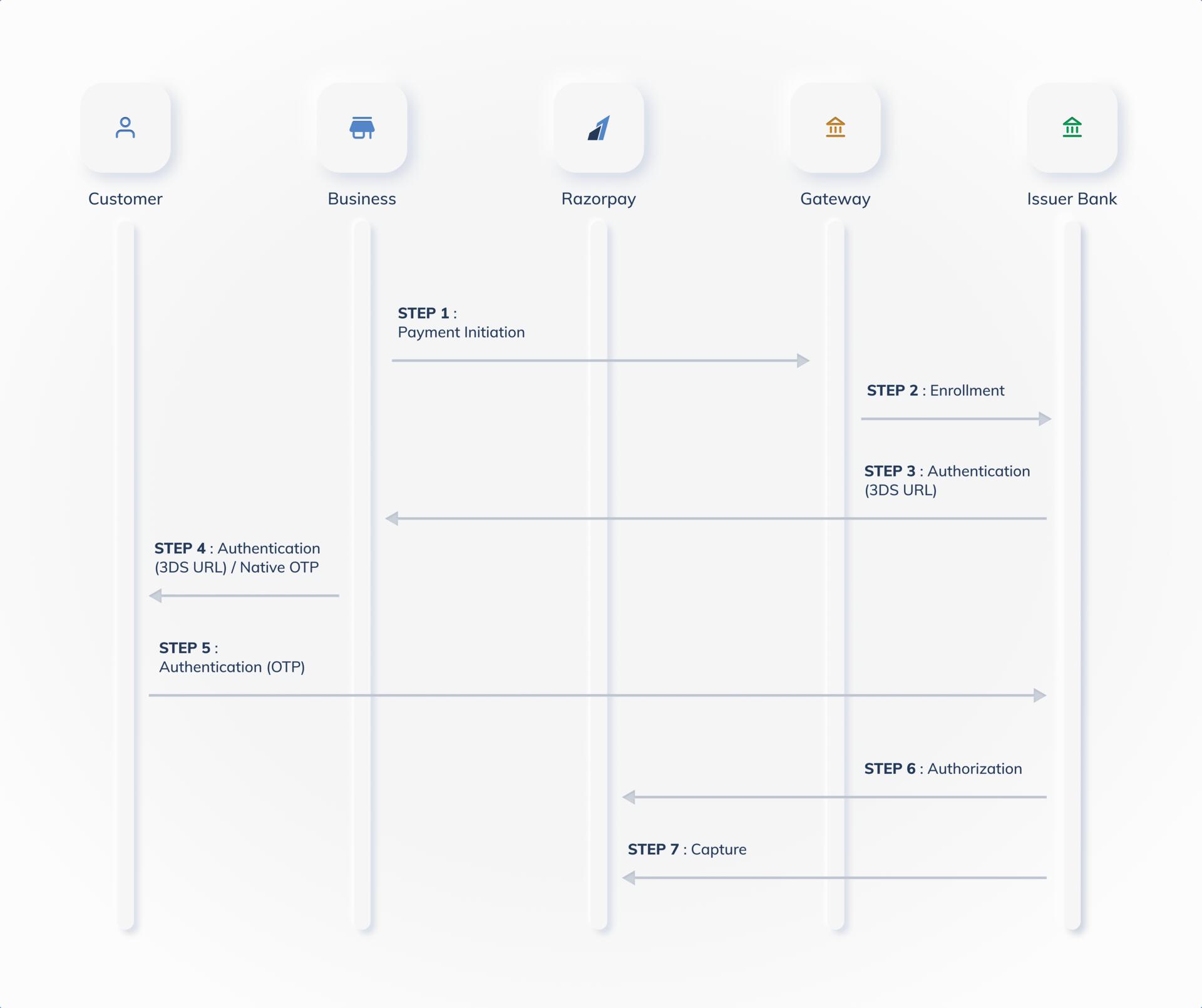
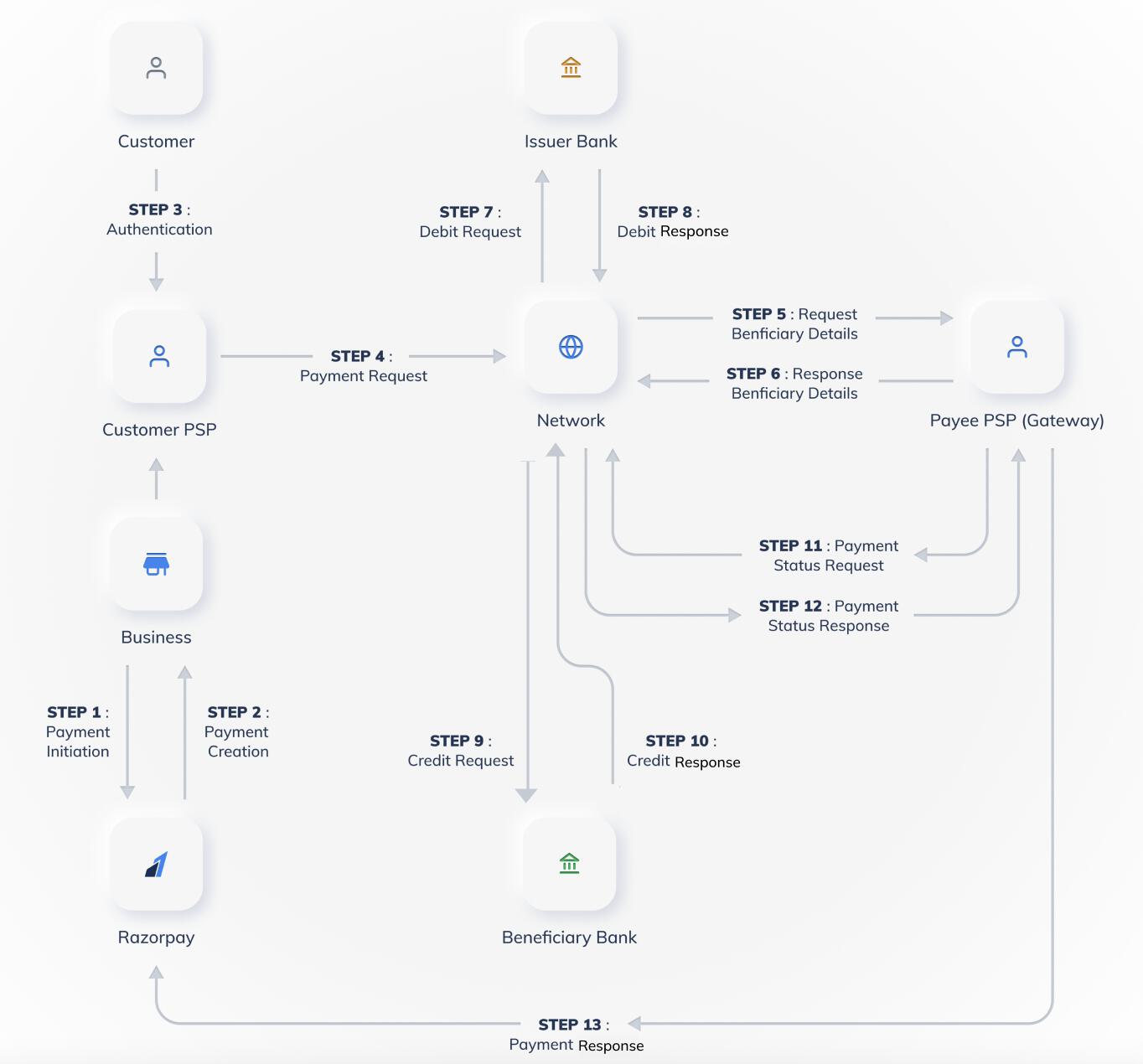
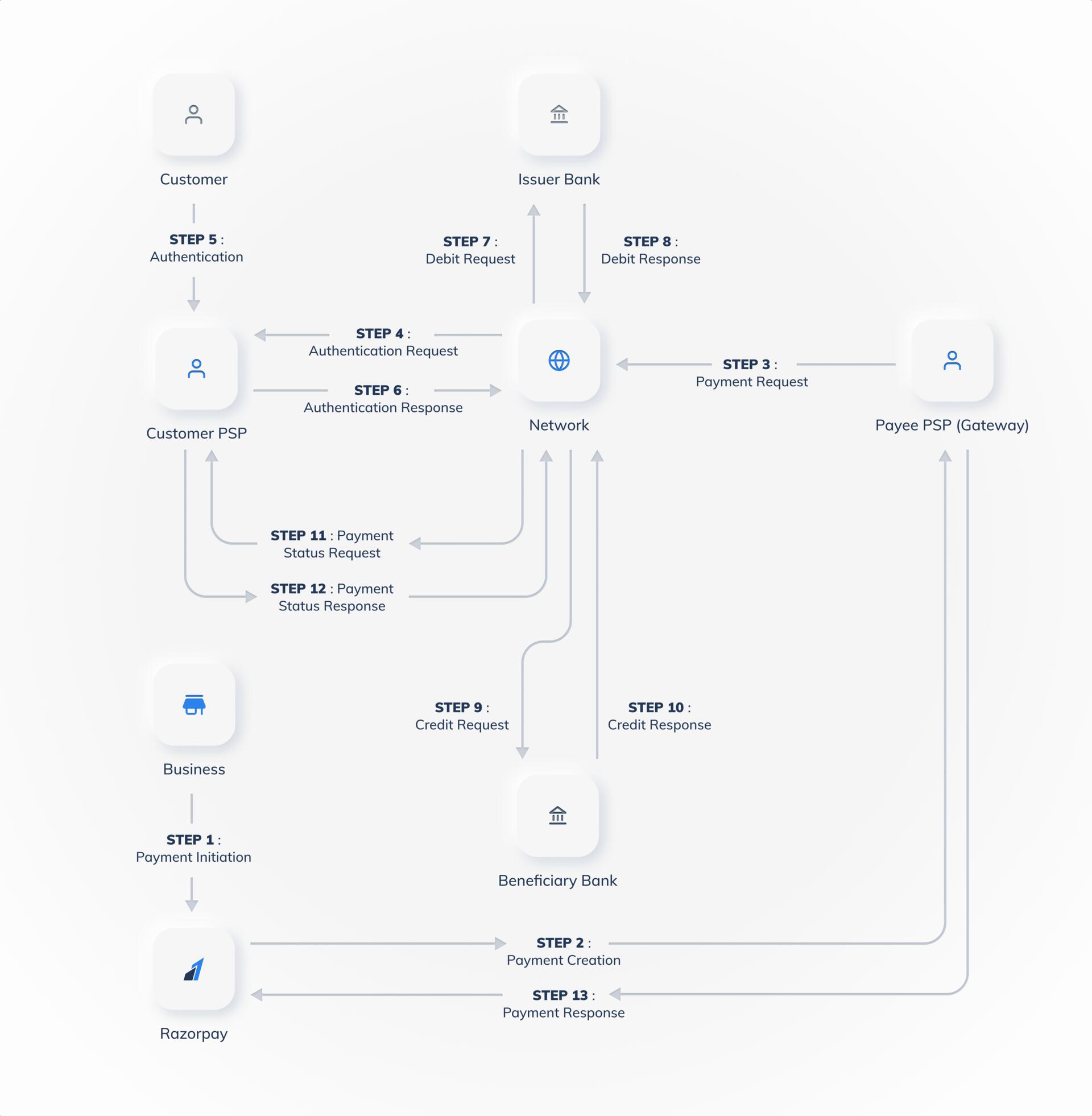
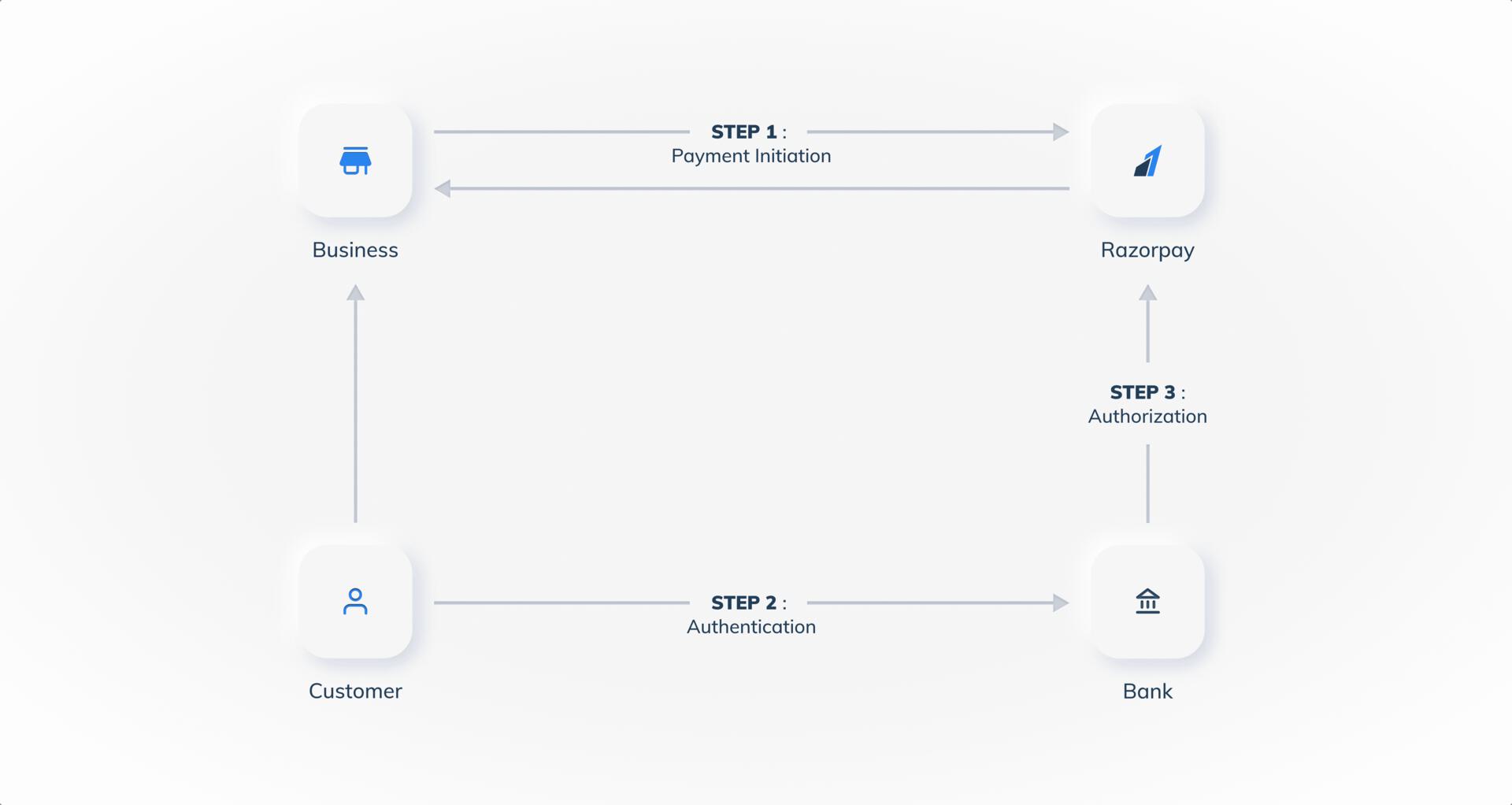
 The payment flow for Wallet payments is illustrated below: