> ## Documentation Index
> Fetch the complete documentation index at: https://razorpay-881012b3.mintlify.site/llms.txt
> Use this file to discover all available pages before exploring further.
# About Payment Methods
> Check the different payment methods that can be configured to accept payments from your customers using Razorpay products.
Available in
🇮🇳 India
Razorpay offers multiple payment methods, allowing your customer the flexibility to complete the payment using the payment method of their choice. This improves user experience and allows you to offer alternate payment methods to your customer in the case of downtimes or low success rates with one of the payment methods.
## View Payment Methods
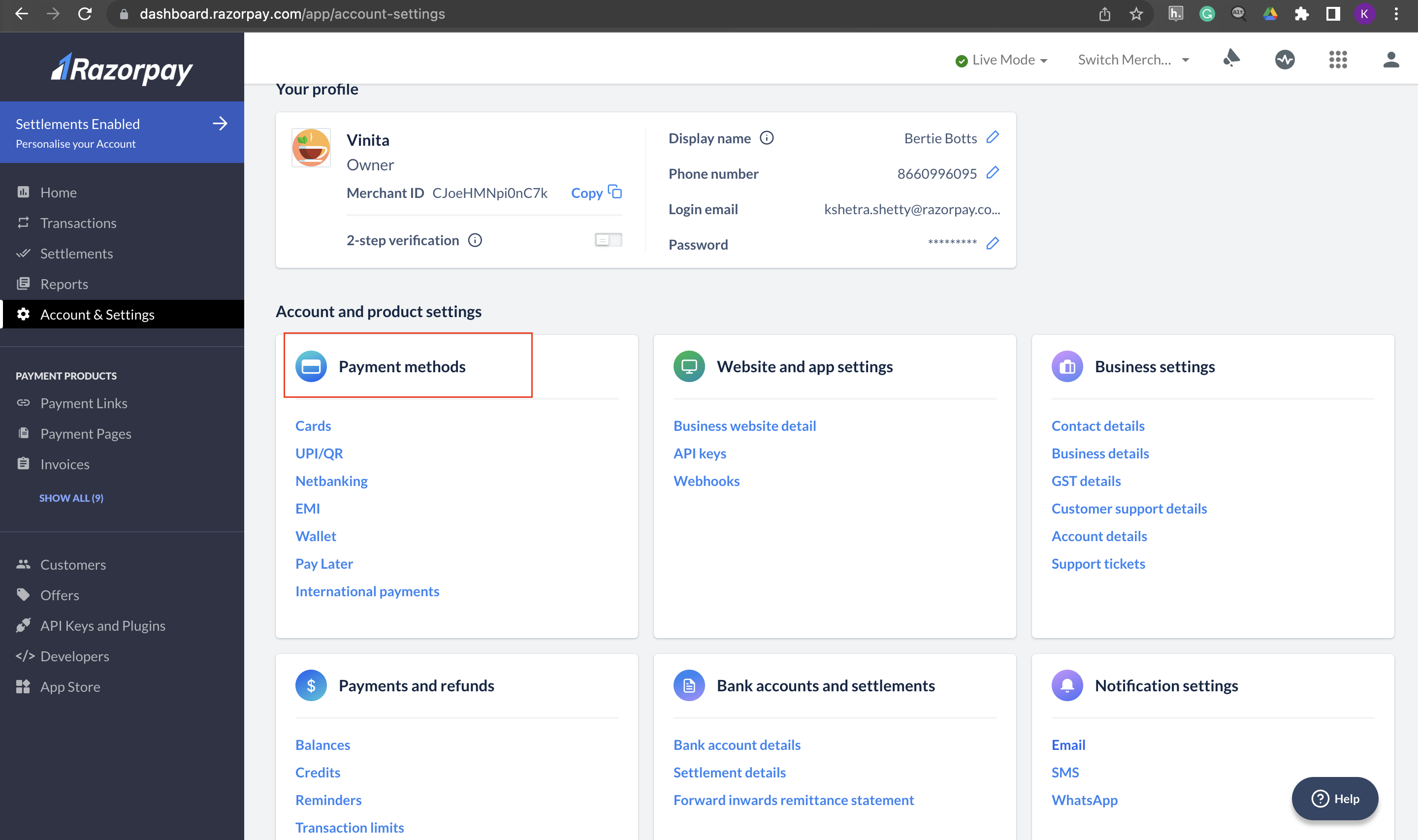
To view payment methods enabled for you:
1. Log in to the Dashboard.
2. Click **Account & Settings** in the left menu.
3. Go to **Payment methods** to view the payment methods enabled for your Razorpay account.
 ## Supported Payment Methods
Following are all the payment modes that the customer can use to complete the payment. Some of them are available by default, while others require approval from us. Raise a request from the Dashboard to enable such payment methods.
| Payment Method | Code | Availability |
| -------------------------------------- | -------------- | -------------------------------------------------- |
| Debit Card | `debit` | ✓ |
| Credit Card | `credit` | ✓ |
| UPI | `upi` | ✓ |
| EMI - Credit Card EMI & Debit Card EMI | `emi` | ✓ |
| Cardless EMI | `cardless_emi` | Requires [Approval](https://razorpay.com/support). |
| Pay Later | `paylater` | ✓ |
| EMI by Razorpay Catalog (Brand EMI) | `brand` | ✓ |
Know more about [supported banks for EMI](/docs/pos/payment-methods/emi/emi-by-razorpay).
## Transaction Limits
* [Transaction Limits for Payment Methods](/docs/payments/payment-methods/transaction-limits)
* [UPI Transaction Limits](/docs/payments/payment-methods/transaction-limits/upi)
## Payment Method Error Codes
There are certain error codes specific to each payment method supported by Razorpay. Know more about the [Payment Method Error Codes](/docs/errors/payments/payment-methods-error-parameters).
## Supported Payment Methods
Following are all the payment modes that the customer can use to complete the payment. Some of them are available by default, while others require approval from us. Raise a request from the Dashboard to enable such payment methods.
| Payment Method | Code | Availability |
| -------------------------------------- | -------------- | -------------------------------------------------- |
| Debit Card | `debit` | ✓ |
| Credit Card | `credit` | ✓ |
| UPI | `upi` | ✓ |
| EMI - Credit Card EMI & Debit Card EMI | `emi` | ✓ |
| Cardless EMI | `cardless_emi` | Requires [Approval](https://razorpay.com/support). |
| Pay Later | `paylater` | ✓ |
| EMI by Razorpay Catalog (Brand EMI) | `brand` | ✓ |
Know more about [supported banks for EMI](/docs/pos/payment-methods/emi/emi-by-razorpay).
## Transaction Limits
* [Transaction Limits for Payment Methods](/docs/payments/payment-methods/transaction-limits)
* [UPI Transaction Limits](/docs/payments/payment-methods/transaction-limits/upi)
## Payment Method Error Codes
There are certain error codes specific to each payment method supported by Razorpay. Know more about the [Payment Method Error Codes](/docs/errors/payments/payment-methods-error-parameters).