> ## Documentation Index
> Fetch the complete documentation index at: https://razorpay-881012b3.mintlify.site/llms.txt
> Use this file to discover all available pages before exploring further.
# Webhook Notifications
> Set Webhooks to get notified about the events related to virtual accounts.
Available in🇮🇳 India
You can be notified of the events related to virtual accounts and payments by subscribing to the Webhooks available on the Dashboard.
Watch this video to see how to set up a webhook.
To set up webhooks:
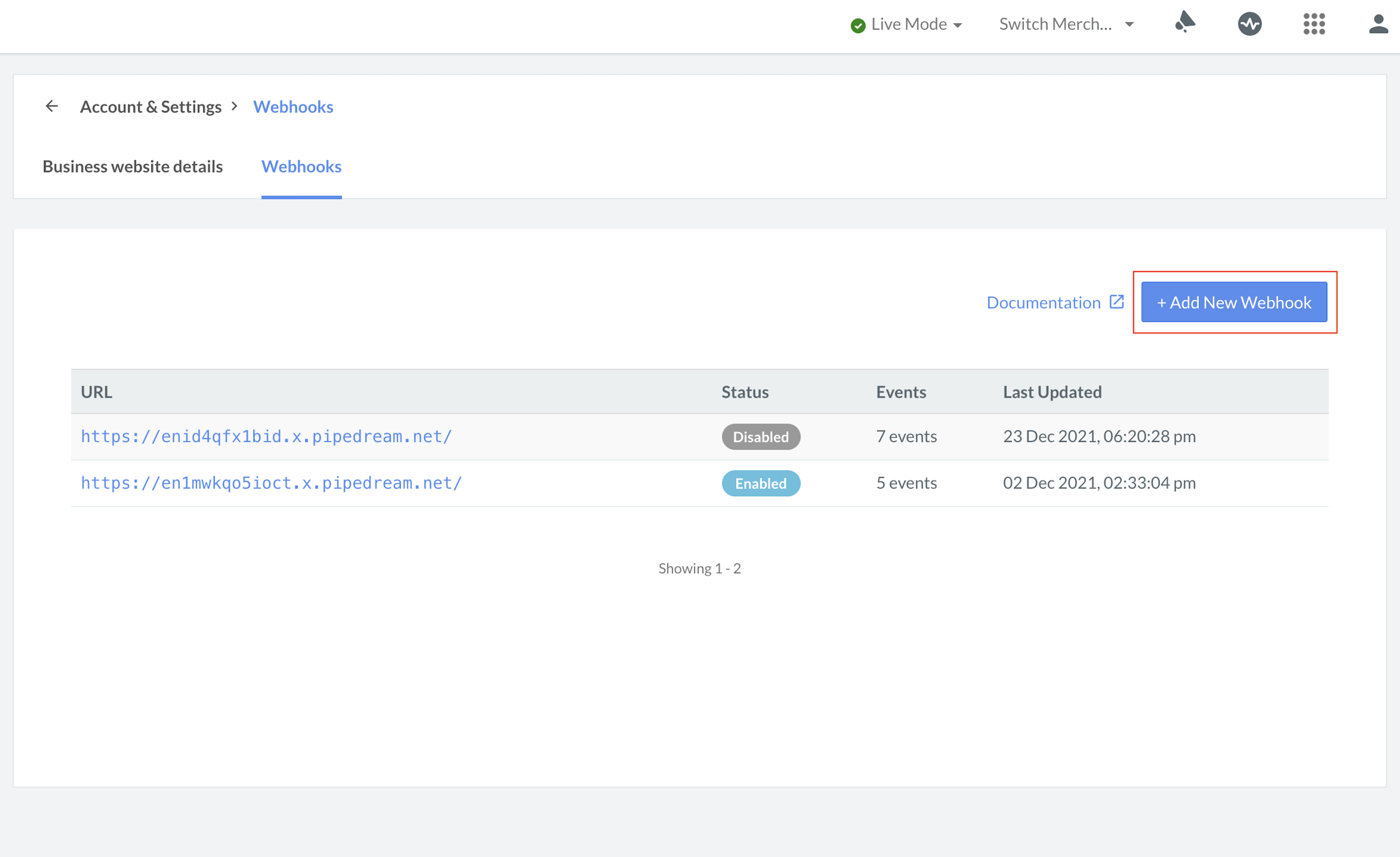
1. Log in to the Dashboard and navigate to **Accounts & Settings**.
2. Click **Webhooks** under **Website and app settings**.
3. Click the **+ Add New Webhook** button.
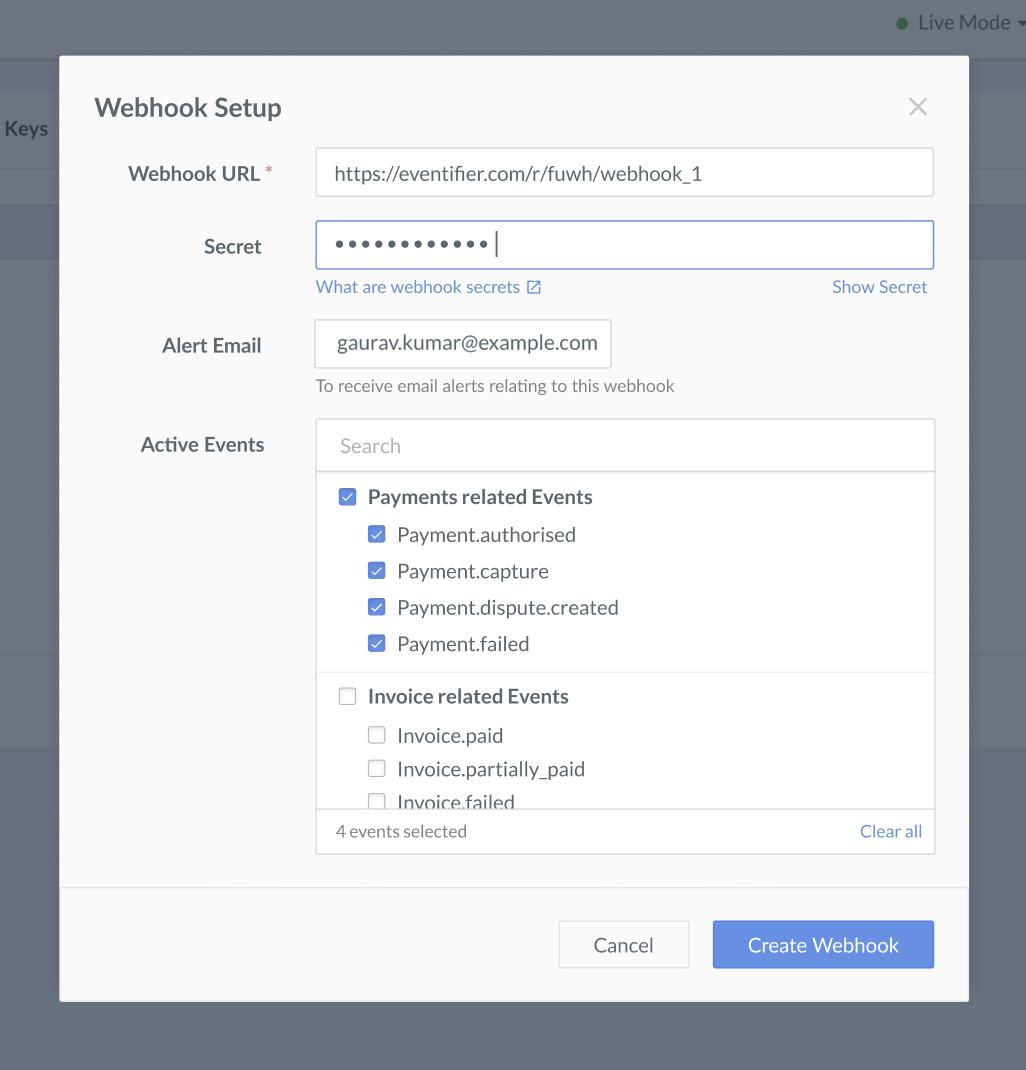
4. In the **Webhook Setup** pop-up page:
* Enter the **URL** where you want to receive the webhook payload when an event is triggered. We recommend using an HTTPS URL.
**Handy Tips**
* You can set up to **30 URLs** to receive Webhook notifications. Webhooks can only be delivered to public URLs.
* If your URL contains `razorpay` as a domain, you will not be able to add the URL and will receive an error.
* If you attempt to save a localhost endpoint as part of a webhook setup, you will notice an error. Know more about [testing Webhooks on an application running on localhost](/docs/webhooks/validate-test#application-running-on-localhost).
* Enter a **Secret** for the webhook endpoint. The secret is used to validate that the webhook is from Razorpay. Do not expose the secret publicly. Know more about [how to validate webhooks](/docs/webhooks/validate-test).
**Handy Tips**
* When setting up the webhook, specify a secret. Use this secret to validate that the webhook is from Razorpay. Entering the secret is optional but recommended. The secret should never be exposed publicly.
* The webhook secret does not need to be the Razorpay API key secret.
* In the **Alert Email** field, enter the email address to which the notifications should be sent in case of webhook failure. You will receive webhook related notifications like failures, deactivation and so on.
* Select the required events from the list of **Active Events**.
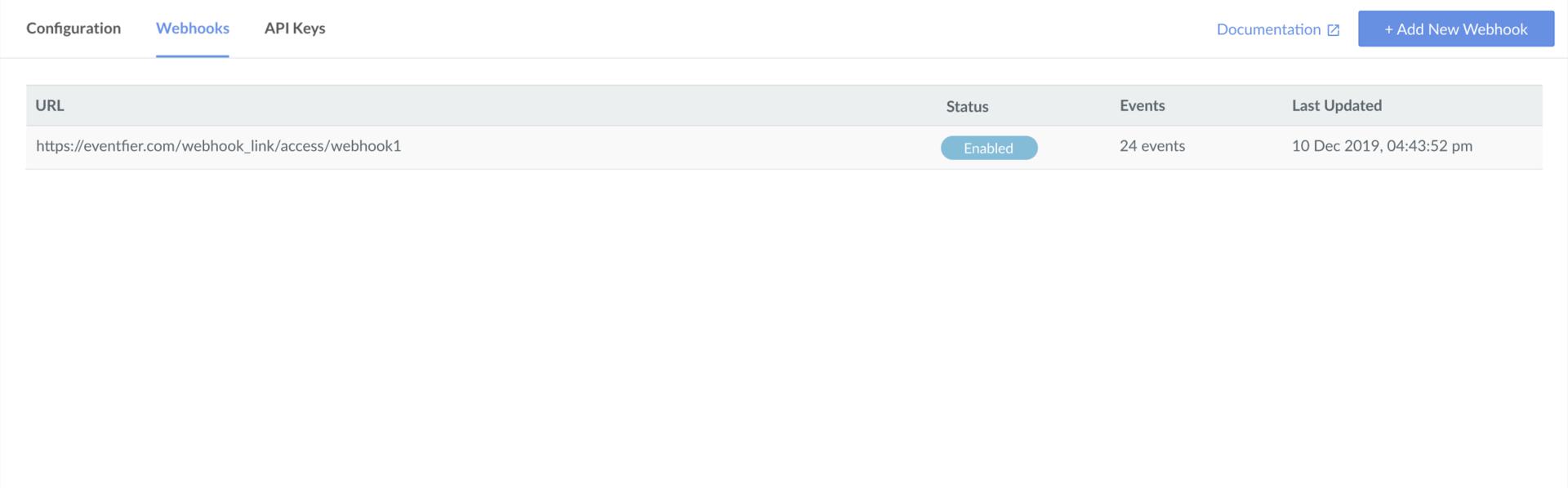
5. Click **Create Webhook**. After you set up a webhook, it appears on the list of webhooks.
6. You can select the webhook and click **Edit** to make more changes.
## Virtual Account Events
In the **Active Events** section, select the following events:
### virtual\_account.created
This event is triggered when a virtual account is created.
```json virtual_account.created theme={null}
{
"entity": "event",
"account_id": "acc_BTIVttuC4ACVOz",
"event": "virtual_account.created",
"contains": [
"virtual_account"
],
"payload": {
"virtual_account": {
"entity": {
"id": "va_Dzzpk3sCZKrcwf",
"name": "acme",
"entity": "virtual_account",
"status": "active",
"description": "Test001",
"amount_expected": null,
"notes": {
"purpose": "emi payment"
},
"amount_paid": 0,
"customer_id": null,
"receivers": [
{
"id": "qr_Dzzpk4GF9c87kT",
"entity": "qr_code",
"reference": "Dzzpk4GF9c87kT",
"short_url": "https://rzp.io/i/7WYVO8U",
"created_at": 1578053029
}
],
"close_by": null,
"closed_at": null,
"created_at": 1578053030
}
}
},
"created_at": 1578053030
}
```
### virtual\_account.credited
This event is generated when the payment is made to a virtual account.
```json virtual_account.credited theme={null}
{
"entity": "event",
"account_id": "acc_BTIVttuC4ACVOz",
"event": "virtual_account.credited",
"contains": [
"payment",
"virtual_account"
],
"payload": {
"payment": {
"entity": {
"id": "pay_Dzzhsw8OqB4LH3",
"entity": "payment",
"amount": 100,
"currency": "INR",
"status": "captured",
"order_id": null,
"invoice_id": null,
"international": false,
"method": "upi",
"amount_refunded": 0,
"refund_status": null,
"captured": true,
"description": null,
"card_id": null,
"bank": null,
"wallet": null,
"vpa": "l.-.l@ybl",
"email": "gaurav.kumar@example.com",
"contact": "+919000090000",
"notes": [],
"fee": 1,
"tax": 0,
"error_code": null,
"error_description": null,
"acquirer_data": {
"rrn": null
},
"created_at": 1578052582
}
},
"virtual_account": {
"entity": {
"id": "va_DzzhQ8z0VOy6N4",
"name": "acme",
"entity": "virtual_account",
"status": "active",
"description": "Test001",
"amount_expected": 100,
"notes": {
"purpose": "emi payment"
},
"amount_paid": 100,
"customer_id": null,
"close_by": null,
"closed_at": null,
"created_at": 1578052556,
"receivers": [
{
"id": "qr_DzzhQ9GuultaKH",
"entity": "qr_code",
"reference": "DzzhQ9GuultaKH",
"short_url": "https://rzp.io/i/romdKJQ",
"created_at": 1578052556
}
]
}
}
},
"created_at": 1578052583
}
```
### virtual\_account.closed
This event is triggered when a virtual account either expires on a date set or is manually closed by you. For example, you might want to stop accepting further payments for a virtual account. In such cases, the virtual account should be closed.
```json virtual_account.closed theme={null}
{
"entity": "event",
"account_id": "acc_BTIVttuC4ACVOz",
"event": "virtual_account.closed",
"contains": [
"virtual_account"
],
"payload": {
"virtual_account": {
"entity": {
"id": "va_DzzhQ8z0VOy6N4",
"name": "acme",
"entity": "virtual_account",
"status": "closed",
"description": "Test001",
"amount_expected": 100,
"notes": {
"purpose": "emi payment"
},
"amount_paid": 100,
"customer_id": null,
"receivers": [
{
"id": "qr_DzzhQ9GuultaKH",
"entity": "qr_code",
"reference": "DzzhQ9GuultaKH",
"short_url": "https://rzp.io/i/romdKJQ",
"created_at": 1578052556
}
],
"close_by": null,
"closed_at": 1578053294,
"created_at": 1578052556
}
}
},
"created_at": 1578053294
}
```
### Related Information
* [Set up Webhooks](/docs/webhooks)
* [Validate Signature](/docs/webhooks#validation)
 4. In the **Webhook Setup** pop-up page:
* Enter the **URL** where you want to receive the webhook payload when an event is triggered. We recommend using an HTTPS URL.
4. In the **Webhook Setup** pop-up page:
* Enter the **URL** where you want to receive the webhook payload when an event is triggered. We recommend using an HTTPS URL.
 6. You can select the webhook and click **Edit** to make more changes.
## Virtual Account Events
In the **Active Events** section, select the following events:
### virtual\_account.created
This event is triggered when a virtual account is created.
```json virtual_account.created theme={null}
{
"entity": "event",
"account_id": "acc_BTIVttuC4ACVOz",
"event": "virtual_account.created",
"contains": [
"virtual_account"
],
"payload": {
"virtual_account": {
"entity": {
"id": "va_Dzzpk3sCZKrcwf",
"name": "acme",
"entity": "virtual_account",
"status": "active",
"description": "Test001",
"amount_expected": null,
"notes": {
"purpose": "emi payment"
},
"amount_paid": 0,
"customer_id": null,
"receivers": [
{
"id": "qr_Dzzpk4GF9c87kT",
"entity": "qr_code",
"reference": "Dzzpk4GF9c87kT",
"short_url": "https://rzp.io/i/7WYVO8U",
"created_at": 1578053029
}
],
"close_by": null,
"closed_at": null,
"created_at": 1578053030
}
}
},
"created_at": 1578053030
}
```
### virtual\_account.credited
This event is generated when the payment is made to a virtual account.
```json virtual_account.credited theme={null}
{
"entity": "event",
"account_id": "acc_BTIVttuC4ACVOz",
"event": "virtual_account.credited",
"contains": [
"payment",
"virtual_account"
],
"payload": {
"payment": {
"entity": {
"id": "pay_Dzzhsw8OqB4LH3",
"entity": "payment",
"amount": 100,
"currency": "INR",
"status": "captured",
"order_id": null,
"invoice_id": null,
"international": false,
"method": "upi",
"amount_refunded": 0,
"refund_status": null,
"captured": true,
"description": null,
"card_id": null,
"bank": null,
"wallet": null,
"vpa": "l.-.l@ybl",
"email": "gaurav.kumar@example.com",
"contact": "+919000090000",
"notes": [],
"fee": 1,
"tax": 0,
"error_code": null,
"error_description": null,
"acquirer_data": {
"rrn": null
},
"created_at": 1578052582
}
},
"virtual_account": {
"entity": {
"id": "va_DzzhQ8z0VOy6N4",
"name": "acme",
"entity": "virtual_account",
"status": "active",
"description": "Test001",
"amount_expected": 100,
"notes": {
"purpose": "emi payment"
},
"amount_paid": 100,
"customer_id": null,
"close_by": null,
"closed_at": null,
"created_at": 1578052556,
"receivers": [
{
"id": "qr_DzzhQ9GuultaKH",
"entity": "qr_code",
"reference": "DzzhQ9GuultaKH",
"short_url": "https://rzp.io/i/romdKJQ",
"created_at": 1578052556
}
]
}
}
},
"created_at": 1578052583
}
```
### virtual\_account.closed
This event is triggered when a virtual account either expires on a date set or is manually closed by you. For example, you might want to stop accepting further payments for a virtual account. In such cases, the virtual account should be closed.
```json virtual_account.closed theme={null}
{
"entity": "event",
"account_id": "acc_BTIVttuC4ACVOz",
"event": "virtual_account.closed",
"contains": [
"virtual_account"
],
"payload": {
"virtual_account": {
"entity": {
"id": "va_DzzhQ8z0VOy6N4",
"name": "acme",
"entity": "virtual_account",
"status": "closed",
"description": "Test001",
"amount_expected": 100,
"notes": {
"purpose": "emi payment"
},
"amount_paid": 100,
"customer_id": null,
"receivers": [
{
"id": "qr_DzzhQ9GuultaKH",
"entity": "qr_code",
"reference": "DzzhQ9GuultaKH",
"short_url": "https://rzp.io/i/romdKJQ",
"created_at": 1578052556
}
],
"close_by": null,
"closed_at": 1578053294,
"created_at": 1578052556
}
}
},
"created_at": 1578053294
}
```
### Related Information
* [Set up Webhooks](/docs/webhooks)
* [Validate Signature](/docs/webhooks#validation)
6. You can select the webhook and click **Edit** to make more changes.
## Virtual Account Events
In the **Active Events** section, select the following events:
### virtual\_account.created
This event is triggered when a virtual account is created.
```json virtual_account.created theme={null}
{
"entity": "event",
"account_id": "acc_BTIVttuC4ACVOz",
"event": "virtual_account.created",
"contains": [
"virtual_account"
],
"payload": {
"virtual_account": {
"entity": {
"id": "va_Dzzpk3sCZKrcwf",
"name": "acme",
"entity": "virtual_account",
"status": "active",
"description": "Test001",
"amount_expected": null,
"notes": {
"purpose": "emi payment"
},
"amount_paid": 0,
"customer_id": null,
"receivers": [
{
"id": "qr_Dzzpk4GF9c87kT",
"entity": "qr_code",
"reference": "Dzzpk4GF9c87kT",
"short_url": "https://rzp.io/i/7WYVO8U",
"created_at": 1578053029
}
],
"close_by": null,
"closed_at": null,
"created_at": 1578053030
}
}
},
"created_at": 1578053030
}
```
### virtual\_account.credited
This event is generated when the payment is made to a virtual account.
```json virtual_account.credited theme={null}
{
"entity": "event",
"account_id": "acc_BTIVttuC4ACVOz",
"event": "virtual_account.credited",
"contains": [
"payment",
"virtual_account"
],
"payload": {
"payment": {
"entity": {
"id": "pay_Dzzhsw8OqB4LH3",
"entity": "payment",
"amount": 100,
"currency": "INR",
"status": "captured",
"order_id": null,
"invoice_id": null,
"international": false,
"method": "upi",
"amount_refunded": 0,
"refund_status": null,
"captured": true,
"description": null,
"card_id": null,
"bank": null,
"wallet": null,
"vpa": "l.-.l@ybl",
"email": "gaurav.kumar@example.com",
"contact": "+919000090000",
"notes": [],
"fee": 1,
"tax": 0,
"error_code": null,
"error_description": null,
"acquirer_data": {
"rrn": null
},
"created_at": 1578052582
}
},
"virtual_account": {
"entity": {
"id": "va_DzzhQ8z0VOy6N4",
"name": "acme",
"entity": "virtual_account",
"status": "active",
"description": "Test001",
"amount_expected": 100,
"notes": {
"purpose": "emi payment"
},
"amount_paid": 100,
"customer_id": null,
"close_by": null,
"closed_at": null,
"created_at": 1578052556,
"receivers": [
{
"id": "qr_DzzhQ9GuultaKH",
"entity": "qr_code",
"reference": "DzzhQ9GuultaKH",
"short_url": "https://rzp.io/i/romdKJQ",
"created_at": 1578052556
}
]
}
}
},
"created_at": 1578052583
}
```
### virtual\_account.closed
This event is triggered when a virtual account either expires on a date set or is manually closed by you. For example, you might want to stop accepting further payments for a virtual account. In such cases, the virtual account should be closed.
```json virtual_account.closed theme={null}
{
"entity": "event",
"account_id": "acc_BTIVttuC4ACVOz",
"event": "virtual_account.closed",
"contains": [
"virtual_account"
],
"payload": {
"virtual_account": {
"entity": {
"id": "va_DzzhQ8z0VOy6N4",
"name": "acme",
"entity": "virtual_account",
"status": "closed",
"description": "Test001",
"amount_expected": 100,
"notes": {
"purpose": "emi payment"
},
"amount_paid": 100,
"customer_id": null,
"receivers": [
{
"id": "qr_DzzhQ9GuultaKH",
"entity": "qr_code",
"reference": "DzzhQ9GuultaKH",
"short_url": "https://rzp.io/i/romdKJQ",
"created_at": 1578052556
}
],
"close_by": null,
"closed_at": 1578053294,
"created_at": 1578052556
}
}
},
"created_at": 1578053294
}
```
### Related Information
* [Set up Webhooks](/docs/webhooks)
* [Validate Signature](/docs/webhooks#validation)