> ## Documentation Index
> Fetch the complete documentation index at: https://razorpay-881012b3.mintlify.site/llms.txt
> Use this file to discover all available pages before exploring further.
# Build Integration
> Steps to integrate with Razorpay Import Flow for Goods businesses accepting international payments from Indian customers.
Available in
🇮🇳 India
Given below are the steps to integrate with the Import Flow APIs.
## 1.1 Create a Customer
Creating a customer generates a unique `customer_id` by collecting basic details such as name, email, and contact details. This `customer_id` must be included when creating a payment request to link the payment to the customer. Use the following API to create a customer.
You can try out our APIs on the Razorpay Postman Public Workspace. Fork the workspace and test the APIs with your [Test API Keys](/docs/api/authentication#generate-api-keys).
`POST /customers`
```bash Curl theme={null}
curl -u [YOUR_KEY_ID]:[YOUR_KEY_SECRET] \
-X POST https://api.razorpay.com/v1/customers \
-H "Content-Type: application/json" \
-d '{
"name": "Gaurav Kumar",
"contact": "9123456780",
"email": "gaurav.kumar@example.com",
"fail_existing": "0",
"notes": {
"notes_key_1": "Tea, Earl Grey, Hot",
"notes_key_2": "Tea, Earl Grey… decaf."
}
}'
```
```java Java theme={null}
RazorpayClient razorpay = new RazorpayClient("[YOUR_KEY_ID]", "[YOUR_KEY_SECRET]");
JSONObject customerRequest = new JSONObject();
customerRequest.put("name","Gaurav Kumar");
customerRequest.put("contact","9123456780");
customerRequest.put("email","gaurav.kumar@example.com");
customerRequest.put("fail_existing","0");
JSONObject notes = new JSONObject();
notes.put("notes_key_1","Tea, Earl Grey, Hot");
notes.put("notes_key_2","Tea, Earl Grey… decaf.");
customerRequest.put("notes",notes);
Customer customer = razorpay.customers.create(customerRequest);
```
```python Python theme={null}
import razorpay
client = razorpay.Client(auth=("YOUR_ID", "YOUR_SECRET"))
client.customer.create({
"name": "Gaurav Kumar",
"contact": 9123456780,
"email": "gaurav.kumar@example.com",
"fail_existing": "0",
"notes": {
"notes_key_1": "Tea, Earl Grey, Hot",
"notes_key_2": "Tea, Earl Grey… decaf."
}
})
```
```go Go theme={null}
import ( razorpay "github.com/razorpay/razorpay-go" )
client := razorpay.NewClient("YOUR_KEY_ID", "YOUR_SECRET")
data := map[string]interface{}{
"name": "Gaurav Kumar",
"contact": 9123456780,
"email": "gaurav.kumar@example.com",
"fail_existing": "0",
"notes": map[string]interface{}{
"notes_key_1": "Tea, Earl Grey, Hot",
"notes_key_2": "Tea, Earl Grey… decaf.",
},
}
body, err := client.Customer.Create(data, nil)
```
```php PHP theme={null}
$api = new Api($key_id, $secret);
$api->customer->create(array('name' => 'Gaurav Kumar', 'email' => 'gaurav.kumar@example.com','contact'=>'9123456780','notes'=> array('notes_key_1'=> 'Tea, Earl Grey, Hot','notes_key_2'=> 'Tea, Earl Grey… decaf'));
```
```csharp .NET theme={null}
RazorpayClient client = new RazorpayClient("[YOUR_KEY_ID]", "[YOUR_KEY_SECRET]");
Dictionary options = new Dictionary();
options.Add("name", "Gaurav Kumar");
options.Add("contact", "9123456780");
options.Add("email", "gaurav.kumar@example.com");
options.Add("fail_existing", "0");
Customer customer = Customer.Create(options);
```
```ruby Ruby theme={null}
require "razorpay"
Razorpay.setup('YOUR_KEY_ID', 'YOUR_SECRET')
Razorpay::Customer.create({
"name": "Gaurav Kumar",
"contact": 9123456780,
"email": "gaurav.kumar@example.com",
"fail_existing": "0",
"notes": {
"notes_key_1": "Tea, Earl Grey, Hot",
"notes_key_2": "Tea, Earl Grey… decaf."
}
})
```
```javascript Node.js theme={null}
var instance = new Razorpay({ key_id: 'YOUR_KEY_ID', key_secret: 'YOUR_SECRET' })
instance.customers.create({
name: "Gaurav Kumar",
contact: 9123456780,
email: "gaurav.kumar@example.com",
fail_existing: "0",
notes: {
notes_key_1: "Tea, Earl Grey, Hot",
notes_key_2: "Tea, Earl Grey… decaf."
}
})
```
```json Success theme={null}
{
"id": "cust_MpINfSkdEvtdxb",
"entity": "customer",
"name": "Gaurav Kumar",
"email": "gaurav.kumar@example.com",
"contact": "9123456780",
"gstin": null,
"notes": {
"notes_key_1": "Tea, Earl Grey, Hot",
"notes_key_2": "Tea, Earl Grey… decaf."
},
"created_at": 1697550382
}
```
```json Failure theme={null}
{
"error": {
"code": "BAD_REQUEST_ERROR",
"description": "Contact number should be at least 8 digits, including country code",
"source": "business",
"step": "NA",
"reason": "invalid_contact_number",
"metadata": {},
"field": "contact"
}
}
```
`name` *mandatory*
: `string` Customer's name.
* Character length: Between 5 and 50 characters.
* Allowed characters: Uppercase letters (A-Z), lowercase letters (a-z), and spaces (not at the beginning).
* Not allowed characters: Numbers, special characters (e.g., @, ", ,, ., etc.), Unicode characters, emojis, and non-Latin scripts or regional languages.
* Prohibited names: Names must be meaningful and contextually appropriate.
* Avoid using repetitive patterns (e.g., aaa, xyz, kkk kk).
* Names like litri litri, Hfg Gh, or husi husi are not permitted.
* Curse words or offensive names are prohibited.
* Example: `Gaurav Kumar`.
`contact` *mandatory*
: `string` The customer's phone number. A maximum length of 15 characters including country code. For example, `+919123456780`.
`email` *mandatory*
: `string` The customer's email address. A maximum length of 64 characters for the username. For example, in "[gaurav.kumar@example.com](mailto:gaurav.kumar@example.com)", "gaurav.kumar" must not exceed 64 characters.
`fail_existing` *optional*
: `string` The request throws an exception by default if a customer with the exact details already exists. You can pass an additional parameter `fail_existing` to get the existing customer's details in the response. Possible values:
* `1` (default): If a customer with the same details already exists, throws an error.
* `0`: If a customer with the same details already exists, fetches details of the existing customer.
`gstin` *optional*
: `string` Customer's GST number, if available.
For example, `29XAbbA4369J1PA`.
`notes` *optional*
: `object` Key-value pair used to store additional information about the entity. Holds 15 key-value pairs, 256 characters (maximum) each. For example, `"note_key": "Beam me up Scotty”`.
`id`
: `string` Unique identifier of the customer. For example, `cust_1Aa00000000004`.
`entity` *optional*
: `string` Indicates the type of entity.
`name`
: `string` Customer's name.
* Character length: Between 5 and 50 characters.
* Allowed characters: Uppercase letters (A-Z), lowercase letters (a-z), and spaces (not at the beginning).
* Not allowed characters: Numbers, special characters (e.g., @, ", ,, ., etc.), Unicode characters, emojis, and non-Latin scripts or regional languages.
* Prohibited names: Names must be meaningful and contextually appropriate.
* Avoid using repetitive patterns (e.g., aaa, xyz, kkk kk).
* Names like litri litri, Hfg Gh, or husi husi are not permitted.
* Curse words or offensive names are prohibited.
* Example: `Gaurav Kumar`.
`contact`
: `string` The customer's phone number. A maximum length of 15 characters including country code. For example, `+919123456780`.
`email`
: `string` The customer's email address. A maximum length of 64 characters for the username. For example, in "[gaurav.kumar@example.com](mailto:gaurav.kumar@example.com)", "gaurav.kumar" must not exceed 64 characters.
`gstin`
: `string` GST number linked to the customer.
For example, `29XAbbA4369J1PA`.
`notes`
: `object` Key-value pair used to store additional information about the entity. Holds 15 key-value pairs, 256 characters (maximum) each. For example, `"note_key": "Beam me up Scotty”`.
`created_at`
: `integer` UNIX timestamp, when the customer was created. For example, `1234567890`.
| Error | Cause | Solution |
| ------------------------------------------------------------------- | ----------------------------------------------------------------------------------------------------------------------------------------------------------------------------------------------------- | ---------------------------------------------------------------------------------------------------------------------------------------------------------------------------- |
| The API `` provided is invalid. | The API credentials passed in the API call differ from the ones generated on the Dashboard. Possible reasons: - Different keys for test mode and live modes.
- Expired API key.
| The API keys must be active and entered correctly with no whitespace before or after the keys. Know how to [Generate API keys](/docs/api/authentication#generate-api-keys). |
| Contact number should be at least 8 digits, including country code. | The contact number is less than 8 digits. | Enter contact number that meets the validation criteria. It should have at least 8 digits, including the country code. For example, "+919123456780". |
## 1.2 Create an Order
After a customer is created, an order needs to be generated using the Orders API. This order contains details such as the payment amount, currency, customer details, tax-related information and other custom notes. After the order is created, an `order_id` is generated, for example, `order_NGrgEcmYJsfUyl`. You must pass this `order_id` in the checkout code to associate this order with the payment. Learn more about [Order and Payment states](/docs/payments/orders#order-states).
`POST /orders`
```bash Curl theme={null}
curl -u [YOUR_KEY_ID]:[YOUR_KEY_SECRET] \
-X POST https://api.razorpay.com/v1/orders \
-H "content-type: application/json" \
-d '{
"amount": 10000,
"currency": "INR",
"receipt": "receipt#1",
"customer_id": "cust_OwZZseNBf9Uqsi",
"customer_details": {
"name": "Gaurav Kumar",
"email": "gaurav.kumar@example.com",
"contact": "9123456780",
"shipping_address": {
"line1": "Mantri apartment",
"line2": "Koramangala",
"city": "Bengaluru",
"country": "IND",
"state": "Karnataka",
"zipcode": "560032",
"latitude": "123123",
"longitude": "1231231"
}
},
"line_items": [
{
"type": "e_commerce",
"name": "Cotton Shirt",
"e_commerce": {
"other_product_codes": {
"hsc": "620520"
}
}
}
],
"notes": {
"key2": "value2"
}
}'
```
```json Success theme={null}
{
"amount": 10000,
"amount_due": 10000,
"amount_paid": 0,
"attempts": 0,
"created_at": 1703569876,
"currency": "INR",
"entity": "order",
"id": "order_NGrgEcmYJsfUyl",
"notes": {
"key1": "value3",
"key2": "value2"
},
"offer_id": null,
"receipt": "receipt#1",
"status": "created"
}
```
```json Failure - Amount theme={null}
{
"error": {
"code": "BAD_REQUEST_ERROR",
"description": "The amount must be at least INR 1.00",
"source": "business",
"step": "payment_initiation",
"reason": "input_validation_failed",
"metadata": {},
"field": "amount"
}
}
```
```json Failure - Customer Name theme={null}
{
"error": {
"code": "BAD_REQUEST_ERROR",
"description": "customer name is invalid",
"metadata": {},
"reason": "input_validation_failed",
"source": "business",
"step": "payment_initiation"
}
}
```
```json Failure - Address Line theme={null}
{
"error": {
"code": "BAD_REQUEST_ERROR",
"description": "Address line 1 and line 2 can only contain alphanumeric characters and limited special characters",
"metadata": {},
"reason": "input_validation_failed",
"source": "business",
"step": "payment_initiation"
}
}
```
```json Failure - HS Code theme={null}
{
"error": {
"code": "BAD_REQUEST_ERROR",
"description": "hsc should be between 6-12 digits",
"source": "business",
"step": "payment_initiation",
"reason": "input_validation_failed",
"metadata": {},
"field": "hsc"
}
}
```
**Merchant ID(MID)-Level HS Code Mapping**
If all your products map to a single HS code, Razorpay can configure it at the MID level. In this case, you do not need to pass `hsc` in the Create Order API. If you sell products with different HS codes, pass the respective `hsc` in the line item details for each product.
For example:
* **Single HS code:** A business who only sells cotton shirts maps HS code `620520` at the MID level. The Create Order API can be called without `line_items`.
* **Multiple HS codes:** A business who sells cotton shirts and sports footwear passes the respective HS code for each product in `line_items` (`620520` for shirts, `640411` for footwear).
If the HS code is not provided through either method, the payment will be captured but settlement of that payment will be held until HS code is provided.
`amount` *mandatory*
: `integer` The amount for which the order was created, in currency subunits. For example, for an amount of ₹295, enter `29500`. Payment can only be made for this amount against the Order.
`currency` *mandatory*
: `string` ISO code for the currency in which you want to accept the payment. The default length is 3 characters. For example, `INR`.
`receipt` *optional*
: `string` Receipt number that corresponds to this order, set for your internal reference. Can have a maximum length of 40 characters and has to be unique.
`customer_id` *mandatory*
: `string` Unique identifier of the customer. For example, `cust_1Aa00000000004`.
`customer_details` *mandatory*
: `object` This contains details about the customer details of the order.
`name` *mandatory*
: `string` Customer's name.
* Character length: Between 5 and 50 characters.
* Allowed characters: Uppercase letters (A-Z), lowercase letters (a-z), and spaces (not at the beginning).
* Not allowed characters: Numbers, special characters (e.g., @, ", ,, ., etc.), Unicode characters, emojis, and non-Latin scripts or regional languages.
* Prohibited names: Names must be meaningful and contextually appropriate.
* Avoid using repetitive patterns (e.g., aaa, xyz, kkk kk).
* Names like litri litri, Hfg Gh, or husi husi are not permitted.
* Curse words or offensive names are prohibited.
* Example: `Gaurav Kumar`.
`email` *optional*
: `string` The customer's email address. A maximum length of 64 characters for the username. For example, in "[gaurav.kumar@example.com](mailto:gaurav.kumar@example.com)", "gaurav.kumar" must not exceed 64 characters.
`contact` *optional*
: `string` The customer's phone number. A maximum length of 15 characters including country code. For example, `+919123456780`.
`shipping_address` *mandatory*
: `object` This contains the shipping address of the order.
`line1` *mandatory*
: `string` Address Line 1 of the address.
* Character length: Must be between 3 and 100 characters.
* Allowed characters: Uppercase letters (A-Z), lowercase letters (a-z), numbers (0-9), spaces, and special characters (\*&/-()#\_+\{}\[]:'".,.).
* Not allowed characters: Regional languages.
`line2` *mandatory*
: `string` Address Line 2 of the address.
* Character length: Must be between 3 and 100 characters.
* Allowed characters: Uppercase letters (A-Z), lowercase letters (a-z), numbers (0-9), spaces, and special characters (\*&/-()#\_+\{}\[]:'".,.).
* Not allowed characters: Regional languages.
`city` *mandatory*
: `string` Name of the city. Must be between 3 and 50 characters in length and can only include uppercase (A-Z) and lowercase (a-z) English letters, and spaces.
`country` *mandatory*
: `string` ISO3 country code of the billing address. Only `IND` is allowed.
`state` *mandatory*
: `string` Name of the state. It must be between 3 and 50 characters extended and can only include uppercase (A-Z) and lowercase (a-z) English letters and spaces. Please send the full name of the state, for example, Madhya Pradesh.
`zipcode` *mandatory*
: `string` The ZIP code must consist of 6-digit numeric characters. Only valid Indian ZIP codes will be accepted. Refer to the [list of supported ZIP codes](https://razorpay.com/docs/build/browser/assets/images/list-of-supported-zip-codes.xlsx).
`latitude` *optional*
: `float` Latitude of the position expressed in decimal degrees (WSG 84), for example, 6.244203. A positive value denotes the northern hemisphere or the equator, and a negative value denotes the southern hemisphere. The number of digits to represent the precision of the coordinate.
`longitude` *optional*
: `float` Longitude of the position expressed in decimal degrees (WSG 84), for example, -75.581211. A positive value denotes east longitude or the prime meridian, and a negative value denotes west longitude. The number of digits to represent the precision of the coordinate.
`line_items` *mandatory*
: `array` Array of line items in the order. Each line item represents a product being purchased. Required for Goods businesses to capture the Harmonised System code per product for cross-border settlement.
`type` *optional*
: `string` Type of the line item. Possible value: `e_commerce`.
`name` *optional*
: `string` Name of the product. For example, `Cotton Shirt`.
`e_commerce` *mandatory*
: `object` Contains e-commerce specific details for the product.
`other_product_codes` *mandatory*
: `object` Contains product code identifiers used for risk assessment and regulatory classification.
`hsc` *mandatory*
: `string` Harmonised System code that classifies the exported product for customs and AD bank settlement. Must be between 6 and 12 digits. For example, `620520`.
`notes` *optional*
: `json object` Key-value pair used to store additional information about the entity. Holds 15 key-value pairs, 256 characters (maximum) each. For example, `"note_key": "Beam me up Scotty”`.
`amount`
: `integer` The amount for which the order was created, in currency subunits. For example, for an amount of ₹295, enter `29500`.
`amount_due`
: `integer` The amount pending against the order.
`amount_paid`
: `integer` The amount paid against the order.
`attempts`
: `integer` The number of payment attempts, successful and failed, that have been made against this order.
`created_at`
: `integer` Indicates the Unix timestamp when this order was created.
`currency`
: `string` ISO code for the currency in which you want to accept the payment. The default length is 3 characters.
`entity`
: `string` Name of the entity. Here, it is `order`.
`id`
: `string` The unique identifier of the order.
`notes`
: `object` Key-value pair used to store additional information about the entity. Holds 15 key-value pairs, 256 characters (maximum) each. For example, `"note_key": "Beam me up Scotty”`.
`offer_id`
: `string` The unique identifier of the offer. For example, `offer_JHD834hjbxzhd38d`.
`receipt`
: `string` Receipt number that corresponds to this order. Can have a maximum length of 40 characters and has to be unique.
`status`
: `string` The status of the order. Possible values:
* `created`: When you create an order, it is in the `created` state. It stays in this state till a payment is attempted on it.
* `attempted`: An order changes to the `attempted` state following the first payment attempt and remains in this state until at least one payment is successfully processed and captured.
* `paid`: After the successful capture of the payment, the order moves to the `paid` state. No further payment requests are permitted once the order moves to the `paid` state.
The order stays in the `paid` state even if the payment associated with the order is refunded.
| Error | Cause | Solution |
| -------------------------------------------------------------------------------------------------- | --------------------------------------------------------------------------------------------------------------------------------------------------------------------------------------------------------------------------------------------------- | ---------------------------------------------------------------------------------------------------------------------------------------------------------------------------------------------------------------------------------------------------------------------------------------------------------------------------------------------------------------------------------- |
| The API `` provided is invalid. | The API credentials passed in the API call differ from the ones generated on the Dashboard. Possible reasons: - Different keys for test mode and live modes.
- Expired API key.
| The API keys must be active and entered correctly with no whitespace before or after the keys. |
| The amount must be at least INR 1.00. | The amount specified is less than the minimum amount. Currency subunits, such as paise (in the case of INR), should always be greater than 100. | Enter an amount equal to or greater than the minimum amount, that is 100. |
| The **field name** is required. | A mandatory field is missing. | Ensure all mandatory fields and values are present. |
| Only english alphabets are allowed in customer name. | The customer name provided in the request contains characters other than English alphabets, such as numbers, special characters, regional language characters, or emojis. | Ensure that the name field in the request contains only English letters (A-Z, a-z) and meets the validation criteria: - Verify that the name does not include numerical characters, special characters (e.g., @, #, \$, etc.), or non-Latin scripts.
- Confirm that there are no extra spaces at the beginning or end of the name.
|
| Customer name should be between 5 and 50 characters. | The `name` field provided in the request does not meet the required character length. It is either shorter than 5 characters or exceeds 50 characters. | - Ensure that the `name` field in the request is between 5 and 50 characters long.
- Check that no extra spaces are included at the beginning or end of the name, which might affect the character count.
|
| Customer name is invalid. | The `name` field provided in the request does not meet the validation requirements. This could be due to the presence of disallowed characters, such as special characters, numbers, regional language characters, or the use of non-Latin scripts. | - Ensure that the `name` field only contains English letters (A-Z, a-z) and spaces (not at the beginning).
- Verify that the name does not include special characters, numerical digits, emojis, or regional language characters.
- Check for unintended characters that may have been included by mistake (e.g., trailing spaces or special symbols).
|
| Only English alphabet is allowed in City and State. | The `city` or `state` field in the request contains invalid characters such as numbers, special characters, or regional language text. | - Ensure that the `city` and `state` fields only contain English letters (A-Z, a-z) and spaces.
- Verify that these fields do not include numerical characters, special characters, or regional language scripts.
|
| Address line 1 and line 2 can only contain alphanumeric characters and limited special characters. | The `Address line1` or `Address line2` field in the request contains invalid characters that are not allowed, such as unsupported symbols or regional language characters. | - Ensure that `Address line1` and `Address line2` only include alphanumeric characters (A-Z, a-z, 0-9) and allowed special characters (e.g., \*&/-()#\_+\{}\[]:'".,).
- Verify that no unsupported symbols or regional language scripts are included.
|
| hsc should be between 6-12 digits. | The `hsc` value provided in the line item is either shorter than 6 digits, longer than 12 digits, or not present in the DGFT allowed HS code list. | - Ensure the `hsc` value is between 6 and 12 digits.
- Look up the correct HS code for the product from the DGFT HS Code list.
- Pass the `hsc` for every line item in the `line_items` array.
|
## 1.3 Create a Payment
Create a payment using the S2S JSON Payments API.
`POST /payments/create/json`
```bash Request theme={null}
curl -u [YOUR_KEY_ID]:[YOUR_KEY_SECRET] \
-X POST https://api.razorpay.com/v1/payments/create/json \
-H "Content-Type: application/json" \
-d '{
"amount": "10000",
"currency": "INR",
"email": "gaurav.kumar@example.com",
"contact": "9123456780",
"customer_id": "cust_MpINfSkdEvtdxb",
"order_id": "order_NGrgEcmYJsfUyl",
"ip": "192.168.0.103",
"method": "netbanking",
"bank": "YESB",
"notes": {
"invoice_number": "IRS1245",
"goods_description": "Digital Lamp"
}
}'
```
```json Success theme={null}
{
"razorpay_payment_id": "pay_Myff1gPuKp3035",
"next": [
{
"action": "redirect",
"url": "https://api.razorpay.com/v1/payments/Myff1gPuKp3035/authenticate"
}
]
}
```
```bash Request theme={null}
curl -u [YOUR_KEY_ID]:[YOUR_KEY_SECRET] \
-X POST https://api.razorpay.com/v1/payments/create/json \
-H "Content-Type: application/json" \
-d '{
"amount": 10000,
"currency": "INR",
"email": "gaurav.kumar@example.com",
"contact": "9123456780",
"ip": "192.168.0.103",
"customer_id": "cust_SHDrkEh1jdzpXB",
"order_id": "order_SgddvrltXpjPhj",
"method": "card",
"card": {
"number": "5267318187975449",
"name": "Gaurav",
"expiry_month": "11",
"expiry_year": "27",
"cvv": "123"
},
"notes": {
"invoice_number": "asd12",
"goods_description": "Digital Lamp"
}
}'
```
```json Success theme={null}
{
"next": [
{
"action": "redirect",
"url": "https://api.razorpay.com/pg_router_test/v1/payments/Sgdo9yMhYGSnmm/authenticate"
},
{
"action": "otp_generate",
"url": "https://api.razorpay.com/pg_router_test/v1/payments/pay_Sgdo9yMhYGSnmm/otp_generate?key_id=rzp_test_iCMpxgO8RdOKGF"
}
],
"razorpay_payment_id": "pay_Sgdo9yMhYGSnmm"
}
```
There are 2 UPI flows available for S2S.
* **Intent Flow:** When a customer selects the UPI payment app on checkout, the app is launched automatically on the mobile device. Customers need not enter VPA or phone numbers as these details are prefilled and submitted along with the other payment details.
* **Collect Flow:** Customers enter their VPAs, open the respective UPI apps and complete the payment on their mobile devices.
**UPI Collect Flow Deprecated**
According to NPCI guidelines, the UPI Collect flow is being deprecated effective 28 February 2026. Customers can no longer make payments or register UPI mandates by manually entering VPA/UPI id/mobile numbers.
**Exemptions:** UPI Collect will continue to be supported for:
* MCC 6012 & 6211 (IPO and secondary market transactions).
* iOS mobile app and mobile web transactions.
* UPI Mandates (execute/modify/revoke operations only)
* eRupi vouchers.
* PACB businesses (cross-border/international payments).
**Action Required:**
* If you are a new Razorpay user, use [UPI Intent](/docs/payments/payment-gateway/s2s-integration/payment-methods/upi/intent).
* If you are an existing Razorpay user not covered by exemptions, you must migrate to UPI Intent or UPI QR code to continue accepting UPI payments. For detailed migration steps, refer to the [migration documentation](/docs/announcements/upi-collect-migration/s2s-integration).
`POST /payments/create/upi`
```bash Request theme={null}
curl -u [YOUR_KEY_ID]:[YOUR_KEY_SECRET] \
-X POST https://api.razorpay.com/v1/payments/create/upi \
-H "Content-Type: application/json" \
-d '{
"amount": "10000",
"currency": "INR",
"email": "gaurav.kumar@example.com",
"contact": "9123456780",
"customer_id": "cust_MpINfSkdEvtdxb",
"order_id": "order_NGrgEcmYJsfUyl",
"ip": "192.168.0.103",
"method": "upi",
"notes": {
"invoice_number": "IRS1245",
"goods_description": "Digital Lamp"
},
"upi": {
"flow" : "intent"
}
}'
```
```json Success theme={null}
{
"link": "upi://pay?am=1.00&cu=INR&mc=6300&mode=04&pa=demo920134.rzp@rxaxis&pn=deeptanshu&tr=Qj0AKJ5fgbMBqZ",
"razorpay_payment_id": "pay_Qj0AKJ5fgbMBqZ"
}
```
**UPI Intent Deep Link - Integration Best Practices**
When rendering the UPI intent flow, use the deep link exactly as returned by the Razorpay API. Do not modify or prefix it with any app-specific scheme (for example, `phonepe://`, `paytm://` or similar). Using the deep link as is ensures the device automatically surfaces all UPI compatible PSP apps installed on the user's device, allowing the user to choose their preferred app to complete the payment.
**Note:** This automatic PSP app discovery via the intent deep link is supported on Android only.
```bash Request theme={null}
curl -u [YOUR_KEY_ID]:[YOUR_KEY_SECRET] \
-X POST https://api.razorpay.com/v1/payments/create/upi \
-H "Content-Type: application/json" \
-d '{
"amount": "10000",
"currency": "INR",
"email": "gaurav.kumar@example.com",
"contact": "9123456780",
"customer_id": "cust_MpINfSkdEvtdxb",
"order_id": "order_NGrgEcmYJsfUyl",
"ip": "192.168.0.103",
"method": "upi",
"notes": {
"invoice_number": "IRS1245",
"goods_description": "Digital Lamp"
},
"upi": {
"flow": "collect",
"vpa": "gauravkumar@exampleupi",
"expiry_time": 5
}
}'
```
```json Success theme={null}
{
"razorpay_payment_id": "pay_Myff1gPuKp3035",
"next": [
{
"action": "redirect",
"url": "https://api.razorpay.com/v1/payments/Myff1gPuKp3035/authenticate"
}
]
}
```
`amount` *mandatory*
: `integer` Payment amount in the smallest currency sub-unit. For example, if the amount to be charged is ₹299, then pass `29900` in this field.
`currency` *mandatory*
: `string` Currency code for the currency in which you want to accept the payment. For example, `INR`.
`email` *mandatory*
: `string` Email address of the customer. Maximum length supported is 40 characters.
`contact` *mandatory*
: `string` Phone number of the customer. For example, 9123456780.
`customer_id` *mandatory*
: `string` Unique identifier of the customer.
`order_id` *mandatory*
: `string` Unique identifier of the Order.
Know more about [Orders API](/docs/api/orders).
`ip` *optional*
: `string` Customer's IP address.
`method` *mandatory*
: `string` Name of the payment method. Possible values are:
* `card`
* `netbanking`
* `upi`
`notes` *mandatory*
: `object` Key-value pair that can be used to store additional information about the entity. Maximum 15 key-value pairs, 256 characters (maximum) each. For example, `"note_key": "Beam me up Scotty”`.
`invoice_number` *mandatory*
: `string` Invoice number of the generated invoice. Ensure that each payment has a unique invoice number, with a length of fewer than 40 characters.
`goods_description` *optional*
: `string` Description of the goods. For example, `Digital Lamp`.
If the payment request is valid, the response contains the following fields.
`link`
: `string` The UPI intent link to redirect the customer to their UPI app for mandate approval. Use this as a deeplink on mobile or convert it to a QR code for desktop.
`razorpay_payment_id`
: `string` Unique identifier of the payment. Present for all responses.
`next`
: `array` A list of action objects available to you to continue the payment process. Present when the payment requires further processing.
`action`
: `string` An indication of the next step available to you to continue the payment process. The value here is `redirect`. Use this URL to redirect customer to the bank page.
`url`
: `string` URL to be used for the action indicated.
**Watch Out!**
* The `invoice_number` field is mandatory for all payment methods. Ensure each payment has a unique invoice number.
* Refer to the [Payment Methods](/docs/payments/payment-gateway/s2s-integration/payment-methods) section for other payment options request parameters.
Following payment methods are supported under the Import Flow:
* Netbanking
* UPI
* Cards (Debit and Credit)
* [Recurring](/docs/payments/international-payments/accept-international-payments-from-indian-customers/s2s-integration/recurring-payments)
For recurring payments, additional integration is needed. Cards, UPI, and UPI with TPV are supported as a payment methods.
## 1.4 Handle Payment Success and Error Events
Once the payment is completed by the customer, a `POST` request is made to the `callback_url` provided in the payment request. The data contained in this request will depend on whether the payment was a **success** or a **failure**.
If the payment made by the customer is successful, the following fields are sent:
* `razorpay_payment_id`
* `razorpay_order_id`
* `razorpay_signature`
```json Callback Example theme={null}
{
"razorpay_payment_id": "pay_29QQoUBi66xm2f",
"razorpay_order_id": "order_9A33XWu170gUtm",
"razorpay_signature": "9ef4dffbfd84f1318f6739a3ce19f9d85851857ae648f114332d8401e0949a3d"
}
```
If the payment has failed, the callback will contain details of the error. Refer to [Errors](/docs/errors) for details.
## 1.5 Verify Payment Signature
Signature verification is a mandatory step to ensure that the callback is sent by Razorpay. The `razorpay_signature` contained in the callback can be regenerated by your system and verified as follows.
Create a string for hashing by combining the "razorpay\_payment\_id" from the callback and the Order ID generated in the initial step, separated by a `|`. Proceed to hash this string using SHA256 alongside your API Secret.
```
generated_signature = hmac_sha256(order_id + "|" + razorpay_payment_id, secret);
if (generated_signature == razorpay_signature) {
payment is successful
}
```
### Generate Signature on your Server
```java Java theme={null}
/**
* This class defines common routines for generating
* authentication signatures for Razorpay Webhook requests.
*/
public class Signature
{
private static final String HMAC_SHA256_ALGORITHM = "HmacSHA256";
/**
* Computes RFC 2104-compliant HMAC signature.
* * @param data
* The data to be signed.
* @param key
* The signing key.
* @return
* The Base64-encoded RFC 2104-compliant HMAC signature.
* @throws
* java.security.SignatureException when signature generation fails
*/
public static String calculateRFC2104HMAC(String data, String secret)
throws java.security.SignatureException
{
String result;
try {
// get an hmac_sha256 key from the raw secret bytes
SecretKeySpec signingKey = new SecretKeySpec(secret.getBytes(), HMAC_SHA256_ALGORITHM);
// get an hmac_sha256 Mac instance and initialize with the signing key
Mac mac = Mac.getInstance(HMAC_SHA256_ALGORITHM);
mac.init(signingKey);
// compute the hmac on input data bytes
byte[] rawHmac = mac.doFinal(data.getBytes());
// base64-encode the hmac
result = DatatypeConverter.printHexBinary(rawHmac).toLowerCase();
} catch (Exception e) {
throw new SignatureException("Failed to generate HMAC : " + e.getMessage());
}
return result;
}
}
```
```php PHP theme={null}
use Razorpay\Api\Api;
$api = new Api($key_id, $key_secret);
$attributes = array('razorpay_signature' => '23233', 'razorpay_payment_id' => '332' , 'razorpay_order_id' => '12122');
$order = $api->utility->verifyPaymentSignature($attributes)
```
```ruby Ruby theme={null}
require 'razorpay'
Razorpay.setup('key_id', 'key_secret')
payment_response = {
'razorpay_order_id': '12122',
'razorpay_payment_id': '332',
'razorpay_signature': '23233'
}
Razorpay::Utility.verify_payment_signature(payment_response)
```
```python Python theme={null}
import razorpay
client = razorpay.Client(auth=("YOUR_ID", "YOUR_SECRET"))
client.utility.verify_payment_signature({
'razorpay_order_id': razorpay_order_id,
'razorpay_payment_id': razorpay_payment_id,
'razorpay_signature': razorpay_signature
})
```
```c .NET theme={null}
Dictionary attributes = new Dictionary();
attributes.Add("razorpay_payment_id", paymentId);
attributes.Add("razorpay_order_id", Request.Form["razorpay_order_id"]);
attributes.Add("razorpay_signature", Request.Form["razorpay_signature"]);
Utils.verifyPaymentSignature(attributes);
```
```javascript Node.js theme={null}
var { validatePaymentVerification } = require('./dist/utils/razorpay-utils');
validatePaymentVerification({"order_id": razorpayOrderId, "payment_id": razorpayPaymentId }, signature, secret);
```
```go Go theme={null}
import (
"crypto/hmac"
"crypto/sha256"
"crypto/subtle"
"encoding/hex"
"fmt"
)
func main() {
signature := "b888a492cb9abb6cb9be1c915f68f4c2a55665464181725f90fcb46cdadd1e13"
secret := "sampleKeySecret000000001"
data := "order_J2AeF1ZpvfqRGH|pay_J2AfAxNHgqqBiI"
//fmt.Printf("Secret: %s Data: %s\n", secret, data)
// Create a new HMAC by defining the hash type and the key (as byte array)
h := hmac.New(sha256.New, []byte(secret))
// Write Data to it
_, err := h.Write([]byte(data))
if err != nil {
panic(err)
}
// Get result and encode as hexadecimal string
sha := hex.EncodeToString(h.Sum(nil))
fmt.Printf("Result: %s\n", sha)
if subtle.ConstantTimeCompare([]byte(sha), []byte(signature)) == 1 {
fmt.Println("Works")
}
}
```
## 1.6 Verify Payment Status
**Handy Tips**
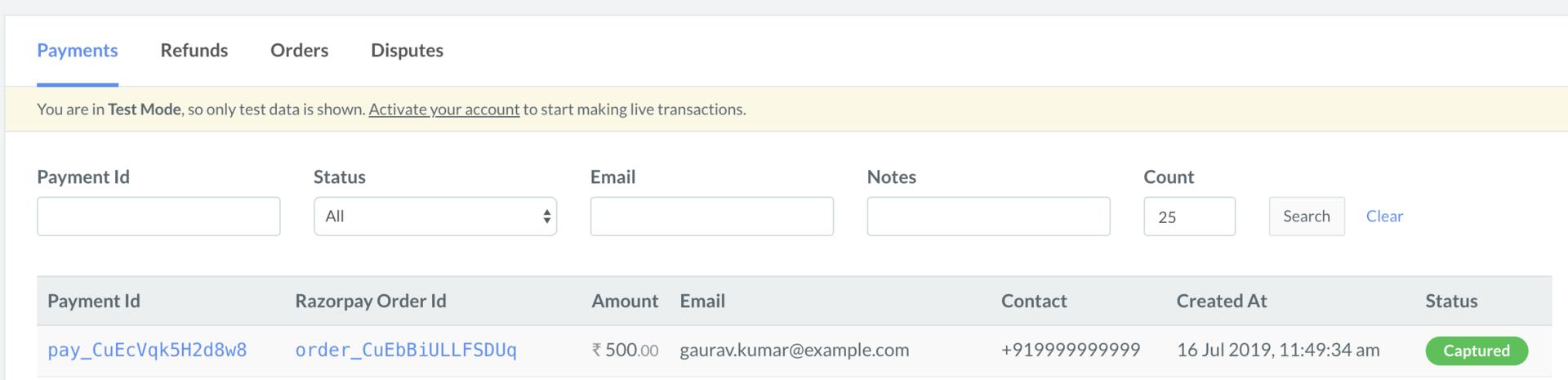
On the Razorpay Dashboard, ensure that the payment status is `captured`. Refer to the payment capture settings page to know how to [capture payments automatically](/docs/payments/payments/capture-settings).
To verify the payment status from the Razorpay Dashboard:
1. Log in to the Razorpay Dashboard and navigate to **Transactions** → **Payments**.
2. Check if a **Payment Id** has been generated and note the status. In case of a successful payment, the status is marked as **Captured**.
 You can use Razorpay webhooks to configure and receive notifications when a specific event occurs. When one of these events is triggered, we send an HTTP POST payload in JSON to the webhook's configured URL. Know how to [set up webhooks.](/docs/webhooks/setup-edit-payments)
#### Example
If you have subscribed to the `order.paid` webhook event, you will receive a notification every time a customer pays you for an order.
[Poll Payment APIs](/docs/api/payments/fetch-all-payments) to check the payment status.
## Next Steps
[Step 2: Test Integration](/docs/payments/international-payments/accept-international-payments-from-indian-customers/s2s-integration/test-integration)
You can use Razorpay webhooks to configure and receive notifications when a specific event occurs. When one of these events is triggered, we send an HTTP POST payload in JSON to the webhook's configured URL. Know how to [set up webhooks.](/docs/webhooks/setup-edit-payments)
#### Example
If you have subscribed to the `order.paid` webhook event, you will receive a notification every time a customer pays you for an order.
[Poll Payment APIs](/docs/api/payments/fetch-all-payments) to check the payment status.
## Next Steps
[Step 2: Test Integration](/docs/payments/international-payments/accept-international-payments-from-indian-customers/s2s-integration/test-integration)