> ## Documentation Index
> Fetch the complete documentation index at: https://razorpay-881012b3.mintlify.site/llms.txt
> Use this file to discover all available pages before exploring further.
# 1. Build Integration
> Steps to integrate with Import Flow APIs for a seamless payment solution for International Businesses.
Available in
🇮🇳 India
Given below are the steps to integrate Razorpay Custom Checkout in your site:
## 1.1 Create a Customer in Server
Creating a customer generates a unique `customer_id` by collecting basic details such as name, email, and contact details. This `customer_id` must be included when creating a payment request to link the payment to the customer. Use the following API to create a customer.
You can try out our APIs on the Razorpay Postman Public Workspace. Fork the workspace and test the APIs with your [Test API Keys](/docs/api/authentication#generate-api-keys).
`POST /customers`
```bash Curl theme={null}
curl -u [YOUR_KEY_ID]:[YOUR_KEY_SECRET] \
-X POST https://api.razorpay.com/v1/customers \
-H "Content-Type: application/json" \
-d '{
"name": "Gaurav Kumar",
"contact": "9123456780",
"email": "gaurav.kumar@example.com",
"fail_existing": "0",
"notes": {
"notes_key_1": "Tea, Earl Grey, Hot",
"notes_key_2": "Tea, Earl Grey… decaf."
}
}'
```
```java Java theme={null}
RazorpayClient razorpay = new RazorpayClient("[YOUR_KEY_ID]", "[YOUR_KEY_SECRET]");
JSONObject customerRequest = new JSONObject();
customerRequest.put("name","Gaurav Kumar");
customerRequest.put("contact","9123456780");
customerRequest.put("email","gaurav.kumar@example.com");
customerRequest.put("fail_existing","0");
JSONObject notes = new JSONObject();
notes.put("notes_key_1","Tea, Earl Grey, Hot");
notes.put("notes_key_2","Tea, Earl Grey… decaf.");
customerRequest.put("notes",notes);
Customer customer = razorpay.customers.create(customerRequest);
```
```python Python theme={null}
import razorpay
client = razorpay.Client(auth=("YOUR_ID", "YOUR_SECRET"))
client.customer.create({
"name": "Gaurav Kumar",
"contact": 9123456780,
"email": "gaurav.kumar@example.com",
"fail_existing": "0",
"notes": {
"notes_key_1": "Tea, Earl Grey, Hot",
"notes_key_2": "Tea, Earl Grey… decaf."
}
})
```
```go Go theme={null}
import ( razorpay "github.com/razorpay/razorpay-go" )
client := razorpay.NewClient("YOUR_KEY_ID", "YOUR_SECRET")
data := map[string]interface{}{
"name": "Gaurav Kumar",
"contact": 9123456780,
"email": "gaurav.kumar@example.com",
"fail_existing": "0",
"notes": map[string]interface{}{
"notes_key_1": "Tea, Earl Grey, Hot",
"notes_key_2": "Tea, Earl Grey… decaf.",
},
}
body, err := client.Customer.Create(data, nil)
```
```php PHP theme={null}
$api = new Api($key_id, $secret);
$api->customer->create(array('name' => 'Gaurav Kumar', 'email' => 'gaurav.kumar@example.com','contact'=>'9123456780','notes'=> array('notes_key_1'=> 'Tea, Earl Grey, Hot','notes_key_2'=> 'Tea, Earl Grey… decaf'));
```
```csharp .NET theme={null}
RazorpayClient client = new RazorpayClient("[YOUR_KEY_ID]", "[YOUR_KEY_SECRET]");
Dictionary options = new Dictionary();
options.Add("name", "Gaurav Kumar");
options.Add("contact", "9123456780");
options.Add("email", "gaurav.kumar@example.com");
options.Add("fail_existing", "0");
Customer customer = Customer.Create(options);
```
```ruby Ruby theme={null}
require "razorpay"
Razorpay.setup('YOUR_KEY_ID', 'YOUR_SECRET')
Razorpay::Customer.create({
"name": "Gaurav Kumar",
"contact": 9123456780,
"email": "gaurav.kumar@example.com",
"fail_existing": "0",
"notes": {
"notes_key_1": "Tea, Earl Grey, Hot",
"notes_key_2": "Tea, Earl Grey… decaf."
}
})
```
```javascript Node.js theme={null}
var instance = new Razorpay({ key_id: 'YOUR_KEY_ID', key_secret: 'YOUR_SECRET' })
instance.customers.create({
name: "Gaurav Kumar",
contact: 9123456780,
email: "gaurav.kumar@example.com",
fail_existing: "0",
notes: {
notes_key_1: "Tea, Earl Grey, Hot",
notes_key_2: "Tea, Earl Grey… decaf."
}
})
```
```json Success theme={null}
{
"id": "cust_MpINfSkdEvtdxb",
"entity": "customer",
"name": "Gaurav Kumar",
"email": "gaurav.kumar@example.com",
"contact": "9123456780",
"gstin": null,
"notes": {
"notes_key_1": "Tea, Earl Grey, Hot",
"notes_key_2": "Tea, Earl Grey… decaf."
},
"created_at": 1697550382
}
```
```json Failure theme={null}
{
"error": {
"code": "BAD_REQUEST_ERROR",
"description": "Contact number should be at least 8 digits, including country code",
"source": "business",
"step": "NA",
"reason": "invalid_contact_number",
"metadata": {},
"field": "contact"
}
}
```
`name` *mandatory*
: `string` Customer's name.
* Character length: Between 5 and 50 characters.
* Allowed characters: Uppercase letters (A-Z), lowercase letters (a-z), and spaces (not at the beginning).
* Not allowed characters: Numbers, special characters (e.g., @, ", ,, ., etc.), Unicode characters, emojis, and non-Latin scripts or regional languages.
* Prohibited names: Names must be meaningful and contextually appropriate.
* Avoid using repetitive patterns (e.g., aaa, xyz, kkk kk).
* Names like litri litri, Hfg Gh, or husi husi are not permitted.
* Curse words or offensive names are prohibited.
* Example: `Gaurav Kumar`.
`contact` *mandatory*
: `string` The customer's phone number. A maximum length of 15 characters including country code. For example, `+919123456780`.
`email` *mandatory*
: `string` The customer's email address. A maximum length of 64 characters for the username. For example, in "[gaurav.kumar@example.com](mailto:gaurav.kumar@example.com)", "gaurav.kumar" must not exceed 64 characters.
`fail_existing` *optional*
: `string` The request throws an exception by default if a customer with the exact details already exists. You can pass an additional parameter `fail_existing` to get the existing customer's details in the response. Possible values:
* `1` (default): If a customer with the same details already exists, throws an error.
* `0`: If a customer with the same details already exists, fetches details of the existing customer.
`gstin` *optional*
: `string` Customer's GST number, if available.
For example, `29XAbbA4369J1PA`.
`notes` *optional*
: `object` Key-value pair used to store additional information about the entity. Holds 15 key-value pairs, 256 characters (maximum) each. For example, `"note_key": "Beam me up Scotty”`.
`id`
: `string` Unique identifier of the customer. For example, `cust_1Aa00000000004`.
`entity`
: `string` Indicates the type of entity.
`name`
: `string` Customer's name.
* Character length: Between 5 and 50 characters.
* Allowed characters: Uppercase letters (A-Z), lowercase letters (a-z), and spaces (not at the beginning).
* Not allowed characters: Numbers, special characters (e.g., @, ", ,, ., etc.), Unicode characters, emojis, and non-Latin scripts or regional languages.
* Prohibited names: Names must be meaningful and contextually appropriate.
* Avoid using repetitive patterns (e.g., aaa, xyz, kkk kk).
* Names like litri litri, Hfg Gh, or husi husi are not permitted.
* Curse words or offensive names are prohibited.
* Example: `Gaurav Kumar`.
`contact`
: `string` The customer's phone number. A maximum length of 15 characters including country code. For example, `+919123456780`.
`email`
: `string` The customer's email address. A maximum length of 64 characters for the username. For example, in "[gaurav.kumar@example.com](mailto:gaurav.kumar@example.com)", "gaurav.kumar" must not exceed 64 characters.
`gstin`
: `string` GST number linked to the customer.
For example, `29XAbbA4369J1PA`.
`notes`
: `object` Key-value pair used to store additional information about the entity. Holds 15 key-value pairs, 256 characters (maximum) each. For example, `"note_key": "Beam me up Scotty”`.
`created_at`
: `integer` UNIX timestamp, when the customer was created. For example, `1234567890`.
| Error | Cause | Solution |
| ------------------------------------------------------------------- | ----------------------------------------------------------------------------------------------------------------------------------------------------------------------------------------------------- | --------------------------------------------------------------------------------------------------------------------------------------------------------------------------- |
| The API `` provided is invalid. | The API credentials passed in the API call differ from the ones generated on the Dashboard. Possible reasons: - Different keys for test mode and live modes.
- Expired API key.
| The API keys must be active and entered correctly with no whitespace before or after the keys. Know how to [Generate API keys](/docs/api/authentication#generate-api-keys). |
| Contact number should be at least 8 digits, including country code. | The contact number is less than 8 digits. | Enter contact number that meets the validation criteria. It should have at least 8 digits, including the country code. For example, "+919123456780". |
## 1.2 Create an Order in Server
After a customer is created, an order needs to be generated using the Orders API. This order contains details such as the payment amount, currency, customer details, tax-related information and other custom notes. After the order is created, an `order_id` is generated, for example, `order_NGrgEcmYJsfUyl`. You must pass this `order_id` in the checkout code to associate this order with the payment. Learn more about [Order and Payment states](/docs/payments/orders#order-states).
`POST /orders`
```bash Request theme={null}
curl -u [YOUR_KEY_ID]:[YOUR_KEY_SECRET] \
-X POST https://api.razorpay.com/v1/orders \
-H "content-type: application/json" \
-d '{
"amount": 10000,
"currency": "INR",
"receipt": "receipt#1",
"customer_id": "cust_OwZZseNBf9Uqsi",
"customer_details": {
"name": "Gaurav Kumar",
"email": "gaurav.kumar@example.com",
"contact": "9123456780",
"shipping_address": {
"line1": "Mantri apartment",
"line2": "Koramangala",
"city": "Bengaluru",
"country": "IND",
"state": "Karnataka",
"zipcode": "560032",
"latitude": "123123",
"longitude": "1231231"
},
"identity": [
{
"type": "tax_id",
"id": "HSCPE4563G"
}
]
},
"notes": {
"key1": "value3",
"key2": "value2"
}
}'
```
```json Success theme={null}
{
"amount": 10000,
"amount_due": 10000,
"amount_paid": 0,
"attempts": 0,
"created_at": 1703569876,
"currency": "INR",
"entity": "order",
"id": "order_NGrgEcmYJsfUyl",
"notes": {
"key1": "value3",
"key2": "value2"
},
"offer_id": null,
"receipt": "receipt#1",
"status": "created"
}
```
```json Failure - Amount theme={null}
{
"error": {
"code": "BAD_REQUEST_ERROR",
"description": "The amount must be at least INR 1.00",
"source": "business",
"step": "payment_initiation",
"reason": "input_validation_failed",
"metadata": {},
"field": "amount"
}
}
```
```json Failure - Customer Name theme={null}
{
"error": {
"code": "BAD_REQUEST_ERROR",
"description": "customer name is invalid",
"metadata": {},
"reason": "input_validation_failed",
"source": "business",
"step": "payment_initiation"
}
}
```
```json Failure - Address Line theme={null}
{
"error": {
"code": "BAD_REQUEST_ERROR",
"description": "Address line 1 and line 2 can only contain alphanumeric characters and limited special characters",
"metadata": {},
"reason": "input_validation_failed",
"source": "business",
"step": "payment_initiation"
}
}
```
`amount` *mandatory*
: `integer` The amount for which the order was created, in currency subunits. For example, for an amount of ₹295, enter `29500`. Payment can only be made for this amount against the Order.
`currency` *mandatory*
: `string` ISO code for the currency in which you want to accept the payment. The default length is 3 characters. For example, `INR`.
`receipt` *optional*
: `string` Receipt number that corresponds to this order, set for your internal reference. Can have a maximum length of 40 characters and has to be unique.
`customer_id` *mandatory*
: `string` Unique identifier of the customer. For example, `cust_1Aa00000000004`.
`customer_details` *mandatory*
: `object` This contains details about the customer details of the order.
`name` *mandatory*
: `string` Customer's name.
* Character length: Between 5 and 50 characters.
* Allowed characters: Uppercase letters (A-Z), lowercase letters (a-z), and spaces (not at the beginning).
* Not allowed characters: Numbers, special characters (e.g., @, ", ,, ., etc.), Unicode characters, emojis, and non-Latin scripts or regional languages.
* Prohibited names: Names must be meaningful and contextually appropriate.
* Avoid using repetitive patterns (e.g., aaa, xyz, kkk kk).
* Names like litri litri, Hfg Gh, or husi husi are not permitted.
* Curse words or offensive names are prohibited.
* Example: `Gaurav Kumar`.
`email` *optional*
: `string` The customer's email address. A maximum length of 64 characters for the username. For example, in "[gaurav.kumar@example.com](mailto:gaurav.kumar@example.com)", "gaurav.kumar" must not exceed 64 characters.
`contact` *optional*
: `string` The customer's phone number. A maximum length of 15 characters including country code. For example, `+919123456780`.
`shipping_address` *mandatory*
: `object` This contains the shipping address of the order.
`line1` *mandatory*
: `string` Address Line 1 of the address.
* Character length: Must be between 3 and 100 characters.
* Allowed characters: Uppercase letters (A-Z), lowercase letters (a-z), numbers (0-9), spaces, and special characters (\*&/-()#\_+\{}\[]:'".,.).
* Not allowed characters: Regional languages.
`line2` *mandatory*
: `string` Address Line 2 of the address.
* Character length: Must be between 3 and 100 characters.
* Allowed characters: Uppercase letters (A-Z), lowercase letters (a-z), numbers (0-9), spaces, and special characters (\*&/-()#\_+\{}\[]:'".,.).
* Not allowed characters: Regional languages.
`city` *mandatory*
: `string` Name of the city. Must be between 3 and 50 characters in length and can only include uppercase (A-Z) and lowercase (a-z) English letters, and spaces.
`country` *mandatory*
: `string` ISO3 country code of the billing address. Only `IND` is allowed.
`state` *mandatory*
: `string` Name of the state. It must be between 3 and 50 characters extended and can only include uppercase (A-Z) and lowercase (a-z) English letters and spaces. Please send the full name of the state, for example, Madhya Pradesh.
`zipcode` *mandatory*
: `string` The ZIP code must consist of 6-digit numeric characters. Only valid Indian ZIP codes will be accepted. Refer to the [list of supported ZIP codes](https://razorpay.com/docs/build/browser/assets/images/list-of-supported-zip-codes.xlsx).
`latitude` *optional*
: `float` Latitude of the position expressed in decimal degrees (WSG 84), for example, 6.244203. A positive value denotes the northern hemisphere or the equator, and a negative value denotes the southern hemisphere. The number of digits to represent the precision of the coordinate.
`longitude` *optional*
: `float` Longitude of the position expressed in decimal degrees (WSG 84), for example, -75.581211. A positive value denotes east longitude or the prime meridian, and a negative value denotes west longitude. The number of digits to represent the precision of the coordinate.
`identity` *optional*
: `array` A list of identity objects containing customer identification details.
`type` *optional*
: `string` The type of identification document. For example, `tax_id`.
`id` *optional*
: `string` The identification number or value corresponding to the `type` provided. For example, `ABCDE1234F`.
`notes` *optional*
: `json object` Key-value pair used to store additional information about the entity. Holds 15 key-value pairs, 256 characters (maximum) each. For example, `"note_key": "Beam me up Scotty"`.
`amount`
: `integer` The amount for which the order was created, in currency subunits. For example, for an amount of ₹295, enter `29500`.
`amount_due`
: `integer` The amount pending against the order.
`amount_paid`
: `integer` The amount paid against the order.
`attempts`
: `integer` The number of payment attempts, successful and failed, that have been made against this order.
`created_at`
: `integer` Indicates the Unix timestamp when this order was created.
`currency`
: `string` ISO code for the currency in which you want to accept the payment. The default length is 3 characters.
`entity`
: `string` Name of the entity. Here, it is `order`.
`id`
: `string` The unique identifier of the order.
`notes`
: `object` Key-value pair used to store additional information about the entity. Holds 15 key-value pairs, 256 characters (maximum) each. For example, `"note_key": "Beam me up Scotty"`.
`offer_id`
: `string` The unique identifier of the offer. For example, `offer_JHD834hjbxzhd38d`.
`receipt`
: `string` Receipt number that corresponds to this order. Can have a maximum length of 40 characters and has to be unique.
`status`
: `string` The status of the order. Possible values:
* `created`: When you create an order, it is in the `created` state. It stays in this state till a payment is attempted on it.
* `attempted`: An order changes to the `attempted` state following the first payment attempt and remains in this state until at least one payment is successfully processed and captured.
* `paid`: After the successful capture of the payment, the order moves to the `paid` state. No further payment requests are permitted once the order moves to the `paid` state.
The order stays in the `paid` state even if the payment associated with the order is refunded.
| Error | Cause | Solution |
| -------------------------------------------------------------------------------------------------- | --------------------------------------------------------------------------------------------------------------------------------------------------------------------------------------------------------------------------------------------------- | ---------------------------------------------------------------------------------------------------------------------------------------------------------------------------------------------------------------------------------------------------------------------------------------------------------------------------------------------------------------------------------- |
| The API `` provided is invalid. | The API credentials passed in the API call differ from the ones generated on the Dashboard. Possible reasons: - Different keys for test mode and live modes.
- Expired API key.
| The API keys must be active and entered correctly with no whitespace before or after the keys. |
| The amount must be at least INR 1.00. | The amount specified is less than the minimum amount. Currency subunits, such as paise (in the case of INR), should always be greater than 100. | Enter an amount equal to or greater than the minimum amount, that is 100. |
| The **field name** is required. | A mandatory field is missing. | Ensure all mandatory fields and values are present. |
| Only english alphabets are allowed in customer name. | The customer name provided in the request contains characters other than English alphabets, such as numbers, special characters, regional language characters, or emojis. | Ensure that the name field in the request contains only English letters (A-Z, a-z) and meets the validation criteria: - Verify that the name does not include numerical characters, special characters (e.g., @, #, \$, etc.), or non-Latin scripts.
- Confirm that there are no extra spaces at the beginning or end of the name.
|
| Customer name should be between 5 and 50 characters. | The `name` field provided in the request does not meet the required character length. It is either shorter than 5 characters or exceeds 50 characters. | - Ensure that the `name` field in the request is between 5 and 50 characters long.
- Check that no extra spaces are included at the beginning or end of the name, which might affect the character count.
|
| Customer name is invalid. | The `name` field provided in the request does not meet the validation requirements. This could be due to the presence of disallowed characters, such as special characters, numbers, regional language characters, or the use of non-Latin scripts. | - Ensure that the `name` field only contains English letters (A-Z, a-z) and spaces (not at the beginning).
- Verify that the name does not include special characters, numerical digits, emojis, or regional language characters.
- Check for unintended characters that may have been included by mistake (e.g., trailing spaces or special symbols).
|
| Only English alphabet is allowed in City and State. | The `city` or `state` field in the request contains invalid characters such as numbers, special characters, or regional language text. | - Ensure that the `city` and `state` fields only contain English letters (A-Z, a-z) and spaces.
- Verify that these fields do not include numerical characters, special characters, or regional language scripts.
|
| Address line 1 and line 2 can only contain alphanumeric characters and limited special characters. | The `Address line1` or `Address line2` field in the request contains invalid characters that are not allowed, such as unsupported symbols or regional language characters. | - Ensure that `Address line1` and `Address line2` only include alphanumeric characters (A-Z, a-z, 0-9) and allowed special characters (e.g., \*&/-()#\_+\{}\[]:'".,).
- Verify that no unsupported symbols or regional language scripts are included.
|
## 1.3 Fetch Payment Methods
When creating a custom checkout form, display only the activated methods to the customer. Use the below methods to fetch all payments methods available to you:
```javascript Request theme={null}
var razorpay = new Razorpay({
key: '',
// logo, displayed in the popup
image: 'https://i.imgur.com/n5tjHFD.jpg',
});
razorpay.once('ready', function(response) {
console.log(response.methods);
})
```
```javascript Response theme={null}
{
"methods": {
"entity": "methods",
"card": true,
"debit_card": true,
"credit_card": true,
"prepaid_card": true,
"card_networks": {
"AMEX": 0,
"DICL": 1,
"MC": 1,
"MAES": 1,
"VISA": 1,
"JCB": 1,
"RUPAY": 1,
"BAJAJ": 0
},
"amex": false,
"netbanking": {
...
...
"HDFC": "HDFC Bank",
"ICIC": "ICICI Bank"
...
...
},
"wallet": {
"payzapp": true
},
"emi": true,
"upi": true,
"cardless_emi": [],
"paylater": [],
"emi_subvention": "customer",
"emi_options": {
...
...
"ICIC": [
{
"duration": 3,
"interest": 13,
"subvention": "customer",
"min_amount": 150000
},
{
"duration": 6,
"interest": 13,
"subvention": "customer",
"min_amount": 150000
}
...// rest of the emi plans
],
"HDFC": [
{
"duration": 12,
"interest": 14,
"subvention": "customer",
"min_amount": 300000
},
{
"duration": 18,
"interest": 15,
"subvention": "customer",
"min_amount": 300000
}
...
...// rest of the emi plans
]
}
}
}
```
Know more about the various [payment methods](/docs/payments/payment-methods) offered by Razorpay.
## 1.4 Invoke Checkout and Pass Order Id and Other Options
Include the following script, preferably in the `` section of your page:
```html Index HTML theme={null}
```
**Handy Tips**
* Include the script from `https://checkout.razorpay.com/v1/razorpay.js` instead of entering a copy from your server. This allows the library's new updates and bug fixes to fit your application automatically.
* We always maintain backward compatibility with our code.
You can instantiate single instance or multiple instances of Custom Checkout on the same page.
```javascript Invoke a Single Instance theme={null}
var razorpay = new Razorpay({
key: '',
// logo, displayed in the payment processing popup
image: 'https://i.imgur.com/n5tjHFD.jpg',
});
```
```javascript Invoke Multiple Instances theme={null}
Razorpay.configure({
key: '',
// logo, displayed in the payment processing popup
image: 'https://i.imgur.com/n5tjHFD.jpg',
})
new Razorpay({}); // will inherit key and image from above.
```
While building a custom UI for accepting payments from your customers, you should be familiar with the fields supported in the `razorpay.js` script.
`key` *mandatory*
: `string` API Key ID generated from **Dashboard** → **Account & Settings** → [API Keys](/docs/api/authentication#generate-api-keys).
`image` *optional*
: `string` Link to an image (usually your business logo) shown in the Checkout form. Can also be a **base64** string, if loading the image from a network is not desirable.
After creating an order and obtaining the customer's payment details, send the information to Razorpay to complete the payment. You can do this by invoking `createPayment` method. The data that needs to be submitted depends on the customer's payment method.
Know more about [sample codes for various payment methods](/docs/payments/payment-gateway/web-integration/custom/payment-methods) and [supported payment methods](#supported-payment-methods).
```javascript createPayment with handler function theme={null}
var data = {
amount: 1000, // in currency subunits.
currency: "INR",// Default is INR. We support more than 90 currencies.
email: '',
contact: '',
customer_id: 'cust_MpINfSkdEvtdxb',
notes: {
"invoice_number": "IRS1245",
"goods_description": "Digital Lamp",
},
order_id: 'order_NGrgEcmYJsfUyl',// Replace with Order ID generated in Step 4
method: 'netbanking',
// method specific fields
bank: 'YESB'
};
var btn = document.querySelector('#btn');
btn.addEventListener('click', function(){
// has to be placed within user initiated context, such as click, in order for popup to open.
razorpay.createPayment(data);
razorpay.on('payment.success', function(resp) {
alert(resp.razorpay_payment_id),
alert(resp.razorpay_order_id),
alert(resp.razorpay_signature)}); // will pass payment ID, order ID, and Razorpay signature to success handler.
razorpay.on('payment.error', function(resp){alert(resp.error.description)}); // will pass error object to error handler
})
```
```javascript createPayment with callback URL theme={null}
var data = {
callback_url: 'https://www.examplecallbackurl.com/',
amount: 1000, // in currency subunits.
currency: "INR",// Default is INR. We support more than 90 currencies.
email: '',
contact: '',
customer_id: 'cust_MpINfSkdEvtdxb',
notes: {
"invoice_number": "IRS1245",
"goods_description": "Digital Lamp",
},
order_id: 'order_NGrgEcmYJsfUyl',// Replace with Order ID generated in Step 4
method: 'netbanking',
// method specific fields
bank: 'HDFC'
};
var btn = document.querySelector('#btn');
btn.addEventListener('click', function(){
// has to be placed within user initiated context, such as click, in order for popup to open.
razorpay.createPayment(data);
})
```
**Watch Out!**
* The `invoice_number` field is mandatory for all payment methods. Ensure each payment has a unique invoice number.
* The `createPayment` method should be called within an event listener triggered by user action to prevent the popup from being blocked. For example:
```javascript theme={null}
$('button').click( function (){ razorpay.createPayment(...) })
```
Following payment methods are supported under the Import Flow:
* Netbanking
* UPI
* Cards
* [Recurring](/docs/payments/international-payments/accept-international-payments-from-indian-customers/custom-integration/recurring-payments)
For recurring payments, additional integration is needed. Cards, UPI, and UPI with TPV are supported as a payment methods.
You can use Handler Function or Callback URL to send the payment details to us. Following is the difference between them.
When you use the handler function, the response object of the successful payment (`razorpay_payment_id`, `razorpay_order_id` and `razorpay_signature`) is submitted to the Checkout Form. You need to collect these and send them to your server.
When you use a callback URL, Razorpay makes a post call to the callback URL, with the `razorpay_payment_id`, `razorpay_order_id` and `razorpay_signature` in the response object of the successful payment (`razorpay_payment_id` and `razorpay_order_id`).
`amount` *mandatory*
: `integer` The amount to be paid by the customer in currency subunits. For example, if the amount is ₹100, enter `10000`.
`currency` *mandatory*
: `string` The currency in which the payment should be made by the customer. For example, `INR`. See the list of [supported currencies](/docs/payments/international-payments#supported-currencies).
`email` *mandatory*
: `string` The customer's email address. A maximum length of 64 characters for the username. For example, in "[gaurav.kumar@example.com](mailto:gaurav.kumar@example.com)", "gaurav.kumar" must not exceed 64 characters.
`contact` *mandatory*
: `string` The customer's phone number. A maximum length of 15 characters including country code. For example, `+919123456780`.
`customer_id` *mandatory*
: `string` Unique identifier of the customer.
`description` *optional*
: `string` Description of the product shown in the Checkout form. It must start with an alphanumeric character.
`image` *optional*
: `string` Link to an image (usually your business logo) shown in the Checkout form. Can also be a **base64** string, if loading the image from a network is not desirable.
`order_id` *mandatory*
: `string` Order ID generated via the [Orders API](/docs/api/orders).
`method` *mandatory*
: `string` The payment method used by the customer on Checkout.
Possible values:
* `card` (default)
* `upi` (default)
* `netbanking` (default)
* `wallet` (default)
* `emi` (default)
* `cardless_emi` (requires [approval](https://razorpay.com/support/#request))
* `paylater` (requires [approval](https://razorpay.com/support/#request))
* `emandate` (requires [approval](https://razorpay.com/support/#request))
`card` *mandatory if method=card/emi*
: `object` The details of the card that should be entered while making the payment.
`number`
: `integer` Unformatted card number.
`name`
: `string` The name of the cardholder.
`expiry_month`
: `integer` Expiry month for card in MM format.
`expiry_year`
: `integer` Expiry year for card in YY format.
`cvv`
: `integer` CVV printed on the back of the card.
**Handy Tips**
* CVV is not required by default for tokenised cards across all networks.
* CVV is optional for tokenised card payments. Do not pass dummy CVV values.
* To implement this change, skip passing the `cvv` parameter entirely, or pass a `null` or empty value in the CVV field.
* We recommend removing the CVV field from your checkout UI/UX for tokenised cards.
* If CVV is still collected for tokenised cards and the customer enters a CVV, pass the entered CVV value to Razorpay.
`emi_duration`
: `integer` Defines the number of months in the EMI plan.
`bank_account` *mandatory if method=emandate*
: The details of the bank account that should be passed in the request. These details include bank account number, IFSC code and the name of the customer associated with the bank account.
`account_number`
: `string` Bank account number used to initiate the payment.
`ifsc`
: `string` IFSC of the bank used to initiate the payment.
`name`
: `string` Name associated with the bank account used to initiate the payment.
`bank` *mandatory if method=netbanking*
: `string` Bank code. List of available banks enabled for your account can be fetched via [**methods**](/docs/payments/payment-gateway/web-integration/custom/payment-methods#fetch-supported-methods).
`wallet` *mandatory if method=wallet*
: `string` Wallet code for the wallet used for the payment. Possible values:
* `payzapp` (default)
* `olamoney` (requires [approval](https://razorpay.com/support/#request))
* `phonepe` (requires [approval](https://razorpay.com/support/#request))
* `airtelmoney` (requires [approval](https://razorpay.com/support/#request))
* `mobikwik` (requires [approval](https://razorpay.com/support/#request))
* `jiomoney` (requires [approval](https://razorpay.com/support/#request))
* `amazonpay` (requires [approval](https://razorpay.com/support/#request))
* `paypal` (requires [approval](https://razorpay.com/support/#request))
* `phonepeswitch` (requires [approval](https://razorpay.com/support/#request))
`provider` *mandatory if method=cardless\_emi/paylater*
: `string` Name of the cardless EMI provider partnered with Razorpay.
Available options for Cardless EMI (requires [approval](https://razorpay.com/support/#request)):
* `hdfc`
* `icic`
* `idfb`
* `kkbk`
* `zestmoney`
* `earlysalary`
* `walnut369`
Available options for Pay Later:
* `lazypay`
* `paypal`
`vpa` *mandatory if method=upi*
: `string` UPI ID used for making the payment on the UPI app.
**Deprecation Notice**
UPI Collect is deprecated effective 28 February 2026. This tab is applicable only for exempted businesses. If you are not covered by the exemptions, refer to the [migration documentation](/docs/announcements/upi-collect-migration/custom-integration) to switch to UPI Intent.
`callback_url` *optional*
: `string` The URL to which the customer must be redirected upon completion of payment. The URL must accept incoming `POST` requests. The callback URL will have `razorpay_payment_id`, `razorpay_order_id` and `razorpay_signature` as the request parameters for a successful payment.
`redirect` *conditionally mandatory*
: `boolean` Determines whether customer should be redirected to the URL mentioned in the
`callback_url` parameter. This is mandatory if `callback_url` parameter is used. Possible values:
* `true`: Customer will be redirected to the `callback_url`.
* `false`: Customer will not be redirected to the `callback_url`
`notes` *mandatory*
: `object` Key-value pair that can be used to store additional information about the entity. Maximum 15 key-value pairs, 256 characters (maximum) each. For example, `"note_key": "Beam me up Scotty”`.
`invoice_number` *mandatory*
: `string` Invoice number of the invoice generated. Ensure each payment has a unique invoice number.
`goods_description` *mandatory*
: `string` Description of the goods. For example, `Digital Lamp`.
## 1.5 Store Fields in Your Server
A successful payment returns the following fields to the Checkout form.
* You need to store these fields in your server.
* You can confirm the authenticity of these details by verifying the signature in the next step.
```json Success Callback theme={null}
{
"razorpay_payment_id": "pay_29QQoUBi66xm2f",
"razorpay_order_id": "order_9A33XWu170gUtm",
"razorpay_signature": "9ef4dffbfd84f1318f6739a3ce19f9d85851857ae648f114332d8401e0949a3d"
}
```
`razorpay_payment_id`
: `string` Unique identifier for the payment returned by Checkout **only** for successful payments.
`razorpay_order_id`
: `string` Unique identifier for the order returned by Checkout.
`razorpay_signature`
: `string` Signature returned by the Checkout. This is used to verify the payment.
A failed payment returns an error response.
```json Sample Error Response theme={null}
{
"error": {
"code": "BAD_REQUEST_ERROR",
"description": "Authentication failed due to incorrect otp",
"field": null,
"source": "customer",
"step": "payment_authentication",
"reason": "invalid_otp",
"metadata": {
"payment_id": "pay_EDNBKIP31Y4jl8",
"order_id": "order_DBJKIP31Y4jl8"
}
}
}
```
Know more about [Error Codes](/docs/errors).
## 1.6 Verify Payment Signature
This is a mandatory step to confirm the authenticity of the details returned to the Checkout form for successful payments.
1. Create a signature in your server using the following attributes:
* `order_id`: Retrieve the `order_id` from your server. Do not use the `razorpay_order_id` returned by Checkout.
* `razorpay_payment_id`: Returned by Checkout.
* `key_secret`: Available in your server. The `key_secret` that was generated from the [Dashboard](/docs/payments/dashboard/account-settings/api-keys#generate-api-keys).
2. Use the SHA256 algorithm, the `razorpay_payment_id` and the `order_id` to construct a HMAC hex digest as shown below:
```html HMAC Hex Digest theme={null}
generated_signature = hmac_sha256(order_id + "|" + razorpay_payment_id, secret);
if (generated_signature == razorpay_signature) {
payment is successful
}
```
3. If the signature you generate on your server matches the `razorpay_signature` returned to you by the Checkout form, the payment received is from an authentic source.
Given below is the sample code for payment signature verification:
```java Java theme={null}
RazorpayClient razorpay = new RazorpayClient("[YOUR_KEY_ID]", "[YOUR_KEY_SECRET]");
String secret = "EnLs21M47BllR3X8PSFtjtbd";
JSONObject options = new JSONObject();
options.put("razorpay_order_id", "order_IEIaMR65cu6nz3");
options.put("razorpay_payment_id", "pay_IH4NVgf4Dreq1l");
options.put("razorpay_signature", "0d4e745a1838664ad6c9c9902212a32d627d68e917290b0ad5f08ff4561bc50f");
boolean status = Utils.verifyPaymentSignature(options, secret);
```
```php PHP theme={null}
$api = new Api($key_id, $secret);
$api->utility->verifyPaymentSignature(array('razorpay_order_id' => $razorpayOrderId, 'razorpay_payment_id' => $razorpayPaymentId, 'razorpay_signature' => $razorpaySignature));
```
```ruby Ruby theme={null}
require "razorpay"
Razorpay.setup('YOUR_KEY_ID', 'YOUR_SECRET')
payment_response = {
razorpay_order_id: 'order_IEIaMR65cu6nz3',
razorpay_payment_id: 'pay_IH4NVgf4Dreq1l',
razorpay_signature: '0d4e745a1838664ad6c9c9902212a32d627d68e917290b0ad5f08ff4561bc50f'
}
Razorpay::Utility.verify_payment_signature(payment_response)
```
```python Python theme={null}
import razorpay
client = razorpay.Client(auth=("YOUR_ID", "YOUR_SECRET"))
client.utility.verify_payment_signature({
'razorpay_order_id': razorpay_order_id,
'razorpay_payment_id': razorpay_payment_id,
'razorpay_signature': razorpay_signature
})
```
```c .NET theme={null}
RazorpayClient client = new RazorpayClient("[YOUR_KEY_ID]", "[YOUR_KEY_SECRET]");
Dictionary options = new Dictionary();
options.Add("razorpay_order_id", "order_IEIaMR65cu6nz3");
options.Add("razorpay_payment_id", "pay_IH4NVgf4Dreq1l");
options.Add("razorpay_signature", "0d4e745a1838664ad6c9c9902212a32d627d68e917290b0ad5f08ff4561bc50f");
Utils.verifyPaymentSignature(options);
```
```javascript Node.js theme={null}
var instance = new Razorpay({ key_id: 'YOUR_KEY_ID', key_secret: 'YOUR_SECRET' })
var { validatePaymentVerification, validateWebhookSignature } = require('./dist/utils/razorpay-utils');
validatePaymentVerification({"order_id": razorpayOrderId, "payment_id": razorpayPaymentId }, signature, secret);
```
```go Go theme={null}
import ( razorpay "github.com/razorpay/razorpay-go" )
client := razorpay.NewClient("YOUR_KEY_ID", "YOUR_SECRET")
params := map[string]interface{}{
"razorpay_order_id": "order_IEIaMR65cu6nz3",
"razorpay_payment_id": "pay_IH4NVgf4Dreq1l",
}
signature := "0d4e745a1838664ad6c9c9902212a32d627d68e917290b0ad5f08ff4561bc50f";
secret := "EnLs21M47BllR3X8PSFtjtbd";
utils.VerifyPaymentSignature(params, signature, secret)
```
After you have completed the integration, you can [set up webhooks](/docs/webhooks/setup-edit-payments), make test payments, replace the test key with the live key and integrate with other [APIs](/docs/api).
## 1.7 Verify Payment Status
**Handy Tips**
On the Razorpay Dashboard, ensure that the payment status is `captured`. Refer to the payment capture settings page to know how to [capture payments automatically](/docs/payments/payments/capture-settings).
To verify the payment status from the Razorpay Dashboard:
1. Log in to the Razorpay Dashboard and navigate to **Transactions** → **Payments**.
2. Check if a **Payment Id** has been generated and note the status. In case of a successful payment, the status is marked as **Captured**.
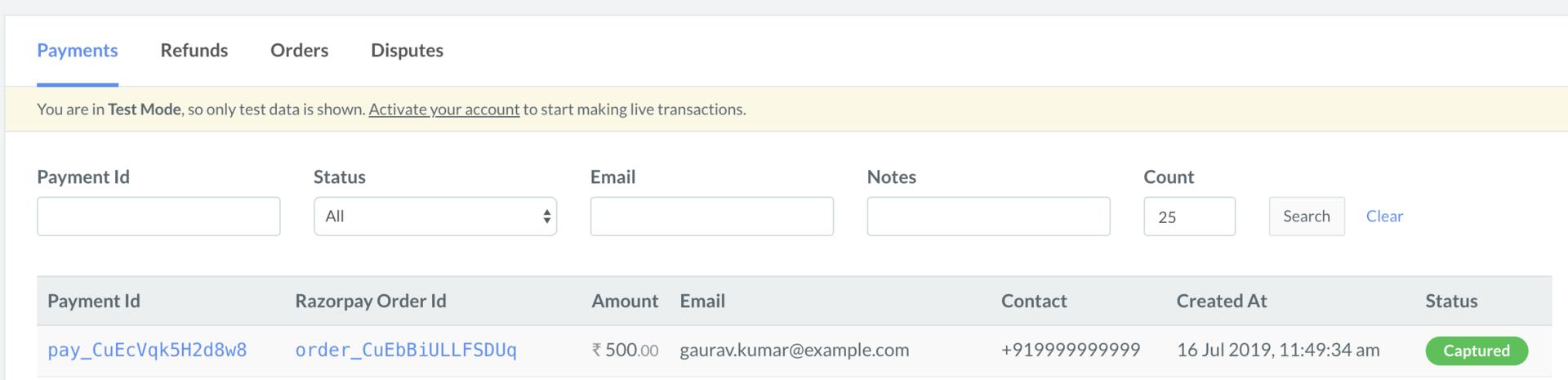 You can use Razorpay webhooks to configure and receive notifications when a specific event occurs. When one of these events is triggered, we send an HTTP POST payload in JSON to the webhook's configured URL. Know how to [set up webhooks.](/docs/webhooks/setup-edit-payments)
#### Example
If you have subscribed to the `order.paid` webhook event, you will receive a notification every time a customer pays you for an order.
[Poll Payment APIs](/docs/api/payments/fetch-all-payments) to check the payment status.
## Next Steps
[Step 2: Test Integration](/docs/payments/international-payments/accept-international-payments-from-indian-customers/custom-integration/test-integration)
You can use Razorpay webhooks to configure and receive notifications when a specific event occurs. When one of these events is triggered, we send an HTTP POST payload in JSON to the webhook's configured URL. Know how to [set up webhooks.](/docs/webhooks/setup-edit-payments)
#### Example
If you have subscribed to the `order.paid` webhook event, you will receive a notification every time a customer pays you for an order.
[Poll Payment APIs](/docs/api/payments/fetch-all-payments) to check the payment status.
## Next Steps
[Step 2: Test Integration](/docs/payments/international-payments/accept-international-payments-from-indian-customers/custom-integration/test-integration)